> ## Documentation Index
> Fetch the complete documentation index at: https://docs.encord.com/llms.txt
> Use this file to discover all available pages before exploring further.
# Roles and Permissions
## Integrations
Integrations have the following user based access controls.
| Permission | Admin | User |
| ----------------------------------- | ----- | ---- |
| View integration | ✅ | ✅ |
| Register data using the integration | ✅ | ❌ |
| Delete integration | ✅ | ❌ |
| Add users | ✅ | ❌ |
## Projects
The table below illustrates the role-based access control for various Project actions available to different user types.
Contact [support](mailto:support@encord.com) to gain access to the Viewer role for your Projects.
Viewers on Workflow projects can access the **Explore** tab in read-only mode. They can browse grid, analytics, and embeddings views and apply existing filters, but cannot create or modify collections, filter presets, or prediction sets, and cannot perform bulk actions. Viewers can still post comments and raise issues. The **Explore** tab remains inaccessible for all roles on ManualQA projects.
| Permission | Project Admin | Team Manager | Reviewer | Annotator | Annotator & Reviewer | Viewer |
| -------------------------------------------------------------- | ------------- | ----------------------- | ----------- | ------------- | -------------------- | ------------- |
| Attach / Detach Datasets | ✅ | ❌ | ❌ | ❌ | ❌ | ❌ |
| Attach / Switch Ontology | ✅ | ❌ | ❌ | ❌ | ❌ | ❌ |
| Delete | ✅ | ❌ | ❌ | ❌ | ❌ | ❌ |
| Invite team members | ✅ | ✅ | ❌ | ❌ | ❌ | ❌ |
| Manage team permissions | ✅ | ✅ | ❌ | ❌ | ❌ | ❌ |
| Manage admins | ✅ | ❌ | ❌ | ❌ | ❌ | ❌ |
| Annotate & review tasks | ✅ | ✅ | Review only | Annotate only | ✅ | ❌ |
| Confirm annotations | ✅ | ✅ | ❌ | ❌ | ❌ | ❌ |
| Control task assignments and status | ✅ | ✅ | ❌ | ❌ | ❌ | ❌ |
| Exporting labels | ✅ | ❌ | ❌ | ❌ | ❌ | ❌ |
| Assign and Release Tasks | ✅ | ✅ | ❌ | ❌ | ❌ | ❌ |
| Assign task (per-row, label queue) | ✅ | ✅ | ❌ | ❌ | ❌ | ❌ |
| Release task (per-row, label queue) | ✅ | ✅ | ❌ | ❌ | ❌ | ❌ |
| Change task priority (per-row, label queue) | ✅ | ✅ | ❌ | ❌ | ❌ | ❌ |
| Move task to stage (per-row, label queue) | ✅ | ✅ | ❌ | ❌ | ❌ | ❌ |
| Browse and inspect labels (all workflow stages) | ✅ | ✅ | ✅ | ✅ | ✅ | ✅ |
| Create and resolve comments | ✅ | ✅ | ✅ | ✅ | ✅ | ✅ |
| Access Project Explorer (Explore tab) — Workflow projects only | ✅ | ✅ (statistics fallback) | ❌ | ❌ | ❌ | ✅ (read-only) |
### Consensus
Certain tabs can only be accessed by specific users roles.
| **Tab** | Annotator | Reviewer\* | Annotator + Reviewer\* | Team Manager | Admin |
| --------- | --------- | ---------- | ---------------------- | ------------ | ----- |
| Summary | ❌ | ❌ | ❌ | ✅ | ✅ |
| Explore | ❌ | ❌ | ❌ | ✅ | ✅ |
| Queue | ✅ | ✅ | ✅ | ✅ | ✅ |
| Workflow | ❌ | ❌ | ❌ | ✅ | ✅ |
| Analytics | ✅ | ✅ | ✅ | ✅ | ✅ |
| Settings | ❌ | ❌ | ❌ | ✅ | ✅ |
When **Show peer annotations** is enabled on a Consensus annotation nodes, peer annotators (all subtasks after the first) cannot initiate their task until the first annotator completes theirs. This restriction applies to all roles (annotators, collaborators, and admins) and is not role-based. The first annotator's **Initiate** button is never affected by this restriction. Once the first annotator completes their subtask, the **Initiate** button becomes available to all peer annotators. Hovering over a disabled peer **Initiate** button displays the tooltip: *"The first annotation must be completed before peer annotations can be initiated"*.
## Ontologies
The user who created the Ontology is granted admin privileges, which gives full control over the Ontology including adding other team members as viewers and admins.
Add and manage users in the *Team* pane of the [*Settings* tab of the Ontology](/platform-documentation/Annotate/annotate-ontologies/annotate-working-with-ontologies#ontology-settings).
The following table summarizes user based access control for each role.
| **Role** | **Edit structure** | **Attach/detach from Projects** | **View tree structure** | **View JSON structure** | **Manage collaborators** | Copy | Delete |
| -------- | ------------------ | ------------------------------- | ----------------------- | ----------------------- | ------------------------ | ---- | ------ |
| Viewer | ❌ | ✅(if Project admin) | ✅ | ✅ | ❌ | ❌ | ❌ |
| Admin | ✅ | ✅(if Project admin) | ✅ | ✅ | ✅ | ✅ | ✅ |
## Workflows
## Datasets
Collaborator permissions can be set in the *Team* section of the Dataset *Settings*.
| Permission | Admin | Viewer |
| --------------- | ----- | ------ |
| View dataset | ✅ | ✅ |
| Add data | ✅ | ❌ |
| Adjust settings | ✅ | ❌ |
## Data Curation
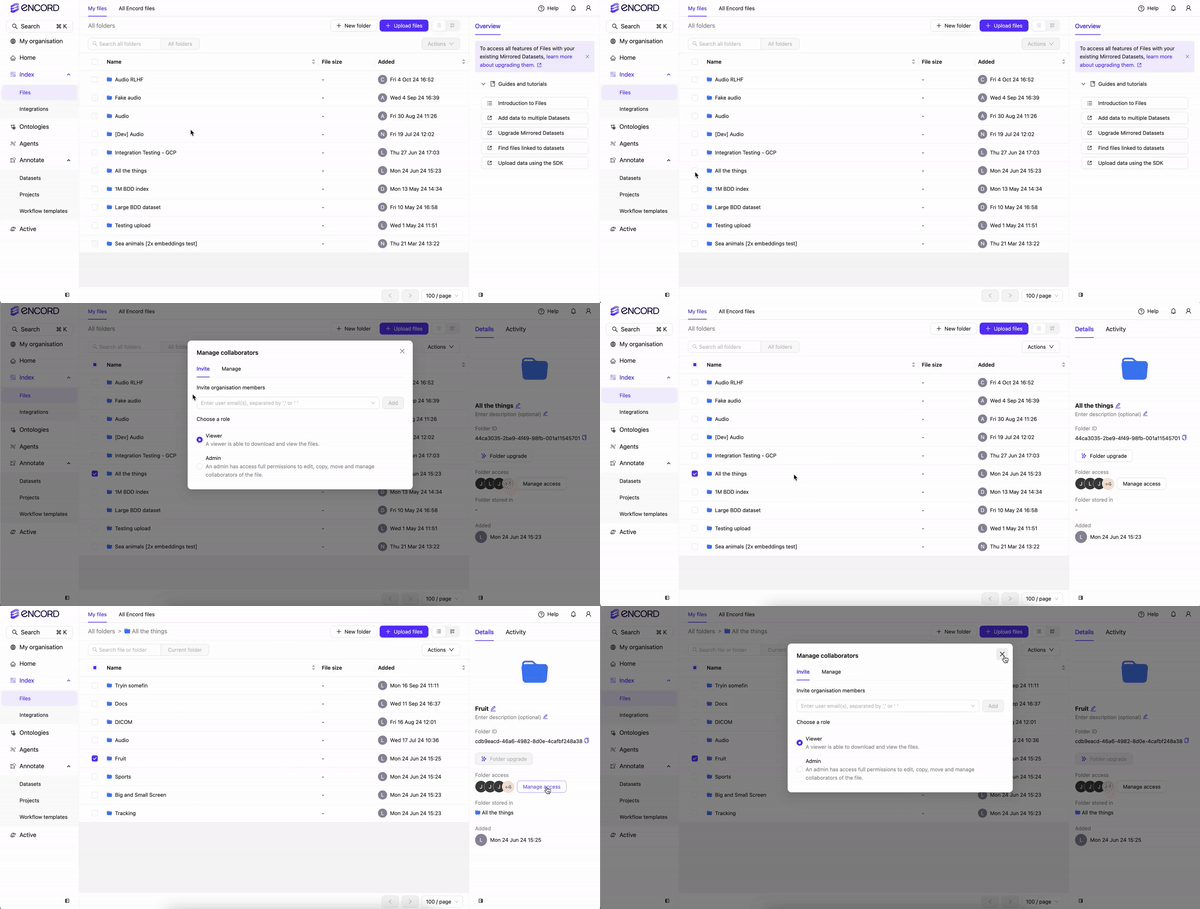
User permissions for Folders are configured by selecting a Folder in **Files**. Click **Manage access** after selecting a Folder to add or remove users from the Folder.
Only users that are a part of your Workspace settings can be added to your Folders.
Users added to your Folders have access to all files in the Folder.
| Permission | Admin | Viewer |
| --------------- | ----- | ------ |
| View Folder | ✅ | ✅ |
| Add data | ✅ | ❌ |
| Adjust settings | ✅ | ❌ |
## Project Explorer (Explore Tab)
Users with the Viewer role on Workflow projects can now access the **Explore** tab and browse the Project Explorer in read-only mode. Viewers can use the grid, analytics, and embeddings views and apply existing filters, but Encord hides all mutation affordances for Viewers.
The following actions are **not available** to Viewers in the Explorer:
* Bulk actions (priority changes, bulk classify, change class, delete labels, export CSV)
* Collection management (create, edit, delete, convert, send to annotate, bulk classify, add to dataset)
* Adding or removing items from collections in the item preview (collection tags remain visible)
* Filter preset management (create, edit, delete, save) and the `Alt+P` keyboard shortcut
* The **Manage** button for prediction sets (import/delete)
Viewers **can** post comments and raise issues in the Explorer, consistent with platform-wide permissions.
The **Explore** tab remains inaccessible for all roles on ManualQA projects. Team Managers see the **Explore** tab in the project navigation but land on the statistics fallback view — this is pre-existing behavior and is unchanged.
## Label Queue
The following actions are available in the Label Queue. Per-row task management actions in the three-dot (⋯) menu are restricted by role.
| Action | Project Admin | Team Manager | Reviewer | Annotator | Annotator & Reviewer | Viewer |
| --------------- | ------------- | ------------ | -------- | --------- | -------------------- | ------ |
| View task | ✅ | ✅ | ✅ | ✅ | ✅ | ✅ |
| Activity log | ✅ | ✅ | ✅ | ✅ | ✅ | ✅ |
| API details | ✅ | ✅ | ✅ | ✅ | ✅ | ✅ |
| Assign task | ✅ | ✅ | ❌ | ❌ | ❌ | ❌ |
| Release task | ✅ | ✅ | ❌ | ❌ | ❌ | ❌ |
| Change priority | ✅ | ✅ | ❌ | ❌ | ❌ | ❌ |
| Move to stage | ✅ | ✅ | ❌ | ❌ | ❌ | ❌ |
**Assign** is available for annotation and review stages only. Consensus-annotation rows are coordinator tasks assigned per subtask and do not offer the per-row Assign action.
### Bulk Actions
In list and grid views, the **Actions** button appears in the floating selection toolbar only after you select one or more tasks. In explorer view, the **Actions** button remains in the top bar regardless of selection state.
The floating selection toolbar displays items in this order: **N selected · Clear · Select all · Actions**. Hover over **Select all** to see the tip for range selection using `Shift`-click.