> ## Documentation Index
> Fetch the complete documentation index at: https://docs.encord.com/llms.txt
> Use this file to discover all available pages before exploring further.
# Curation Basics
## Filters
You can refine searches by data quality metrics, Collections, custom metadata, folders, data titles, and data types.
Collections: Collections are a way to save interesting groups of data units and labels, to support and guide your downstream workflow.
Custom Metadata: Custom metadata added to data units. The custom metadata added to data units in Folders persists to Annotate Projects and Active.
For information on importing custom metadata, refer to [Adding Metadata](/sdk-documentation/datasets-sdk/sdk-client-metadata) in the documentation.
Data title: The file name of the image or video.
Data Types: Data, labels, and Predictions can be filtered by: images, image sequences, image groups, and videos.
File ID: The unique hash assigned to the image or video when it imports into Encord.
Folder: The Folder images or videos reside in.
Integration: The integration (if any) your images/videos reside in.
Keyframe: Frames of interest you specified on your videos.
MIME type: Also known as *media type*. The file type of an image or video. For example, `video/mp4`.
Storage location: The location where your images/videos reside. Examples include AWS, GCP, Local.
Uploaded at: The date and time that the image/video uploaded.
**To filter data:**
1. Navigate to **Data** > **Explore** and select a folder.
2. Click the **Filter** dropdown or press F.
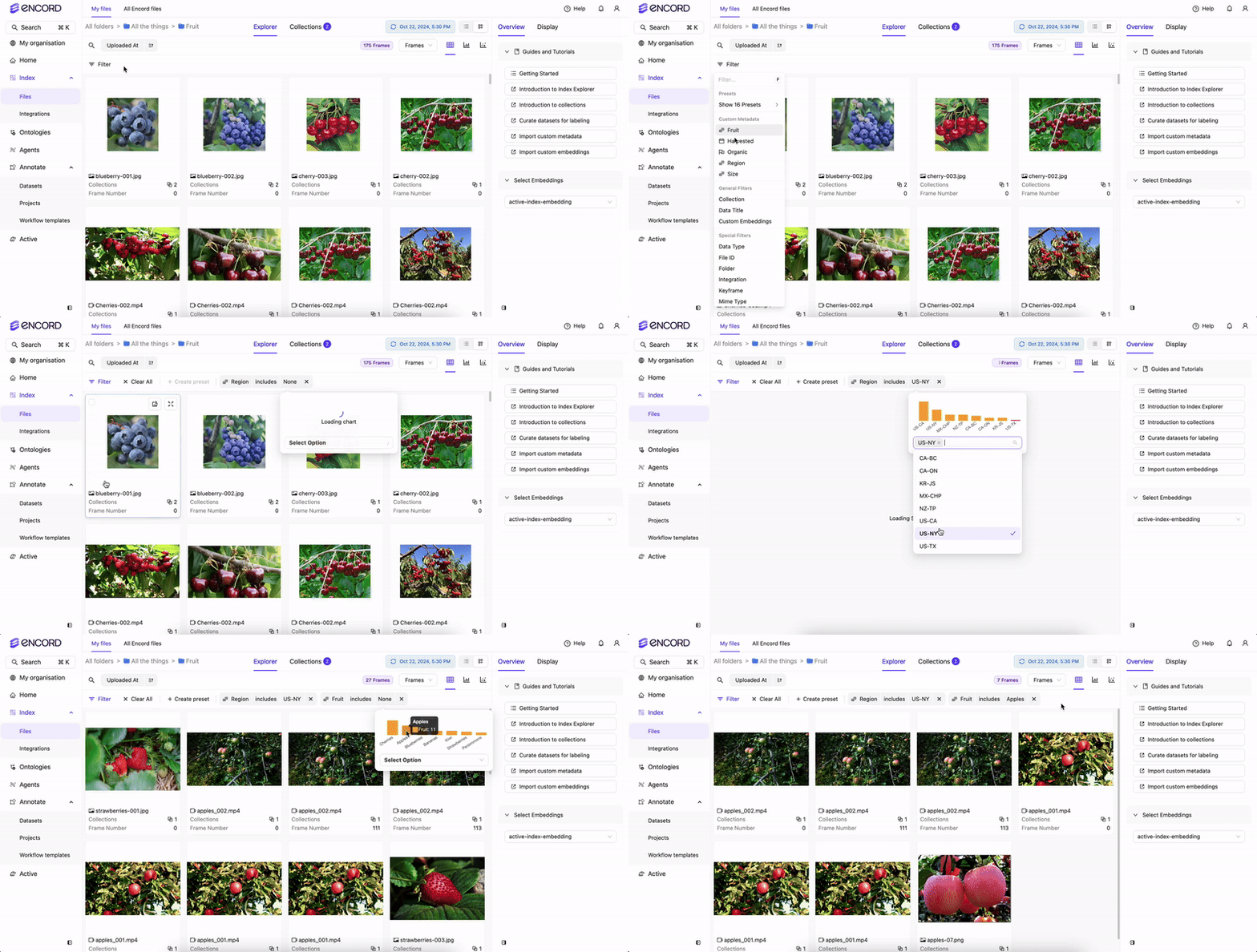
3. Add and configure the filters you need.
### Preset Filters
Preset filters let you save and reuse filtering criteria across your workspace. Since presets are available everywhere during data curation, some may return no results in certain contexts. For example, a preset scoped to Folder A will return nothing when browsing Folder B if Folder A isn't a subfolder of it.
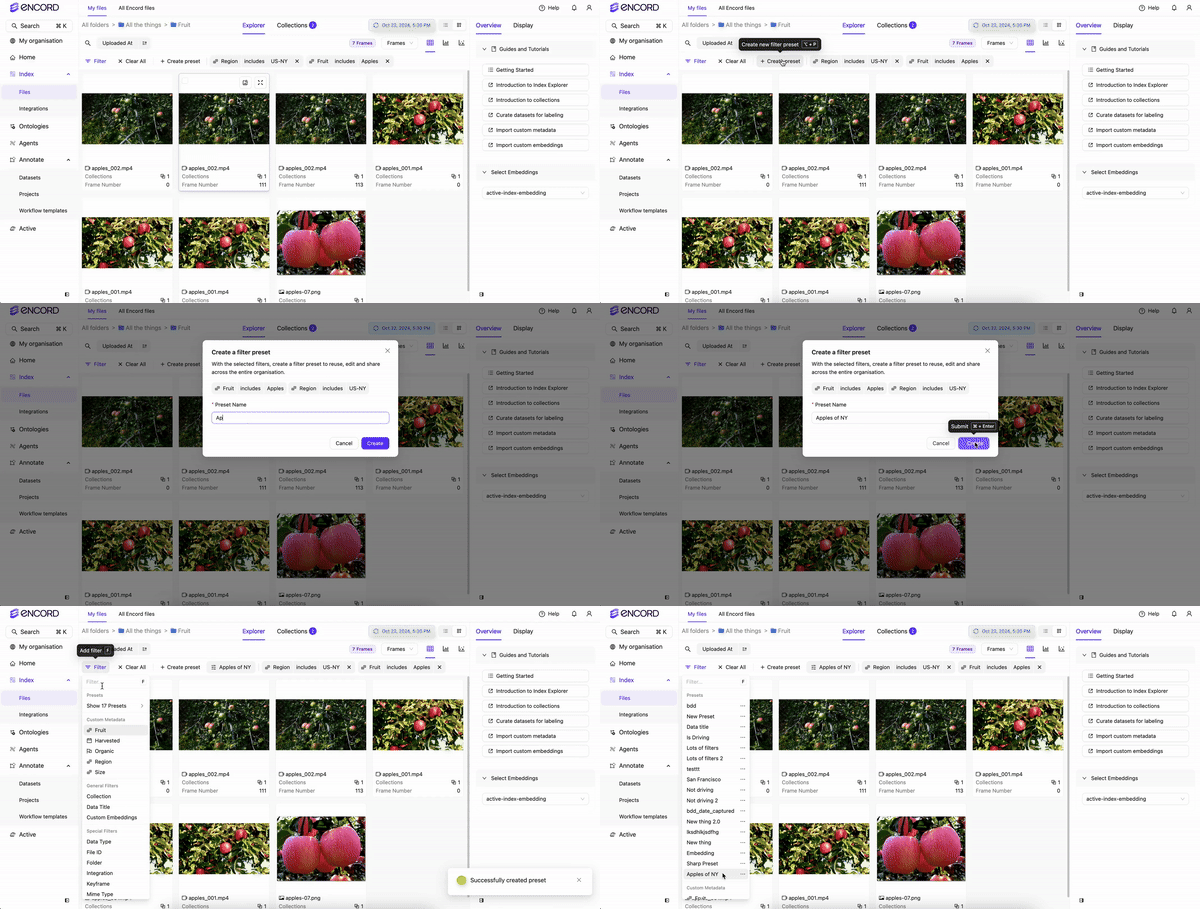
**To create a Preset filter:**
1. Navigate to **Data** > **Explore** and select a folder.
2. Click the **Filter** dropdown or press F.
3. Add and configure the filters you need.

4. Click **+Create preset** and give the preset a name.
5. Click **Create** to finish creating the preset.
**To use an existing Preset:**
1. Navigate to **Data** > **Explore** and select a folder.
2. Click the **Filter** dropdown or press F.
3. Select the Preset you want to use from the dropdown. All presets are listed at the top of the list oif filters.
Global filters apply to any Folder, but Local filters only apply on the Folder where the Preset was created.
### Sorting
Sort your data, in ascending or descending order, using data quality metrics.
**To sort your data:**
1. Navigate to **Data** > **Explore** and select a folder.
2. Select the metric to sort the data.
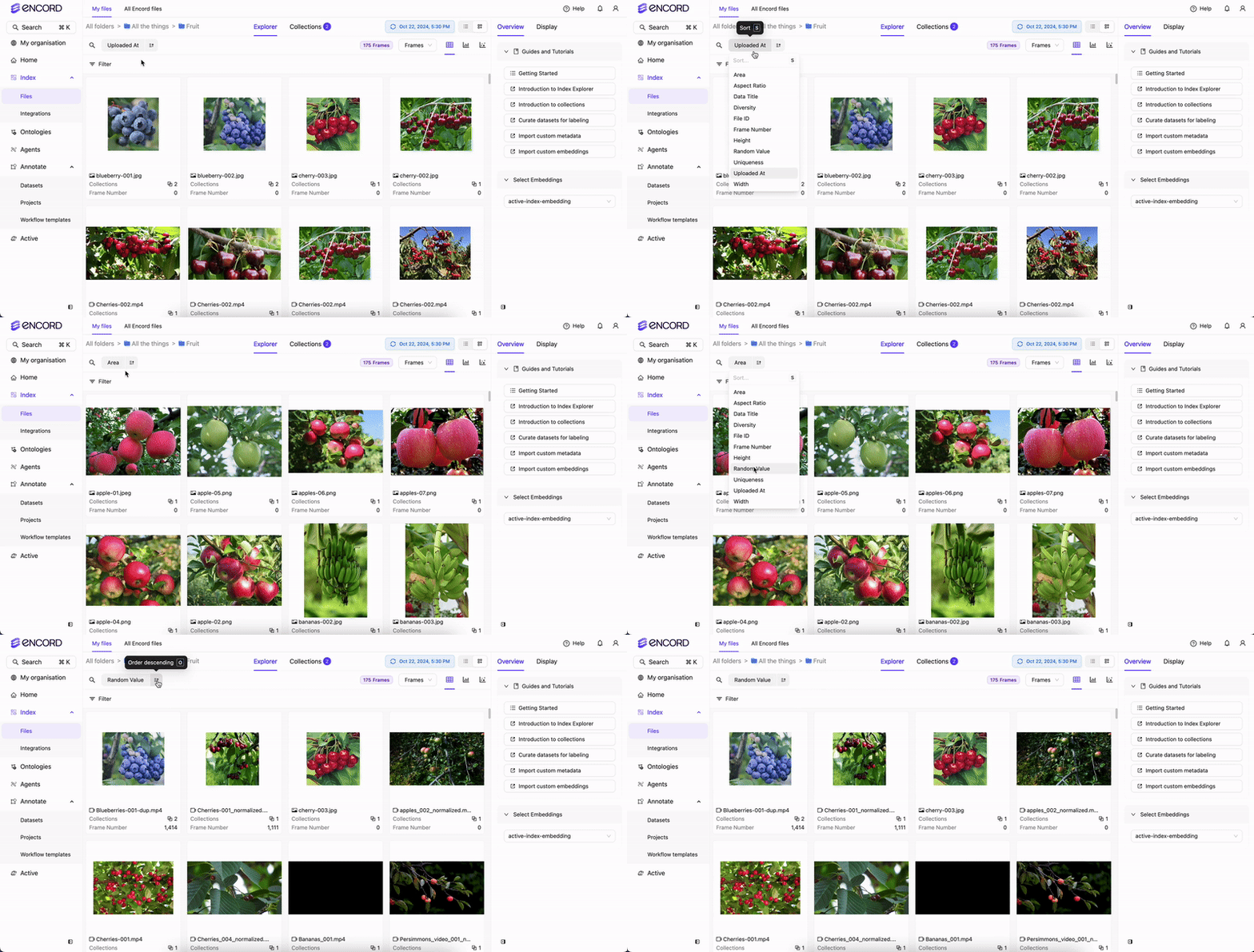
3. Specify ascending or descending order.
* Filter and use the natural language searches to further help get the results you want.
* After filtering, sorting, and searching, create a [Collection](/platform-documentation/Curate/curation-basics#collections).
### Quality Metrics
Quality metrics are only calculated when you [upgrade your folder](#folder-upgrade). If you don't see the quality metrics during curation, make sure to upgrade your folder.
Quality metrics evaluate your data, labels, and model predictions, forming the foundation of effective data curation. They provide meaningful ways to surface, rank, and explore your data — helping you identify issues, spot patterns, and make informed decisions about what to curate, fix, or prioritize.
Video Quality Metrics: Video quality metrics must be calculated by upgrading your folder. Examples include Area, Clip duration, Frames per second, Number of frames.
Data Quality Metrics: Data quality metrics must be calculated by upgrading your folder. Examples include Area, Frame number, Random value.
For more detailed information on Data Quality Metrics, refer to the Data Quality Metrics documentation.
| Title | Metric Type | Ontology Type |
| ----------------------------------------------------------------------------------------------------------------------------------------------- | ----------- | ------------------------------------------------------------------------------------------------------------------ |
| **Area** - Ranks images by their area (width/height). | `image` | |
| **Aspect Ratio** - Ranks images by their aspect ratio (width/height). | `image` | |
| **Blue Value** - Ranks images by how blue the average value of the image is. | `image` | |
| **Brightness** - Ranks images by their brightness. | `image` | |
| **Contrast** - Ranks images by their contrast. | `image` | |
| **Diversity** - Forms clusters based on the Ontology and ranks images from easy samples to annotate to hard samples to annotate. | `image` | |
| **Frame Number** - Selects images based on a specified range. | `image` | |
| **Green Value** - Ranks images by how green the average value of the image is. | `image` | |
| **Height** - Ranks images by the height of the image. | `image` | |
| **Object Count** - Counts number of objects in the image. | `image` | `bounding box`, `checklist`, `point`, `polygon`, `polyline`, `radio`, `rotatable bounding box`, `skeleton`, `text` |
| **Object Density** - Computes the percentage of image area that is occupied by objects. | `image` | `bounding box`, `polygon`, `rotatable bounding box` |
| **Randomize Images** - Assigns a random value between 0 and 1 to images. | `image` | |
| **Red Value** - Ranks images by how red the average value of the image is. | `image` | |
| **Sharpness** - Ranks images by their sharpness. | `image` | |
| **Uniqueness** - Finds duplicate and near-duplicate images. | `image` | |
| **Width** - Ranks images by the width of the image. | `image` | |
Label Quality Metrics are used for sorting data, filtering data, and data analytics.
| Title | Metric Type | Ontology Type |
| ------------------------------------------------------------------------------------------------------------------ | ------------------- | ------------------------------------------------------------------------------------ |
| **Absolute Area** - Computes object size in amount of pixels. | `image` | `bounding box`, `polygon`, `rotatable bounding box` |
| **Aspect Ratio** - Computes aspect ratios of objects. | `image` | `bounding box`, `polygon`, `rotatable bounding box` |
| **Blue Value** - Ranks annotated objects by how blue the average value of the object is. | `image` | `bounding box`, `polygon`, `rotatable bounding box` |
| **Border Proximity** - Ranks annotations by how close they are to image borders. | `image` | `bounding box`, `point`, `polygon`, `polyline`, `rotatable bounding box`, `skeleton` |
| **Brightness** - Ranks annotated objects by their brightness. | `image` | `bounding box`, `polygon`, `rotatable bounding box` |
| **Broken Object Tracks** - Identifies broken object tracks based on object overlaps. | `sequence`, `video` | `bounding box`, `polygon`, `rotatable bounding box` |
| **Classification Quality** - Compares image classifications against similar images. | `image` | `radio` |
| **Confidence** - The confidence that an object was annotated correctly. | `image` | `bounding box`, `polygon`, `rotatable bounding box` |
| **Contrast** - Ranks annotated objects by their contrast. | `image` | `bounding box`, `polygon`, `rotatable bounding box` |
| **Green Value** - Ranks annotated objects by how green the average value of the object is. | `image` | `bounding box`, `polygon`, `rotatable bounding box` |
| **Height** - Ranks annotated objects by the height of the object. | `image` | `bounding box`, `polygon`, `rotatable bounding box` |
| **Inconsistent Object Class** - Looks for overlapping objects with different classes across frames. | `sequence`, `video` | `bounding box`, `polygon`, `rotatable bounding box` |
| **Inconsistent Track ID** - Looks for overlapping objects with different track IDs across frames. | `sequence`, `video` | `bounding box`, `polygon`, `rotatable bounding box` |
| **Label Duplicates** - Ranks labels by how likely they are to represent the same object. | `image` | `bounding box`, `polygon`, `rotatable bounding box` |
| **Missing Objects** - Identifies missing objects based on object overlaps. | `sequence`, `video` | `bounding box`, `polygon`, `rotatable bounding box` |
| **Object Classification Quality** - Compares object annotations against similar image crops. | `image` | `bounding box`, `polygon`, `rotatable bounding box` |
| **Occlusion Risk** - Tracks objects and detects outliers in videos. | `sequence`, `video` | `bounding box`, `rotatable bounding box` |
| **Polygon Shape Anomaly** - Calculates potential outliers by polygon shape. | `image` | `polygon` |
| **Randomize Objects** - Assigns a random value between 0 and 1 to objects. | `image` | `bounding box`, `polygon`, `rotatable bounding box` |
| **Red Value** - Ranks annotated objects by how red the average value of the object is. | `image` | `bounding box`, `polygon`, `rotatable bounding box` |
| **Relative Area** - Computes object size as a percentage of total image size. | `image` | `bounding box`, `polygon`, `rotatable bounding box` |
| **Sharpness** - Ranks annotated objects by their sharpness. | `image` | `bounding box`, `polygon`, `rotatable bounding box` |
| **Width** - Ranks annotated objects by the width of the object. | `image` | `bounding box`, `polygon`, `rotatable bounding box` |
| Title | Metric Type | Ontology Type |
| ----------------------------------------------------------------------------------------------------------------------------------------------- | ----------- | ------------------------------------------------------------------------------------------------------------------ |
| **Area** - Ranks videos by their area (width/height). | `video` | |
| **Aspect Ratio** - Ranks videos by their aspect ratio (width/height). | `video` | |
| **Blue Value** - Ranks videos by how blue the average value of the video is. | `video` | |
| **Brightness** - Ranks videos by their brightness. | `video` | |
| **Clip Duration** - Ranks videos based on the video's duration. | `video` | |
| **Contrast** - Ranks videos by their contrast. | `video` | |
| **Diversity** - Forms clusters based on the ontology and ranks videos from easy samples to annotate to hard samples to annotate. | `video` | |
| **Frame Number** - Selects videos based on a specified range. | `video` | |
| **Frame Label Count** | `video` | |
| **Frames Per Second** | `video` | |
| **Green Value** - Ranks videos by how green the average value of the video is. | `video` | |
| **Height** - Ranks videos by the height of the video. | `video` | |
| **Instance Label Count** - Ranks videos by the number of unique objects in the video. | `video` | `bounding box`, `checklist`, `point`, `polygon`, `polyline`, `radio`, `rotatable bounding box`, `skeleton`, `text` |
| **Red Value** - Ranks videos by how red the average value of the video is. | `video` | |
| **Sharpness** - Ranks videos by their sharpness. | `video` | |
| **Uniqueness** - Finds duplicate and near-duplicate videos. | `video` | |
| **Unlabelled Frames (%)** - Ranks videos based on the percentage of unlabelled frames in the video. | `video` | |
| **Unlabelled Frames (#)** - Ranks videos based on the number of unlabelled frames in the video. | `video` | |
| **Width** - Ranks videos by the width of the video. | `video` | |
Model quality metrics help you evaluate your data and labels based on a trained model and imported model predictions.
**Acquisition Functions**
Acquisition functions are a special type of model quality metric, primarily used in active learning to score data samples according to how informative they are for the model, enabling smart labeling of unannotated data.
| Title | Metric Type | Data Type |
| ----------------------------------------------------------------------------------- | ----------- | --------- |
| **Entropy** - Ranks images by their entropy. | `image` | |
| **Least Confidence** - Ranks images by their least confidence score. | `image` | |
| **Margin** - Ranks images by their margin score. | `image` | |
| **Variance** - Ranks images by their variance. | `image` | |
| **Mean Object Score** - Ranks images by their average object score. | `image` | `object` |
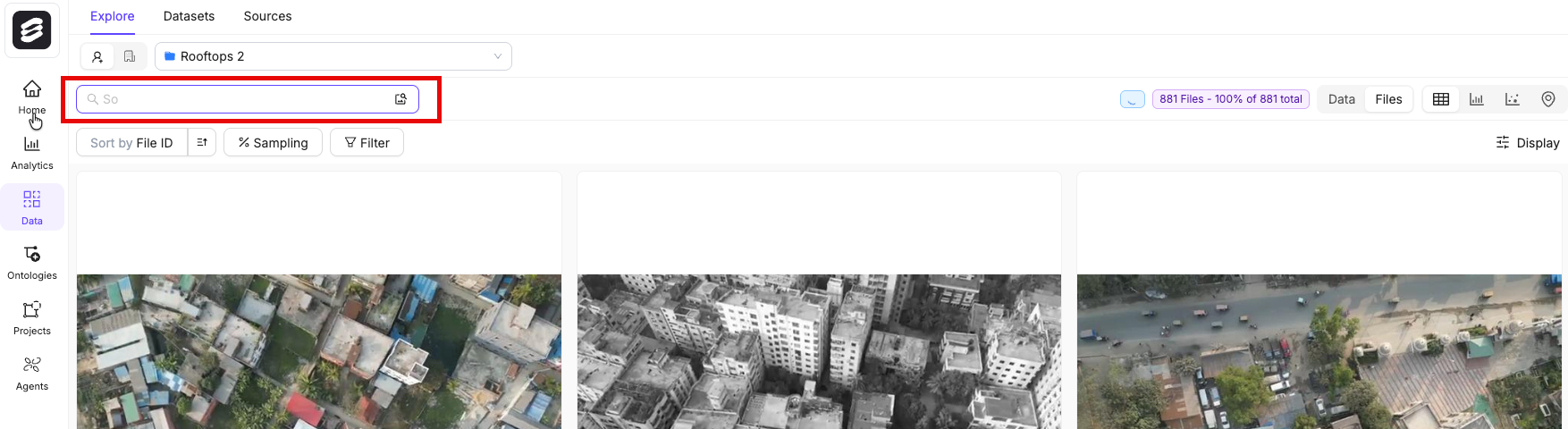
### Natural Language Search
Natural language search and similarity search can only be performed after you [upgrade your folder](#folder-upgrade).
**To use natural language or image search:**
1. Navigate to **Data** > **Explore** and select a folder.
2. Type a search query or upload an image.
## Collections
Collections are saved groups of data units or labels that let you curate subsets of your data and perform bulk actions on them, such as sending items to annotation, running bulk classifications, or exporting a curated Dataset.
## Folder Upgrade
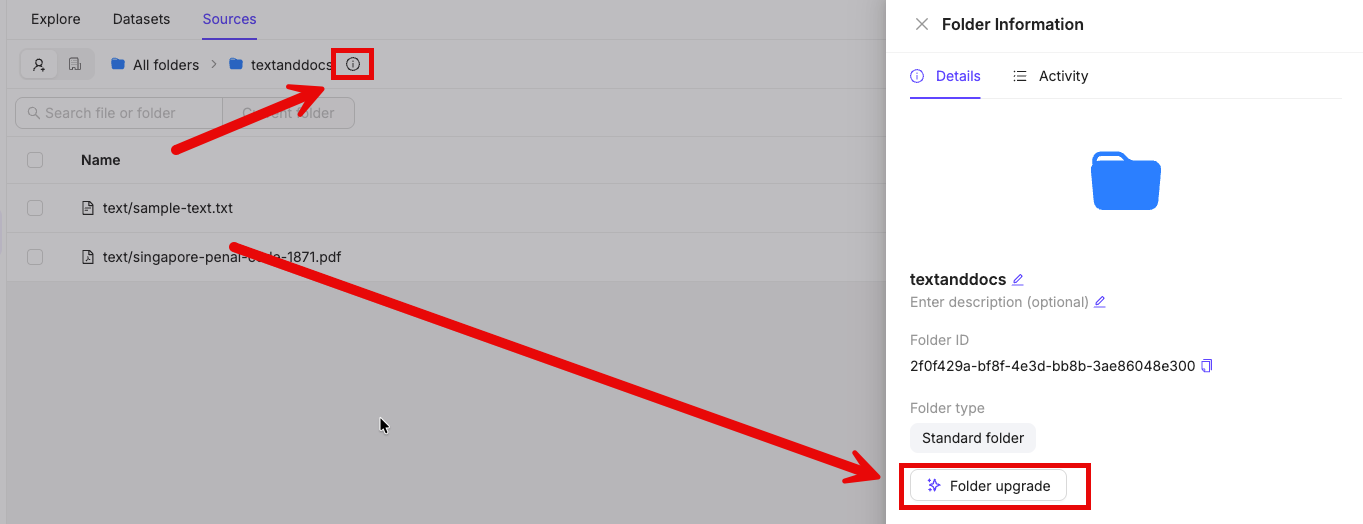
After you data is added into Encord you can upgrade the storage folder that your data resides in. Upgrading your folder calculates quality metrics, generates data embeddings, and enables features like natural language search and embedding plots to support your data curation.
**To upgrade your folder:**
1. Navigate to **Data** > **Files & Folders**.
2. Click into the folder.
3. Click the **info** icon next to the folder name.
4. Click **Folder upgrade**.
## Delete Files
You can delete files from the Explore Grid View.
**To delete files from the Explore Grid View:**
1. Navigate to **Data**.
2. Click **Explore**.
The *Explore* page appears displaying files from the currently selected Folder in the Grid view.
3. Change the selected Folder to the Folder with the data units you want to delete.
4. Select one or more data units.
Select one data unit and then use `SHIFT` or `CMD`/`CTRL` to select multiple data units.
5. Click **Actions** > **Delete**.