> ## Documentation Index
> Fetch the complete documentation index at: https://docs.encord.com/llms.txt
> Use this file to discover all available pages before exploring further.
# Create a Folder for Your Data
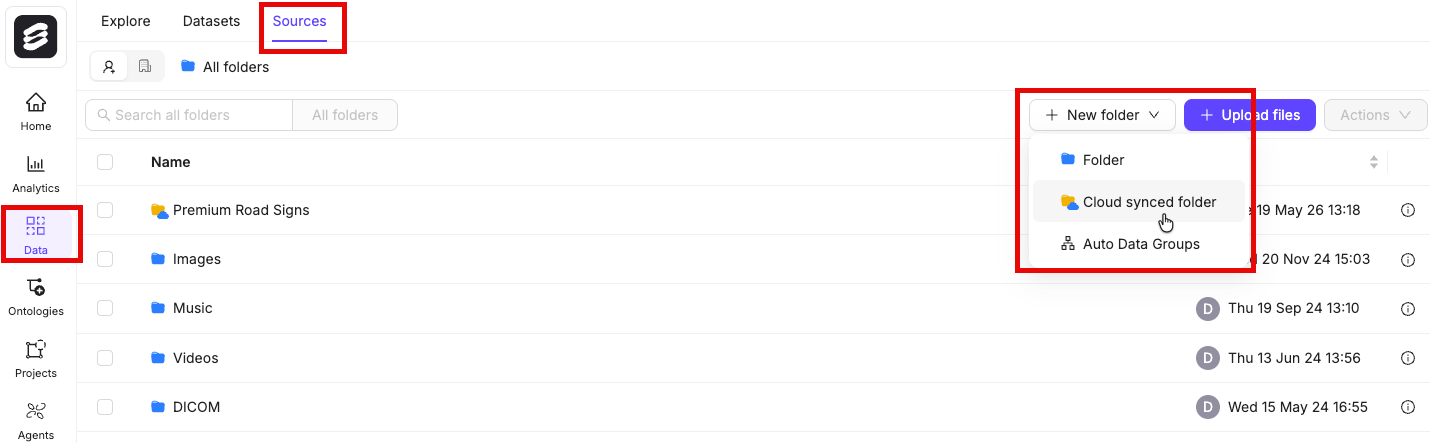
All files in Encord must be stored within folders. Therefore, you need to create a folder before registering any data with Encord. To create a folder:
1. Navigate to **Data** > **Files & Folders**
2. Click the **+ New folder** button to create a new folder. Select the type of folder you want to create.
3. Give the folder a meaningful name and description.
4. Click **Create** to create the folder.
The folder is listed in **Files & Folders**.
## Manage Folders
You can manage your folders directly from the folder navigation dropdown on the **Data** tab. Click the **⋯** menu next to any folder to access options such as viewing folder information and managing access permissions.
These folder management options have moved from their previous location to this **⋯** menu.