> ## Documentation Index
> Fetch the complete documentation index at: https://docs.encord.com/llms.txt
> Use this file to discover all available pages before exploring further.
# Label Validation Basics
## Compute Metrics and Embeddings
Computing metrics and embeddings is required to use Similarity Search, Natural Language Search, Quality Metric filters, and Embeddings Analysis.
1. Navigate to **Projects**.
2. Open the **Explore** tab.
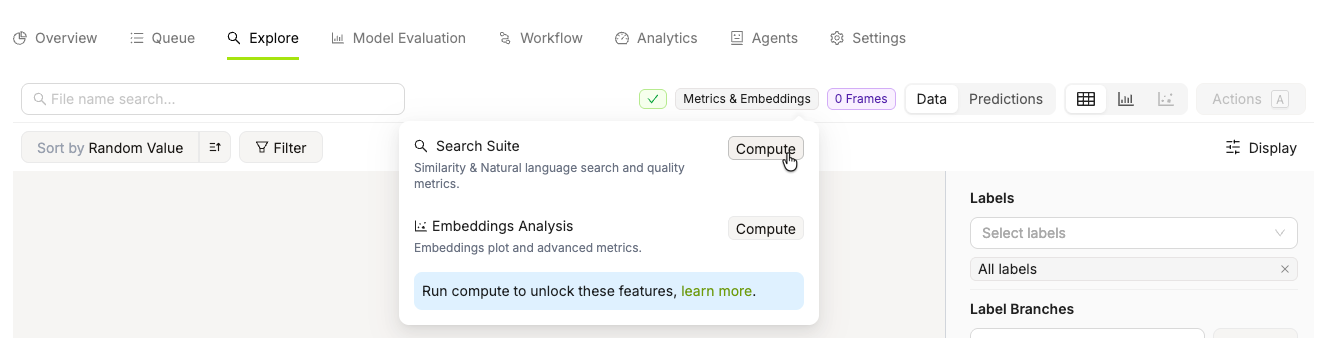
3. Hover over **Metrics & Embeddings**
4. Click **Compute**.
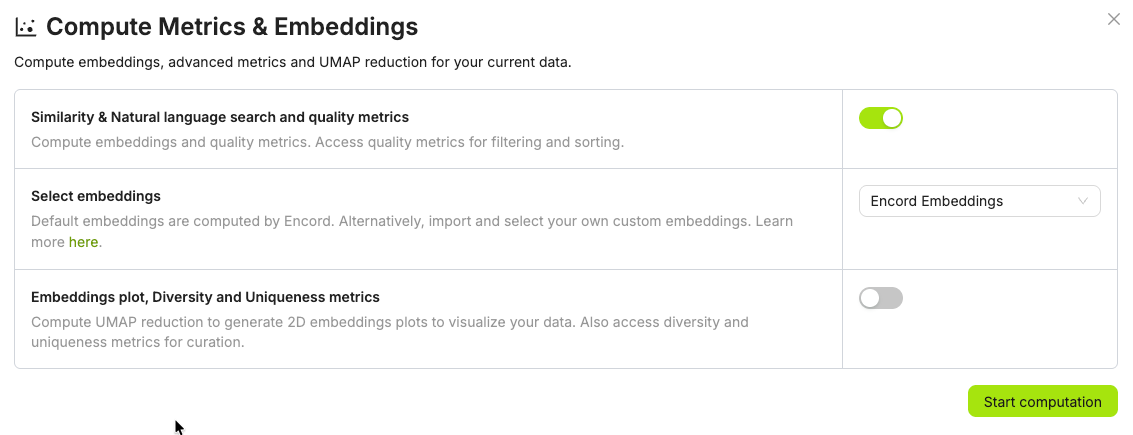
5. Configure the computation:
* Select whether you want Similarity & Natural language search and quality metrics
* Select which embeddings to use.
* Select whether you want the embeddings plot, and Diversity and Uniqueness metrics.
6. Click **Start computation**.
## Quality Metrics
Quality metrics are only calculated when you [compute metrics and embeddings](#compute-metrics-and-embeddings).
Quality metrics evaluate your data, labels, and model predictions, forming the foundation of effective data curation. They provide meaningful ways to surface, rank, and explore your data — helping you identify issues, spot patterns, and make informed decisions about what to curate, fix, or prioritize.
Video Quality Metrics: Video quality metrics must be calculated by upgrading your folder. Examples include Area, Clip duration, Frames per second, Number of frames.
Data Quality Metrics: Data quality metrics must be calculated by upgrading your folder. Examples include Area, Frame number, Random value.
For more detailed information on Data Quality Metrics, refer to the Data Quality Metrics documentation.
| Title | Metric Type | Ontology Type |
| ----------------------------------------------------------------------------------------------------------------------------------------------- | ----------- | ------------------------------------------------------------------------------------------------------------------ |
| **Area** - Ranks images by their area (width/height). | `image` | |
| **Aspect Ratio** - Ranks images by their aspect ratio (width/height). | `image` | |
| **Blue Value** - Ranks images by how blue the average value of the image is. | `image` | |
| **Brightness** - Ranks images by their brightness. | `image` | |
| **Contrast** - Ranks images by their contrast. | `image` | |
| **Diversity** - Forms clusters based on the Ontology and ranks images from easy samples to annotate to hard samples to annotate. | `image` | |
| **Frame Number** - Selects images based on a specified range. | `image` | |
| **Green Value** - Ranks images by how green the average value of the image is. | `image` | |
| **Height** - Ranks images by the height of the image. | `image` | |
| **Object Count** - Counts number of objects in the image. | `image` | `bounding box`, `checklist`, `point`, `polygon`, `polyline`, `radio`, `rotatable bounding box`, `skeleton`, `text` |
| **Object Density** - Computes the percentage of image area that is occupied by objects. | `image` | `bounding box`, `polygon`, `rotatable bounding box` |
| **Randomize Images** - Assigns a random value between 0 and 1 to images. | `image` | |
| **Red Value** - Ranks images by how red the average value of the image is. | `image` | |
| **Sharpness** - Ranks images by their sharpness. | `image` | |
| **Uniqueness** - Finds duplicate and near-duplicate images. | `image` | |
| **Width** - Ranks images by the width of the image. | `image` | |
Label Quality Metrics are used for sorting data, filtering data, and data analytics.
| Title | Metric Type | Ontology Type |
| ------------------------------------------------------------------------------------------------------------------ | ------------------- | ------------------------------------------------------------------------------------ |
| **Absolute Area** - Computes object size in amount of pixels. | `image` | `bounding box`, `polygon`, `rotatable bounding box` |
| **Aspect Ratio** - Computes aspect ratios of objects. | `image` | `bounding box`, `polygon`, `rotatable bounding box` |
| **Blue Value** - Ranks annotated objects by how blue the average value of the object is. | `image` | `bounding box`, `polygon`, `rotatable bounding box` |
| **Border Proximity** - Ranks annotations by how close they are to image borders. | `image` | `bounding box`, `point`, `polygon`, `polyline`, `rotatable bounding box`, `skeleton` |
| **Brightness** - Ranks annotated objects by their brightness. | `image` | `bounding box`, `polygon`, `rotatable bounding box` |
| **Broken Object Tracks** - Identifies broken object tracks based on object overlaps. | `sequence`, `video` | `bounding box`, `polygon`, `rotatable bounding box` |
| **Classification Quality** - Compares image classifications against similar images. | `image` | `radio` |
| **Confidence** - The confidence that an object was annotated correctly. | `image` | `bounding box`, `polygon`, `rotatable bounding box` |
| **Contrast** - Ranks annotated objects by their contrast. | `image` | `bounding box`, `polygon`, `rotatable bounding box` |
| **Green Value** - Ranks annotated objects by how green the average value of the object is. | `image` | `bounding box`, `polygon`, `rotatable bounding box` |
| **Height** - Ranks annotated objects by the height of the object. | `image` | `bounding box`, `polygon`, `rotatable bounding box` |
| **Inconsistent Object Class** - Looks for overlapping objects with different classes across frames. | `sequence`, `video` | `bounding box`, `polygon`, `rotatable bounding box` |
| **Inconsistent Track ID** - Looks for overlapping objects with different track IDs across frames. | `sequence`, `video` | `bounding box`, `polygon`, `rotatable bounding box` |
| **Label Duplicates** - Ranks labels by how likely they are to represent the same object. | `image` | `bounding box`, `polygon`, `rotatable bounding box` |
| **Missing Objects** - Identifies missing objects based on object overlaps. | `sequence`, `video` | `bounding box`, `polygon`, `rotatable bounding box` |
| **Object Classification Quality** - Compares object annotations against similar image crops. | `image` | `bounding box`, `polygon`, `rotatable bounding box` |
| **Occlusion Risk** - Tracks objects and detects outliers in videos. | `sequence`, `video` | `bounding box`, `rotatable bounding box` |
| **Polygon Shape Anomaly** - Calculates potential outliers by polygon shape. | `image` | `polygon` |
| **Randomize Objects** - Assigns a random value between 0 and 1 to objects. | `image` | `bounding box`, `polygon`, `rotatable bounding box` |
| **Red Value** - Ranks annotated objects by how red the average value of the object is. | `image` | `bounding box`, `polygon`, `rotatable bounding box` |
| **Relative Area** - Computes object size as a percentage of total image size. | `image` | `bounding box`, `polygon`, `rotatable bounding box` |
| **Sharpness** - Ranks annotated objects by their sharpness. | `image` | `bounding box`, `polygon`, `rotatable bounding box` |
| **Width** - Ranks annotated objects by the width of the object. | `image` | `bounding box`, `polygon`, `rotatable bounding box` |
| Title | Metric Type | Ontology Type |
| ----------------------------------------------------------------------------------------------------------------------------------------------- | ----------- | ------------------------------------------------------------------------------------------------------------------ |
| **Area** - Ranks videos by their area (width/height). | `video` | |
| **Aspect Ratio** - Ranks videos by their aspect ratio (width/height). | `video` | |
| **Blue Value** - Ranks videos by how blue the average value of the video is. | `video` | |
| **Brightness** - Ranks videos by their brightness. | `video` | |
| **Clip Duration** - Ranks videos based on the video's duration. | `video` | |
| **Contrast** - Ranks videos by their contrast. | `video` | |
| **Diversity** - Forms clusters based on the ontology and ranks videos from easy samples to annotate to hard samples to annotate. | `video` | |
| **Frame Number** - Selects videos based on a specified range. | `video` | |
| **Frame Label Count** | `video` | |
| **Frames Per Second** | `video` | |
| **Green Value** - Ranks videos by how green the average value of the video is. | `video` | |
| **Height** - Ranks videos by the height of the video. | `video` | |
| **Instance Label Count** - Ranks videos by the number of unique objects in the video. | `video` | `bounding box`, `checklist`, `point`, `polygon`, `polyline`, `radio`, `rotatable bounding box`, `skeleton`, `text` |
| **Red Value** - Ranks videos by how red the average value of the video is. | `video` | |
| **Sharpness** - Ranks videos by their sharpness. | `video` | |
| **Uniqueness** - Finds duplicate and near-duplicate videos. | `video` | |
| **Unlabelled Frames (%)** - Ranks videos based on the percentage of unlabelled frames in the video. | `video` | |
| **Unlabelled Frames (#)** - Ranks videos based on the number of unlabelled frames in the video. | `video` | |
| **Width** - Ranks videos by the width of the video. | `video` | |
Model quality metrics help you evaluate your data and labels based on a trained model and imported model predictions.
**Acquisition Functions**
Acquisition functions are a special type of model quality metric, primarily used in active learning to score data samples according to how informative they are for the model, enabling smart labeling of unannotated data.
| Title | Metric Type | Data Type |
| ----------------------------------------------------------------------------------- | ----------- | --------- |
| **Entropy** - Ranks images by their entropy. | `image` | |
| **Least Confidence** - Ranks images by their least confidence score. | `image` | |
| **Margin** - Ranks images by their margin score. | `image` | |
| **Variance** - Ranks images by their variance. | `image` | |
| **Mean Object Score** - Ranks images by their average object score. | `image` | `object` |
## Collections
Collections are saved groups of data units or labels that let you curate subsets of your data and perform bulk actions on them, such as sending items to annotation, running bulk classifications, or exporting a curated Dataset.
## Analytics View
Use the Analytics view to display Metric Correlation and prediction distribution for your ML model. Prediction distribution provides class and underrepresented class data. You can adjust the X and Y values on the Metric Correlation across a number of data and label metrics.
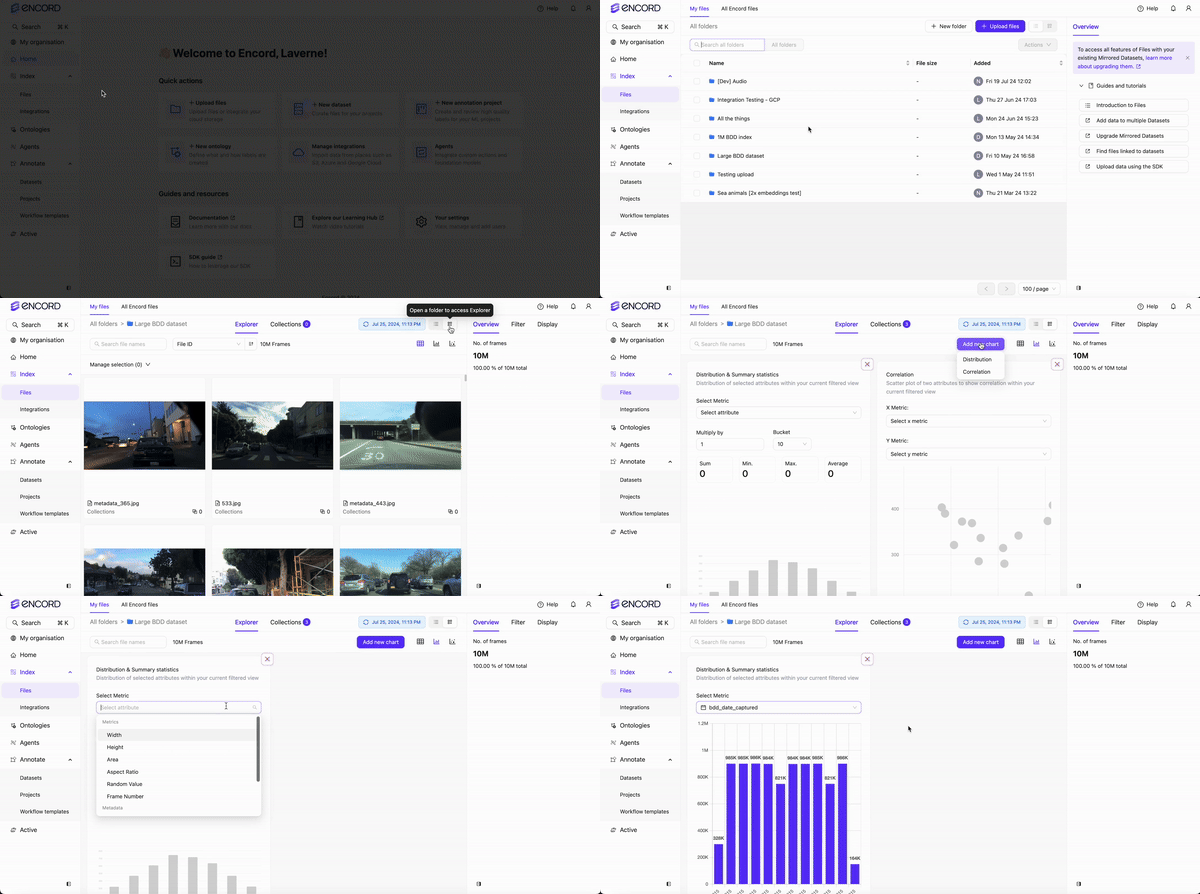
You can create custom analytics dashboards from the **Analytics View** using **Distribution** and **Correlation** charts.

### Distribution charts
Distribution charts display distributions and summaries of the selected metrics and custom metadata.
Here are some examples:
* Data unit: Frame number, random value, area
* Metadata: Enum with their enum options, numeric, date time, and boolean
`varchar` (previously `string`), `text` (previously `long_string`), and `uuid` are NOT SUPPORTED for use in Distribution charts.
### Correlation charts
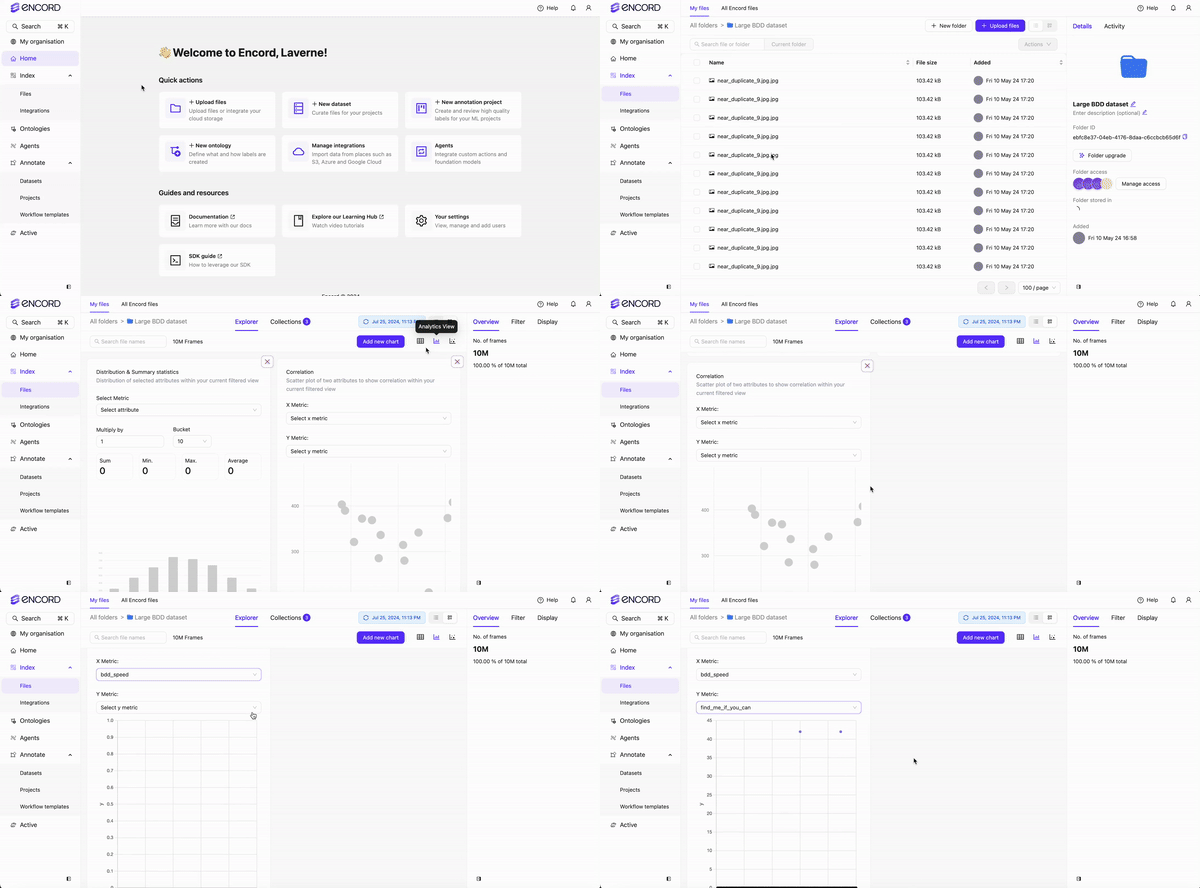
Correlation charts display a scatter plot of two attributes to show correlation within your current filtered view. Correlation charts require numeric data.
Distribution charts support a number of custom metadata types, however Correlation charts ONLY SUPPORT `numeric` custom metadata.
### Custom Analytics Dashboard
Before creating a custom analytics dashboard, we recommend having custom metadata available in your data. Custom metadata can make the insights you get from the dashboard much more useful.
1. Navigate to **Project** > **Explore** and select a folder.
2. Click **Analytics view**.
3. Specify the display criteria for the *Distribution* and *Correlation* cards that display by default.
4. Click **Add chart** to add additional *Distribution* and *Correlation* cards.
5. Specify the display criteria for the added *Distribution* and *Correlation*.
## Crop View
Crop View is only available from the **Labels** page of the **Explore** tab in your Project.
The **Labels** page displays all object and classification annotations on your images and video frames. *Crop View* zooms in on each annotated object, making it easier to inspect small or densely annotated regions.
For example, if a blueberry is annotated in an HD video frame containing many blueberries, Crop View off shows the full frame with the annotation highlighted but hard to see. Crop View on zooms directly into the annotated object.
**To turn ON Crop View for all labels:**
1. Navigate to your Project and click **Explore**.
2. Click **Labels**.
The *Labels* page appears.
3. Click **Display**.
The *Display* tab appears.
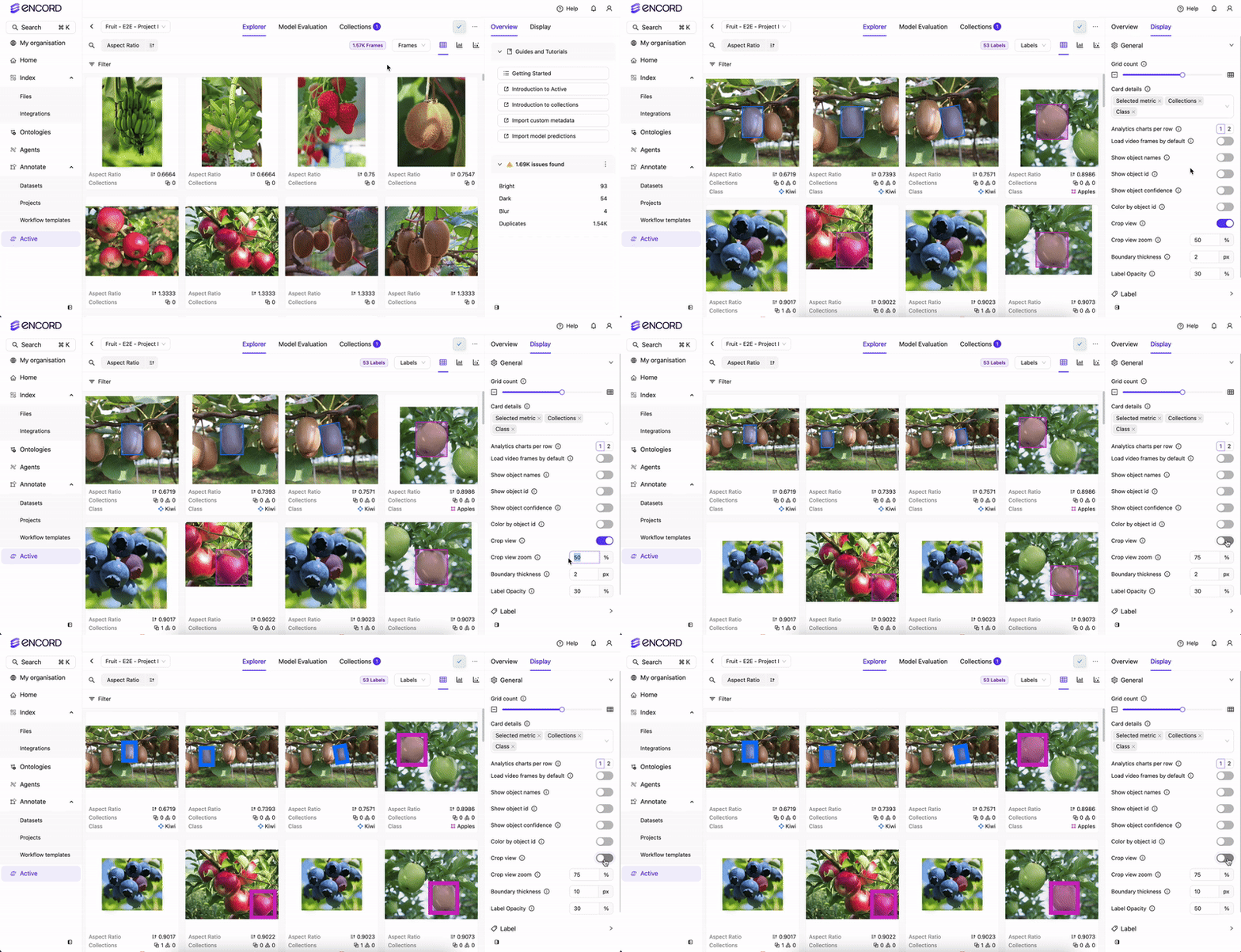
4. Toggle the Crop View switch.
Object labels immediately are zoomed in on. Images/video frames with Classifications remain unchanged.
Classifications on images/video frames are not affected by the Crop View feature. This is because Classifications apply to the entire image/video frame, while object annotations apply to specific areas/regions of an image/video frame. The following image has a Classification label/annotation `Blueberry or Cherry? Blueberry` and a bitmask object label/annotation `Blueberry`. The bitmask object annotation zooms in, while the classification does not.
5. Adjust the **Crop View Zoom** as required.