> ## Documentation Index
> Fetch the complete documentation index at: https://docs.encord.com/llms.txt
> Use this file to discover all available pages before exploring further.
# Import Prediction Sets
## Overview
To upload predictions in Encord Active, you need to create a prediction branch. This guide explains everything you need to know for importing predictions.
### Predictions Workflow

1. **Import Predictions to Annotate Project:** Everything starts in Annotate. Your labels and predictions must exist in your Annotate Project for the labels and predictions to appear in Active.
2. **Import/Sync Project in Active:** After importing your predictions, you can then import the Project into Active. Or you can sync an existing Active Project after importing your predictions.
3. **Analyze the Predictions in Active:** Once the Project import/sync completes, specify the prediction set for Active to analyze.
4. **Select the Predictions in Active:** Once analysis completes, select the prediction set you want to view in Active.
## Supported Prediction Formats
**[Encord Format (Recommended)](/platform-documentation/Validation/active-how-to/active-import-model-predictions-cloud#import-encord-format-predictions)**
* Supports multi-level nested classifications (radio, checklist, or free-form text) under objects or classifications.
* Handles all object types and classification.
- Only top-level objects and classifications are considered when calculating in model metrics.
- Metrics are not yet available for keypoints and polylines. If you are interested in these, please contact the Encord team.
**[COCO Format](/platform-documentation/Validation/active-how-to/active-import-model-predictions-cloud#import-coco-labels-as-predictions)**
Does not support multiple levels of nested classifications (radio, checklist, or free-form text) under tools or classifications.
### Confidence Score
You can include confidence scores when uploading predictions. Encord automatically calculates model metrics based on your prediction set and assigned confidence scores.
## Prediction Branches
When importing prediction sets into Encord Active, they are added as branches to individual label rows on your data units (images, videos, audio). Each data unit has the following:
* A MAIN branch for ground truth annotations or pre-labels.
* Optional Consensus branches and Prediction branches for different prediction sets.

You can [export main branch labels from the UI](/platform-documentation/Annotate/annotate-export/annotate-how-to-export-labels). [Consensus labels and model predictions can only be exported using the SDK](/sdk-documentation/sdk-labels/sdk-export#export-all-consensus-labels).
## List Branches
Use `list_branches` to list all the branches (imported or Consensus) in a Project.
```python theme={"dark"}
# Import dependencies
from encord import EncordUserClient
SSH_PATH = "/Users/chris-encord/ssh-private-key.txt" # Replace with the file path to your SSH private key
PROJECT_ID = "00000000-0000-0000-0000-000000000000" # Replace with the unique Project ID
user_client = EncordUserClient.create_with_ssh_private_key(
ssh_private_key_path=SSH_PATH,
# For US platform users use domain="https://api.us.encord.com"
domain="https://api.encord.com",
)
project = user_client.get_project(PROJECT_ID)
with open("branches.txt", "w") as output_file:
for branch_name in project.list_branches():
output_file.write(f"{branch_name}\n")
```
## STEP 1: Import Predictions
Import your predictions to a Project in Annotate. Encord currently supports importing predictions from the Encord format and from COCO.
### TLDR;
Do you already know what you are doing and only want to look over a Jupyter Notebook example to import your predictions? We provide one [here](#end-to-end-prediction-import-example).
### Import Encord-Format Predictions
Use `branch_name` to create a prediction branch in `label_rows_v2` for a data unit.
* `branch_name` supports alphanumeric characters (a-z, A-Z, 0-9) and is case sensitive
* `branch_name` supports the following special characters: hyphens (-), underscores (\_), and periods (.)
**Example 1**
Imports a single bounding box (`Cherry`) to a single image (`cherry_001.png`).
**Example 2:**
Imports three instances (tracking an object across three sequential frames: 103, 104, and 105) of a bounding box (`Cherry`) to a video (`Cherries_video.mp4`).
**Example 3**
Imports three bounding boxes (`Cherry`) to a single image (`cherry_001.png`).
**Example 4:**
Imports three instances (tracking 3 different objects across three frames: object 1 - frames 103, 104, 105, object 2 - frames 206, 207, 208, and object 3 - frames 313, 315, 317) of three bounding boxes (`Cherry`) to a video (`Cherries_video.mp4`).
```python Bounding Box Template theme={"dark"}
# Import dependencies
import os
from pathlib import Path
from encord import EncordUserClient, Project
from encord.objects import LabelRowV2, Object, OntologyStructure, ObjectInstance
from encord.objects.coordinates import BoundingBoxCoordinates, RotatableBoundingBoxCoordinates, PolygonCoordinates, PolylineCoordinates, PointCoordinate, BitmaskCoordinates
# Configuration
SSH_PATH = ""
PROJECT_HASH = ""
PREDICTION_BRANCH_NAME = ""
ONTOLOGY_OBJECT_TITLE = "" # Name of object label in your Ontology
DATA_UNIT_TITLES = ["", ""] # List of specific data units
# Ensure SSH path and project hash are set
assert SSH_PATH, "SSH path cannot be None"
assert PROJECT_HASH, "Project hash cannot be None"
# Authenticate with Encord using access key
user_client = EncordUserClient.create_with_ssh_private_key(
ssh_private_key_path=Path(SSH_PATH).read_text()
)
# Get the project and list label rows for the prediction branch
project = user_client.get_project(PROJECT_HASH)
all_prediction_branch_rows = project.list_label_rows_v2(branch_name=PREDICTION_BRANCH_NAME)
# Filter label rows based on the specified data unit titles
prediction_branch_rows = [
row for row in all_prediction_branch_rows
if row.data_title in DATA_UNIT_TITLES
]
if not prediction_branch_rows:
print("No matching data units found in the specified branch.")
else:
print("Data units found:", [row.data_title for row in prediction_branch_rows])
# Retrieve the specified ontology object by title
ontology_object = project.ontology_structure.get_child_by_title(
title=ONTOLOGY_OBJECT_TITLE,
type_=Object
)
# Initialize labels for each selected label row in the prediction branch
with project.create_bundle() as bundle:
for row in prediction_branch_rows:
row.initialise_labels(bundle=bundle)
# Add bounding box predictions to each filtered label row
for row in prediction_branch_rows:
# Instantiate an object instance for bounding box predictions
inst = ontology_object.create_instance()
inst.set_for_frames(
coordinates=BoundingBoxCoordinates(
height=0.1,
width=0.1,
top_left_x=0.5,
top_left_y=0.5,
),
frames=0, # Apply to the specified frame
manual_annotation=False, # Set to False as this is a prediction
confidence=1, # Confidence of your prediction
)
# Add the prediction instance to the label row
row.add_object_instance(inst)
with project.create_bundle() as bundle:
# Save the row with predictions within the bundle
for row in prediction_branch_rows:
row.save(bundle=bundle)
```
```python Example 1 theme={"dark"}
# Import dependencies
import os
from pathlib import Path
from encord import EncordUserClient, Project
from encord.objects import LabelRowV2, Object, OntologyStructure, ObjectInstance
from encord.objects.coordinates import BoundingBoxCoordinates, RotatableBoundingBoxCoordinates, PolygonCoordinates, PolylineCoordinates, PointCoordinate, BitmaskCoordinates
# Configuration
SSH_PATH = "/Users/chris-encord/sdk-ssh-private-key.txt"
PROJECT_HASH = "80ae53e3-594c-4120-a108-ee4af105bff3"
PREDICTION_BRANCH_NAME = "my-prediction-branch-I"
ONTOLOGY_OBJECT_TITLE = "Cherry" # Name of object label in your Ontology
DATA_UNIT_TITLES = ["cherry_001.png"] # List of specific data units
# Ensure SSH path and project hash are set
assert SSH_PATH, "SSH path cannot be None"
assert PROJECT_HASH, "Project hash cannot be None"
# Authenticate with Encord using access key
user_client = EncordUserClient.create_with_ssh_private_key(
ssh_private_key_path=Path(SSH_PATH).read_text()
)
# Get the project and list label rows for the prediction branch
project = user_client.get_project(PROJECT_HASH)
all_prediction_branch_rows = project.list_label_rows_v2(branch_name=PREDICTION_BRANCH_NAME)
# Filter label rows based on the specified data unit titles
prediction_branch_rows = [
row for row in all_prediction_branch_rows
if row.data_title in DATA_UNIT_TITLES
]
if not prediction_branch_rows:
print("No matching data units found in the specified branch.")
else:
print("Data units found:", [row.data_title for row in prediction_branch_rows])
# Retrieve the specified ontology object by title
ontology_object = project.ontology_structure.get_child_by_title(
title=ONTOLOGY_OBJECT_TITLE,
type_=Object
)
# Initialize labels for each selected label row in the prediction branch
with project.create_bundle() as bundle:
for row in prediction_branch_rows:
row.initialise_labels(bundle=bundle)
# Add bounding box predictions to each filtered label row
for row in prediction_branch_rows:
# Instantiate an object instance for bounding box predictions
inst = ontology_object.create_instance()
inst.set_for_frames(
coordinates=BoundingBoxCoordinates(
height=0.1,
width=0.1,
top_left_x=0.5,
top_left_y=0.5,
),
frames=0, # Apply to the specified frame
manual_annotation=False, # Set to False as this is a prediction
confidence=1, # Confidence of your prediction
)
# Add the prediction instance to the label row
row.add_object_instance(inst)
with project.create_bundle() as bundle:
for row in prediction_branch_rows:
# Save the row with predictions within the bundle
row.save(bundle=bundle)
```
```python Example 2 theme={"dark"}
# Import dependencies
from pathlib import Path
from encord import EncordUserClient, Project
from encord.objects import Object, ObjectInstance
from encord.objects.coordinates import BoundingBoxCoordinates
# Configuration
SSH_PATH = "/Users/chris-encord/sdk-ssh-private-key.txt"
PROJECT_HASH = "7d4ead9c-4087-4832-a301-eb2545e7d43b"
PREDICTION_BRANCH_NAME = "my-prediction-branch-I"
ONTOLOGY_OBJECT_TITLE = "Cherry"
DATA_UNIT_TITLES = ["Cherries_video.mp4"] # List of specific video data units
# Authenticate with Encord using access key
user_client = EncordUserClient.create_with_ssh_private_key(
ssh_private_key_path=Path(SSH_PATH).read_text()
)
# Get the project and list label rows for the prediction branch
project = user_client.get_project(PROJECT_HASH)
all_prediction_branch_rows = project.list_label_rows_v2(branch_name=PREDICTION_BRANCH_NAME)
# Filter label rows based on the specified data unit titles
prediction_branch_rows = [
row for row in all_prediction_branch_rows
if row.data_title in DATA_UNIT_TITLES
]
if not prediction_branch_rows:
print("No matching data units found in the specified branch.")
else:
print("Data units found:", [row.data_title for row in prediction_branch_rows])
# Retrieve the specified ontology object by title
box_ontology_object = project.ontology_structure.get_child_by_title(
title=ONTOLOGY_OBJECT_TITLE,
type_=Object
)
with project.create_bundle() as bundle:
# Initialize labels for each selected label row in the prediction branch
for label_row in prediction_branch_rows:
label_row.initialise_labels(bundle=bundle)
# Define frame coordinates for video tracking
coordinates_per_frame = {
103: BoundingBoxCoordinates(
height=0.5,
width=0.5,
top_left_x=0.2,
top_left_y=0.2,
),
104: BoundingBoxCoordinates(
height=0.5,
width=0.5,
top_left_x=0.3,
top_left_y=0.3,
),
105: BoundingBoxCoordinates(
height=0.5,
width=0.5,
top_left_x=0.4,
top_left_y=0.4,
),
}
# Add bounding box predictions to each filtered label row across specified frames
for label_row in prediction_branch_rows:
# Instantiate an object instance for bounding box predictions
box_object_instance = box_ontology_object.create_instance()
# Apply bounding box coordinates for each specified frame
for frame_number, coordinates in coordinates_per_frame.items():
box_object_instance.set_for_frames(
coordinates=coordinates,
frames=frame_number, # Specify the frame number
manual_annotation=False # Mark as a prediction
)
# Add the object instance to the label row
label_row.add_object_instance(box_object_instance)
with project.create_bundle() as bundle:
for label_row in prediction_branch_rows:
# Save the label row with the updated predictions within the bundle
label_row.save(bundle=bundle)
```
```python Example 3 theme={"dark"}
# Import dependencies
from pathlib import Path
from encord import EncordUserClient, Project
from encord.objects import Object, ObjectInstance
from encord.objects.coordinates import BoundingBoxCoordinates
# Configuration
SSH_PATH = "/Users/chris-encord/sdk-ssh-private-key.txt"
PROJECT_HASH = "7d4ead9c-4087-4832-a301-eb2545e7d43b"
PREDICTION_BRANCH_NAME = "my-prediction-branch-II"
ONTOLOGY_OBJECT_TITLE = "Cherry"
DATA_UNIT_TITLES = ["cherry_001.png"] # List of specific image data units
# Authenticate with Encord using access key
user_client = EncordUserClient.create_with_ssh_private_key(
ssh_private_key_path=Path(SSH_PATH).read_text()
)
# Get the project and list label rows for the prediction branch
project = user_client.get_project(PROJECT_HASH)
all_prediction_branch_rows = project.list_label_rows_v2(branch_name=PREDICTION_BRANCH_NAME)
# Filter label rows based on the specified data unit titles
prediction_branch_rows = [
row for row in all_prediction_branch_rows
if row.data_title in DATA_UNIT_TITLES
]
if not prediction_branch_rows:
print("No matching data units found in the specified branch.")
else:
print("Data units found:", [row.data_title for row in prediction_branch_rows])
# Retrieve the specified ontology object by title
box_ontology_object = project.ontology_structure.get_child_by_title(
title=ONTOLOGY_OBJECT_TITLE,
type_=Object
)
with project.create_bundle() as bundle:
# Initialize labels for each selected label row in the prediction branch
for label_row in prediction_branch_rows:
label_row.initialise_labels(bundle=bundle)
# Add bounding box predictions to each filtered label row
for label_row in prediction_branch_rows:
# Define bounding box coordinates for each prediction
bounding_boxes = [
BoundingBoxCoordinates(height=0.1, width=0.1, top_left_x=0.2, top_left_y=0.2),
BoundingBoxCoordinates(height=0.1, width=0.1, top_left_x=0.3, top_left_y=0.3),
BoundingBoxCoordinates(height=0.1, width=0.1, top_left_x=0.4, top_left_y=0.4),
]
# Instantiate and set predictions for each bounding box
for coordinates in bounding_boxes:
box_object_instance = box_ontology_object.create_instance()
box_object_instance.set_for_frames(
coordinates=coordinates,
frames=0, # Image frame
manual_annotation=False, # Mark as prediction
confidence=1.0,
)
# Add each object instance to the label row
label_row.add_object_instance(box_object_instance)
with project.create_bundle() as bundle:
for label_row in prediction_branch_rows:
# Save the label row with the updated predictions within the bundle
label_row.save(bundle=bundle)
```
```python Example 4 theme={"dark"}
# Import dependencies
from pathlib import Path
from encord import EncordUserClient, Project
from encord.objects import Object, ObjectInstance
from encord.objects.coordinates import BoundingBoxCoordinates
# Configuration
SSH_PATH = "/Users/chris-encord/sdk-ssh-private-key.txt"
PROJECT_HASH = "7d4ead9c-4087-4832-a301-eb2545e7d43b"
PREDICTION_BRANCH_NAME = "my-prediction-branch-II"
ONTOLOGY_OBJECT_TITLE = "Cherry"
DATA_UNIT_TITLES = ["Cherries_video.mp4"] # List of specific video data units
# Authenticate with Encord using access key
user_client = EncordUserClient.create_with_ssh_private_key(
ssh_private_key_path=Path(SSH_PATH).read_text()
)
# Get the project and list label rows for the prediction branch
project = user_client.get_project(PROJECT_HASH)
all_prediction_branch_rows = project.list_label_rows_v2(branch_name=PREDICTION_BRANCH_NAME)
# Filter label rows based on the specified data unit titles
prediction_branch_rows = [
row for row in all_prediction_branch_rows
if row.data_title in DATA_UNIT_TITLES
]
if not prediction_branch_rows:
print("No matching data units found in the specified branch.")
else:
print("Data units found:", [row.data_title for row in prediction_branch_rows])
# Retrieve the specified ontology object by title
box_ontology_object = project.ontology_structure.get_child_by_title(
title=ONTOLOGY_OBJECT_TITLE,
type_=Object
)
with project.create_bundle() as bundle:
# Initialize labels for each selected label row in the prediction branch
for label_row in prediction_branch_rows:
label_row.initialise_labels(bundle=bundle)
# Define frame coordinates for tracking across multiple frames for each object
tracking_coordinates = [
{ # First object tracked across frames 103, 104, 105
103: BoundingBoxCoordinates(height=0.5, width=0.5, top_left_x=0.2, top_left_y=0.2),
104: BoundingBoxCoordinates(height=0.5, width=0.5, top_left_x=0.3, top_left_y=0.3),
105: BoundingBoxCoordinates(height=0.5, width=0.5, top_left_x=0.4, top_left_y=0.4)
},
{ # Second object tracked across frames 206, 207, 208
206: BoundingBoxCoordinates(height=0.5, width=0.5, top_left_x=0.2, top_left_y=0.2),
207: BoundingBoxCoordinates(height=0.5, width=0.5, top_left_x=0.3, top_left_y=0.3),
208: BoundingBoxCoordinates(height=0.5, width=0.5, top_left_x=0.4, top_left_y=0.4)
},
{ # Third object tracked across frames 313, 315, 317
313: BoundingBoxCoordinates(height=0.5, width=0.5, top_left_x=0.2, top_left_y=0.2),
315: BoundingBoxCoordinates(height=0.5, width=0.5, top_left_x=0.3, top_left_y=0.3),
317: BoundingBoxCoordinates(height=0.5, width=0.5, top_left_x=0.4, top_left_y=0.4)
},
]
# Add bounding box predictions to each filtered label row across specified frames
for label_row in prediction_branch_rows:
for frame_coordinates in tracking_coordinates:
box_object_instance = box_ontology_object.create_instance()
for frame_number, coordinates in frame_coordinates.items():
box_object_instance.set_for_frames(
coordinates=coordinates,
frames=frame_number,
manual_annotation=False, # Mark as a prediction
confidence=1.0
)
# Add each object instance to the label row
label_row.add_object_instance(box_object_instance)
with project.create_bundle() as bundle:
for label_row in prediction_branch_rows:
# Save the label row with the updated predictions within the bundle
label_row.save(bundle=bundle)
```
**Example 1**
Imports a single rotatable bounding box (`Other type of fruit`) to a single image (`apple_001.png`).
**Example 2**
Imports three instances (tracking an object across three sequential frames: 120, 121, and 122) of a bounding box (`Other type of fruit`) to a video (`Cherries_video.mp4`).
**Example 3**
Imports three rotatable bounding boxes (`Other type of fruit`) to a single image (`apple_001.png`).
**Example 4:**
Imports three instances (tracking 3 different objects across three frames: object 1 - frames 120, 121, 122, object 2 - frames 222, 224, 226, and object 3 - frames 321, 323, 325) of three rotatable bounding boxes (`Other type of fruit`) to a video (`Cherries_video.mp4`).
```python Import Rotatable Bounding Box Template theme={"dark"}
# Import dependencies
from pathlib import Path
from encord import EncordUserClient, Project
from encord.objects import Object, ObjectInstance
from encord.objects.coordinates import RotatableBoundingBoxCoordinates
# Configuration
SSH_PATH = ""
PROJECT_HASH = ""
PREDICTION_BRANCH_NAME = ""
ONTOLOGY_OBJECT_TITLE = ""
DATA_UNIT_TITLES = ["", ""] # Specify the data unit titles here
# Authenticate with Encord using access key
user_client = EncordUserClient.create_with_ssh_private_key(
ssh_private_key_path=Path(SSH_PATH).read_text()
)
# Get the project and list label rows for the prediction branch
project = user_client.get_project(PROJECT_HASH)
all_prediction_branch_rows = project.list_label_rows_v2(branch_name=PREDICTION_BRANCH_NAME)
# Filter label rows based on the specified data unit titles
prediction_branch_rows = [
row for row in all_prediction_branch_rows
if row.data_title in DATA_UNIT_TITLES
]
if not prediction_branch_rows:
print("No matching data units found in the specified branch.")
else:
print("Data units found:", [row.data_title for row in prediction_branch_rows])
# Retrieve the specified ontology object by title
rbb_ontology_object = project.ontology_structure.get_child_by_title(
title=ONTOLOGY_OBJECT_TITLE,
type_=Object
)
with project.create_bundle() as bundle:
# Initialize labels for each selected label row in the prediction branch
for label_row in prediction_branch_rows:
label_row.initialise_labels(bundle=bundle)
# Define rotatable bounding box coordinates and frame for each object
rotatable_bounding_box_predictions = [
{
"frame_number": 0,
"coordinates": RotatableBoundingBoxCoordinates(
height=0.3,
width=0.2,
top_left_x=0.1,
top_left_y=0.1,
theta=15 # Angle of rotation in degrees
),
},
{
"frame_number": 5,
"coordinates": RotatableBoundingBoxCoordinates(
height=0.25,
width=0.25,
top_left_x=0.15,
top_left_y=0.15,
theta=30
),
},
{
"frame_number": 10,
"coordinates": RotatableBoundingBoxCoordinates(
height=0.2,
width=0.3,
top_left_x=0.2,
top_left_y=0.2,
theta=45
),
},
]
# Add rotatable bounding box predictions to each filtered label row
for label_row in prediction_branch_rows:
for prediction in rotatable_bounding_box_predictions:
rbb_object_instance = rbb_ontology_object.create_instance()
rbb_object_instance.set_for_frames(
coordinates=prediction["coordinates"],
frames=prediction["frame_number"],
manual_annotation=False, # Mark as a prediction
confidence=1.0
)
# Link the object instance to the label row
label_row.add_object_instance(rbb_object_instance)
with project.create_bundle() as bundle:
for label_row in prediction_branch_rows:
# Save the label row with the updated predictions within the bundle
label_row.save(bundle=bundle)
```
```python Example 1 theme={"dark"}
# Import dependencies
from pathlib import Path
from encord import EncordUserClient, Project
from encord.objects import Object, ObjectInstance
from encord.objects.coordinates import RotatableBoundingBoxCoordinates
# Configuration
SSH_PATH = "/Users/chris-encord/sdk-ssh-private-key.txt"
PROJECT_HASH = "7d4ead9c-4087-4832-a301-eb2545e7d43b"
PREDICTION_BRANCH_NAME = "my-prediction-branch-I"
DATA_UNIT_TITLE = "apple_001.jpg" # Specific data unit title
ONTOLOGY_OBJECT_TITLE = "Other type of fruit" # Ontology class title for rotatable bounding box
# Authenticate with Encord using access key
user_client = EncordUserClient.create_with_ssh_private_key(
ssh_private_key_path=Path(SSH_PATH).read_text()
)
# Get the project and list label rows for the prediction branch
project = user_client.get_project(PROJECT_HASH)
prediction_branch_rows = project.list_label_rows_v2(
branch_name=PREDICTION_BRANCH_NAME,
data_title_eq=DATA_UNIT_TITLE
)
if not prediction_branch_rows:
print("No matching data unit found in the specified branch.")
else:
print("Data unit found:", prediction_branch_rows[0].data_title)
# Retrieve the specified ontology object by title
rbb_ontology_object = project.ontology_structure.get_child_by_title(
title=ONTOLOGY_OBJECT_TITLE,
type_=Object
)
# Prepare for prediction imports by creating a bundle
with project.create_bundle() as bundle:
# Initialize labels for the label row in the prediction branch
label_row = prediction_branch_rows[0]
label_row.initialise_labels(bundle=bundle)
# Define the rotatable bounding box coordinates for prediction
rbb_coordinates = RotatableBoundingBoxCoordinates(
height=0.23,
width=0.13,
top_left_x=0.3,
top_left_y=0.5,
theta=95 # Angle of rotation in degrees
)
# Add rotatable bounding box prediction to the label row
rbb_object_instance = rbb_ontology_object.create_instance()
rbb_object_instance.set_for_frames(
coordinates=rbb_coordinates,
frames=0, # Frame for the image
manual_annotation=False, # Mark as a prediction
confidence=1.0
)
# Link the object instance to the label row
label_row.add_object_instance(rbb_object_instance)
with project.create_bundle() as bundle:
# Save the label row with the updated predictions within the bundle
# (useful if you're calling `initialise_labels` on many label rows
label_row.save(bundle=bundle)
```
```python Example 2 theme={"dark"}
# Import dependencies
from pathlib import Path
from encord import EncordUserClient, Project
from encord.objects import Object, ObjectInstance
from encord.objects.coordinates import RotatableBoundingBoxCoordinates
# Configuration
SSH_PATH = "/Users/chris-encord/sdk-ssh-private-key.txt"
PROJECT_HASH = "7d4ead9c-4087-4832-a301-eb2545e7d43b"
PREDICTION_BRANCH_NAME = "my-prediction-branch-I" # Specify the prediction branch
DATA_UNIT_TITLE = "Cherries_video.mp4" # The title of the video data unit
ONTOLOGY_OBJECT_TITLE = "Other type of fruit" # The ontology object title for the bounding box
# Create user client using access key
user_client: EncordUserClient = EncordUserClient.create_with_ssh_private_key(
Path(SSH_PATH).read_text()
)
# Get project for which predictions are to be added
project: Project = user_client.get_project(PROJECT_HASH)
# Creating multiple instances of a rotatable bounding box - START
label_row = project.list_label_rows_v2(
branch_name=PREDICTION_BRANCH_NAME, # Use the prediction branch
data_title_eq=DATA_UNIT_TITLE
)[0]
with project.create_bundle() as bundle:
# Initialize labels for the selected label row in the prediction branch
label_row.initialise_labels(bundle=bundle)
# Find a rotatable bounding box annotation object in the project ontology
rbb_ontology_object: Object = project.ontology_structure.get_child_by_title(
title=ONTOLOGY_OBJECT_TITLE, type_=Object
)
# Define the coordinates for the rotatable bounding boxes across frames
coordinates_per_frame = {
120: RotatableBoundingBoxCoordinates(
height=0.5,
width=0.5,
top_left_x=0.2,
top_left_y=0.2,
theta=23
),
121: RotatableBoundingBoxCoordinates(
height=0.5,
width=0.5,
top_left_x=0.3,
top_left_y=0.3,
theta=27
),
122: RotatableBoundingBoxCoordinates(
height=0.5,
width=0.5,
top_left_x=0.4,
top_left_y=0.4,
theta=57
),
}
# Iterate through the frames and create instances for each bounding box
for frame_number, coordinates in coordinates_per_frame.items():
# Instantiate an object instance from the ontology node for each frame
rbb_object_instance: ObjectInstance = rbb_ontology_object.create_instance()
# Set the coordinates for the rotatable bounding box for this frame
rbb_object_instance.set_for_frames(
coordinates=coordinates,
frames=frame_number,
manual_annotation=False, # Mark as a prediction
confidence=1.0 # Optional confidence score
)
# Link the object instance to the label row
label_row.add_object_instance(rbb_object_instance)
with project.create_bundle() as bundle:
# Save the label row with the updated predictions within the bundle
label_row.save(bundle=bundle)
```
```python Example 3 theme={"dark"}
# Import dependencies
from pathlib import Path
from encord import EncordUserClient, Project
from encord.objects import Object, ObjectInstance
from encord.objects.coordinates import RotatableBoundingBoxCoordinates
# Configuration
SSH_PATH = "/Users/chris-encord/sdk-ssh-private-key.txt"
PROJECT_HASH = "7d4ead9c-4087-4832-a301-eb2545e7d43b"
PREDICTION_BRANCH_NAME = "my-prediction-branch-II" # Specify the prediction branch
DATA_UNIT_TITLE = "apple_001.jpg" # The title of the image data unit
ONTOLOGY_OBJECT_TITLE = "Other type of fruit" # The ontology object title for the bounding box
# Create user client using access key
user_client: EncordUserClient = EncordUserClient.create_with_ssh_private_key(
Path(SSH_PATH).read_text()
)
# Get the project and list label rows for the prediction branch
project: Project = user_client.get_project(PROJECT_HASH)
label_row = project.list_label_rows_v2(
branch_name=PREDICTION_BRANCH_NAME, # Use the prediction branch
data_title_eq=DATA_UNIT_TITLE
)[0]
with project.create_bundle() as bundle:
# Initialize labels for the selected label row in the prediction branch
label_row.initialise_labels(bundle=bundle)
# Find the rotatable bounding box annotation object in the project ontology
rbb_ontology_object: Object = project.ontology_structure.get_child_by_title(
title=ONTOLOGY_OBJECT_TITLE, type_=Object
)
# Define rotatable bounding box instances with different coordinates
rotatable_bounding_boxes = [
RotatableBoundingBoxCoordinates(
height=0.23,
width=0.13,
top_left_x=0.1,
top_left_y=0.2,
theta=37
),
RotatableBoundingBoxCoordinates(
height=0.23,
width=0.13,
top_left_x=0.3,
top_left_y=0.5,
theta=95
),
RotatableBoundingBoxCoordinates(
height=0.23,
width=0.13,
top_left_x=0.4,
top_left_y=0.6,
theta=70
),
]
# Iterate over each bounding box and apply them as predictions to the label row
for rbb_coordinates in rotatable_bounding_boxes:
rbb_object_instance: ObjectInstance = rbb_ontology_object.create_instance()
rbb_object_instance.set_for_frames(
coordinates=rbb_coordinates,
frames=0, # Image frame
manual_annotation=False, # Mark as a prediction
confidence=1.0
)
# Link the object instance to the label row
label_row.add_object_instance(rbb_object_instance)
with project.create_bundle() as bundle:
# Save the label row with the updated predictions within the bundle
label_row.save(bundle=bundle)
```
```python Example 4 theme={"dark"}
# Import dependencies
from pathlib import Path
from encord import EncordUserClient, Project
from encord.objects import Object, ObjectInstance
from encord.objects.coordinates import RotatableBoundingBoxCoordinates
# Configuration
SSH_PATH = "/Users/chris-encord/sdk-ssh-private-key.txt"
PROJECT_HASH = "7d4ead9c-4087-4832-a301-eb2545e7d43b"
PREDICTION_BRANCH_NAME = "" # Specify the prediction branch
DATA_UNIT_TITLE = "Cherries_video.mp4" # The title of the video data unit
ONTOLOGY_OBJECT_TITLE = "Other type of fruit" # The ontology object title for the bounding box
# Create user client using access key
user_client: EncordUserClient = EncordUserClient.create_with_ssh_private_key(
Path(SSH_PATH).read_text()
)
# Get the project and list label rows for the prediction branch
project: Project = user_client.get_project(PROJECT_HASH)
label_row = project.list_label_rows_v2(
branch_name=PREDICTION_BRANCH_NAME, # Use the prediction branch
data_title_eq=DATA_UNIT_TITLE
)[0]
with project.create_bundle() as bundle:
# Initialize labels for the selected label row in the prediction branch
label_row.initialise_labels(bundle=bundle)
# Find the rotatable bounding box annotation object in the project ontology
rbb_ontology_object: Object = project.ontology_structure.get_child_by_title(
title=ONTOLOGY_OBJECT_TITLE, type_=Object
)
# Define frame coordinates for the first rotatable bounding box
coordinates_per_frame_01 = {
120: RotatableBoundingBoxCoordinates(
height=0.5,
width=0.5,
top_left_x=0.2,
top_left_y=0.2,
theta=23
),
121: RotatableBoundingBoxCoordinates(
height=0.5,
width=0.5,
top_left_x=0.3,
top_left_y=0.3,
theta=27
),
122: RotatableBoundingBoxCoordinates(
height=0.5,
width=0.5,
top_left_x=0.4,
top_left_y=0.4,
theta=57
),
}
# Create and link the first rotatable bounding box to the label row
rbb_object_instance_01: ObjectInstance = rbb_ontology_object.create_instance()
for frame_number, coordinates in coordinates_per_frame_01.items():
rbb_object_instance_01.set_for_frames(
coordinates=coordinates,
frames=frame_number,
manual_annotation=False, # Mark as a prediction
confidence=1.0 # Optional confidence score
)
label_row.add_object_instance(rbb_object_instance_01)
# Define frame coordinates for the second rotatable bounding box
coordinates_per_frame_02 = {
222: RotatableBoundingBoxCoordinates(
height=0.5,
width=0.5,
top_left_x=0.2,
top_left_y=0.2,
theta=23
),
224: RotatableBoundingBoxCoordinates(
height=0.5,
width=0.5,
top_left_x=0.3,
top_left_y=0.3,
theta=27
),
226: RotatableBoundingBoxCoordinates(
height=0.5,
width=0.5,
top_left_x=0.4,
top_left_y=0.4,
theta=57
),
}
# Create and link the second rotatable bounding box to the label row
rbb_object_instance_02: ObjectInstance = rbb_ontology_object.create_instance()
for frame_number, coordinates in coordinates_per_frame_02.items():
rbb_object_instance_02.set_for_frames(
coordinates=coordinates,
frames=frame_number,
manual_annotation=False, # Mark as a prediction
confidence=1.0 # Optional confidence score
)
label_row.add_object_instance(rbb_object_instance_02)
# Define frame coordinates for the third rotatable bounding box
coordinates_per_frame_03 = {
321: RotatableBoundingBoxCoordinates(
height=0.5,
width=0.5,
top_left_x=0.2,
top_left_y=0.2,
theta=23
),
323: RotatableBoundingBoxCoordinates(
height=0.5,
width=0.5,
top_left_x=0.3,
top_left_y=0.3,
theta=27
),
325: RotatableBoundingBoxCoordinates(
height=0.5,
width=0.5,
top_left_x=0.4,
top_left_y=0.4,
theta=57
),
}
# Create and link the third rotatable bounding box to the label row
rbb_object_instance_03: ObjectInstance = rbb_ontology_object.create_instance()
for frame_number, coordinates in coordinates_per_frame_03.items():
rbb_object_instance_03.set_for_frames(
coordinates=coordinates,
frames=frame_number,
manual_annotation=False, # Mark as a prediction
confidence=1.0 # Optional confidence score
)
label_row.add_object_instance(rbb_object_instance_03)
with project.create_bundle() as bundle:
# Save the label row with the updated predictions within the bundle
label_row.save(bundle=bundle)
```
**Example 1**
Imports a single polygon (`Persimmon`) to a single image (`persimmon_001.jpg`).
**Example 2**
Imports three instances (tracking an object across three sequential frames: 143, 144, and 145) of a polygon (`Persimmon`) to a video (`Cherries_video.mp4`).
**Example 3**
Imports three polygons (`Persimmon`) to a single image (`persimmon_001.jpg`).
**Example 4:**
Imports three instances (tracking 3 different objects across three frames: object 1 - frames 153, 154, 155, object 2 - frames 242, 244, 246, and object 3 - frames 343, 345, 347) of three polygons (`Persimmon`) to a video (`Cherries_video.mp4`).
```python Import Polygon Template theme={"dark"}
# Import dependencies
from pathlib import Path
from encord import EncordUserClient, Project
from encord.objects import Object, ObjectInstance
from encord.objects.coordinates import PolygonCoordinates, PointCoordinate
# Configuration
SSH_PATH = ""
PROJECT_HASH = ""
PREDICTION_BRANCH_NAME = "" # Specify the prediction branch
DATA_UNIT_TITLE = "" # The title of the data unit (image or video)
ONTOLOGY_OBJECT_TITLE = "" # The ontology object title for the polygon
# Create user client using access key
user_client: EncordUserClient = EncordUserClient.create_with_ssh_private_key(
Path(SSH_PATH).read_text()
)
# Get the project and list label rows for the prediction branch
project: Project = user_client.get_project(PROJECT_HASH)
prediction_branch_rows = project.list_label_rows_v2(
branch_name=PREDICTION_BRANCH_NAME, # Use the prediction branch
data_title_eq=DATA_UNIT_TITLE
)
if not prediction_branch_rows:
print("No matching data units found in the specified branch.")
else:
print("Data units found:", [row.data_title for row in prediction_branch_rows])
# Initialize labels for each selected label row in the prediction branch
label_row = prediction_branch_rows[0]
label_row.initialise_labels()
# Find a polygon annotation object in the project ontology
polygon_ontology_object: Object = project.ontology_structure.get_child_by_title(
title=ONTOLOGY_OBJECT_TITLE, type_=Object
)
# Instantiate an object instance from the polygon ontology node
polygon_object_instance: ObjectInstance = polygon_ontology_object.create_instance()
# Define the polygon coordinates
polygon_coordinates = PolygonCoordinates([
PointCoordinate(0.1, 0.2),
PointCoordinate(0.3, 0.4),
PointCoordinate(0.5, 0.6),
PointCoordinate(0.7, 0.8)
])
# Set the polygon prediction for the specified frame
polygon_object_instance.set_for_frames(
coordinates=polygon_coordinates,
frames=0, # Specify the frame number
manual_annotation=False, # Mark as a prediction
confidence=1.0 # Optional confidence score
)
# Link the object instance to the label row
label_row.add_object_instance(polygon_object_instance)
# Save the label row
label_row.save()
```
```python Example 1 theme={"dark"}
# Import dependencies
from pathlib import Path
from encord import EncordUserClient, Project
from encord.objects import Object, ObjectInstance
from encord.objects.coordinates import PolygonCoordinates, PointCoordinate
# Configuration
SSH_PATH = "/Users/chris-encord/sdk-ssh-private-key.txt"
PROJECT_HASH = "7d4ead9c-4087-4832-a301-eb2545e7d43b"
PREDICTION_BRANCH_NAME = "my-prediction-branch-I" # Specify your prediction branch
ONTOLOGY_OBJECT_TITLE = "Persimmon" # Name of object label in your Ontology
DATA_UNIT_TITLE = "persimmon_001.jpg" # Specific data unit title
# Ensure SSH path and project hash are set
assert SSH_PATH, "SSH path cannot be None"
assert PROJECT_HASH, "Project hash cannot be None"
# Authenticate with Encord using access key
user_client = EncordUserClient.create_with_ssh_private_key(
Path(SSH_PATH).read_text()
)
# Get project and list label rows for the specified branch and data unit
project = user_client.get_project(PROJECT_HASH)
all_label_rows = project.list_label_rows_v2(branch_name=PREDICTION_BRANCH_NAME)
# Filter label rows based on the specified data unit title
label_rows = [
row for row in all_label_rows
if row.data_title == DATA_UNIT_TITLE
]
if not label_rows:
print(f"No matching label rows found for {DATA_UNIT_TITLE} in branch '{PREDICTION_BRANCH_NAME}'.")
exit() # Nothing to do so exit early
print("Label rows found:", [row.data_title for row in label_rows])
with project.create_bundle() as bundle:
# Prepare for labeling
for label_row in label_rows:
label_row.initialise_labels(bundle=bundle)
for label_row in label_rows:
# Retrieve the specified ontology object by title
polygon_ontology_object = project.ontology_structure.get_child_by_title(
title=ONTOLOGY_OBJECT_TITLE,
type_=Object
)
# Instantiate an object instance from the polygon ontology node
polygon_object_instance = polygon_ontology_object.create_instance()
# The x,y coordinates of each polygon vertex
polygon_object_instance.set_for_frames(
coordinates=PolygonCoordinates(
[PointCoordinate(.1, .1), PointCoordinate(.2, .2), PointCoordinate(.3, .3), PointCoordinate(.4, .4)]
),
frames=0, # Apply to the specified frame
manual_annotation=True, # Set to True for manual annotation
confidence=1.0, # Confidence of your prediction
)
# Link the object instance to the label row
label_row.add_object_instance(polygon_object_instance)
with project.create_bundle() as bundle:
for label_row in label_rows:
# Save the label row with the polygon object instance within the bundle
label_row.save(bundle=bundle)
print("Label rows updated with polygon instances.")
```
```python Example 2 theme={"dark"}
# Import dependencies
from pathlib import Path
from encord import EncordUserClient, Project
from encord.objects import Object, ObjectInstance
from encord.objects.coordinates import PolygonCoordinates, PointCoordinate
# Configuration
SSH_PATH = "/Users/chris-encord/sdk-ssh-private-key.txt"
PROJECT_HASH = "7d4ead9c-4087-4832-a301-eb2545e7d43b"
PREDICTION_BRANCH_NAME = "my-prediction-branch-I" # Specify your prediction branch
DATA_UNIT_TITLE = "Cherries_video.mp4" # Specific data unit title
ONTOLOGY_OBJECT_TITLE = "Persimmon" # Name of object label in your Ontology
# Ensure SSH path and project hash are set
assert SSH_PATH, "SSH path cannot be None"
assert PROJECT_HASH, "Project hash cannot be None"
# Create user client using access key
user_client: EncordUserClient = EncordUserClient.create_with_ssh_private_key(
Path(SSH_PATH).read_text()
)
# Get project for which predictions are to be added
project: Project = user_client.get_project(PROJECT_HASH)
# Retrieve the label row for the specified data unit
label_row = project.list_label_rows_v2(
data_title_eq=DATA_UNIT_TITLE
)[0]
# Initialize labels for the label row
label_row.initialise_labels()
# Find the polygon annotation object in the project ontology
polygon_ontology_object: Object = project.ontology_structure.get_child_by_title(
title=ONTOLOGY_OBJECT_TITLE, type_=Object
)
# Coordinates for each frame
coordinates_per_frame = {
143: PolygonCoordinates(
[PointCoordinate(.1, .1),
PointCoordinate(.2, .1),
PointCoordinate(.3, .2),
PointCoordinate(.1, .3)]
),
144: PolygonCoordinates(
[PointCoordinate(.1, .1),
PointCoordinate(.2, .1),
PointCoordinate(.3, .2),
PointCoordinate(.1, .3)]
),
145: PolygonCoordinates(
[PointCoordinate(.1, .1),
PointCoordinate(.2, .1),
PointCoordinate(.3, .2),
PointCoordinate(.1, .3)]
),
}
# Create and link polygon object instances for each frame
for frame_number, coordinates in coordinates_per_frame.items():
polygon_object_instance: ObjectInstance = polygon_ontology_object.create_instance()
polygon_object_instance.set_for_frames(
coordinates=coordinates,
frames=frame_number,
manual_annotation=True, # Set to True for manual annotation
confidence=1.0, # Set confidence level as needed
)
# Link the object instance to the label row
label_row.add_object_instance(polygon_object_instance)
# Save the label row
label_row.save()
print("Label row updated with polygon instances.")
```
```python Example 3 theme={"dark"}
# Import dependencies
from pathlib import Path
from encord import EncordUserClient, Project
from encord.objects import Object, ObjectInstance
from encord.objects.coordinates import PolygonCoordinates, PointCoordinate
# Configuration
SSH_PATH = "/Users/chris-encord/sdk-ssh-private-key.txt"
PROJECT_HASH = "7d4ead9c-4087-4832-a301-eb2545e7d43b"
PREDICTION_BRANCH_NAME = "my-prediction-branch-I" # Specify your prediction branch
DATA_UNIT_TITLE = "persimmon_001.jpg" # Specific data unit title
ONTOLOGY_OBJECT_TITLE = "Persimmon" # Name of object label in your Ontology
# Create user client using access key
user_client: EncordUserClient = EncordUserClient.create_with_ssh_private_key(
Path(SSH_PATH).read_text()
)
# Get project for which predictions are to be added
project: Project = user_client.get_project(PROJECT_HASH)
# Specify the data unit to label in the given branch
label_row = project.list_label_rows_v2(
branch_name=PREDICTION_BRANCH_NAME, # Filter by prediction branch
data_title_eq=DATA_UNIT_TITLE
)[0]
label_row.initialise_labels()
# Find a polygon annotation object in the project ontology
polygon_ontology_object: Object = project.ontology_structure.get_child_by_title(
title=ONTOLOGY_OBJECT_TITLE, type_=Object
)
# Function to create a polygon object instance
def create_polygon_instance(ontology_object, coordinates, frame, manual_annotation=True, confidence=1.0):
polygon_instance = ontology_object.create_instance()
polygon_instance.set_for_frames(
coordinates=coordinates,
frames=frame,
manual_annotation=manual_annotation,
confidence=confidence,
)
return polygon_instance
# Define coordinates for polygons
polygon_coordinates = [
PolygonCoordinates([PointCoordinate(.1, .1), PointCoordinate(.2, .2), PointCoordinate(.3, .3), PointCoordinate(.4, .4)]),
PolygonCoordinates([PointCoordinate(.15, .15), PointCoordinate(.25, .25), PointCoordinate(.35, .35), PointCoordinate(.15, .45)]),
PolygonCoordinates([PointCoordinate(.2, .2), PointCoordinate(.3, .3), PointCoordinate(.4, .4), PointCoordinate(.2, .5)]),
]
# Create and link polygon instances for each set of coordinates
for coords in polygon_coordinates:
polygon_instance = create_polygon_instance(polygon_ontology_object, coords, frame=0)
label_row.add_object_instance(polygon_instance)
# Save the label row with polygon instances
label_row.save()
print("Label row updated with polygon instances.")
```
```python Example 4 theme={"dark"}
# Import dependencies
from pathlib import Path
from encord import EncordUserClient, Project
from encord.objects import Object, ObjectInstance
from encord.objects.coordinates import PolygonCoordinates, PointCoordinate
# Configuration
SSH_PATH = "/Users/chris-encord/sdk-ssh-private-key.txt"
PROJECT_HASH = "7d4ead9c-4087-4832-a301-eb2545e7d43b"
PREDICTION_BRANCH_NAME = "my-prediction-branch-I" # Specify your prediction branch
DATA_UNIT_TITLE = "Cherries_video.mp4" # Specific data unit title
ONTOLOGY_OBJECT_TITLE = "Persimmon" # Name of object label in your Ontology
# Create user client using access key
user_client: EncordUserClient = EncordUserClient.create_with_ssh_private_key(
Path(SSH_PATH).read_text()
)
# Get project for which predictions are to be added
project: Project = user_client.get_project(PROJECT_HASH)
# Specify the data unit to label in the given branch
label_row = project.list_label_rows_v2(
branch_name=PREDICTION_BRANCH_NAME, # Filter by prediction branch
data_title_eq=DATA_UNIT_TITLE
)[0]
# Initialize labels for the label row
label_row.initialise_labels()
# Find a polygon annotation object in the project ontology
polygon_ontology_object: Object = project.ontology_structure.get_child_by_title(
title=ONTOLOGY_OBJECT_TITLE, type_=Object
)
# Function to create and add a polygon instance
def add_polygon_instance(label_row, ontology_object, coordinates_per_frame):
polygon_instance = ontology_object.create_instance()
for frame_number, coordinates in coordinates_per_frame.items():
polygon_instance.set_for_frames(
coordinates=coordinates,
frames=frame_number,
manual_annotation=True, # Set to True for manual annotation
confidence=1.0, # Set confidence level as needed
)
# Link the object instance to the label row
label_row.add_object_instance(polygon_instance)
# Coordinates for each polygon
coordinates_list = [
{
153: PolygonCoordinates([PointCoordinate(.1, .1), PointCoordinate(.2, .1), PointCoordinate(.3, .2), PointCoordinate(.1, .3)]),
154: PolygonCoordinates([PointCoordinate(.1, .1), PointCoordinate(.2, .1), PointCoordinate(.3, .2), PointCoordinate(.1, .3)]),
155: PolygonCoordinates([PointCoordinate(.1, .1), PointCoordinate(.2, .1), PointCoordinate(.3, .2), PointCoordinate(.1, .3)]),
},
{
242: PolygonCoordinates([PointCoordinate(.1, .1), PointCoordinate(.2, .1), PointCoordinate(.3, .2), PointCoordinate(.1, .3)]),
244: PolygonCoordinates([PointCoordinate(.1, .1), PointCoordinate(.2, .1), PointCoordinate(.3, .2), PointCoordinate(.1, .3)]),
246: PolygonCoordinates([PointCoordinate(.1, .1), PointCoordinate(.2, .1), PointCoordinate(.3, .2), PointCoordinate(.1, .3)]),
},
{
343: PolygonCoordinates([PointCoordinate(.1, .1), PointCoordinate(.2, .1), PointCoordinate(.3, .2), PointCoordinate(.1, .3)]),
345: PolygonCoordinates([PointCoordinate(.1, .1), PointCoordinate(.2, .1), PointCoordinate(.3, .2), PointCoordinate(.1, .3)]),
347: PolygonCoordinates([PointCoordinate(.1, .1), PointCoordinate(.2, .1), PointCoordinate(.3, .2), PointCoordinate(.1, .3)]),
},
]
# Add polygon instances
for coordinates in coordinates_list:
add_polygon_instance(label_row, polygon_ontology_object, coordinates)
# Save the label row with polygon instances
label_row.save()
print("Label row updated with polygon instances.")
```
**Example 1**
Imports a single polyline (`Branch`) to a single image (`persimmon_001.jpg`).
**Example 2**
Imports three instances (tracking an object across three sequential frames: 146, 147, and 148) of a polygon (`Branch`) to a video (`Cherries_video.mp4`).
**Example 3**
Imports three polylines (`Branch`) to a single image (`persimmon_001.jpg`).
**Example 4:**
Imports three instances (tracking 3 different objects across three frames: object 1 - frames 246, 247, 248, object 2 - frames 346, 347, 348, and object 3 - frames 446, 447, 448) of three polylines (`Branch`) to a video (`Cherries_video.mp4`).
```python Import Polyline Template theme={"dark"}
# Import dependencies
from pathlib import Path
from encord import EncordUserClient, Project
from encord.objects import Object, ObjectInstance
from encord.objects.coordinates import PolylineCoordinates, PointCoordinate
# Configuration
SSH_PATH = "" # Path to your SSH private key
PROJECT_HASH = "" # Unique project hash
PREDICTION_BRANCH_NAME = "" # Specify your prediction branch
DATA_UNIT_TITLE = "" # Specific data unit title
ONTOLOGY_OBJECT_TITLE = "" # Name of the polyline object in your ontology
# Create user client using access key
user_client: EncordUserClient = EncordUserClient.create_with_ssh_private_key(
Path(SSH_PATH).read_text()
)
# Get project for which predictions are to be added
project: Project = user_client.get_project(PROJECT_HASH)
# Specify the data unit to label in the given branch
label_row = project.list_label_rows_v2(
branch_name=PREDICTION_BRANCH_NAME, # Filter by prediction branch
data_title_eq=DATA_UNIT_TITLE
)[0]
# Initialize labels for the label row
label_row.initialise_labels()
# Find a polyline annotation object in the project ontology
polyline_ontology_object: Object = project.ontology_structure.get_child_by_title(
title=ONTOLOGY_OBJECT_TITLE, type_=Object
)
# Instantiate an object instance from the polyline ontology node
polyline_object_instance: ObjectInstance = polyline_ontology_object.create_instance()
# The x,y coordinates of each polyline vertex are specified as follows
polyline_object_instance.set_for_frames(
coordinates=PolylineCoordinates(
[PointCoordinate(.x1, .y1), PointCoordinate(.x1, .y1), PointCoordinate(.x3, .y3), PointCoordinate(.13, .456)]
),
# Add the polyline to the specified frame number
frames=, # Replace with the actual frame number
# There are multiple additional fields that can be set optionally:
manual_annotation=True,
confidence=1.0,
)
# Link the object instance to the label row
label_row.add_object_instance(polyline_object_instance)
# Save the label row with the polyline instance
label_row.save()
print("Label row updated with polyline instance.")
```
```python Example 1 theme={"dark"}
# Import dependencies
from pathlib import Path
from encord import EncordUserClient, Project
from encord.objects import Object, ObjectInstance
from encord.objects.coordinates import PolylineCoordinates, PointCoordinate
# Configuration
SSH_PATH = "/Users/chris-encord/sdk-ssh-private-key.txt"
PROJECT_HASH = "7d4ead9c-4087-4832-a301-eb2545e7d43b"
PREDICTION_BRANCH_NAME = "my-prediction-branch-I" # Specify your prediction branch
DATA_UNIT_TITLE = "apple_001.png" # Specific data unit title
ONTOLOGY_OBJECT_TITLE = "Branch" # Name of the polyline object in your ontology
# Create user client using access key
user_client: EncordUserClient = EncordUserClient.create_with_ssh_private_key(
Path(SSH_PATH).read_text()
)
# Get project for which predictions are to be added
project: Project = user_client.get_project(PROJECT_HASH)
# Specify the data unit to label in the given branch
label_row = project.list_label_rows_v2(
branch_name=PREDICTION_BRANCH_NAME, # Filter by prediction branch
data_title_eq=DATA_UNIT_TITLE
)[0]
# Initialize labels for the label row
label_row.initialise_labels()
# Find a polyline annotation object in the project ontology
polyline_ontology_object: Object = project.ontology_structure.get_child_by_title(
title=ONTOLOGY_OBJECT_TITLE, type_=Object
)
# Instantiate an object instance from the polyline ontology node
polyline_object_instance: ObjectInstance = polyline_ontology_object.create_instance()
# The x,y coordinates of each polyline vertex are specified as follows
polyline_object_instance.set_for_frames(
coordinates=PolylineCoordinates(
[PointCoordinate(.1, .1), PointCoordinate(.2, .2), PointCoordinate(.3, .3), PointCoordinate(.4, .4)]
),
# Add the polyline to the image
frames=0, # Specify the frame number
# There are multiple additional fields that can be set optionally:
manual_annotation=True,
confidence=1.0,
)
# Link the object instance to the label row
label_row.add_object_instance(polyline_object_instance)
# Save the label row with the polyline instance
label_row.save()
print("Label row updated with polyline instance.")
```
```python Example 2 theme={"dark"}
# Import dependencies
from pathlib import Path
from encord import EncordUserClient, Project
from encord.objects import Object, ObjectInstance
from encord.objects.coordinates import PolylineCoordinates, PointCoordinate
# Configuration
SSH_PATH = "/Users/chris-encord/sdk-ssh-private-key.txt"
PROJECT_HASH = "7d4ead9c-4087-4832-a301-eb2545e7d43b"
PREDICTION_BRANCH_NAME = "my-prediction-branch-I" # Specify your prediction branch
DATA_UNIT_TITLE = "Cherries_video.mp4" # Specific data unit title
ONTOLOGY_OBJECT_TITLE = "Branch" # Name of the polyline object in your ontology
# Create user client using access key
user_client: EncordUserClient = EncordUserClient.create_with_ssh_private_key(
Path(SSH_PATH).read_text()
)
# Get project for which predictions are to be added
project: Project = user_client.get_project(PROJECT_HASH)
# Specify the data unit to label in the given branch
label_row = project.list_label_rows_v2(
branch_name=PREDICTION_BRANCH_NAME, # Filter by prediction branch
data_title_eq=DATA_UNIT_TITLE
)[0]
# Initialize labels for the label row
label_row.initialise_labels()
# Find a polyline annotation object in the project ontology
polyline_ontology_object: Object = project.ontology_structure.get_child_by_title(
title=ONTOLOGY_OBJECT_TITLE, type_=Object
)
# Instantiate an object instance from the polyline ontology node
polyline_object_instance: ObjectInstance = polyline_ontology_object.create_instance()
# Coordinates for each frame
coordinates_per_frame = {
146: PolylineCoordinates(
[PointCoordinate(.1, .1), PointCoordinate(.2, .1), PointCoordinate(.3, .2), PointCoordinate(.1, .3)]
),
147: PolylineCoordinates(
[PointCoordinate(.1, .1), PointCoordinate(.2, .1), PointCoordinate(.3, .2), PointCoordinate(.1, .3)]
),
148: PolylineCoordinates(
[PointCoordinate(.1, .1), PointCoordinate(.2, .1), PointCoordinate(.3, .2), PointCoordinate(.1, .3)]
),
}
# Set coordinates for each frame in the polyline object instance
for frame_number, coordinates in coordinates_per_frame.items():
polyline_object_instance.set_for_frames(
coordinates=coordinates, frames=frame_number, manual_annotation=True
)
# Link the object instance to the label row
label_row.add_object_instance(polyline_object_instance)
# Save the label row with the polyline instance
label_row.save()
print("Label row updated with polyline instance.")
```
```python Example 3 theme={"dark"}
# Import dependencies
from pathlib import Path
from encord import EncordUserClient, Project
from encord.objects import Object, ObjectInstance
from encord.objects.coordinates import PolylineCoordinates, PointCoordinate
# Configuration
SSH_PATH = "/Users/chris-encord/sdk-ssh-private-key.txt"
PROJECT_HASH = "7d4ead9c-4087-4832-a301-eb2545e7d43b"
PREDICTION_BRANCH_NAME = "my-prediction-branch-I" # Specify your prediction branch
DATA_UNIT_TITLE = "apple_001.png" # Specific data unit title
ONTOLOGY_OBJECT_TITLE = "Branch" # Name of the polyline object in your ontology
# Create user client using access key
user_client: EncordUserClient = EncordUserClient.create_with_ssh_private_key(
Path(SSH_PATH).read_text()
)
# Get project for which predictions are to be added
project: Project = user_client.get_project(PROJECT_HASH)
# Specify the data unit to label in the given branch
label_row = project.list_label_rows_v2(
branch_name=PREDICTION_BRANCH_NAME, # Filter by prediction branch
data_title_eq=DATA_UNIT_TITLE
)[0]
# Initialize labels for the label row
label_row.initialise_labels()
# Find a polyline annotation object in the project ontology
polyline_ontology_object: Object = project.ontology_structure.get_child_by_title(
title=ONTOLOGY_OBJECT_TITLE, type_=Object
)
# Polyline 1 - START
# Instantiate an object instance from the polyline ontology node
polyline_object_instance01: ObjectInstance = polyline_ontology_object.create_instance()
# The x,y coordinates of each polyline vertex are specified as follows
polyline_object_instance01.set_for_frames(
coordinates=PolylineCoordinates(
[PointCoordinate(.1, .1), PointCoordinate(.2, .2), PointCoordinate(.3, .3), PointCoordinate(.4, .4)]
),
# Add the polyline to the image
frames=0,
# There are multiple additional fields that can be set optionally:
manual_annotation=True,
confidence=1.0,
)
# Link the object instance to the label row
label_row.add_object_instance(polyline_object_instance01)
# Polyline 1 - END
# Polyline 2 - START
# Instantiate an object instance from the polyline ontology node
polyline_object_instance02: ObjectInstance = polyline_ontology_object.create_instance()
# The x,y coordinates of each polyline vertex are specified as follows
polyline_object_instance02.set_for_frames(
coordinates=PolylineCoordinates(
[PointCoordinate(.15, .15), PointCoordinate(.25, .25), PointCoordinate(.35, .35), PointCoordinate(.45, .45)]
),
# Add the polyline to the image
frames=0,
# There are multiple additional fields that can be set optionally:
manual_annotation=True,
)
# Link the object instance to the label row
label_row.add_object_instance(polyline_object_instance02)
# Polyline 2 - END
# Polyline 3 - START
# Instantiate an object instance from the polyline ontology node
polyline_object_instance03: ObjectInstance = polyline_ontology_object.create_instance()
# The x,y coordinates of each polyline vertex are specified as follows
polyline_object_instance03.set_for_frames(
coordinates=PolylineCoordinates(
[PointCoordinate(.17, .17), PointCoordinate(.27, .27), PointCoordinate(.37, .37), PointCoordinate(.47, .47)]
),
# Add the polyline to the image
frames=0,
# There are multiple additional fields that can be set optionally:
manual_annotation=True,
)
# Link the object instance to the label row
label_row.add_object_instance(polyline_object_instance03)
# Polyline 3 - END
# Save the label row with the polyline instances
label_row.save()
print("Label row updated with polyline instances.")
```
```python Example 4 theme={"dark"}
# Import dependencies
from pathlib import Path
from encord import EncordUserClient, Project
from encord.objects import Object, ObjectInstance
from encord.objects.coordinates import PolylineCoordinates, PointCoordinate
# Configuration
SSH_PATH = "/Users/chris-encord/sdk-ssh-private-key.txt"
PROJECT_HASH = "7d4ead9c-4087-4832-a301-eb2545e7d43b"
PREDICTION_BRANCH_NAME = "my-prediction-branch-I" # Specify your prediction branch
DATA_UNIT_TITLE = "Cherries_video.mp4" # Specific data unit title
ONTOLOGY_OBJECT_TITLE = "Branch" # Name of the polyline object in your ontology
# Create user client using access key
user_client: EncordUserClient = EncordUserClient.create_with_ssh_private_key(
Path(SSH_PATH).read_text()
)
# Get project for which predictions are to be added
project: Project = user_client.get_project(PROJECT_HASH)
# Specify the data unit to label in the given branch
label_row = project.list_label_rows_v2(
branch_name=PREDICTION_BRANCH_NAME, # Filter by prediction branch
data_title_eq=DATA_UNIT_TITLE
)[0]
# Initialize labels for the label row
label_row.initialise_labels()
# Find a polyline annotation object in the project ontology
polyline_ontology_object: Object = project.ontology_structure.get_child_by_title(
title=ONTOLOGY_OBJECT_TITLE, type_=Object
)
# Polyline 1 - START
# Instantiate an object instance from the polyline ontology node
polyline_object_instance01: ObjectInstance = polyline_ontology_object.create_instance()
coordinates_per_frame = {
246: PolylineCoordinates(
[PointCoordinate(.1, .1),
PointCoordinate(.2, .1),
PointCoordinate(.3, .2),
PointCoordinate(.1, .3)]
),
247: PolylineCoordinates(
[PointCoordinate(.1, .1),
PointCoordinate(.2, .1),
PointCoordinate(.3, .2),
PointCoordinate(.1, .3)]
),
248: PolylineCoordinates(
[PointCoordinate(.1, .1),
PointCoordinate(.2, .1),
PointCoordinate(.3, .2),
PointCoordinate(.1, .3)]
),
}
for frame_number, coordinates in coordinates_per_frame.items():
polyline_object_instance01.set_for_frames(
coordinates=coordinates, frames=frame_number, manual_annotation=True
)
# Link the object instance to the label row
label_row.add_object_instance(polyline_object_instance01)
# Polyline 1 - END
# Polyline 2 - START
# Instantiate an object instance from the polyline ontology node
polyline_object_instance02: ObjectInstance = polyline_ontology_object.create_instance()
coordinates_per_frame = {
346: PolylineCoordinates(
[PointCoordinate(.11, .11),
PointCoordinate(.21, .11),
PointCoordinate(.31, .21),
PointCoordinate(.11, .31)]
),
347: PolylineCoordinates(
[PointCoordinate(.11, .11),
PointCoordinate(.21, .11),
PointCoordinate(.31, .21),
PointCoordinate(.11, .31)]
),
348: PolylineCoordinates(
[PointCoordinate(.11, .11),
PointCoordinate(.21, .11),
PointCoordinate(.31, .21),
PointCoordinate(.11, .31)]
),
}
for frame_number, coordinates in coordinates_per_frame.items():
polyline_object_instance02.set_for_frames(
coordinates=coordinates, frames=frame_number, manual_annotation=True
)
# Link the object instance to the label row
label_row.add_object_instance(polyline_object_instance02)
# Polyline 2 - END
# Polyline 3 - START
# Instantiate an object instance from the polyline ontology node
polyline_object_instance03: ObjectInstance = polyline_ontology_object.create_instance()
coordinates_per_frame = {
446: PolylineCoordinates(
[PointCoordinate(.21, .21),
PointCoordinate(.22, .21),
PointCoordinate(.23, .22),
PointCoordinate(.21, .23)]
),
447: PolylineCoordinates(
[PointCoordinate(.21, .21),
PointCoordinate(.22, .21),
PointCoordinate(.23, .22),
PointCoordinate(.21, .23)]
),
448: PolylineCoordinates(
[PointCoordinate(.21, .21),
PointCoordinate(.22, .21),
PointCoordinate(.23, .22),
PointCoordinate(.21, .23)]
),
}
for frame_number, coordinates in coordinates_per_frame.items():
polyline_object_instance03.set_for_frames(
coordinates=coordinates, frames=frame_number, manual_annotation=True
)
# Link the object instance to the label row
label_row.add_object_instance(polyline_object_instance03)
# Polyline 3 - END
# Save the label row with the polyline instances
label_row.save()
print("Label row updated with polyline instances.")
```
**Example 1**
Imports a single keypoint (`Pedicel`) to a single image (`blueberry_003.png`).
**Example 2**
Imports three instances (tracking an object across three sequential frames: 143, 144, and 145) of a keypoint (`Pedicel`) to a video (`Blueberries_video.mp4`).
**Example 3**
Imports three keypoints (`Pedicel`) to a single image (`blueberry_003.png`).
**Example 4:**
Imports three instances (tracking 3 different objects across three frames: object 1 - frames 143, 144, 145, object 2 - frames 242, 244, 246, and object 3 - frames 343, 345, 347) of three keypoints (`Pedicel`) to a video (`Blueberries_video.mp4`).
```python Import Keypoint Template theme={"dark"}
# Import dependencies
from pathlib import Path
from encord import EncordUserClient, Project
from encord.objects import Object, ObjectInstance
from encord.objects.coordinates import PointCoordinate
# Configuration
SSH_PATH = "" # Path to your SSH private key
PROJECT_HASH = "" # Unique project hash
PREDICTION_BRANCH_NAME = "" # Specify your prediction branch
DATA_UNIT_TITLE = "" # Specific data unit title
ONTOLOGY_OBJECT_TITLE = "" # Name of the keypoint object in your ontology
# Create user client using access key
user_client: EncordUserClient = EncordUserClient.create_with_ssh_private_key(
Path(SSH_PATH).read_text()
)
# Get project for which predictions are to be added
project: Project = user_client.get_project(PROJECT_HASH)
# Specify the data unit to label in the given branch
label_row = project.list_label_rows_v2(
branch_name=PREDICTION_BRANCH_NAME, # Filter by prediction branch
data_title_eq=DATA_UNIT_TITLE
)[0]
# Initialize labels for the label row
label_row.initialise_labels()
# Find a keypoint annotation object in the project ontology
keypoint_ontology_object: Object = project.ontology_structure.get_child_by_title(
title=ONTOLOGY_OBJECT_TITLE, type_=Object
)
# Instantiate an object instance from the keypoint ontology node
keypoint_object_instance: ObjectInstance = keypoint_ontology_object.create_instance()
# The x,y coordinates of the keypoint are specified as follows
keypoint_object_instance.set_for_frames(
coordinates=PointCoordinate(
x=, # Replace with the actual value for the x-axis
y= # Replace with the actual value for the y-axis
),
# Add the keypoint to the specified frame number
frames=, # Replace with the actual frame number
# There are multiple additional fields that can be set optionally:
manual_annotation=True,
confidence=1.0,
)
# Link the object instance to the label row
label_row.add_object_instance(keypoint_object_instance)
# Save the label row with the keypoint instance
label_row.save()
print("Label row updated with keypoint instance.")
```
```python Example 1 theme={"dark"}
# Import dependencies
from pathlib import Path
from encord import EncordUserClient, Project
from encord.objects import Object, ObjectInstance
from encord.objects.coordinates import PointCoordinate
# Configuration
SSH_PATH = "/Users/chris-encord/sdk-ssh-private-key.txt"
PROJECT_HASH = "7d4ead9c-4087-4832-a301-eb2545e7d43b"
PREDICTION_BRANCH_NAME = "my-prediction-branch-I" # Specify your prediction branch
DATA_UNIT_TITLE = "blueberry_003.png" # Specific data unit title
ONTOLOGY_OBJECT_TITLE = "Pedicel" # Name of the keypoint object in your ontology
# Create user client using access key
user_client: EncordUserClient = EncordUserClient.create_with_ssh_private_key(
Path(SSH_PATH).read_text()
)
# Get project for which predictions are to be added
project: Project = user_client.get_project(PROJECT_HASH)
# Specify the data unit to label in the given branch
label_row = project.list_label_rows_v2(
branch_name=PREDICTION_BRANCH_NAME, # Filter by prediction branch
data_title_eq=DATA_UNIT_TITLE
)[0]
# Initialize labels for the label row
label_row.initialise_labels()
# Find a keypoint annotation object in the project ontology
keypoint_ontology_object: Object = project.ontology_structure.get_child_by_title(
title=ONTOLOGY_OBJECT_TITLE, type_=Object
)
# Instantiate an object instance from the keypoint ontology node
keypoint_object_instance: ObjectInstance = keypoint_ontology_object.create_instance()
# The x,y coordinates of the keypoint are specified as follows
keypoint_object_instance.set_for_frames(
coordinates=PointCoordinate(
x=.1,
y=.1
),
# Add the keypoint to the specified frame number
frames=, # Replace with the actual frame number
# There are multiple additional fields that can be set optionally:
manual_annotation=True,
confidence=1.0,
)
# Link the object instance to the label row
label_row.add_object_instance(keypoint_object_instance)
# Save the label row with the keypoint instance
label_row.save()
print("Label row updated with keypoint instance.")
```
```python Example 2 theme={"dark"}
# Import dependencies
from pathlib import Path
from encord import EncordUserClient, Project
from encord.objects import Object, ObjectInstance
from encord.objects.coordinates import PointCoordinate
# Configuration
SSH_PATH = "/Users/chris-encord/sdk-ssh-private-key.txt"
PROJECT_HASH = "7d4ead9c-4087-4832-a301-eb2545e7d43b"
PREDICTION_BRANCH_NAME = "my-prediction-branch-I" # Specify your prediction branch
DATA_UNIT_TITLE = "Blueberries_video.mp4" # Specific data unit title
ONTOLOGY_OBJECT_TITLE = "Pedicel" # Name of the keypoint object in your ontology
# Create user client using access key
user_client: EncordUserClient = EncordUserClient.create_with_ssh_private_key(
Path(SSH_PATH).read_text()
)
# Get project for which predictions are to be added
project: Project = user_client.get_project(PROJECT_HASH)
# Specify the data unit to label in the given branch
label_row = project.list_label_rows_v2(
branch_name=PREDICTION_BRANCH_NAME, # Filter by prediction branch
data_title_eq=DATA_UNIT_TITLE
)[0]
# Initialize labels for the label row
label_row.initialise_labels()
# Find a keypoint annotation object in the project ontology
keypoint_ontology_object: Object = project.ontology_structure.get_child_by_title(
title=ONTOLOGY_OBJECT_TITLE, type_=Object
)
# Instantiate an object instance from the keypoint ontology node
keypoint_object_instance: ObjectInstance = keypoint_ontology_object.create_instance()
# Define coordinates for keypoints across frames
coordinates_per_frame = {
143: PointCoordinate(
x=.1,
y=.2
),
144: PointCoordinate(
x=.11,
y=.22
),
145: PointCoordinate(
x=.12,
y=.23
),
}
# Set keypoint coordinates for each frame
for frame_number, coordinates in coordinates_per_frame.items():
keypoint_object_instance.set_for_frames(
coordinates=coordinates,
frames=frame_number,
manual_annotation=True,
confidence=1.0 # Set confidence level as needed
)
# Link the object instance to the label row
label_row.add_object_instance(keypoint_object_instance)
# Save the label row with the keypoint instance
label_row.save()
print("Label row updated with keypoint instance.")
```
```python Example 3 theme={"dark"}
# Import dependencies
from pathlib import Path
from encord import EncordUserClient, Project
from encord.objects import Object, ObjectInstance
from encord.objects.coordinates import PointCoordinate
# Configuration
SSH_PATH = "/Users/chris-encord/sdk-ssh-private-key.txt"
PROJECT_HASH = "7d4ead9c-4087-4832-a301-eb2545e7d43b"
PREDICTION_BRANCH_NAME = "my-prediction-branch-I" # Specify your prediction branch
DATA_UNIT_TITLE = "blueberry_003.png" # Specific data unit title
ONTOLOGY_OBJECT_TITLE = "Pedicel" # Name of the keypoint object in your ontology
# Create user client using access key
user_client: EncordUserClient = EncordUserClient.create_with_ssh_private_key(
Path(SSH_PATH).read_text()
)
# Get project for which predictions are to be added
project: Project = user_client.get_project(PROJECT_HASH)
# Specify the data unit to label in the given branch
label_row = project.list_label_rows_v2(
branch_name=PREDICTION_BRANCH_NAME, # Filter by prediction branch
data_title_eq=DATA_UNIT_TITLE
)[0]
# Initialize labels for the label row
label_row.initialise_labels()
# Find a keypoint annotation object in the project ontology
keypoint_ontology_object: Object = project.ontology_structure.get_child_by_title(
title=ONTOLOGY_OBJECT_TITLE, type_=Object
)
# Keypoint 1 - START
# Instantiate an object instance from the keypoint ontology node
keypoint_object_instance01: ObjectInstance = keypoint_ontology_object.create_instance()
# The x,y coordinates of the keypoint are specified as follows
keypoint_object_instance01.set_for_frames(
coordinates=PointCoordinate(
x=.1,
y=.1
),
# Add the keypoint to the specified frame number
frames=, # Replace with the actual frame number
# Additional fields that can be set optionally:
manual_annotation=True,
confidence=1.0,
)
# Link the object instance to the label row
label_row.add_object_instance(keypoint_object_instance01)
# Keypoint 1 - END
# Keypoint 2 - START
# Instantiate an object instance from the keypoint ontology node
keypoint_object_instance02: ObjectInstance = keypoint_ontology_object.create_instance()
# The x,y coordinates of the keypoint are specified as follows
keypoint_object_instance02.set_for_frames(
coordinates=PointCoordinate(
x=.2,
y=.2
),
# Add the keypoint to the specified frame number
frames=, # Replace with the actual frame number
# Additional fields that can be set optionally:
manual_annotation=True,
confidence=1.0,
)
# Link the object instance to the label row
label_row.add_object_instance(keypoint_object_instance02)
# Keypoint 2 - END
# Keypoint 3 - START
# Instantiate an object instance from the keypoint ontology node
keypoint_object_instance03: ObjectInstance = keypoint_ontology_object.create_instance()
# The x,y coordinates of the keypoint are specified as follows
keypoint_object_instance03.set_for_frames(
coordinates=PointCoordinate(
x=.3,
y=.3
),
# Add the keypoint to the specified frame number
frames=, # Replace with the actual frame number
# Additional fields that can be set optionally:
manual_annotation=True,
confidence=1.0,
)
# Link the object instance to the label row
label_row.add_object_instance(keypoint_object_instance03)
# Keypoint 3 - END
# Save the label row with the keypoint instances
label_row.save()
print("Label row updated with keypoint instances.")
```
```python Example 4 theme={"dark"}
# Import dependencies
from pathlib import Path
from encord import EncordUserClient, Project
from encord.objects import Object, ObjectInstance
from encord.objects.coordinates import PointCoordinate
# Configuration
SSH_PATH = "/Users/chris-encord/sdk-ssh-private-key.txt"
PROJECT_HASH = "7d4ead9c-4087-4832-a301-eb2545e7d43b"
PREDICTION_BRANCH_NAME = "my-prediction-branch-I" # Specify your prediction branch
DATA_UNIT_TITLE = "Blueberries_video.mp4" # Specific data unit title
ONTOLOGY_OBJECT_TITLE = "Pedicel" # Name of the keypoint object in your ontology
# Create user client using access key
user_client: EncordUserClient = EncordUserClient.create_with_ssh_private_key(
Path(SSH_PATH).read_text()
)
# Get project for which predictions are to be added
project: Project = user_client.get_project(PROJECT_HASH)
# Specify the data unit to label in the given branch
label_row = project.list_label_rows_v2(
branch_name=PREDICTION_BRANCH_NAME, # Filter by prediction branch
data_title_eq=DATA_UNIT_TITLE
)[0]
# Initialize labels for the label row
label_row.initialise_labels()
# Find a keypoint annotation object in the project ontology
keypoint_ontology_object: Object = project.ontology_structure.get_child_by_title(
title=ONTOLOGY_OBJECT_TITLE, type_=Object
)
# Keypoint 1 - START
# Instantiate an object instance from the keypoint ontology node
keypoint_object_instance01: ObjectInstance = keypoint_ontology_object.create_instance()
coordinates_per_frame = {
143: PointCoordinate(
x=.1,
y=.2
),
144: PointCoordinate(
x=.11,
y=.22
),
145: PointCoordinate(
x=.12,
y=.23
),
}
for frame_number, coordinates in coordinates_per_frame.items():
keypoint_object_instance01.set_for_frames(
coordinates=coordinates, frames=frame_number, manual_annotation=True, confidence=1.0
)
# Link the object instance to the label row
label_row.add_object_instance(keypoint_object_instance01)
# Keypoint 1 - END
# Keypoint 2 - START
# Instantiate an object instance from the keypoint ontology node
keypoint_object_instance02: ObjectInstance = keypoint_ontology_object.create_instance()
coordinates_per_frame = {
242: PointCoordinate(
x=.21,
y=.22
),
244: PointCoordinate(
x=.211,
y=.222
),
246: PointCoordinate(
x=.212,
y=.223
),
}
for frame_number, coordinates in coordinates_per_frame.items():
keypoint_object_instance02.set_for_frames(
coordinates=coordinates, frames=frame_number, manual_annotation=True, confidence=1.0
)
# Link the object instance to the label row
label_row.add_object_instance(keypoint_object_instance02)
# Keypoint 2 - END
# Keypoint 3 - START
# Instantiate an object instance from the keypoint ontology node
keypoint_object_instance03: ObjectInstance = keypoint_ontology_object.create_instance()
coordinates_per_frame = {
343: PointCoordinate(
x=.31,
y=.32
),
345: PointCoordinate(
x=.311,
y=.322
),
347: PointCoordinate(
x=.312,
y=.323
),
}
for frame_number, coordinates in coordinates_per_frame.items():
keypoint_object_instance03.set_for_frames(
coordinates=coordinates, frames=frame_number, manual_annotation=True, confidence=1.0
)
# Link the object instance to the label row
label_row.add_object_instance(keypoint_object_instance03)
# Keypoint 3 - END
# Save the label row with the keypoint instances
label_row.save()
print("Label row updated with keypoint instances.")
```
**Example 1:**
Imports a single bitmask (`Blueberry`) to a single image (`blueberry_003.jpg`). For simplicity, the bitmask covers the entire image (image dimensions: 1254x836).
**Example 2:**
Imports three instances (tracking an object across three sequential frames: 156, 157, and 159) of a bitmask (`Blueberry`) to a video (`Blueberries_video.mp4`). For simplicity, the bitmask covers the entire frame (video dimensions: 1920x1080).
**Example 3:**
Imports three bitmasks (`Blueberry`) to a single image (`blueberry_003.jpg`). For simplicity, the bitmasks cover the entire image (image dimensions: 1254x836).
**Example 4:**
Imports three instances (tracking 3 different objects across three frames: object 1 - frames 156, 157, 158, object 2 - frames 256, 258, 259, and object 3 - frames 355, 357, 359) of three bitmasks (`Blueberry`) to a video (`Blueberries_video.mp4`). For simplicity, the bitmasks cover the entire frame (video dimensions: 1920x1080).
```python Template theme={"dark"}
# Import dependencies
import numpy as np
from pathlib import Path
from encord import EncordUserClient, Project
from encord.objects import Object, ObjectInstance
from encord.objects.coordinates import BitmaskCoordinates
# Configuration
SSH_PATH = "" # Path to your SSH private key
PROJECT_HASH = "" # Unique project hash
PREDICTION_BRANCH_NAME = "" # Specify your prediction branch
DATA_UNIT_TITLE = "" # Specific data unit title
ONTOLOGY_OBJECT_TITLE = "" # Name of the bitmask object in your ontology
# Prepare the mask itself.
# For simplicity, we can just mask the whole image
# Note: the size of the mask must be identical to the size of the image
numpy_coordinates = np.ones((, )) # Replace with actual values
# Ensure the image is in boolean format
numpy_coordinates = numpy_coordinates.astype(bool)
# Create user client using access key
user_client: EncordUserClient = EncordUserClient.create_with_ssh_private_key(
Path(SSH_PATH).read_text()
)
# Get project for which predictions are to be added
project: Project = user_client.get_project(PROJECT_HASH)
# Specify the data unit to label in the given branch
label_row = project.list_label_rows_v2(
branch_name=PREDICTION_BRANCH_NAME, # Filter by prediction branch
data_title_eq=DATA_UNIT_TITLE
)[0]
# Initialize labels for the label row
label_row.initialise_labels()
# Find a bitmask annotation object in the project ontology
bitmask_ontology_object: Object = project.ontology_structure.get_child_by_title(
title=ONTOLOGY_OBJECT_TITLE, type_=Object
)
# Instantiate an object instance from the bitmask ontology node
bitmask_object_instance: ObjectInstance = bitmask_ontology_object.create_instance()
# The coordinates for the bitmask are specified as follows
bitmask_object_instance.set_for_frames(
# Create coordinates from provided numpy bitmask
coordinates=BitmaskCoordinates(numpy_coordinates),
# Add the bitmask to the first frame
frames=0,
# There are multiple additional fields that can be set optionally:
manual_annotation=True,
confidence=1.0,
)
# Link the object instance to the label row
label_row.add_object_instance(bitmask_object_instance)
# Save the label row with the bitmask instance
label_row.save()
print("Label row updated with bitmask instance.")
```
```python Example 1 theme={"dark"}
# Import dependencies
import numpy as np
from pathlib import Path
from encord import EncordUserClient, Project
from encord.objects import Object, ObjectInstance
from encord.objects.coordinates import BitmaskCoordinates
# Configuration
SSH_PATH = "/Users/chris-encord/sdk-ssh-private-key.txt"
PROJECT_HASH = "7d4ead9c-4087-4832-a301-eb2545e7d43b"
PREDICTION_BRANCH_NAME = "my-prediction-branch-I" # Specify your prediction branch
DATA_UNIT_TITLE = "blueberry_003.jpg" # Specific data unit title
ONTOLOGY_OBJECT_TITLE = "Blueberry" # Name of the bitmask object in your ontology
# Prepare the mask itself.
# For simplicity, we can just mask the whole image
# Note: the size of the mask must be identical to the size of the image
numpy_coordinates = np.ones((836, 1254))
# Ensure the image is in boolean format
numpy_coordinates = numpy_coordinates.astype(bool)
# Create user client using access key
user_client: EncordUserClient = EncordUserClient.create_with_ssh_private_key(
Path(SSH_PATH).read_text()
)
# Get project for which predictions are to be added
project: Project = user_client.get_project(PROJECT_HASH)
# Specify the data unit to label in the given branch
label_row = project.list_label_rows_v2(
branch_name=PREDICTION_BRANCH_NAME, # Filter by prediction branch
data_title_eq=DATA_UNIT_TITLE
)[0]
# Initialize labels for the label row
label_row.initialise_labels()
# Find a bitmask annotation object in the project ontology
bitmask_ontology_object: Object = project.ontology_structure.get_child_by_title(
title=ONTOLOGY_OBJECT_TITLE, type_=Object
)
# Instantiate an object instance from the bitmask ontology node
bitmask_object_instance: ObjectInstance = bitmask_ontology_object.create_instance()
# The coordinates for the bitmask are specified as follows
bitmask_object_instance.set_for_frames(
# Create coordinates from provided numpy bitmask
coordinates=BitmaskCoordinates(numpy_coordinates),
# Add the bitmask to the first frame
frames=0,
# Additional fields that can be set optionally:
manual_annotation=True,
confidence=1.0,
)
# Link the object instance to the label row
label_row.add_object_instance(bitmask_object_instance)
# Save the label row with the bitmask instance
label_row.save()
print("Label row updated with bitmask instance.")
```
```python Example 2 theme={"dark"}
# Import dependencies
import numpy as np
from pathlib import Path
from encord import EncordUserClient, Project
from encord.objects import Object, ObjectInstance
from encord.objects.coordinates import BitmaskCoordinates
# Configuration
SSH_PATH = "/Users/chris-encord/sdk-ssh-private-key.txt"
PROJECT_HASH = "7d4ead9c-4087-4832-a301-eb2545e7d43b"
PREDICTION_BRANCH_NAME = "my-prediction-branch-I" # Specify your prediction branch
DATA_UNIT_TITLE = "Blueberries_video.mp4" # Specific data unit title
ONTOLOGY_OBJECT_TITLE = "Blueberry" # Name of the bitmask object in your ontology
# Prepare the mask itself.
# For simplicity, we'll mask the entire frame
# Note: the size of the mask must be identical to the size of the image/frame
numpy_coordinates = np.ones((1080, 1920))
# Ensure the image/frame is in boolean format
numpy_coordinates = numpy_coordinates.astype(bool)
# Create user client using access key
user_client: EncordUserClient = EncordUserClient.create_with_ssh_private_key(
Path(SSH_PATH).read_text()
)
# Get project for which predictions are to be added
project: Project = user_client.get_project(PROJECT_HASH)
# Specify the data unit to label in the given branch
label_row = project.list_label_rows_v2(
branch_name=PREDICTION_BRANCH_NAME, # Filter by prediction branch
data_title_eq=DATA_UNIT_TITLE
)[0]
# Initialize labels for the label row
label_row.initialise_labels()
# Find a bitmask annotation object in the project ontology
bitmask_ontology_object: Object = project.ontology_structure.get_child_by_title(
title=ONTOLOGY_OBJECT_TITLE, type_=Object
)
# Instantiate an object instance from the bitmask ontology node
bitmask_object_instance: ObjectInstance = bitmask_ontology_object.create_instance()
# Create and assign the bitmask coordinates for multiple frames
coordinates_per_frame = {
156: BitmaskCoordinates(numpy_coordinates),
157: BitmaskCoordinates(numpy_coordinates),
158: BitmaskCoordinates(numpy_coordinates),
}
for frame_number, coordinates in coordinates_per_frame.items():
bitmask_object_instance.set_for_frames(
coordinates=coordinates, frames=frame_number, manual_annotation=True, confidence=1.0
)
# Link the object instance to the label row
label_row.add_object_instance(bitmask_object_instance)
# Save the label row with the bitmask instance
label_row.save()
print("Label row updated with bitmask instance.")
```
```python Example 3 theme={"dark"}
# Import dependencies
import numpy as np
from pathlib import Path
from encord import EncordUserClient, Project
from encord.objects import Object, ObjectInstance
from encord.objects.coordinates import BitmaskCoordinates
# Configuration
SSH_PATH = "/Users/chris-encord/sdk-ssh-private-key.txt"
PROJECT_HASH = "7d4ead9c-4087-4832-a301-eb2545e7d43b"
PREDICTION_BRANCH_NAME = "my-prediction-branch-I" # Specify your prediction branch
DATA_UNIT_TITLE = "blueberry_003.jpg" # Specific data unit title
ONTOLOGY_OBJECT_TITLE = "Blueberry" # Name of the bitmask object in your ontology
# Prepare the mask itself.
# For simplicity, we can just mask the whole image
# Note: the size of the mask must be identical to the size of the image
numpy_coordinates = np.ones((836, 1254))
# Ensure the image is in boolean format
numpy_coordinates = numpy_coordinates.astype(bool)
# Create user client using access key
user_client: EncordUserClient = EncordUserClient.create_with_ssh_private_key(
Path(SSH_PATH).read_text()
)
# Get project for which predictions are to be added
project: Project = user_client.get_project(PROJECT_HASH)
# Specify the data unit to label in the given branch
label_row = project.list_label_rows_v2(
branch_name=PREDICTION_BRANCH_NAME, # Filter by prediction branch
data_title_eq=DATA_UNIT_TITLE
)[0]
# Initialize labels for the label row
label_row.initialise_labels()
# Find a bitmask annotation object in the project ontology
bitmask_ontology_object: Object = project.ontology_structure.get_child_by_title(
title=ONTOLOGY_OBJECT_TITLE, type_=Object
)
# Bitmask 1 - START
# Instantiate an object instance from the bitmask ontology node
bitmask_object_instance01: ObjectInstance = bitmask_ontology_object.create_instance()
# The coordinates for the bitmask are specified as follows
bitmask_object_instance01.set_for_frames(
# Create coordinates from provided numpy bitmask
coordinates=BitmaskCoordinates(numpy_coordinates),
# Add the bitmask to the first frame
frames=0,
# Additional fields that can be set optionally:
manual_annotation=True,
confidence=1.0,
)
# Link the object instance to the label row
label_row.add_object_instance(bitmask_object_instance01)
# Bitmask 1 - END
# Bitmask 2 - START
# Instantiate an object instance from the bitmask ontology node
bitmask_object_instance02: ObjectInstance = bitmask_ontology_object.create_instance()
# The coordinates for the bitmask are specified as follows
bitmask_object_instance02.set_for_frames(
# Create coordinates from provided numpy bitmask
coordinates=BitmaskCoordinates(numpy_coordinates),
# Add the bitmask to the first frame
frames=0,
# Additional fields that can be set optionally:
manual_annotation=True,
confidence=1.0,
)
# Link the object instance to the label row
label_row.add_object_instance(bitmask_object_instance02)
# Bitmask 2 - END
# Bitmask 3 - START
# Instantiate an object instance from the bitmask ontology node
bitmask_object_instance03: ObjectInstance = bitmask_ontology_object.create_instance()
# The coordinates for the bitmask are specified as follows
bitmask_object_instance03.set_for_frames(
# Create coordinates from provided numpy bitmask
coordinates=BitmaskCoordinates(numpy_coordinates),
# Add the bitmask to the first frame
frames=0,
# Additional fields that can be set optionally:
manual_annotation=True,
confidence=1.0,
)
# Link the object instance to the label row
label_row.add_object_instance(bitmask_object_instance03)
# Bitmask 3 - END
# Save the label row with the bitmask instances
label_row.save()
print("Label row updated with bitmask instances.")
```
```python Example 4 theme={"dark"}
# Import dependencies
import numpy as np
from pathlib import Path
from encord import EncordUserClient, Project
from encord.objects import Object, ObjectInstance
from encord.objects.coordinates import BitmaskCoordinates
# Configuration
SSH_PATH = "/Users/chris-encord/sdk-ssh-private-key.txt"
PROJECT_HASH = "7d4ead9c-4087-4832-a301-eb2545e7d43b"
PREDICTION_BRANCH_NAME = "my-prediction-branch-I" # Specify your prediction branch
DATA_UNIT_TITLE = "Blueberries_video.mp4" # Specific data unit title
ONTOLOGY_OBJECT_TITLE = "Blueberry" # Name of the bitmask object in your ontology
# Prepare the mask itself.
# For simplicity, we'll mask the entire frame
# Note: the size of the mask must be identical to the size of the image/frame
numpy_coordinates = np.ones((1080, 1920))
# Ensure the image/frame is in boolean format
numpy_coordinates = numpy_coordinates.astype(bool)
# Create user client using access key
user_client: EncordUserClient = EncordUserClient.create_with_ssh_private_key(
Path(SSH_PATH).read_text()
)
# Get project for which predictions are to be added
project: Project = user_client.get_project(PROJECT_HASH)
# Specify the data unit to label in the given branch
label_row = project.list_label_rows_v2(
branch_name=PREDICTION_BRANCH_NAME, # Filter by prediction branch
data_title_eq=DATA_UNIT_TITLE
)[0]
# Initialize labels for the label row
label_row.initialise_labels()
# Find a bitmask annotation object in the project ontology
bitmask_ontology_object: Object = project.ontology_structure.get_child_by_title(
title=ONTOLOGY_OBJECT_TITLE, type_=Object
)
# Bitmask 1 - START
# Instantiate an object instance from the bitmask ontology node
bitmask_object_instance01: ObjectInstance = bitmask_ontology_object.create_instance()
coordinates_per_frame = {
156: BitmaskCoordinates(numpy_coordinates),
157: BitmaskCoordinates(numpy_coordinates),
158: BitmaskCoordinates(numpy_coordinates),
}
for frame_number, coordinates in coordinates_per_frame.items():
bitmask_object_instance01.set_for_frames(
coordinates=coordinates, frames=frame_number, manual_annotation=True, confidence=1.0
)
# Link the object instance to the label row
label_row.add_object_instance(bitmask_object_instance01)
# Bitmask 1 - END
# Bitmask 2 - START
# Instantiate an object instance from the bitmask ontology node
bitmask_object_instance02: ObjectInstance = bitmask_ontology_object.create_instance()
coordinates_per_frame = {
256: BitmaskCoordinates(numpy_coordinates),
258: BitmaskCoordinates(numpy_coordinates),
259: BitmaskCoordinates(numpy_coordinates),
}
for frame_number, coordinates in coordinates_per_frame.items():
bitmask_object_instance02.set_for_frames(
coordinates=coordinates, frames=frame_number, manual_annotation=True, confidence=1.0
)
# Link the object instance to the label row
label_row.add_object_instance(bitmask_object_instance02)
# Bitmask 2 - END
# Bitmask 3 - START
# Instantiate an object instance from the bitmask ontology node
bitmask_object_instance03: ObjectInstance = bitmask_ontology_object.create_instance()
coordinates_per_frame = {
355: BitmaskCoordinates(numpy_coordinates),
357: BitmaskCoordinates(numpy_coordinates),
359: BitmaskCoordinates(numpy_coordinates),
}
for frame_number, coordinates in coordinates_per_frame.items():
bitmask_object_instance03.set_for_frames(
coordinates=coordinates, frames=frame_number, manual_annotation=True, confidence=1.0
)
# Link the object instance to the label row
label_row.add_object_instance(bitmask_object_instance03)
# Bitmask 3 - END
# Save the label row with the bitmask instances
label_row.save()
print("Label row updated with bitmask instances.")
```
Before you can import Object Primitive labels into Encord, the Object Primitive Template MUST exist in Encord. [Use the UI to create the Object Primitive Template](/platform-documentation/Annotate/annotate-ontologies/annotate-working-with-ontologies#object-primitives) so you can visually inspect the Object Primitive.
**Import Object Primitive labels**
*Example 1*
Imports a single object primitive (Ontology object = `Strawberry` Object Primitive name = `Triangle`) to a single image (`strawberries_10.jpg`).
*Example 2*
Imports three instances (tracking an object across three sequential frames: 163, 164, and 165) of a object primitive (Ontology object = `Strawberry` Object Primitive name = `Triangle`) to a video (`Cherries_video.mp4`).
*Example 3*
Imports three object primitives (Ontology object = `Strawberry` Object Primitive name = `Triangle`) to a single image (`strawberries_10.jpg`).
*Example 4*
Imports three instances (tracking 3 different objects across three frames: object 1 - frames 173, 174, 175, object 2 - frames 183, 184, 185, and object 3 - frames 193, 194, 195) of three object primitives (Ontology object = `Strawberry` Object Primitive name = `Triangle`) to a video (`Cherries_video.mp4`).
```python Import Skeleton Template theme={"dark"}
# Import dependencies
from pathlib import Path
from encord import EncordUserClient, Project
from encord.objects import Object, ObjectInstance
from encord.objects.coordinates import SkeletonCoordinate, SkeletonCoordinates
from encord.objects.skeleton_template import SkeletonTemplate
# Configuration
SSH_PATH = "" # Path to your SSH private key
PROJECT_HASH = "" # Unique project hash
PREDICTION_BRANCH_NAME = "" # Specify your prediction branch
DATA_UNIT_TITLE = "" # Specific data unit title
ONTOLOGY_OBJECT_TITLE = "" # Name of the object in your ontology
SKELETON_TEMPLATE_NAME = "" # Name of the skeleton template
# Create user client using access key
user_client: EncordUserClient = EncordUserClient.create_with_ssh_private_key(
Path(SSH_PATH).read_text()
)
# Get project for which predictions are to be added
project: Project = user_client.get_project(PROJECT_HASH)
# Specify the data unit to label in the given branch
label_row = project.list_label_rows_v2(
branch_name=PREDICTION_BRANCH_NAME, # Filter by prediction branch
data_title_eq=DATA_UNIT_TITLE
)[0]
# Initialize labels for the label row
label_row.initialise_labels()
# Find a skeleton annotation object in the project ontology
skeleton_ontology_object: Object = project.ontology_structure.get_child_by_title(
title=ONTOLOGY_OBJECT_TITLE, type_=Object
)
skeleton_template: SkeletonTemplate = project.ontology_structure.skeleton_templates[SKELETON_TEMPLATE_NAME]
# Instantiate an object instance from the skeleton ontology node
skeleton_object_instance: ObjectInstance = skeleton_ontology_object.create_instance()
skeleton_hashes = [coord.feature_hash for coord in skeleton_template.skeleton.values()]
skeleton_coordinates: SkeletonCoordinates = SkeletonCoordinates(values=[
SkeletonCoordinate(
x=0.x0, y=0.y0, # Replace with actual coordinates
name='point_0',
color='#000000',
value="point_0",
feature_hash=skeleton_hashes[0]
),
SkeletonCoordinate(
x=0.x1, y=0.y1, # Replace with actual coordinates
name='point_1',
color='#000000',
value="point_1",
feature_hash=skeleton_hashes[1]
),
SkeletonCoordinate(
x=0.x2, y=0.y2, # Replace with actual coordinates
name='point_2',
color='#000000',
value="point_2",
feature_hash=skeleton_hashes[2]
)
],
name="" # Replace with the actual name
)
print(skeleton_coordinates)
# The x,y coordinates of the skeleton are specified as follows
skeleton_object_instance.set_for_frames(
coordinates=skeleton_coordinates,
# Add the skeleton to the image
frames=0,
# Additional fields that can be set optionally:
manual_annotation=True,
confidence=1.0,
)
# Link the object instance to the label row
label_row.add_object_instance(skeleton_object_instance)
# Save the label row with the skeleton instance
label_row.save()
print("Label row updated with skeleton instance.")
```
```python Example 1 theme={"dark"}
# Import dependencies
from pathlib import Path
from encord import EncordUserClient, Project
from encord.objects import Object, ObjectInstance
from encord.objects.coordinates import SkeletonCoordinate, SkeletonCoordinates
from encord.objects.skeleton_template import SkeletonTemplate
# Configuration
SSH_PATH = "/Users/chris-encord/sdk-ssh-private-key.txt" # Path to your SSH private key
PROJECT_HASH = "7d4ead9c-4087-4832-a301-eb2545e7d43b" # Unique project hash
PREDICTION_BRANCH_NAME = "my-prediction-branch-I" # Specify your prediction branch
DATA_UNIT_TITLE = "strawberries_10.jpg" # Specific data unit title
ONTOLOGY_OBJECT_TITLE = "Strawberry" # Name of the object in your ontology
SKELETON_TEMPLATE_NAME = "Triangle" # Name of the skeleton template
# Create user client using access key
user_client: EncordUserClient = EncordUserClient.create_with_ssh_private_key(
Path(SSH_PATH).read_text()
)
# Get project for which labels are to be added
project: Project = user_client.get_project(PROJECT_HASH)
# Specify the data unit to label in the given branch
label_row = project.list_label_rows_v2(
branch_name=PREDICTION_BRANCH_NAME, # Filter by prediction branch
data_title_eq=DATA_UNIT_TITLE
)[0]
# Initialize labels for the label row
label_row.initialise_labels()
# Find a skeleton annotation object in the project ontology
skeleton_ontology_object: Object = project.ontology_structure.get_child_by_title(
title=ONTOLOGY_OBJECT_TITLE, type_=Object
)
skeleton_template: SkeletonTemplate = project.ontology_structure.skeleton_templates[SKELETON_TEMPLATE_NAME]
# Instantiate an object instance from the skeleton ontology node
skeleton_object_instance: ObjectInstance = skeleton_ontology_object.create_instance()
skeleton_hashes = [coord.feature_hash for coord in skeleton_template.skeleton.values()]
skeleton_coordinates: SkeletonCoordinates = SkeletonCoordinates(values=[
SkeletonCoordinate(
x=0.25, y=0.25,
name='point_0',
color='#000000',
value="point_0",
feature_hash=skeleton_hashes[0]
),
SkeletonCoordinate(
x=0.35, y=0.25,
name='point_1',
color='#000000',
value="point_1",
feature_hash=skeleton_hashes[1]
),
SkeletonCoordinate(
x=0.25, y=0.35,
name='point_2',
color='#000000',
value="point_2",
feature_hash=skeleton_hashes[2]
)
],
name=SKELETON_TEMPLATE_NAME)
print(skeleton_coordinates)
# The x,y coordinates of each skeleton vertex are specified as follows
skeleton_object_instance.set_for_frames(
coordinates=skeleton_coordinates,
# Add the skeleton to the image
frames=0,
# There are multiple additional fields that can be set optionally:
manual_annotation=True,
confidence=1.0,
)
# Link the object instance to the label row
label_row.add_object_instance(skeleton_object_instance)
# Save the label row with the skeleton instance
label_row.save()
print("Label row updated with skeleton instance.")
```
```python Example 2 theme={"dark"}
# Import dependencies
from pathlib import Path
from encord import EncordUserClient, Project
from encord.objects import Object, ObjectInstance
from encord.objects.coordinates import SkeletonCoordinate, SkeletonCoordinates
from encord.objects.skeleton_template import SkeletonTemplate
# Configuration
SSH_PATH = "/Users/chris-encord/sdk-ssh-private-key.txt" # Path to your SSH private key
PROJECT_HASH = "b45deb4f-0732-4a89-bdc2-c1c345a82c02" # Unique project hash
PREDICTION_BRANCH_NAME = "my-prediction-branch-I" # Specify your prediction branch
DATA_UNIT_TITLE = "Cherries_video.mp4" # Specific data unit title
ONTOLOGY_OBJECT_TITLE = "Strawberry" # Name of the object in your ontology
SKELETON_TEMPLATE_NAME = "Triangle" # Name of the skeleton template
# Create user client using access key
user_client: EncordUserClient = EncordUserClient.create_with_ssh_private_key(
Path(SSH_PATH).read_text()
)
# Get project for which labels are to be added
project: Project = user_client.get_project(PROJECT_HASH)
# Specify the data unit to label in the given branch
label_row = project.list_label_rows_v2(
branch_name=PREDICTION_BRANCH_NAME, # Filter by prediction branch
data_title_eq=DATA_UNIT_TITLE
)[0]
# Initialize labels for the label row
label_row.initialise_labels()
# Find a skeleton annotation object in the project ontology
skeleton_ontology_object: Object = project.ontology_structure.get_child_by_title(
title=ONTOLOGY_OBJECT_TITLE, type_=Object
)
skeleton_template: SkeletonTemplate = project.ontology_structure.skeleton_templates[SKELETON_TEMPLATE_NAME]
# Instantiate an object instance from the skeleton ontology node
skeleton_object_instance: ObjectInstance = skeleton_ontology_object.create_instance()
skeleton_hashes = [coord.feature_hash for coord in skeleton_template.skeleton.values()]
coordinates_per_frame = {
163: SkeletonCoordinates(
values=[
SkeletonCoordinate(x=0.25, y=0.25, name='point_0', color='#000000', value="point_0", feature_hash=skeleton_hashes[0]),
SkeletonCoordinate(x=0.35, y=0.25, name='point_1', color='#000000', value="point_1", feature_hash=skeleton_hashes[1]),
SkeletonCoordinate(x=0.25, y=0.35, name='point_2', color='#000000', value="point_2", feature_hash=skeleton_hashes[2])
],
name="Triangle"
),
164: SkeletonCoordinates(
values=[
SkeletonCoordinate(x=0.25, y=0.25, name='point_0', color='#000000', value="point_0", feature_hash=skeleton_hashes[0]),
SkeletonCoordinate(x=0.35, y=0.25, name='point_1', color='#000000', value="point_1", feature_hash=skeleton_hashes[1]),
SkeletonCoordinate(x=0.25, y=0.35, name='point_2', color='#000000', value="point_2", feature_hash=skeleton_hashes[2])
],
name="Triangle"
),
165: SkeletonCoordinates(
values=[
SkeletonCoordinate(x=0.25, y=0.25, name='point_0', color='#000000', value="point_0", feature_hash=skeleton_hashes[0]),
SkeletonCoordinate(x=0.35, y=0.25, name='point_1', color='#000000', value="point_1", feature_hash=skeleton_hashes[1]),
SkeletonCoordinate(x=0.25, y=0.35, name='point_2', color='#000000', value="point_2", feature_hash=skeleton_hashes[2])
],
name="Triangle"
)
}
for frame_number, coordinates in coordinates_per_frame.items():
skeleton_object_instance.set_for_frames(
coordinates=coordinates, frames=frame_number, manual_annotation=True, confidence=1.0
)
# Link the object instance to the label row
label_row.add_object_instance(skeleton_object_instance)
# Save the label row with the skeleton instance
label_row.save()
print("Label row updated with skeleton instance.")
```
```python Example 3 theme={"dark"}
# Import dependencies
from pathlib import Path
from encord import EncordUserClient, Project
from encord.objects import Object, ObjectInstance
from encord.objects.coordinates import SkeletonCoordinate, SkeletonCoordinates
from encord.objects.skeleton_template import SkeletonTemplate
# Configuration
SSH_PATH = "/Users/chris-encord/sdk-ssh-private-key.txt" # Path to your SSH private key
PROJECT_HASH = "a4fe6c6a-2a13-4b3d-bd20-13d57421ecbb" # Unique project hash
PREDICTION_BRANCH_NAME = "my-prediction-branch-I" # Specify your prediction branch
DATA_UNIT_TITLE = "strawberries_10.jpg" # Specific data unit title
ONTOLOGY_OBJECT_TITLE = "Strawberry" # Name of the object in your ontology
SKELETON_TEMPLATE_NAME = "Triangle" # Name of the skeleton template
# Create user client using access key
user_client: EncordUserClient = EncordUserClient.create_with_ssh_private_key(
Path(SSH_PATH).read_text()
)
# Get project for which labels are to be added
project: Project = user_client.get_project(PROJECT_HASH)
# Specify the data unit to label in the given branch
label_row = project.list_label_rows_v2(
branch_name=PREDICTION_BRANCH_NAME, # Filter by prediction branch
data_title_eq=DATA_UNIT_TITLE
)[0]
# Initialize labels for the label row
label_row.initialise_labels()
# Find a skeleton annotation object in the project ontology
skeleton_ontology_object: Object = project.ontology_structure.get_child_by_title(
title=ONTOLOGY_OBJECT_TITLE, type_=Object
)
skeleton_template: SkeletonTemplate = project.ontology_structure.skeleton_templates[SKELETON_TEMPLATE_NAME]
# OBJECT PRIMITIVE 1 - START
# Instantiate an object instance from the skeleton ontology node
skeleton_object_instance_01: ObjectInstance = skeleton_ontology_object.create_instance()
skeleton_hashes = [coord.feature_hash for coord in skeleton_template.skeleton.values()]
skeleton_coordinates: SkeletonCoordinates = SkeletonCoordinates(values=[
SkeletonCoordinate(
x=0.25, y=0.25,
name='point_0',
color='#000000',
value="point_0",
feature_hash=skeleton_hashes[0]
),
SkeletonCoordinate(
x=0.35, y=0.25,
name='point_1',
color='#000000',
value="point_1",
feature_hash=skeleton_hashes[1]
),
SkeletonCoordinate(
x=0.25, y=0.35,
name='point_2',
color='#000000',
value="point_2",
feature_hash=skeleton_hashes[2]
)
],
name="Triangle")
print(skeleton_coordinates)
# Set the skeleton coordinates for the specified frames
skeleton_object_instance_01.set_for_frames(
coordinates=skeleton_coordinates,
# Add the skeleton to the image
frames=135-137,
# Additional fields that can be set optionally:
manual_annotation=True,
confidence=1.0,
)
# Link the object instance to the label row
label_row.add_object_instance(skeleton_object_instance_01)
# OBJECT PRIMITIVE 1 - END
# OBJECT PRIMITIVE 2 - START
# Instantiate an object instance from the skeleton ontology node
skeleton_object_instance_02: ObjectInstance = skeleton_ontology_object.create_instance()
skeleton_coordinates: SkeletonCoordinates = SkeletonCoordinates(values=[
SkeletonCoordinate(
x=0.45, y=0.45,
name='point_0',
color='#000000',
value="point_0",
feature_hash=skeleton_hashes[0]
),
SkeletonCoordinate(
x=0.65, y=0.45,
name='point_1',
color='#000000',
value="point_1",
feature_hash=skeleton_hashes[1]
),
SkeletonCoordinate(
x=0.45, y=0.65,
name='point_2',
color='#000000',
value="point_2",
feature_hash=skeleton_hashes[2]
)
],
name="Triangle")
print(skeleton_coordinates)
# Set the skeleton coordinates for the specified frames
skeleton_object_instance_02.set_for_frames(
coordinates=skeleton_coordinates,
# Add the skeleton to the image
frames=0,
# Additional fields that can be set optionally:
manual_annotation=True,
confidence=1.0,
)
# Link the object instance to the label row
label_row.add_object_instance(skeleton_object_instance_02)
# OBJECT PRIMITIVE 2 - END
# OBJECT PRIMITIVE 3 - START
# Instantiate an object instance from the skeleton ontology node
skeleton_object_instance_03: ObjectInstance = skeleton_ontology_object.create_instance()
skeleton_coordinates: SkeletonCoordinates = SkeletonCoordinates(values=[
SkeletonCoordinate(
x=0.75, y=0.75,
name='point_0',
color='#000000',
value="point_0",
feature_hash=skeleton_hashes[0]
),
SkeletonCoordinate(
x=0.95, y=0.75,
name='point_1',
color='#000000',
value="point_1",
feature_hash=skeleton_hashes[1]
),
SkeletonCoordinate(
x=0.75, y=0.95,
name='point_2',
color='#000000',
value="point_2",
feature_hash=skeleton_hashes[2]
)
],
name="Triangle")
print(skeleton_coordinates)
# Set the skeleton coordinates for the specified frames
skeleton_object_instance_03.set_for_frames(
coordinates=skeleton_coordinates,
# Add the skeleton to the image
frames=0,
# Additional fields that can be set optionally:
manual_annotation=True,
confidence=1.0,
)
# Link the object instance to the label row
label_row.add_object_instance(skeleton_object_instance_03)
# OBJECT PRIMITIVE 3 - END
# Save the label row with the skeleton instances
label_row.save()
print("Label row updated with skeleton instances.")
```
```python Example 4 theme={"dark"}
# Import dependencies
from pathlib import Path
from encord import EncordUserClient, Project
from encord.objects import Object, ObjectInstance
from encord.objects.coordinates import SkeletonCoordinate, SkeletonCoordinates
from encord.objects.skeleton_template import SkeletonTemplate
# Configuration
SSH_PATH = "/Users/chris-encord/sdk-ssh-private-key.txt" # Path to your SSH private key
PROJECT_HASH = "0adfb083-9b69-4a09-8084-7fb432ecdfeb" # Unique project hash
PREDICTION_BRANCH_NAME = "my-prediction-branch-I" # Specify your prediction branch
DATA_UNIT_TITLE = "Cherries_video.mp4" # Specific data unit title
ONTOLOGY_OBJECT_TITLE = "Strawberry" # Name of the object in your ontology
SKELETON_TEMPLATE_NAME = "Triangle" # Name of the skeleton template
# Create user client using access key
user_client: EncordUserClient = EncordUserClient.create_with_ssh_private_key(
Path(SSH_PATH).read_text()
)
# Get project for which labels are to be added
project: Project = user_client.get_project(PROJECT_HASH)
# Specify the data unit to label in the given branch
label_row = project.list_label_rows_v2(
branch_name=PREDICTION_BRANCH_NAME, # Filter by prediction branch
data_title_eq=DATA_UNIT_TITLE
)[0]
# Initialize labels for the label row
label_row.initialise_labels()
# Find a skeleton annotation object in the project ontology
skeleton_ontology_object: Object = project.ontology_structure.get_child_by_title(
title=ONTOLOGY_OBJECT_TITLE, type_=Object
)
skeleton_template: SkeletonTemplate = project.ontology_structure.skeleton_templates[SKELETON_TEMPLATE_NAME]
# Skeleton 1 - START
# Instantiate an object instance from the skeleton ontology node
skeleton_object_instance_01: ObjectInstance = skeleton_ontology_object.create_instance()
skeleton_hashes = [coord.feature_hash for coord in skeleton_template.skeleton.values()]
coordinates_per_frame = {
173: SkeletonCoordinates(
values=[
SkeletonCoordinate(x=0.25, y=0.25, name='point_0', color='#000000', value="point_0", feature_hash=skeleton_hashes[0]),
SkeletonCoordinate(x=0.35, y=0.25, name='point_1', color='#000000', value="point_1", feature_hash=skeleton_hashes[1]),
SkeletonCoordinate(x=0.25, y=0.35, name='point_2', color='#000000', value="point_2", feature_hash=skeleton_hashes[2])
],
name="Triangle"
),
174: SkeletonCoordinates(
values=[
SkeletonCoordinate(x=0.25, y=0.25, name='point_0', color='#000000', value="point_0", feature_hash=skeleton_hashes[0]),
SkeletonCoordinate(x=0.35, y=0.25, name='point_1', color='#000000', value="point_1", feature_hash=skeleton_hashes[1]),
SkeletonCoordinate(x=0.25, y=0.35, name='point_2', color='#000000', value="point_2", feature_hash=skeleton_hashes[2])
],
name="Triangle"
),
175: SkeletonCoordinates(
values=[
SkeletonCoordinate(x=0.25, y=0.25, name='point_0', color='#000000', value="point_0", feature_hash=skeleton_hashes[0]),
SkeletonCoordinate(x=0.35, y=0.25, name='point_1', color='#000000', value="point_1", feature_hash=skeleton_hashes[1]),
SkeletonCoordinate(x=0.25, y=0.35, name='point_2', color='#000000', value="point_2", feature_hash=skeleton_hashes[2])
],
name="Triangle"
)
}
for frame_number, coordinates in coordinates_per_frame.items():
skeleton_object_instance_01.set_for_frames(
coordinates=coordinates, frames=frame_number, manual_annotation=True, confidence=1.0
)
# Link the object instance to the label row
label_row.add_object_instance(skeleton_object_instance_01)
# Skeleton 1 - END
# Skeleton 2 - START
# Instantiate an object instance from the skeleton ontology node
skeleton_object_instance_02: ObjectInstance = skeleton_ontology_object.create_instance()
coordinates_per_frame = {
183: SkeletonCoordinates(
values=[
SkeletonCoordinate(x=0.25, y=0.25, name='point_0', color='#000000', value="point_0", feature_hash=skeleton_hashes[0]),
SkeletonCoordinate(x=0.35, y=0.25, name='point_1', color='#000000', value="point_1", feature_hash=skeleton_hashes[1]),
SkeletonCoordinate(x=0.25, y=0.35, name='point_2', color='#000000', value="point_2", feature_hash=skeleton_hashes[2])
],
name="Triangle"
),
184: SkeletonCoordinates(
values=[
SkeletonCoordinate(x=0.25, y=0.25, name='point_0', color='#000000', value="point_0", feature_hash=skeleton_hashes[0]),
SkeletonCoordinate(x=0.35, y=0.25, name='point_1', color='#000000', value="point_1", feature_hash=skeleton_hashes[1]),
SkeletonCoordinate(x=0.25, y=0.35, name='point_2', color='#000000', value="point_2", feature_hash=skeleton_hashes[2])
],
name="Triangle"
),
185: SkeletonCoordinates(
values=[
SkeletonCoordinate(x=0.25, y=0.25, name='point_0', color='#000000', value="point_0", feature_hash=skeleton_hashes[0]),
SkeletonCoordinate(x=0.35, y=0.25, name='point_1', color='#000000', value="point_1", feature_hash=skeleton_hashes[1]),
SkeletonCoordinate(x=0.25, y=0.35, name='point_2', color='#000000', value="point_2", feature_hash=skeleton_hashes[2])
],
name="Triangle"
)
}
for frame_number, coordinates in coordinates_per_frame.items():
skeleton_object_instance_02.set_for_frames(
coordinates=coordinates, frames=frame_number, manual_annotation=True, confidence=1.0
)
# Link the object instance to the label row
label_row.add_object_instance(skeleton_object_instance_02)
# Skeleton 2 - END
# Skeleton 3 - START
# Instantiate an object instance from the skeleton ontology node
skeleton_object_instance_03: ObjectInstance = skeleton_ontology_object.create_instance()
coordinates_per_frame = {
193: SkeletonCoordinates(
values=[
SkeletonCoordinate(x=0.25, y=0.25, name='point_0', color='#000000', value="point_0", feature_hash=skeleton_hashes[0]),
SkeletonCoordinate(x=0.35, y=0.25, name='point_1', color='#000000', value="point_1", feature_hash=skeleton_hashes[1]),
SkeletonCoordinate(x=0.25, y=0.35, name='point_2', color='#000000', value="point_2", feature_hash=skeleton_hashes[2])
],
name="Triangle"
),
194: SkeletonCoordinates(
values=[
SkeletonCoordinate(x=0.25, y=0.25, name='point_0', color='#000000', value="point_0", feature_hash=skeleton_hashes[0]),
SkeletonCoordinate(x=0.35, y=0.25, name='point_1', color='#000000', value="point_1", feature_hash=skeleton_hashes[1]),
SkeletonCoordinate(x=0.25, y=0.35, name='point_2', color='#000000', value="point_2", feature_hash=skeleton_hashes[2])
],
name="Triangle"
),
195: SkeletonCoordinates(
values=[
SkeletonCoordinate(x=0.25, y=0.25, name='point_0', color='#000000', value="point_0", feature_hash=skeleton_hashes[0]),
SkeletonCoordinate(x=0.35, y=0.25, name='point_1', color='#000000', value="point_1", feature_hash=skeleton_hashes[1]),
SkeletonCoordinate(x=0.25, y=0.35, name='point_2', color='#000000', value="point_2", feature_hash=skeleton_hashes[2])
],
name="Triangle"
)
}
for frame_number, coordinates in coordinates_per_frame.items():
skeleton_object_instance_03.set_for_frames(
coordinates=coordinates, frames=frame_number, manual_annotation=True, confidence=1.0
)
# Link the object instance to the label row
label_row.add_object_instance(skeleton_object_instance_03)
# Skeleton 3 - END
# Save the label row with the skeleton instances
label_row.save()
print("Label row updated with skeleton instances.")
```
**Example 1:**
Imports a radio button classification (`Blueberry or Cherry?`) to a single image (`blueberry_003.jpg`).
**Example 2:**
Imports a radio button classification (`Blueberry or Cherry?`) across a range of sequential frames: 193 to 197) to a video (`Blueberries_video.mp4`).
```python Radio Button Template theme={"dark"}
# Import dependencies
from __future__ import annotations
from pathlib import Path
from encord import EncordUserClient, Project
from encord.objects import Classification
from encord.objects.options import Option
# Configuration
SSH_PATH = "" # Path to your SSH private key
PROJECT_HASH = "" # Unique project hash
PREDICTION_BRANCH_NAME = "" # Specify your prediction branch
DATA_UNIT_TITLE = "" # Specific data unit title
ONTOLOGY_OBJECT_TITLE = "" # Name of the classification in your ontology
RADIO_BUTTON_OPTION_TITLE = "" # Title of the radio button option
RADIO_BUTTON_OPTION = "" # Specify the answer for the radio button option
# Create user client using access key
user_client: EncordUserClient = EncordUserClient.create_with_ssh_private_key(
Path(SSH_PATH).read_text()
)
# Get project for which predictions are to be added
project: Project = user_client.get_project(PROJECT_HASH)
# Specify the data unit to apply classification in the given branch
label_row = project.list_label_rows_v2(
branch_name=PREDICTION_BRANCH_NAME, # Filter by prediction branch
data_title_eq=DATA_UNIT_TITLE
)[0]
# Initialize labels for the label row
label_row.initialise_labels()
# Find the radio classification in the project ontology
radio_ontology_classification: Classification = project.ontology_structure.get_child_by_title(
title=ONTOLOGY_OBJECT_TITLE,
type_=Classification,
)
# Find the specific radio button option
blueberry_option = radio_ontology_classification.get_child_by_title(
title=RADIO_BUTTON_OPTION_TITLE, type_=Option
)
# Create an instance of the radio classification
radio_classification_instance = radio_ontology_classification.create_instance()
# Set the answer for the classification instance
radio_classification_instance.set_answer(
answer=RADIO_BUTTON_OPTION
)
# Set the classification for the specified frame
radio_classification_instance.set_for_frames(
# Add the classification to the image
frames=0,
# Additional fields that can be set optionally:
manual_annotation=True,
confidence=1.0,
)
# Link the classification instance to the label row
label_row.add_classification_instance(radio_classification_instance)
# Save the label row with the classification instance
label_row.save()
print("Label row updated with classification instance.")
```
```python Example 1 theme={"dark"}
# Import dependencies
from __future__ import annotations
from pathlib import Path
from encord import EncordUserClient, Project
from encord.objects import Classification
from encord.objects.options import Option
# Configuration
SSH_PATH = "/Users/chris-encord/sdk-ssh-private-key.txt" # Path to your SSH private key
PROJECT_HASH = "7d4ead9c-4087-4832-a301-eb2545e7d43b" # Unique project hash
PREDICTION_BRANCH_NAME = "" # Specify your prediction branch
DATA_UNIT_TITLE = "blueberry_003.jpg" # Specific data unit title
ONTOLOGY_OBJECT_TITLE = "Blueberry or Cherry?" # Name of the classification in your ontology
RADIO_BUTTON_OPTION_TITLE = "Blueberry" # Title of the radio button option
# Create user client using access key
user_client: EncordUserClient = EncordUserClient.create_with_ssh_private_key(
Path(SSH_PATH).read_text()
)
# Get project for which predictions are to be added
project: Project = user_client.get_project(PROJECT_HASH)
# Specify the data unit to apply classification in the given branch
label_row = project.list_label_rows_v2(
branch_name=PREDICTION_BRANCH_NAME, # Filter by prediction branch
data_title_eq=DATA_UNIT_TITLE
)[0]
# Initialize labels for the label row
label_row.initialise_labels()
# Find the radio classification in the project ontology
radio_ontology_classification: Classification = project.ontology_structure.get_child_by_title(
title=ONTOLOGY_OBJECT_TITLE,
type_=Classification,
)
# Find the specific radio button option
blueberry_option = radio_ontology_classification.get_child_by_title(
title=RADIO_BUTTON_OPTION_TITLE, type_=Option
)
# Create an instance of the radio classification
radio_classification_instance = radio_ontology_classification.create_instance()
# Set the answer for the classification instance
radio_classification_instance.set_answer(
answer=blueberry_option
)
# Set the classification for the specified frame
radio_classification_instance.set_for_frames(
# Add the classification to the image
frames=0,
# Additional fields that can be set optionally:
manual_annotation=True,
confidence=1.0,
)
# Link the classification instance to the label row
label_row.add_classification_instance(radio_classification_instance)
# Save the label row with the classification instance
label_row.save()
print("Label row updated with classification instance.")
```
```python Example 2 theme={"dark"}
# Import dependencies
from __future__ import annotations
from pathlib import Path
from encord import EncordUserClient, Project
from encord.objects import Classification
from encord.objects.options import Option
from encord.objects.frames import Range
# Configuration
SSH_PATH = "/Users/chris-encord/sdk-ssh-private-key.txt" # Path to your SSH private key
PROJECT_HASH = "7d4ead9c-4087-4832-a301-eb2545e7d43b" # Unique project hash
PREDICTION_BRANCH_NAME = "" # Specify your prediction branch
DATA_UNIT_TITLE = "Blueberries_video.mp4" # Specific data unit title
ONTOLOGY_OBJECT_TITLE = "Blueberry or Cherry?" # Name of the classification in your ontology
RADIO_BUTTON_OPTION_TITLE = "Blueberry" # Title of the radio button option
# Create user client using access key
user_client: EncordUserClient = EncordUserClient.create_with_ssh_private_key(
Path(SSH_PATH).read_text()
)
# Get project for which classifications are to be added
project: Project = user_client.get_project(PROJECT_HASH)
# Specify the data unit to add classification in the given branch
label_row = project.list_label_rows_v2(
branch_name=PREDICTION_BRANCH_NAME, # Filter by prediction branch
data_title_eq=DATA_UNIT_TITLE
)[0]
# Initialize labels for the label row
label_row.initialise_labels()
# Find the radio classification in the project ontology
radio_ontology_classification: Classification = project.ontology_structure.get_child_by_title(
title=ONTOLOGY_OBJECT_TITLE,
type_=Classification,
)
# Find the specific radio button option
blueberry_option = radio_ontology_classification.get_child_by_title(
title=RADIO_BUTTON_OPTION_TITLE, type_=Option
)
# Create an instance of the radio classification
radio_classification_instance = radio_ontology_classification.create_instance()
# Set the answer for the classification instance
radio_classification_instance.set_answer(
answer=blueberry_option,
)
# Set the classification for the specified frame range
radio_classification_instance.set_for_frames(
frames=Range(start=160, end=165),
# Additional fields that can be set optionally:
manual_annotation=True,
confidence=1.0,
)
# Link the classification instance to the label row
label_row.add_classification_instance(radio_classification_instance)
# Save the label row with the classification instance
label_row.save()
print("Label row updated with classification instance.")
```
**Example 1:**
Imports a checklist classification (`Many types of fruit?`) to a single image (`apple_003.jpg`). The selected items from the list are `apple` and `kiwi`.
**Example 2:**
Imports a checklist classification (`Many types of fruit?`) across a range of sequential frames: 193 to 197) to a video (`Blueberries_video.mp4`). The selected items from the list are `apple` and `kiwi`.
```python Checklist Template theme={"dark"}
# Import dependencies
from __future__ import annotations
from pathlib import Path
from encord import EncordUserClient, Project
from encord.objects import Classification
from encord.objects.options import Option
# Configuration
SSH_PATH = "/Users/chris-encord/sdk-ssh-private-key.txt" # Path to your SSH private key
PROJECT_HASH = "7d4ead9c-4087-4832-a301-eb2545e7d43b" # Unique project hash
PREDICTION_BRANCH_NAME = "" # Specify your prediction branch
DATA_UNIT_TITLE = "Blueberries_video.mp4" # Specific data unit title
ONTOLOGY_OBJECT_TITLE = "Many types of fruit?" # Name of the classification in your ontology
APPLE_OPTION_TITLE = "Apple" # Title of the apple option
KIWI_OPTION_TITLE = "Kiwi" # Title of the kiwi option
# Create user client using access key
user_client: EncordUserClient = EncordUserClient.create_with_ssh_private_key(
Path(SSH_PATH).read_text()
)
# Get project for which predictions are to be added
project: Project = user_client.get_project(PROJECT_HASH)
# Specify the data unit to add classification in the given branch
label_row = project.list_label_rows_v2(
branch_name=PREDICTION_BRANCH_NAME, # Filter by prediction branch
data_title_eq=DATA_UNIT_TITLE
)[0]
# Initialize labels for the label row
label_row.initialise_labels()
# Find the checklist classification in the project ontology
checklist_ontology_classification: Classification = project.ontology_structure.get_child_by_title(
title=ONTOLOGY_OBJECT_TITLE,
type_=Classification,
)
# Find the specific options in the checklist
apple_option = checklist_ontology_classification.get_child_by_title(
title=APPLE_OPTION_TITLE, type_=Option
)
kiwi_option = checklist_ontology_classification.get_child_by_title(
title=KIWI_OPTION_TITLE, type_=Option
)
# Create an instance of the checklist classification
checklist_classification_instance = checklist_ontology_classification.create_instance()
# Set the answers for the classification instance
checklist_classification_instance.set_answer(
[apple_option, kiwi_option]
)
# Set the classification for the specified frame
checklist_classification_instance.set_for_frames(
# Add the classification to the image
frames=177,
# Additional fields that can be set optionally:
manual_annotation=True,
confidence=1.0,
)
# Link the classification instance to the label row
label_row.add_classification_instance(checklist_classification_instance)
# Save the label row with the classification instance
label_row.save()
print("Label row updated with checklist classification instance.")
```
```python Example 1 theme={"dark"}
# Import dependencies
from __future__ import annotations
from pathlib import Path
from encord import EncordUserClient, Project
from encord.objects import Classification
from encord.objects.options import Option
# Configuration
SSH_PATH = "/Users/chris-encord/sdk-ssh-private-key.txt" # Path to your SSH private key
PROJECT_HASH = "7d4ead9c-4087-4832-a301-eb2545e7d43b" # Unique project hash
PREDICTION_BRANCH_NAME = "" # Specify your prediction branch
DATA_UNIT_TITLE = "apple_003.jpg" # Specific data unit title
ONTOLOGY_OBJECT_TITLE = "Many types of fruit?" # Name of the classification in your ontology
APPLE_OPTION_TITLE = "Apple" # Title of the apple option
KIWI_OPTION_TITLE = "Kiwi" # Title of the kiwi option
# Create user client using access key
user_client: EncordUserClient = EncordUserClient.create_with_ssh_private_key(
Path(SSH_PATH).read_text()
)
# Get project for which predictions are to be added
project: Project = user_client.get_project(PROJECT_HASH)
# Specify the data unit to add classification in the given branch
label_row = project.list_label_rows_v2(
branch_name=PREDICTION_BRANCH_NAME, # Filter by prediction branch
data_title_eq=DATA_UNIT_TITLE
)[0]
# Initialize labels for the label row
label_row.initialise_labels()
# Find the checklist classification in the project ontology
checklist_ontology_classification: Classification = project.ontology_structure.get_child_by_title(
title=ONTOLOGY_OBJECT_TITLE,
type_=Classification,
)
# Find the specific options in the checklist
apple_option = checklist_ontology_classification.get_child_by_title(
title=APPLE_OPTION_TITLE, type_=Option
)
kiwi_option = checklist_ontology_classification.get_child_by_title(
title=KIWI_OPTION_TITLE, type_=Option
)
# Create an instance of the checklist classification
checklist_classification_instance = checklist_ontology_classification.create_instance()
# Set the answers for the classification instance
checklist_classification_instance.set_answer(
[apple_option, kiwi_option]
)
# Set the classification for the specified frame
checklist_classification_instance.set_for_frames(
# Add the classification to the image
frames=0,
# Additional fields that can be set optionally:
manual_annotation=True,
)
# Link the classification instance to the label row
label_row.add_classification_instance(checklist_classification_instance)
# Save the label row with the classification instance
label_row.save()
print("Label row updated with checklist classification instance.")
```
```python Example 2 theme={"dark"}
# Import dependencies
from __future__ import annotations
from pathlib import Path
from encord import EncordUserClient, Project
from encord.objects import Classification
from encord.objects.options import Option
from encord.objects.frames import Range
# Configuration
SSH_PATH = "/Users/chris-encord/sdk-ssh-private-key.txt" # Path to your SSH private key
PROJECT_HASH = "7d4ead9c-4087-4832-a301-eb2545e7d43b" # Unique project hash
PREDICTION_BRANCH_NAME = "" # Specify your prediction branch
DATA_UNIT_TITLE = "Blueberries_video.mp4" # Specific data unit title
ONTOLOGY_OBJECT_TITLE = "Many types of fruit?" # Name of the classification in your ontology
APPLE_OPTION_TITLE = "Apple" # Title of the apple option
KIWI_OPTION_TITLE = "Kiwi" # Title of the kiwi option
# Create user client using access key
user_client: EncordUserClient = EncordUserClient.create_with_ssh_private_key(
Path(SSH_PATH).read_text()
)
# Get project for which classifications are to be added
project: Project = user_client.get_project(PROJECT_HASH)
# Specify the data unit to add classification in the given branch
label_row = project.list_label_rows_v2(
branch_name=PREDICTION_BRANCH_NAME, # Filter by prediction branch
data_title_eq=DATA_UNIT_TITLE
)[0]
# Initialize labels for the label row
label_row.initialise_labels()
# Find the checklist classification in the project ontology
checklist_ontology_classification: Classification = project.ontology_structure.get_child_by_title(
title=ONTOLOGY_OBJECT_TITLE,
type_=Classification,
)
# Find the specific options in the checklist
apple_option = checklist_ontology_classification.get_child_by_title(
title=APPLE_OPTION_TITLE, type_=Option
)
kiwi_option = checklist_ontology_classification.get_child_by_title(
title=KIWI_OPTION_TITLE, type_=Option
)
# Create an instance of the checklist classification
checklist_classification_instance = checklist_ontology_classification.create_instance()
# Set the answers for the classification instance
checklist_classification_instance.set_answer(
[apple_option, kiwi_option]
)
# Set the classification for the specified frame range
checklist_classification_instance.set_for_frames(
frames=Range(start=193, end=197),
# Additional fields that can be set optionally:
manual_annotation=True,
)
# Link the classification instance to the label row
label_row.add_classification_instance(checklist_classification_instance)
# Save the label row with the classification instance
label_row.save()
print("Label row updated with checklist classification instance.")
```
This simple example imports a bounding box model prediction to all data units in the prediction branch.
```python Store Predictions Boilerplate theme={"dark"}
# Import dependencies
import os
from encord import EncordUserClient, Project
from encord.objects import LabelRowV2, Object, OntologyStructure, ObjectInstance
from encord.objects.coordinates import BoundingBoxCoordinates, RotatableBoundingBoxCoordinates, PolygonCoordinates, PolylineCoordinates, PointCoordinate, BitmaskCoordinates
# Configuration
SSH_PATH = "file-path-to-your-ssh-key"
PROJECT_HASH = "unique-id-for-project"
# Specify a label_rows_v2 branch name for your predictions.
PREDICTION_BRANCH_NAME = "name-of-your-prediction-branch"
assert SSH_PATH is not None, "SSH path cannot be None"
assert PROJECT_HASH is not None, "Project hash cannot be None"
# Authenticate with Encord
user_client = EncordUserClient.create_with_ssh_private_key(
ssh_private_key_path=SSH_PATH
)
# Access the project and prepare the branch for predictions
project = user_client.get_project(PROJECT_HASH)
prediction_branch_rows = project.list_label_rows_v2(branch_name=PREDICTION_BRANCH_NAME)
if len(prediction_branch_rows) > 0:
print("Branch is:", prediction_branch_rows[0].branch_name)
ontology_object = project.ontology_structure.objects[0]
with project.create_bundle() as bundle:
for row in prediction_branch_rows:
row.initialise_labels(bundle=bundle)
for row in prediction_branch_rows:
inst = ontology_object.create_instance()
inst.set_for_frames(
coordinates=BoundingBoxCoordinates(
height=0.8,
width=0.8,
top_left_x=0.1,
top_left_y=0.1,
),
# Add the bounding box to the first frame
frames=0,
# There are multiple additional fields that can be set optionally:
manual_annotation=False,
)
row.add_object_instance(inst)
with project.create_bundle() as bundle:
for row in prediction_branch_rows:
row.save(bundle=bundle)
```
### Import COCO Labels as Predictions
The following code imports COCO labels as predictions for Active.
For more information on [importing COCO labels into Encord](/sdk-documentation/sdk-labels/sdk-import-coco-labels), refer to our documentation.
Replace the following:
* `` with the file path to your SSH private key.
* `` with the name of your prediction branch.
* `` with the Project ID for your Project.
* `COCOimportfile.json` with the full path of the COCO file containing the predictions you want to import.
```python COCO Label import as Predictions theme={"dark"}
import json
from pathlib import Path
from encord.utilities.coco.datastructure import FrameIndex
from encord import EncordUserClient
from encord.exceptions import OntologyError
# Authenticate client
SSH_PATH = "file-path-to-your-ssh-key"
# Specify a Project to import your predictions to. This Project must already exist in Encord.
PROJECT_HASH = "unique-id-for-project"
# Specify a label_rows_v2 branch name for your predictions.
PREDICTION_BRANCH_NAME = "name-of-your-prediction-branch"
# Authenticate with Encord using the path to your private key
user_client: EncordUserClient = EncordUserClient.create_with_ssh_private_key(
ssh_private_key_path=SSH_PATH
)
# Replace with your project hash
project = user_client.get_project(PROJECT_HASH)
# Load the COCO annotations JSON file
# Replace 'COCOimportfile.json' with the full path to your COCO file
coco_file = Path("COCOimportfile.json")
labels_dict = json.loads(coco_file.read_text())
# Build a mapping from COCO category IDs to the feature hashes in your Encord Ontology.
category_id_to_feature_hash = {}
ont_struct = project.ontology_structure
for coco_category in labels_dict["categories"]:
try:
ont_obj = ont_struct.get_child_by_title(coco_category["name"])
category_id_to_feature_hash[coco_category["id"]] = ont_obj.feature_node_hash
except OntologyError:
print(f"Could not match {coco_category['name']} in the Ontology. Import will crash if these are present.")
# Build a mapping from COCO image IDs to Encord frame indices
# This is only applicable for images, image groups, image sequences, and DICOM series
image_id_to_frame_index = {}
data_title_to_label_row = {lr.data_title: lr for lr in project.list_label_rows_v2()}
for img in labels_dict["images"]:
lr = data_title_to_label_row[img["file_name"]]
# Creates a mapping between the COCO image IDs and the corresponding frame indices in Encord
# In this example, the target frame is 0 because the files in the sample project are single images
image_id_to_frame_index[img["id"]] = FrameIndex(lr.data_hash, frame=0)
# Import the COCO labels into Encord
project.import_coco_labels(
labels_dict,
category_id_to_feature_hash,
image_id_to_frame_index,
branch_name=PREDICTION_BRANCH_NAME,
)
```
### Verify Prediction Import
After importing your predictions, verify that your predictions imported.
The following code returns all labels and predictions on all branches.
```python theme={"dark"}
# Import dependencies
from encord import EncordUserClient
import json
SSH_PATH = "file-path-of-your-ssh-key"
PROJECT_HASH = "unique-id-for-your-project"
# Instantiate client. Replace with the path to the file containing your private key.
user_client = EncordUserClient.create_with_ssh_private_key(
ssh_private_key_path=SSH_PATH
)
# Specify Project. Replace with the hash of the Project you want to export labels for.
project = user_client.get_project(PROJECT_HASH)
# Downloads a local copy of all the labels
# Without the include_all_label_branches flag only the MAIN branch labels export
label_rows = project.list_label_rows_v2(include_all_label_branches=True)
# Initialize label rows using bundles
with project.create_bundle() as bundle:
for label_row in label_rows:
label_row.initialise_labels(bundle=bundle)
for label_row in label_rows:
# Here we have the label row for the branch, but without labels themselves downloaded
print(f"Title: {label_row.data_title}, branch: {label_row.branch_name}")
# Print essential label information for all objects
for object_instance in label_row.get_object_instances():
print (f"objectHash: {object_instance.object_hash}")
print (f"Object name: {object_instance.object_name}")
print (f"featureHash: {object_instance.feature_hash}")
print (f"uid: {object_instance.ontology_item.uid}")
print (f"Object color: {object_instance.ontology_item.color}")
print (f"Ontology shape: {object_instance.ontology_item.shape}")
# Print the frame number and the location of the object on the frame
for annotation in object_instance.get_annotations():
print(f"Frame {annotation.frame} -> {annotation.coordinates}")
# Print all attributes
for attribute in object_instance.ontology_item.attributes:
print (attribute, object_instance)
# Print all essential classification information
for classification_instance in label_row.get_classification_instances():
print (f"classificationHash: {classification_instance.classification_hash}")
print (f"Classification name: {classification_instance.classification_name}")
print (f"featureHash: {classification_instance.feature_hash}")
print (f"Classification answer: {classification_instance.get_answer().value}")
print (f"Classification answer hash: {classification_instance.get_answer().feature_node_hash}")
# Print the frame number(s) that a classification appears on
for annotation in classification_instance.get_annotations():
print(f"Classification appears on frame: {annotation.frame}")
```
### End-to-End Prediction Import Example
We provide an end-to-end example using a Jupyter Notebook [here](https://colab.research.google.com/drive/1UYUBkiqanTdhjE37Pj0ArVFn_x0BiJk8?usp=sharing).
## STEP 2: Import/Sync Project to Active
Import or sync the Annotate Project in Active.
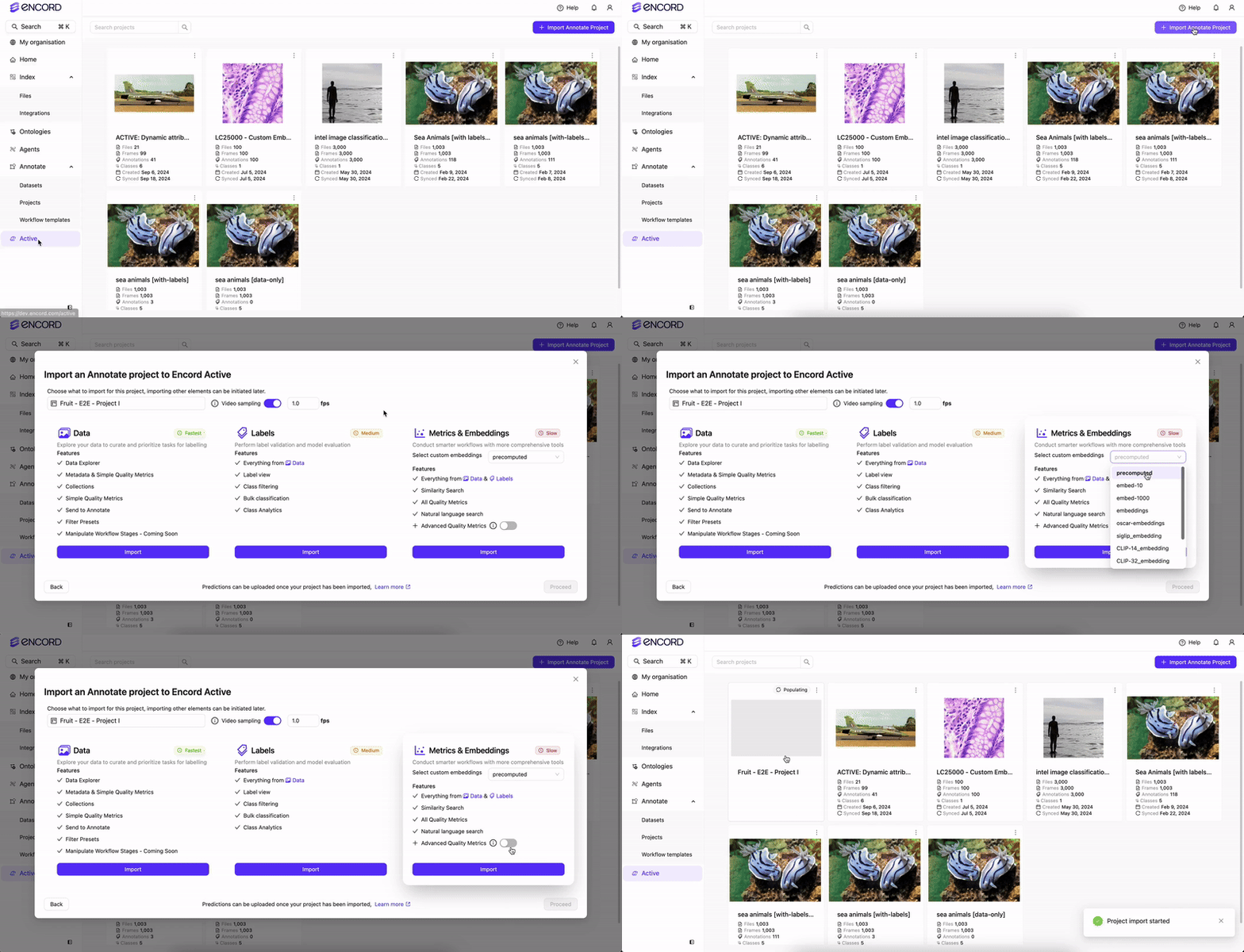
## STEP 3: Analyze the Predictions
Active MUST analyze the predictions before you can view the predictions in Active.
Specify whether you want to import **Strict Match** or **Partial Match** predictions.
### Strict Match Predictions
All attributes are matched. This mode makes the most comprehensive comparison. A prediction is considered as a true positive only if an exact match of all attributes matches with the ground truth.

### Partial Match Predictions
Only attributes provided in the prediction are compared with the ground truth. Any missing attributes in the prediction, but present in the ground truth, have no impact on the outcome of the prediction.

### Perform the Analysis
DO NOT click **Import** on more than one prediction set at a time.
 ## STEP 4: Select the Predictions
Once analysis completes, select the prediction set to view in Active.
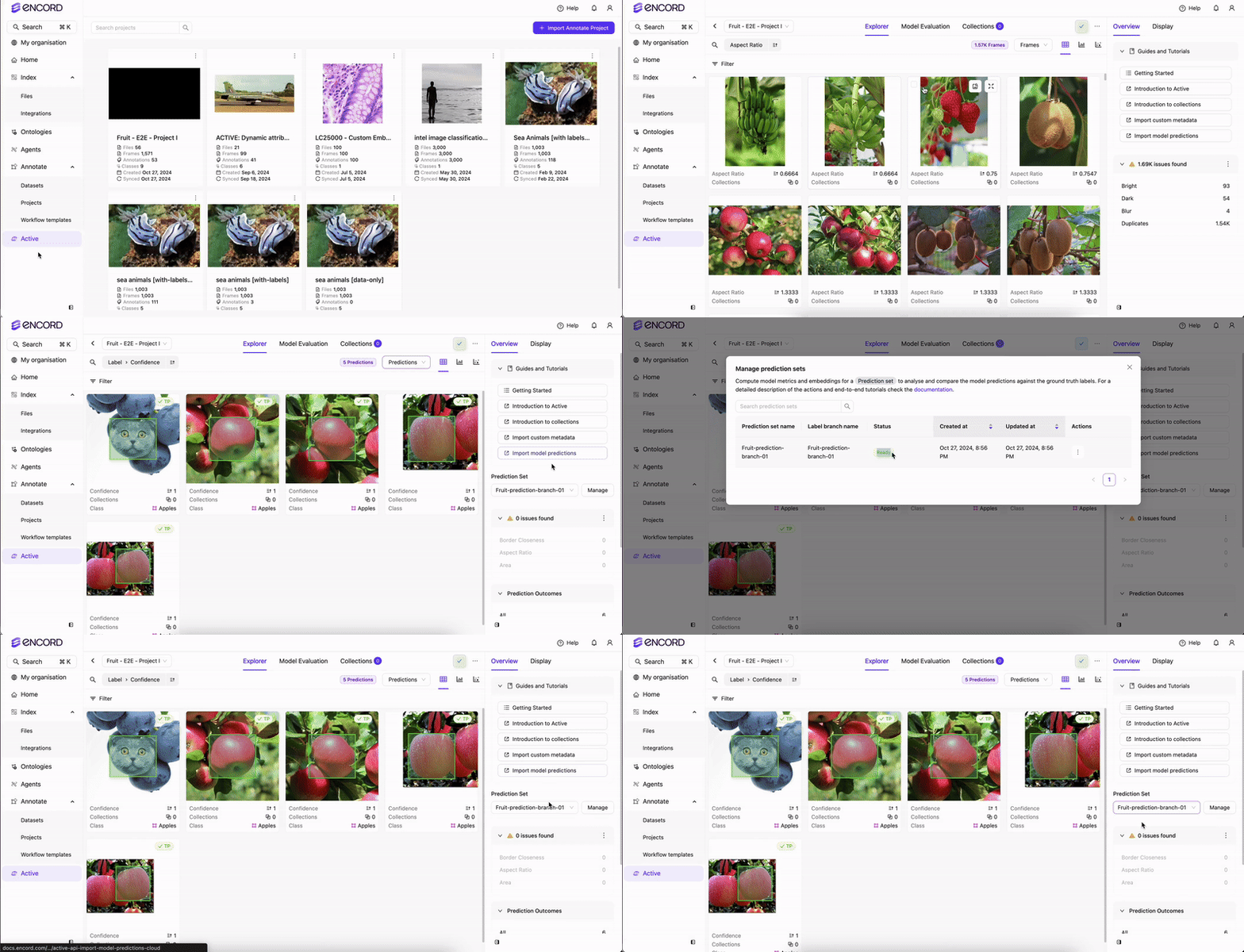
## Delete Prediction Sets
You can delete prediction sets from Active from the Predictions page.
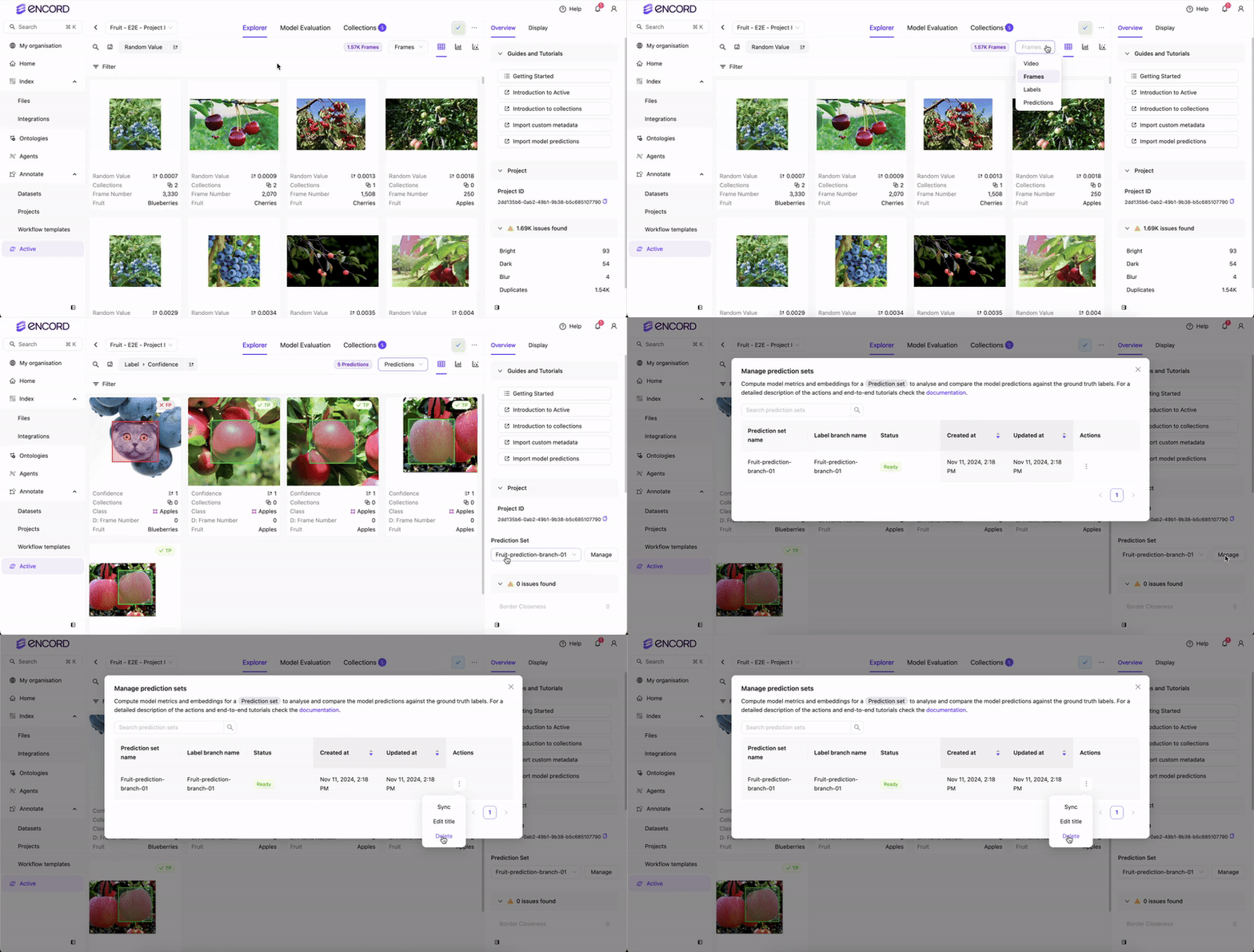
## STEP 4: Select the Predictions
Once analysis completes, select the prediction set to view in Active.

## Delete Prediction Sets
You can delete prediction sets from Active from the Predictions page.
