> ## Documentation Index
> Fetch the complete documentation index at: https://docs.encord.com/llms.txt
> Use this file to discover all available pages before exploring further.
# Data Groups
> Learn how to use Data Groups in Encord using the SDK.
"Data Grouping" (Data Groups) allows you to allocate individual files to groups so that they are more easily annotated and reviewed. This allows you to unlock multi-tile and multi-modal functionality.
Basically, Data Groups are like image groups in Encord, except that Data Groups can include any data type (images, videos, audio files, text files, PDFs) AND that data groups support default and custom layouts for annotation and review.
You can use Data Groups in non-Consensus Projects and Consensus Projects with Review & Refine nodes. Determine Consensus nodes are not yet supported.
* For an end-to-end example of how you can use Data Groups, go [here](/end-to-end/Features/e2e-data-groups).
* For instructions on exporting labels go [here](/sdk-documentation/sdk-labels/sdk-export#export-labels-as-json).
## Create Data Groups
Each of the code examples does the following:
1. Specifies the data units to add to a Data Group.
2. Creates the Data Groups and specifies the layout in the Label Editor.
Each example create multiple Data Groups. To create a single data group, replace `create_data_groups` with `create_data_group`.
3. Adds the Data Groups to a Dataset.
4. Adds the Dataset to a Project.
### Data Group - Grid (Default)
Grid Data Groups allow you to arrange multiple data units in a fixed, ordered grid within the Label Editor.
The order of the data units in the group determines their visual arrangement in the grid.
All layouts (grid, carousel, custom) are limited to 50 data units. Attempting to create a data group with more than 50 data units results in an error.
**3 data unit Data Group Grid**
 **12 data unit Data Group Grid**
 **Requirements**
To display data units in a grid layout, you need:
* A list of data unit UUIDs in the exact order they should appear in the grid.
* A call to DataGroupGrid(...) when creating the Data Group:
**Example**
```python Data Group - Grid expandable theme={"dark"}
from uuid import UUID
from typing import List
from encord.constants.enums import DataType
from encord.objects.metadata import DataGroupMetadata
from encord.orm.storage import DataGroupGrid, StorageItemType
from encord.user_client import EncordUserClient
# --- Configuration ---
SSH_PATH = "/Users/chris-encord/ssh-private-key.txt" # Replace with the file path to your access key
FOLDER_ID = "00000000-0000-0000-0000-000000000000" # Replace with the Folder ID
DATASET_ID = "00000000-0000-0000-0000-000000000000" # Replace with the Dataset ID
PROJECT_ID = "00000000-0000-0000-0000-000000000000" # Replace with the Project ID
# --- Connect to Encord ---
user_client: EncordUserClient = EncordUserClient.create_with_ssh_private_key(
ssh_private_key_path=SSH_PATH,
# For US platform users use "https://api.us.encord.com"
domain="https://api.encord.com",
)
folder = user_client.get_storage_folder(FOLDER_ID)
created_group_uuids = folder.create_data_groups(
[
DataGroupGrid(
name="group-grid-001",
layout_contents=[
UUID("00000000-0000-0000-0000-000000000000"),
UUID("11111111-1111-1111-1111-111111111111"),
UUID("22222222-2222-2222-2222-222222222222"),
UUID("33333333-3333-3333-3333-333333333333"),
],
client_metadata={"key": "value"},
),
DataGroupGrid(
name="group-grid-002",
layout_contents=[
UUID("44444444-4444-4444-4444-444444444444"),
UUID("55555555-5555-5555-5555-555555555555"),
UUID("66666666-6666-6666-6666-666666666666"),
UUID("77777777-7777-7777-7777-777777777777"),
],
client_metadata={"key": "value"},
),
DataGroupGrid(
name="group-grid-003",
layout_contents=[
UUID("88888888-8888-8888-8888-888888888888"),
UUID("99999999-9999-9999-9999-999999999999"),
UUID("12312312-3123-1231-2312-312312312312"),
UUID("45645645-6456-4564-5645-645645645645"),
],
client_metadata={"key": "value"},
),
]
)
print("✅ Created groups:", created_group_uuids)
# --- Add all the Data Groups in a folder to a Dataset ---
group_items = folder.list_items(item_types=[StorageItemType.GROUP])
d = user_client.get_dataset(DATASET_ID)
d.link_items([item.uuid for item in group_items])
# --- Retrieve and inspect Data Group label rows ---
p = user_client.get_project(PROJECT_ID)
rows = p.list_label_rows_v2(include_children=True)
for row in rows:
if row.data_type == DataType.GROUP:
row.initialise_labels()
assert isinstance(row.metadata, DataGroupMetadata)
print(row.metadata.children)
```
### Data Group - Carousel/List
The order of data units in a Data Group determines how they are arranged in the Label Editor.
In the carousel/list layout, a scrollable panel on the left shows all data units in the Data Group, while the currently selected data unit appears in the main editor view.
**Requirements**
To display data units in a grid layout, you need:
* A list of data unit UUIDs in the exact order they should appear in the grid.
* A call to DataGroupGrid(...) when creating the Data Group:
**Example**
```python Data Group - Grid expandable theme={"dark"}
from uuid import UUID
from typing import List
from encord.constants.enums import DataType
from encord.objects.metadata import DataGroupMetadata
from encord.orm.storage import DataGroupGrid, StorageItemType
from encord.user_client import EncordUserClient
# --- Configuration ---
SSH_PATH = "/Users/chris-encord/ssh-private-key.txt" # Replace with the file path to your access key
FOLDER_ID = "00000000-0000-0000-0000-000000000000" # Replace with the Folder ID
DATASET_ID = "00000000-0000-0000-0000-000000000000" # Replace with the Dataset ID
PROJECT_ID = "00000000-0000-0000-0000-000000000000" # Replace with the Project ID
# --- Connect to Encord ---
user_client: EncordUserClient = EncordUserClient.create_with_ssh_private_key(
ssh_private_key_path=SSH_PATH,
# For US platform users use "https://api.us.encord.com"
domain="https://api.encord.com",
)
folder = user_client.get_storage_folder(FOLDER_ID)
created_group_uuids = folder.create_data_groups(
[
DataGroupGrid(
name="group-grid-001",
layout_contents=[
UUID("00000000-0000-0000-0000-000000000000"),
UUID("11111111-1111-1111-1111-111111111111"),
UUID("22222222-2222-2222-2222-222222222222"),
UUID("33333333-3333-3333-3333-333333333333"),
],
client_metadata={"key": "value"},
),
DataGroupGrid(
name="group-grid-002",
layout_contents=[
UUID("44444444-4444-4444-4444-444444444444"),
UUID("55555555-5555-5555-5555-555555555555"),
UUID("66666666-6666-6666-6666-666666666666"),
UUID("77777777-7777-7777-7777-777777777777"),
],
client_metadata={"key": "value"},
),
DataGroupGrid(
name="group-grid-003",
layout_contents=[
UUID("88888888-8888-8888-8888-888888888888"),
UUID("99999999-9999-9999-9999-999999999999"),
UUID("12312312-3123-1231-2312-312312312312"),
UUID("45645645-6456-4564-5645-645645645645"),
],
client_metadata={"key": "value"},
),
]
)
print("✅ Created groups:", created_group_uuids)
# --- Add all the Data Groups in a folder to a Dataset ---
group_items = folder.list_items(item_types=[StorageItemType.GROUP])
d = user_client.get_dataset(DATASET_ID)
d.link_items([item.uuid for item in group_items])
# --- Retrieve and inspect Data Group label rows ---
p = user_client.get_project(PROJECT_ID)
rows = p.list_label_rows_v2(include_children=True)
for row in rows:
if row.data_type == DataType.GROUP:
row.initialise_labels()
assert isinstance(row.metadata, DataGroupMetadata)
print(row.metadata.children)
```
### Data Group - Carousel/List
The order of data units in a Data Group determines how they are arranged in the Label Editor.
In the carousel/list layout, a scrollable panel on the left shows all data units in the Data Group, while the currently selected data unit appears in the main editor view.
 **Requirements**
To display data units in a grid layout, you need:
* A list of data unit UUIDs in the exact order they should appear in the grid.
* A call to `DataGroupCarousel(...)` when creating the data group:
**Example**
```python Data Group - Carousel expandable theme={"dark"}
from uuid import UUID
from typing import List
from encord.constants.enums import DataType
from encord.objects.metadata import DataGroupMetadata
from encord.orm.storage import DataGroupCarousel, StorageItemType
from encord.user_client import EncordUserClient
# --- Configuration ---
SSH_PATH = "/Users/chris-encord/ssh-private-key.txt" # Replace with the file path to your access key
FOLDER_ID = "00000000-0000-0000-0000-000000000000" # Replace with the Folder ID
DATASET_ID = "00000000-0000-0000-0000-000000000000" # Replace with the Dataset ID
PROJECT_ID = "00000000-0000-0000-0000-000000000000" # Replace with the Project ID
# --- Connect to Encord ---
user_client: EncordUserClient = EncordUserClient.create_with_ssh_private_key(
ssh_private_key_path=SSH_PATH,
# For US platform users use "https://api.us.encord.com"
domain="https://api.encord.com",
)
folder = user_client.get_storage_folder(FOLDER_ID)
created_group_uuids = folder.create_data_groups(
[
DataGroupCarousel(
name="group-carousel-001",
layout_contents=[
UUID("00000000-0000-0000-0000-000000000000"), # Replace with File ID
UUID("11111111-1111-1111-1111-111111111111"), # Replace with File ID
UUID("22222222-2222-2222-2222-222222222222"), # Replace with File ID
UUID("33333333-3333-3333-3333-333333333333"), # Replace with File ID
],
client_metadata={"key": "value"},
),
DataGroupCarousel(
name="group-carousel-002",
layout_contents=[
UUID("44444444-4444-4444-4444-444444444444"), # Replace with File ID
UUID("55555555-5555-5555-5555-555555555555"), # Replace with File ID
UUID("66666666-6666-6666-6666-666666666666"), # Replace with File ID
UUID("77777777-7777-7777-7777-777777777777"), # Replace with File ID
],
client_metadata={"key": "value"},
),
DataGroupCarousel(
name="group-carousel-003",
layout_contents=[
UUID("88888888-8888-8888-8888-888888888888"), # Replace with File ID
UUID("99999999-9999-9999-9999-999999999999"), # Replace with File ID
UUID("12312312-3123-1231-2312-312312312312"), # Replace with File ID
UUID("45645645-6456-4564-5645-645645645645"), # Replace with File ID
],
client_metadata={"key": "value"},
),
]
)
print("✅ Created carousel groups:", created_group_uuids)
# --- Add all the Data Groups in a folder to a Dataset ---
group_items = folder.list_items(item_types=[StorageItemType.GROUP])
d = user_client.get_dataset(DATASET_ID)
d.link_items([item.uuid for item in group_items])
# --- Retrieve and inspect Data Group label rows ---
p = user_client.get_project(PROJECT_ID)
rows = p.list_label_rows_v2(include_children=True)
for row in rows:
if row.data_type == DataType.GROUP:
row.initialise_labels()
assert isinstance(row.metadata, DataGroupMetadata)
print(row.metadata.children)
```
### Data Group - Custom
Custom Data Groups give you full control over how multiple data units are arranged in the Label Editor.
Unlike grid or carousel layouts (which use ordered lists of UUIDs), custom layouts use keys:
* Map keys to data unit UUIDs.
* Build a layout tree that references those keys and defines:
* Split direction ("row" or "column")
* Space split ("splitPercentage")
* Where each tile (data unit) appears in the Label Editor
Custom Data Groups can be configured using plain Python dictionaries or ORMs.
* **Using Python dictionaries** — a lightweight, flexible approach
* **Using ORMs** — a more structured approach with stronger typing and validation
Both approaches are functionally equivalent. Choose the one that best fits your workflow.
To create a custom data group, you must define a **layout**, **layout contents**, and (optionally) **settings**. These components work together to control how data units are displayed and behave.
**1. Define the layout structure**
The layout defines how the Label Editor is split and which data units appear in each section.
Layouts are expressed as a tree of containers and data unit tiles.
```python Using ORMs theme={"dark"}
from encord.orm.group_layout import DataUnitTile, LayoutGrid
layout = LayoutGrid(
direction="row",
first=DataUnitTile(key="instructions"),
second=DataUnitTile(key="image"),
split_percentage=30,
)
```
```python Using Dictionaries theme={"dark"}
layout = {
"direction": "row",
"first": {"type": "data_unit", "key": "instructions"},
"second": {"type": "data_unit", "key": "image"},
"splitPercentage": 30,
}
```
**2. Provide layout contents**
`layout_contents` maps each layout key to a data unit UUID.
Every key referenced in the layout **must** be defined here.
```python Using ORMs theme={"dark"}
from uuid import UUID
layout_contents = {
"instructions": UUID("00000000-0000-0000-0000-000000000000"),
"image": UUID("11111111-1111-1111-1111-111111111111"),
}
```
```python Using Dictionaries theme={"dark"}
from uuid import UUID
layout_contents = {
"instructions": UUID("00000000-0000-0000-0000-000000000000"),
"image": UUID("11111111-1111-1111-1111-111111111111"),
}
```
**3. (Optional) Configure tile settings**
Tile settings let you control behavior such as making a tile read-only.
Settings reference the same keys used in the layout.
```python Using ORMs theme={"dark"}
from encord.orm.group_layout import LayoutSettings, TileSettings
settings = LayoutSettings(
tile_settings={
"instructions": TileSettings(is_read_only=True)
}
)
```
```python Using Dictionaries theme={"dark"}
settings = {
"tile_settings": {
"instructions": {"is_read_only": True}
}
}
```
**4. Create the Data Group**
Finally, create the Data Group by passing the layout, layout contents, and settings.
```python Using ORMs theme={"dark"}
from encord.orm.storage import DataGroupCustom
group = folder.create_data_group(
DataGroupCustom(
name="my group",
layout_contents=layout_contents,
layout=layout,
settings=settings,
)
)
```
```python Using Dictionaries theme={"dark"}
group = folder.create_data_group(
{
"name": "my group",
"layout_contents": layout_contents,
"layout": layout,
"settings": settings,
}
)
```
A simple layout: left panel (instructions) and right panel (image).

```python Using ORMs theme={"dark"}
from uuid import UUID
from encord.orm.storage import DataGroupCustom
from encord.user_client import EncordUserClient
from encord.orm.group_layout import (
DataUnitTile,
LayoutGrid,
LayoutSettings,
TileSettings,
)
# --- Configuration ---
SSH_PATH = "/Users/chris-encord/ssh-private-key.txt" # Replace with the file path to your access key
FOLDER_ID = "00000000-0000-0000-0000-000000000000" # Replace with the Folder ID
DATASET_ID = "00000000-0000-0000-0000-000000000000" # Replace with the Dataset ID
PROJECT_ID = "00000000-0000-0000-0000-000000000000" # Replace with the Project ID
# --- Connect to Encord ---
user_client: EncordUserClient = EncordUserClient.create_with_ssh_private_key(
ssh_private_key_path=SSH_PATH,
# For US platform users use "https://api.us.encord.com"
domain="https://api.encord.com",
)
folder = user_client.get_storage_folder(FOLDER_ID)
layout = LayoutGrid(
direction="row",
first=DataUnitTile(key="instructions"),
second=DataUnitTile(key="image"),
split_percentage=30, # 30% for "instructions", 70% for "image"
)
layout_contents = {
"instructions": UUID("00000000-0000-0000-0000-000000000000"), # File ID
"image": UUID("11111111-1111-1111-1111-111111111111"), # File ID
}
settings = LayoutSettings(
tile_settings={
"instructions": TileSettings(is_read_only=True)
}
)
group = folder.create_data_group(
DataGroupCustom(
name="example-custom-group",
layout=layout,
layout_contents=layout_contents,
client_metadata={"key": "value"},
settings=settings,
)
)
# Add all the data groups in a folder to a Dataset
group_items = folder.list_items(item_types=[StorageItemType.GROUP])
d = user_client.get_dataset(DATASET_ID)
d.link_items([item.uuid for item in group_items])
# Add the Dataset with the Data Groups to a Project
p = user_client.get_project(PROJECT_ID)
rows = p.list_label_rows_v2(include_children=True)
```
```python Using Python Dictionaries theme={"dark"}
from uuid import UUID
from encord.constants.enums import DataType
from encord.objects.metadata import DataGroupMetadata
from encord.orm.storage import DataGroupCustom, StorageItemType
from encord.user_client import EncordUserClient
# --- Configuration ---
SSH_PATH = "/Users/chris-encord/ssh-private-key.txt" # Replace with the file path to your access key
FOLDER_ID = "00000000-0000-0000-0000-000000000000" # Replace with the Folder ID
DATASET_ID = "00000000-0000-0000-0000-000000000000" # Replace with the Dataset ID
PROJECT_ID = "00000000-0000-0000-0000-000000000000" # Replace with the Project ID
# --- Connect to Encord ---
user_client: EncordUserClient = EncordUserClient.create_with_ssh_private_key(
ssh_private_key_path=SSH_PATH,
# For US platform users use "https://api.us.encord.com"
domain="https://api.encord.com",
)
folder = user_client.get_storage_folder(FOLDER_ID)
layout = {
"direction": "row",
"first": {"type": "data_unit", "key": "instructions"},
"second": {"type": "data_unit", "key": "image"},
"splitPercentage": 30, # 30% for "instructions", 70% for "image"
}
layout_contents = {
"instructions": UUID("00000000-0000-0000-0000-000000000000"), # Replace with File ID
"image": UUID("11111111-1111-1111-1111-111111111111"), # Replace with File ID
}
settings = {
"tile_settings": {
"instructions": {"is_read_only": True},
}
}
group = folder.create_data_group(
DataGroupCustom(
name="example-custom-group",
layout=layout,
layout_contents=layout_contents,
client_metadata={"key": "value"},
settings=settings,
)
)
# Add all the data groups in a folder to a Dataset
group_items = folder.list_items(item_types=[StorageItemType.GROUP])
d = user_client.get_dataset(DATASET_ID)
d.link_items([item.uuid for item in group_items])
# Add the Dataset with the Data Groups to a Project
p = user_client.get_project(PROJECT_ID)
rows = p.list_label_rows_v2(include_children=True)
```
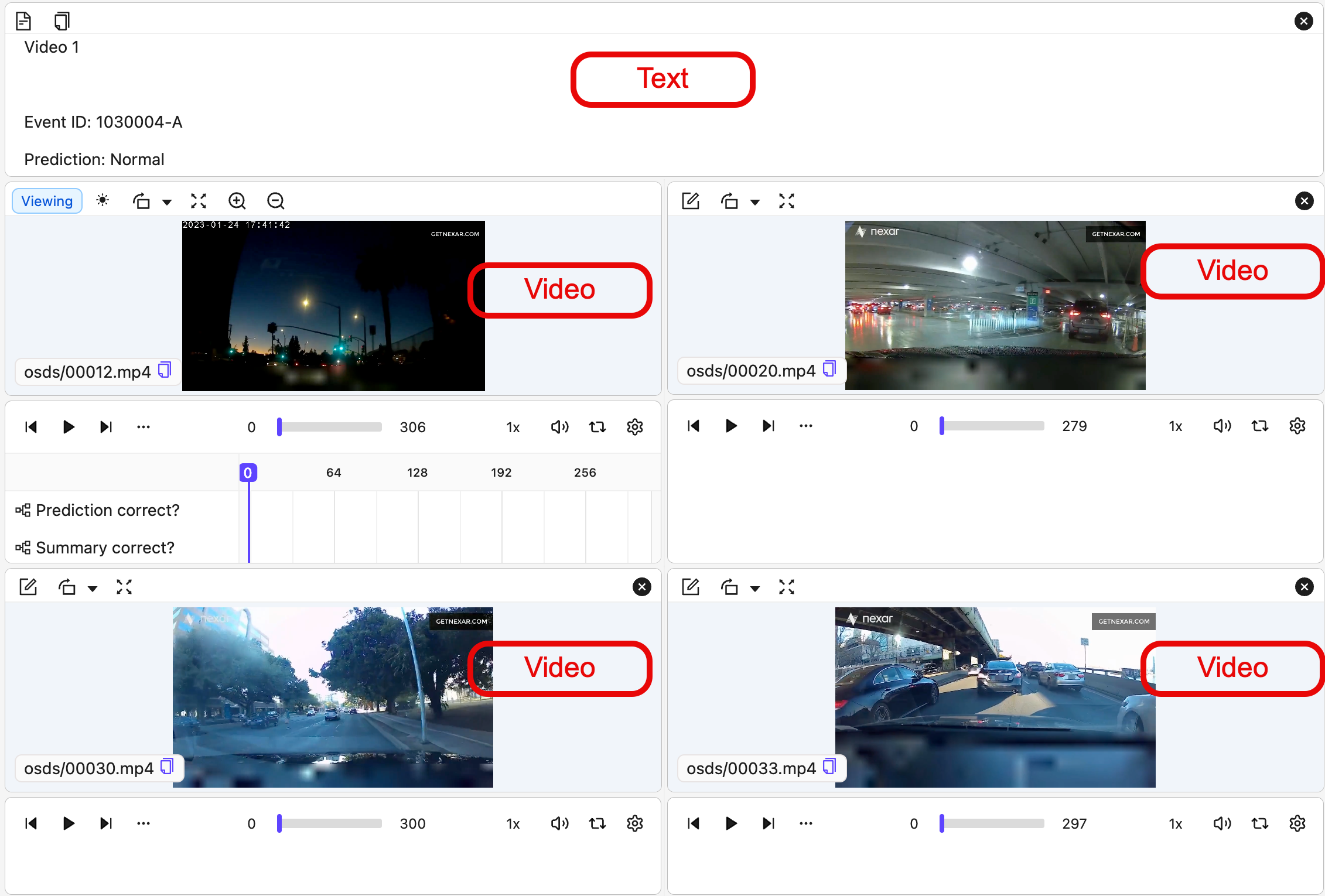
This example:
* Uses a column layout overall.
* Shows "instructions" (a text data unit) at the top (20% height, read-only).
* Underneath "instructions", a 2×2 grid of videos:
* Row 1: "top-left" | "top-right"
* Row 2: "bottom-left" | "bottom-right"
```python Using ORMs theme={"dark"}
from uuid import UUID
from encord.constants.enums import DataType
from encord.objects.metadata import DataGroupMetadata
from encord.orm.storage import DataGroupCustom, StorageItemType
from encord.user_client import EncordUserClient
from encord.orm.group_layout import (
DataUnitTile,
LayoutGrid,
LayoutSettings,
TileSettings,
)
# --- Configuration ---
SSH_PATH = "/Users/chris-encord/ssh-private-key.txt" # Replace with the file path to your access key
FOLDER_ID = "00000000-0000-0000-0000-000000000000" # Replace with the Folder ID
DATASET_ID = "00000000-0000-0000-0000-000000000000" # Replace with the Dataset ID
PROJECT_ID = "00000000-0000-0000-0000-000000000000" # Replace with the Project ID
# --- Connect to Encord ---
user_client: EncordUserClient = EncordUserClient.create_with_ssh_private_key(
ssh_private_key_path=SSH_PATH,
# For US platform users use "https://api.us.encord.com"
domain="https://api.encord.com",
)
folder = user_client.get_storage_folder(FOLDER_ID)
# --- Reusable layout and settings ---
layout = LayoutGrid(
direction="column",
first=DataUnitTile(key="instructions"),
second=LayoutGrid(
direction="column",
first=LayoutGrid(
direction="row",
first=DataUnitTile(key="top-left"),
second=DataUnitTile(key="top-right"),
split_percentage=50,
),
second=LayoutGrid(
direction="row",
first=DataUnitTile(key="bottom-left"),
second=DataUnitTile(key="bottom-right"),
split_percentage=50,
),
split_percentage=50,
),
split_percentage=20,
)
settings = LayoutSettings(
tile_settings={
"instructions": TileSettings(is_read_only=True)
}
)
# --- Group definitions (name + UUIDs) ---
groups = [
{
"name": "group-001",
"uuids": {
"instructions": UUID("00000000-0000-0000-0000-000000000000"), # Replace with File ID. This data unit appears at the top of the Label Editor.
"top-left": UUID("11111111-1111-1111-1111-111111111111"), # Replace with File ID. This data unit appears under the "instructions" data unit at the top left of the Label Editor.
"top-right": UUID("22222222-2222-2222-2222-222222222222"), # Replace with File ID. This data unit appears under the "instructions" data unit at the top right of the Label Editor.
"bottom-left": UUID("33333333-3333-3333-3333-333333333333"), # Replace with File ID. This data unit appears under the top left data unit in the Label Editor.
"bottom-right": UUID("44444444-4444-4444-4444-444444444444"), # Replace with File ID. This data unit appears under the top right data unit in the Label Editor.
},
},
{
"name": "group-002",
"uuids": {
"instructions": UUID("55555555-5555-5555-5555-555555555555"), # Replace with File ID. This data unit appears at the top of the Label Editor.
"top-left": UUID("66666666-6666-6666-6666-666666666666"), # Replace with File ID. This data unit appears under the "instructions" data unit at the top left of the Label Editor.
"top-right": UUID("77777777-7777-7777-7777-777777777777"), # Replace with File ID. This data unit appears under the "instructions" data unit at the top right of the Label Editor.
"bottom-left": UUID("88888888-8888-8888-8888-888888888888"), # Replace with File ID. This data unit appears under the top left data unit in the Label Editor.
"bottom-right": UUID("99999999-9999-9999-9999-999999999999"), # Replace with File ID. This data unit appears under the top right data unit in the Label Editor.
},
},
{
"name": "group-003",
"uuids": {
"instructions": UUID("12312312-3123-1231-2312-312312312312"), # Replace with File ID. This data unit appears at the top of the Label Editor.
"top-left": UUID("23232323-2323-2323-2323-232323232323"), # Replace with File ID. This data unit appears under the "instructions" data unit at the top left of the Label Editor.
"top-right": UUID("31313131-3131-3131-3131-313131313131"), # Replace with File ID. This data unit appears under the "instructions" data unit at the top right of the Label Editor.
"bottom-left": UUID("45645645-6456-4564-5645-645645645645"), # Replace with File ID. This data unit appears under the top left data unit in the Label Editor.
"bottom-right": UUID("56565656-6565-5656-6565-656565656565 "), # Replace with File ID. This data unit appears under the top right data unit in the Label Editor.
},
},
# More groups...
]
# Create the Data Groups
for g in groups:
group = folder.create_data_group(
DataGroupCustom(
name=g["name"],
layout=layout,
layout_contents=g["uuids"],
settings=settings,
)
)
print(f"✅ Created group '{g['name']}' with UUID {group}")
# Add all the data groups in a folder to a Dataset
group_items = folder.list_items(item_types=[StorageItemType.GROUP])
d = user_client.get_dataset(DATASET_ID)
d.link_items([item.uuid for item in group_items])
# Add the Dataset with the Data Groups to a Project
p = user_client.get_project(PROJECT_ID)
rows = p.list_label_rows_v2(include_children=True)
# Label Rows of Data Groups use DataGroupMetadata for the layout to Annotate and Review
for row in rows:
if row.data_type == DataType.GROUP:
row.initialise_labels()
assert isinstance(row.metadata, DataGroupMetadata)
print(row.metadata.children)
```
```python Using Python Dictionaries theme={"dark"}
from uuid import UUID
from encord.constants.enums import DataType
from encord.objects.metadata import DataGroupMetadata
from encord.orm.storage import DataGroupCustom, StorageItemType
from encord.user_client import EncordUserClient
# --- Configuration ---
SSH_PATH = "/Users/chris-encord/ssh-private-key.txt" # Replace with the file path to your access key
FOLDER_ID = "00000000-0000-0000-0000-000000000000" # Replace with the Folder ID
DATASET_ID = "00000000-0000-0000-0000-000000000000" # Replace with the Dataset ID
PROJECT_ID = "00000000-0000-0000-0000-000000000000" # Replace with the Project ID
# --- Connect to Encord ---
user_client: EncordUserClient = EncordUserClient.create_with_ssh_private_key(
ssh_private_key_path=SSH_PATH,
# For US platform users use "https://api.us.encord.com"
domain="https://api.encord.com",
)
folder = user_client.get_storage_folder(FOLDER_ID)
# --- Reusable layout and settings ---
layout = {
"direction": "column",
"first": {"type": "data_unit", "key": "instructions"},
"second": {
"direction": "column",
"first": {
"direction": "row",
"first": {"type": "data_unit", "key": "top-left"},
"second": {"type": "data_unit", "key": "top-right"},
"splitPercentage": 50,
},
"second": {
"direction": "row",
"first": {"type": "data_unit", "key": "bottom-left"},
"second": {"type": "data_unit", "key": "bottom-right"},
"splitPercentage": 50,
},
"splitPercentage": 50,
},
"splitPercentage": 20,
}
settings = {"tile_settings": {"instructions": {"is_read_only": True}}}
# --- Group definitions (name + UUIDs) ---
groups = [
{
"name": "group-001",
"uuids": {
"instructions": UUID("00000000-0000-0000-0000-000000000000"), # Replace with File ID. This data unit appears at the top of the Label Editor.
"top-left": UUID("11111111-1111-1111-1111-111111111111"), # Replace with File ID. This data unit appears under the "instructions" data unit at the top left of the Label Editor.
"top-right": UUID("22222222-2222-2222-2222-222222222222"), # Replace with File ID. This data unit appears under the "instructions" data unit at the top right of the Label Editor.
"bottom-left": UUID("33333333-3333-3333-3333-333333333333"), # Replace with File ID. This data unit appears under the top left data unit in the Label Editor.
"bottom-right": UUID("44444444-4444-4444-4444-444444444444"), # Replace with File ID. This data unit appears under the top right data unit in the Label Editor.
},
},
{
"name": "group-002",
"uuids": {
"instructions": UUID("55555555-5555-5555-5555-555555555555"), # Replace with File ID. This data unit appears at the top of the Label Editor.
"top-left": UUID("66666666-6666-6666-6666-666666666666"), # Replace with File ID. This data unit appears under the "instructions" data unit at the top left of the Label Editor.
"top-right": UUID("77777777-7777-7777-7777-777777777777"), # Replace with File ID. This data unit appears under the "instructions" data unit at the top right of the Label Editor.
"bottom-left": UUID("88888888-8888-8888-8888-888888888888"), # Replace with File ID. This data unit appears under the top left data unit in the Label Editor.
"bottom-right": UUID("99999999-9999-9999-9999-999999999999"), # Replace with File ID. This data unit appears under the top right data unit in the Label Editor.
},
},
{
"name": "group-003",
"uuids": {
"instructions": UUID("12312312-3123-1231-2312-312312312312"), # Replace with File ID. This data unit appears at the top of the Label Editor.
"top-left": UUID("23232323-2323-2323-2323-232323232323"), # Replace with File ID. This data unit appears under the "instructions" data unit at the top left of the Label Editor.
"top-right": UUID("31313131-3131-3131-3131-313131313131"), # Replace with File ID. This data unit appears under the "instructions" data unit at the top right of the Label Editor.
"bottom-left": UUID("45645645-6456-4564-5645-645645645645"), # Replace with File ID. This data unit appears under the top left data unit in the Label Editor.
"bottom-right": UUID("56565656-6565-5656-6565-656565656565 "), # Replace with File ID. This data unit appears under the top right data unit in the Label Editor.
},
},
# More groups...
]
# Create the Data Groups
for g in groups:
group = folder.create_data_group(
DataGroupCustom(
name=g["name"],
layout=layout,
layout_contents=g["uuids"],
settings=settings,
)
)
print(f"✅ Created group '{g['name']}' with UUID {group}")
# Add all the data groups in a folder to a Dataset
group_items = folder.list_items(item_types=[StorageItemType.GROUP])
d = user_client.get_dataset(DATASET_ID)
d.link_items([item.uuid for item in group_items])
# Add the Dataset with the Data Groups to a Project
p = user_client.get_project(PROJECT_ID)
rows = p.list_label_rows_v2(include_children=True)
# Label Rows of Data Groups use DataGroupMetadata for the layout to Annotate and Review
for row in rows:
if row.data_type == DataType.GROUP:
row.initialise_labels()
assert isinstance(row.metadata, DataGroupMetadata)
print(row.metadata.children)
```
This example inserts a carousel-style Data Group inside a grid-style Data Group.
```python Custom Carousel-style in Grid-style theme={"dark"}
from uuid import UUID
from encord.user_client import EncordUserClient
from encord.orm.storage import DataGroupCustom
from encord.orm.group_layout import (
LayoutGrid,
LayoutSettings,
DataUnitTile,
DataUnitCarouselTile,
)
# User Input
SSH_PATH = "/path/to/your/encord_private_key.txt"
FOLDER_ID = "00000000-0000-0000-0000-000000000000"
GROUP_NAME = "carousel-inside-grid"
# --- Connect to Encord ---
user_client: EncordUserClient = EncordUserClient.create_with_ssh_private_key(
ssh_private_key_path=SSH_PATH,
# For US platform users use "https://api.us.encord.com"
domain="https://api.encord.com",
)
folder = user_client.get_storage_folder(FOLDER_ID)
# Replace these with real file UUIDs
LAYOUT_CONTENTS = {
"g1": UUID("11111111-1111-1111-1111-111111111111"),
"g2": UUID("22222222-2222-2222-2222-222222222222"),
"g3": UUID("33333333-3333-3333-3333-333333333333"),
"g4": UUID("44444444-4444-4444-4444-444444444444"),
"g5": UUID("55555555-5555-5555-5555-555555555555"),
"g6": UUID("66666666-6666-6666-6666-666666666666"),
"g7": UUID("77777777-7777-7777-7777-777777777777"),
"g8": UUID("88888888-8888-8888-8888-888888888888"),
"g9": UUID("99999999-9999-9999-9999-999999999999"),
"c1": UUID("aaaaaaaa-aaaa-aaaa-aaaa-aaaaaaaaaaaa"),
"c2": UUID("bbbbbbbb-bbbb-bbbb-bbbb-bbbbbbbbbbbb"),
"c3": UUID("cccccccc-cccc-cccc-cccc-cccccccccccc"),
"c4": UUID("dddddddd-dddd-dddd-dddd-dddddddddddd"),
}
# 3x3 grid on the left
row_1 = LayoutGrid(
direction="row",
first=DataUnitTile(key="g1"),
second=LayoutGrid(
direction="row",
first=DataUnitTile(key="g2"),
second=DataUnitTile(key="g3"),
split_percentage=50,
),
split_percentage=33,
)
row_2 = LayoutGrid(
direction="row",
first=DataUnitTile(key="g4"),
second=LayoutGrid(
direction="row",
first=DataUnitTile(key="g5"),
second=DataUnitTile(key="g6"),
split_percentage=50,
),
split_percentage=33,
)
row_3 = LayoutGrid(
direction="row",
first=DataUnitTile(key="g7"),
second=LayoutGrid(
direction="row",
first=DataUnitTile(key="g8"),
second=DataUnitTile(key="g9"),
split_percentage=50,
),
split_percentage=33,
)
grid_3x3 = LayoutGrid(
direction="column",
first=row_1,
second=LayoutGrid(
direction="column",
first=row_2,
second=row_3,
split_percentage=50,
),
split_percentage=33,
)
# Carousel on the right
carousel_panel = DataUnitCarouselTile(
keys=["c1", "c2", "c3", "c4"],
carousel_position="right",
carousel_size=25,
)
# Final layout
layout = LayoutGrid(
direction="row",
first=grid_3x3,
second=carousel_panel,
split_percentage=78,
)
settings = LayoutSettings(fixed_layout=True)
group_uuid = folder.create_data_group(
DataGroupCustom(
name=GROUP_NAME,
layout=layout,
layout_contents=LAYOUT_CONTENTS,
settings=settings,
)
)
print(f"Created data group: {group_uuid}")
```
## Get Data Group Data Units
Use the following to get the data units that comprise a Data Group.
```python Data Groups - Get Child IDs from Storage Folder theme={"dark"}
from encord import EncordUserClient
SSH_PATH="/Users/chris-encord/ssh-private-key.txt" # Replace with the file path to your SSH private key
DATA_GROUP_ID="00000000-0000-0000-0000-000000000000" # Replace with the file ID for the Data Group
# Initialize the SDK client
user_client: EncordUserClient = EncordUserClient.create_with_ssh_private_key(
ssh_private_key_path=SSH_PATH,
# For US platform users use "https://api.us.encord.com"
domain="https://api.encord.com",
)
# Fetch the Data Group as a storage item
data_group_item = user_client.get_storage_item(DATA_GROUP_ID)
print(f"Data Group: {data_group_item.name} ({data_group_item.uuid})")
for item in data_group_item.get_child_items():
print(f"- UUID: {item.uuid}, Name: {item.name}")
```
```python Data Groups - Get Child IDs from Dataset theme={"dark"}
from encord import EncordUserClient
from uuid import UUID
SSH_PATH="/Users/chris-encord/ssh-private-key.txt" # Replace with the file path to your SSH private key
DATA_GROUP_ID="00000000-0000-0000-0000-000000000000" # Replace with the file ID for the Data Group
DATASET_ID="00000000-0000-0000-0000-000000000000" # Replace with the ID for the Dataset
# Initialize the SDK client
user_client: EncordUserClient = EncordUserClient.create_with_ssh_private_key(
ssh_private_key_path=SSH_PATH,
# For US platform users use "https://api.us.encord.com"
domain="https://api.encord.com",
)
# Data Group
data_group_item = user_client.get_storage_item(DATA_GROUP_ID)
children = list(data_group_item.get_child_items())
# Dataset rows
dataset = user_client.get_dataset(DATASET_ID)
rows = list(dataset.list_data_rows())
rows_by_backing = {}
for r in rows:
try:
# Normalize to UUID for robust matching
if r.backing_item_uuid is not None:
rows_by_backing[UUID(str(r.backing_item_uuid))] = r
except Exception:
pass # ignore malformed ids
# Print header + ALL children in the group
print(f"Data Group: {data_group_item.name} ({data_group_item.uuid})")
for it in children:
_row = rows_by_backing.get(UUID(str(it.uuid)))
print(f"- UUID: {it.uuid}, Name: {it.name}")
```
## Get Data Group Information
Use the following script to view:
* Group layout contents
* Group layout
* Group layout settings
```python Data Group Summary theme={"dark"}
from encord import EncordUserClient
from encord.orm.storage import StorageItemType
# --- Configuration ---
SSH_PATH = "/Users/chris-encord/ssh-private-key.txt" # Replace with the file path to your access key
FOLDER_ID = "b95caa81-931a-4da9-b784-64037699f9fc" # Replace with the Folder ID
# --- Connect to Encord ---
user_client: EncordUserClient = EncordUserClient.create_with_ssh_private_key(
ssh_private_key_path=SSH_PATH,
# For US platform users use "https://api.us.encord.com"
domain="https://api.encord.com",
)
folder = user_client.get_storage_folder(FOLDER_ID)
# Get Data Group Info
first_group = list(folder.list_items(item_types=[StorageItemType.GROUP]))[0]
summary = first_group.get_summary()
assert summary.data_group is not None
print(summary.data_group.layout_contents)
print(summary.data_group.layout)
print(summary.data_group.layout_settings)
```
## Multi-Layer Data Groups
Multi-Layer Data Groups allow you to apply labels across all data units in a group simultaneously. Any label added or edited in the Label Editor is automatically applied to every data unit in the group. These shared labels are exported under the `root` key, which contains all label information that applies to the Data Group as a whole.
To create a Multi-Layer Data Group, set `has_multilayer_labels=True` in the group settings when [creating a custom Data Group](/sdk-documentation/index-sdk/sdk-data-groups#data-group-custom):
```python theme={"dark"}
from encord.orm.group_layout import LayoutSettings, TileSettings
settings = LayoutSettings(
tile_settings={
"instructions": TileSettings(is_read_only=True)
},
has_multilayer_labels=True
)
```
**Requirements**
To display data units in a grid layout, you need:
* A list of data unit UUIDs in the exact order they should appear in the grid.
* A call to `DataGroupCarousel(...)` when creating the data group:
**Example**
```python Data Group - Carousel expandable theme={"dark"}
from uuid import UUID
from typing import List
from encord.constants.enums import DataType
from encord.objects.metadata import DataGroupMetadata
from encord.orm.storage import DataGroupCarousel, StorageItemType
from encord.user_client import EncordUserClient
# --- Configuration ---
SSH_PATH = "/Users/chris-encord/ssh-private-key.txt" # Replace with the file path to your access key
FOLDER_ID = "00000000-0000-0000-0000-000000000000" # Replace with the Folder ID
DATASET_ID = "00000000-0000-0000-0000-000000000000" # Replace with the Dataset ID
PROJECT_ID = "00000000-0000-0000-0000-000000000000" # Replace with the Project ID
# --- Connect to Encord ---
user_client: EncordUserClient = EncordUserClient.create_with_ssh_private_key(
ssh_private_key_path=SSH_PATH,
# For US platform users use "https://api.us.encord.com"
domain="https://api.encord.com",
)
folder = user_client.get_storage_folder(FOLDER_ID)
created_group_uuids = folder.create_data_groups(
[
DataGroupCarousel(
name="group-carousel-001",
layout_contents=[
UUID("00000000-0000-0000-0000-000000000000"), # Replace with File ID
UUID("11111111-1111-1111-1111-111111111111"), # Replace with File ID
UUID("22222222-2222-2222-2222-222222222222"), # Replace with File ID
UUID("33333333-3333-3333-3333-333333333333"), # Replace with File ID
],
client_metadata={"key": "value"},
),
DataGroupCarousel(
name="group-carousel-002",
layout_contents=[
UUID("44444444-4444-4444-4444-444444444444"), # Replace with File ID
UUID("55555555-5555-5555-5555-555555555555"), # Replace with File ID
UUID("66666666-6666-6666-6666-666666666666"), # Replace with File ID
UUID("77777777-7777-7777-7777-777777777777"), # Replace with File ID
],
client_metadata={"key": "value"},
),
DataGroupCarousel(
name="group-carousel-003",
layout_contents=[
UUID("88888888-8888-8888-8888-888888888888"), # Replace with File ID
UUID("99999999-9999-9999-9999-999999999999"), # Replace with File ID
UUID("12312312-3123-1231-2312-312312312312"), # Replace with File ID
UUID("45645645-6456-4564-5645-645645645645"), # Replace with File ID
],
client_metadata={"key": "value"},
),
]
)
print("✅ Created carousel groups:", created_group_uuids)
# --- Add all the Data Groups in a folder to a Dataset ---
group_items = folder.list_items(item_types=[StorageItemType.GROUP])
d = user_client.get_dataset(DATASET_ID)
d.link_items([item.uuid for item in group_items])
# --- Retrieve and inspect Data Group label rows ---
p = user_client.get_project(PROJECT_ID)
rows = p.list_label_rows_v2(include_children=True)
for row in rows:
if row.data_type == DataType.GROUP:
row.initialise_labels()
assert isinstance(row.metadata, DataGroupMetadata)
print(row.metadata.children)
```
### Data Group - Custom
Custom Data Groups give you full control over how multiple data units are arranged in the Label Editor.
Unlike grid or carousel layouts (which use ordered lists of UUIDs), custom layouts use keys:
* Map keys to data unit UUIDs.
* Build a layout tree that references those keys and defines:
* Split direction ("row" or "column")
* Space split ("splitPercentage")
* Where each tile (data unit) appears in the Label Editor
Custom Data Groups can be configured using plain Python dictionaries or ORMs.
* **Using Python dictionaries** — a lightweight, flexible approach
* **Using ORMs** — a more structured approach with stronger typing and validation
Both approaches are functionally equivalent. Choose the one that best fits your workflow.
To create a custom data group, you must define a **layout**, **layout contents**, and (optionally) **settings**. These components work together to control how data units are displayed and behave.
**1. Define the layout structure**
The layout defines how the Label Editor is split and which data units appear in each section.
Layouts are expressed as a tree of containers and data unit tiles.
```python Using ORMs theme={"dark"}
from encord.orm.group_layout import DataUnitTile, LayoutGrid
layout = LayoutGrid(
direction="row",
first=DataUnitTile(key="instructions"),
second=DataUnitTile(key="image"),
split_percentage=30,
)
```
```python Using Dictionaries theme={"dark"}
layout = {
"direction": "row",
"first": {"type": "data_unit", "key": "instructions"},
"second": {"type": "data_unit", "key": "image"},
"splitPercentage": 30,
}
```
**2. Provide layout contents**
`layout_contents` maps each layout key to a data unit UUID.
Every key referenced in the layout **must** be defined here.
```python Using ORMs theme={"dark"}
from uuid import UUID
layout_contents = {
"instructions": UUID("00000000-0000-0000-0000-000000000000"),
"image": UUID("11111111-1111-1111-1111-111111111111"),
}
```
```python Using Dictionaries theme={"dark"}
from uuid import UUID
layout_contents = {
"instructions": UUID("00000000-0000-0000-0000-000000000000"),
"image": UUID("11111111-1111-1111-1111-111111111111"),
}
```
**3. (Optional) Configure tile settings**
Tile settings let you control behavior such as making a tile read-only.
Settings reference the same keys used in the layout.
```python Using ORMs theme={"dark"}
from encord.orm.group_layout import LayoutSettings, TileSettings
settings = LayoutSettings(
tile_settings={
"instructions": TileSettings(is_read_only=True)
}
)
```
```python Using Dictionaries theme={"dark"}
settings = {
"tile_settings": {
"instructions": {"is_read_only": True}
}
}
```
**4. Create the Data Group**
Finally, create the Data Group by passing the layout, layout contents, and settings.
```python Using ORMs theme={"dark"}
from encord.orm.storage import DataGroupCustom
group = folder.create_data_group(
DataGroupCustom(
name="my group",
layout_contents=layout_contents,
layout=layout,
settings=settings,
)
)
```
```python Using Dictionaries theme={"dark"}
group = folder.create_data_group(
{
"name": "my group",
"layout_contents": layout_contents,
"layout": layout,
"settings": settings,
}
)
```
A simple layout: left panel (instructions) and right panel (image).

```python Using ORMs theme={"dark"}
from uuid import UUID
from encord.orm.storage import DataGroupCustom
from encord.user_client import EncordUserClient
from encord.orm.group_layout import (
DataUnitTile,
LayoutGrid,
LayoutSettings,
TileSettings,
)
# --- Configuration ---
SSH_PATH = "/Users/chris-encord/ssh-private-key.txt" # Replace with the file path to your access key
FOLDER_ID = "00000000-0000-0000-0000-000000000000" # Replace with the Folder ID
DATASET_ID = "00000000-0000-0000-0000-000000000000" # Replace with the Dataset ID
PROJECT_ID = "00000000-0000-0000-0000-000000000000" # Replace with the Project ID
# --- Connect to Encord ---
user_client: EncordUserClient = EncordUserClient.create_with_ssh_private_key(
ssh_private_key_path=SSH_PATH,
# For US platform users use "https://api.us.encord.com"
domain="https://api.encord.com",
)
folder = user_client.get_storage_folder(FOLDER_ID)
layout = LayoutGrid(
direction="row",
first=DataUnitTile(key="instructions"),
second=DataUnitTile(key="image"),
split_percentage=30, # 30% for "instructions", 70% for "image"
)
layout_contents = {
"instructions": UUID("00000000-0000-0000-0000-000000000000"), # File ID
"image": UUID("11111111-1111-1111-1111-111111111111"), # File ID
}
settings = LayoutSettings(
tile_settings={
"instructions": TileSettings(is_read_only=True)
}
)
group = folder.create_data_group(
DataGroupCustom(
name="example-custom-group",
layout=layout,
layout_contents=layout_contents,
client_metadata={"key": "value"},
settings=settings,
)
)
# Add all the data groups in a folder to a Dataset
group_items = folder.list_items(item_types=[StorageItemType.GROUP])
d = user_client.get_dataset(DATASET_ID)
d.link_items([item.uuid for item in group_items])
# Add the Dataset with the Data Groups to a Project
p = user_client.get_project(PROJECT_ID)
rows = p.list_label_rows_v2(include_children=True)
```
```python Using Python Dictionaries theme={"dark"}
from uuid import UUID
from encord.constants.enums import DataType
from encord.objects.metadata import DataGroupMetadata
from encord.orm.storage import DataGroupCustom, StorageItemType
from encord.user_client import EncordUserClient
# --- Configuration ---
SSH_PATH = "/Users/chris-encord/ssh-private-key.txt" # Replace with the file path to your access key
FOLDER_ID = "00000000-0000-0000-0000-000000000000" # Replace with the Folder ID
DATASET_ID = "00000000-0000-0000-0000-000000000000" # Replace with the Dataset ID
PROJECT_ID = "00000000-0000-0000-0000-000000000000" # Replace with the Project ID
# --- Connect to Encord ---
user_client: EncordUserClient = EncordUserClient.create_with_ssh_private_key(
ssh_private_key_path=SSH_PATH,
# For US platform users use "https://api.us.encord.com"
domain="https://api.encord.com",
)
folder = user_client.get_storage_folder(FOLDER_ID)
layout = {
"direction": "row",
"first": {"type": "data_unit", "key": "instructions"},
"second": {"type": "data_unit", "key": "image"},
"splitPercentage": 30, # 30% for "instructions", 70% for "image"
}
layout_contents = {
"instructions": UUID("00000000-0000-0000-0000-000000000000"), # Replace with File ID
"image": UUID("11111111-1111-1111-1111-111111111111"), # Replace with File ID
}
settings = {
"tile_settings": {
"instructions": {"is_read_only": True},
}
}
group = folder.create_data_group(
DataGroupCustom(
name="example-custom-group",
layout=layout,
layout_contents=layout_contents,
client_metadata={"key": "value"},
settings=settings,
)
)
# Add all the data groups in a folder to a Dataset
group_items = folder.list_items(item_types=[StorageItemType.GROUP])
d = user_client.get_dataset(DATASET_ID)
d.link_items([item.uuid for item in group_items])
# Add the Dataset with the Data Groups to a Project
p = user_client.get_project(PROJECT_ID)
rows = p.list_label_rows_v2(include_children=True)
```
This example:
* Uses a column layout overall.
* Shows "instructions" (a text data unit) at the top (20% height, read-only).
* Underneath "instructions", a 2×2 grid of videos:
* Row 1: "top-left" | "top-right"
* Row 2: "bottom-left" | "bottom-right"

```python Using ORMs theme={"dark"}
from uuid import UUID
from encord.constants.enums import DataType
from encord.objects.metadata import DataGroupMetadata
from encord.orm.storage import DataGroupCustom, StorageItemType
from encord.user_client import EncordUserClient
from encord.orm.group_layout import (
DataUnitTile,
LayoutGrid,
LayoutSettings,
TileSettings,
)
# --- Configuration ---
SSH_PATH = "/Users/chris-encord/ssh-private-key.txt" # Replace with the file path to your access key
FOLDER_ID = "00000000-0000-0000-0000-000000000000" # Replace with the Folder ID
DATASET_ID = "00000000-0000-0000-0000-000000000000" # Replace with the Dataset ID
PROJECT_ID = "00000000-0000-0000-0000-000000000000" # Replace with the Project ID
# --- Connect to Encord ---
user_client: EncordUserClient = EncordUserClient.create_with_ssh_private_key(
ssh_private_key_path=SSH_PATH,
# For US platform users use "https://api.us.encord.com"
domain="https://api.encord.com",
)
folder = user_client.get_storage_folder(FOLDER_ID)
# --- Reusable layout and settings ---
layout = LayoutGrid(
direction="column",
first=DataUnitTile(key="instructions"),
second=LayoutGrid(
direction="column",
first=LayoutGrid(
direction="row",
first=DataUnitTile(key="top-left"),
second=DataUnitTile(key="top-right"),
split_percentage=50,
),
second=LayoutGrid(
direction="row",
first=DataUnitTile(key="bottom-left"),
second=DataUnitTile(key="bottom-right"),
split_percentage=50,
),
split_percentage=50,
),
split_percentage=20,
)
settings = LayoutSettings(
tile_settings={
"instructions": TileSettings(is_read_only=True)
}
)
# --- Group definitions (name + UUIDs) ---
groups = [
{
"name": "group-001",
"uuids": {
"instructions": UUID("00000000-0000-0000-0000-000000000000"), # Replace with File ID. This data unit appears at the top of the Label Editor.
"top-left": UUID("11111111-1111-1111-1111-111111111111"), # Replace with File ID. This data unit appears under the "instructions" data unit at the top left of the Label Editor.
"top-right": UUID("22222222-2222-2222-2222-222222222222"), # Replace with File ID. This data unit appears under the "instructions" data unit at the top right of the Label Editor.
"bottom-left": UUID("33333333-3333-3333-3333-333333333333"), # Replace with File ID. This data unit appears under the top left data unit in the Label Editor.
"bottom-right": UUID("44444444-4444-4444-4444-444444444444"), # Replace with File ID. This data unit appears under the top right data unit in the Label Editor.
},
},
{
"name": "group-002",
"uuids": {
"instructions": UUID("55555555-5555-5555-5555-555555555555"), # Replace with File ID. This data unit appears at the top of the Label Editor.
"top-left": UUID("66666666-6666-6666-6666-666666666666"), # Replace with File ID. This data unit appears under the "instructions" data unit at the top left of the Label Editor.
"top-right": UUID("77777777-7777-7777-7777-777777777777"), # Replace with File ID. This data unit appears under the "instructions" data unit at the top right of the Label Editor.
"bottom-left": UUID("88888888-8888-8888-8888-888888888888"), # Replace with File ID. This data unit appears under the top left data unit in the Label Editor.
"bottom-right": UUID("99999999-9999-9999-9999-999999999999"), # Replace with File ID. This data unit appears under the top right data unit in the Label Editor.
},
},
{
"name": "group-003",
"uuids": {
"instructions": UUID("12312312-3123-1231-2312-312312312312"), # Replace with File ID. This data unit appears at the top of the Label Editor.
"top-left": UUID("23232323-2323-2323-2323-232323232323"), # Replace with File ID. This data unit appears under the "instructions" data unit at the top left of the Label Editor.
"top-right": UUID("31313131-3131-3131-3131-313131313131"), # Replace with File ID. This data unit appears under the "instructions" data unit at the top right of the Label Editor.
"bottom-left": UUID("45645645-6456-4564-5645-645645645645"), # Replace with File ID. This data unit appears under the top left data unit in the Label Editor.
"bottom-right": UUID("56565656-6565-5656-6565-656565656565 "), # Replace with File ID. This data unit appears under the top right data unit in the Label Editor.
},
},
# More groups...
]
# Create the Data Groups
for g in groups:
group = folder.create_data_group(
DataGroupCustom(
name=g["name"],
layout=layout,
layout_contents=g["uuids"],
settings=settings,
)
)
print(f"✅ Created group '{g['name']}' with UUID {group}")
# Add all the data groups in a folder to a Dataset
group_items = folder.list_items(item_types=[StorageItemType.GROUP])
d = user_client.get_dataset(DATASET_ID)
d.link_items([item.uuid for item in group_items])
# Add the Dataset with the Data Groups to a Project
p = user_client.get_project(PROJECT_ID)
rows = p.list_label_rows_v2(include_children=True)
# Label Rows of Data Groups use DataGroupMetadata for the layout to Annotate and Review
for row in rows:
if row.data_type == DataType.GROUP:
row.initialise_labels()
assert isinstance(row.metadata, DataGroupMetadata)
print(row.metadata.children)
```
```python Using Python Dictionaries theme={"dark"}
from uuid import UUID
from encord.constants.enums import DataType
from encord.objects.metadata import DataGroupMetadata
from encord.orm.storage import DataGroupCustom, StorageItemType
from encord.user_client import EncordUserClient
# --- Configuration ---
SSH_PATH = "/Users/chris-encord/ssh-private-key.txt" # Replace with the file path to your access key
FOLDER_ID = "00000000-0000-0000-0000-000000000000" # Replace with the Folder ID
DATASET_ID = "00000000-0000-0000-0000-000000000000" # Replace with the Dataset ID
PROJECT_ID = "00000000-0000-0000-0000-000000000000" # Replace with the Project ID
# --- Connect to Encord ---
user_client: EncordUserClient = EncordUserClient.create_with_ssh_private_key(
ssh_private_key_path=SSH_PATH,
# For US platform users use "https://api.us.encord.com"
domain="https://api.encord.com",
)
folder = user_client.get_storage_folder(FOLDER_ID)
# --- Reusable layout and settings ---
layout = {
"direction": "column",
"first": {"type": "data_unit", "key": "instructions"},
"second": {
"direction": "column",
"first": {
"direction": "row",
"first": {"type": "data_unit", "key": "top-left"},
"second": {"type": "data_unit", "key": "top-right"},
"splitPercentage": 50,
},
"second": {
"direction": "row",
"first": {"type": "data_unit", "key": "bottom-left"},
"second": {"type": "data_unit", "key": "bottom-right"},
"splitPercentage": 50,
},
"splitPercentage": 50,
},
"splitPercentage": 20,
}
settings = {"tile_settings": {"instructions": {"is_read_only": True}}}
# --- Group definitions (name + UUIDs) ---
groups = [
{
"name": "group-001",
"uuids": {
"instructions": UUID("00000000-0000-0000-0000-000000000000"), # Replace with File ID. This data unit appears at the top of the Label Editor.
"top-left": UUID("11111111-1111-1111-1111-111111111111"), # Replace with File ID. This data unit appears under the "instructions" data unit at the top left of the Label Editor.
"top-right": UUID("22222222-2222-2222-2222-222222222222"), # Replace with File ID. This data unit appears under the "instructions" data unit at the top right of the Label Editor.
"bottom-left": UUID("33333333-3333-3333-3333-333333333333"), # Replace with File ID. This data unit appears under the top left data unit in the Label Editor.
"bottom-right": UUID("44444444-4444-4444-4444-444444444444"), # Replace with File ID. This data unit appears under the top right data unit in the Label Editor.
},
},
{
"name": "group-002",
"uuids": {
"instructions": UUID("55555555-5555-5555-5555-555555555555"), # Replace with File ID. This data unit appears at the top of the Label Editor.
"top-left": UUID("66666666-6666-6666-6666-666666666666"), # Replace with File ID. This data unit appears under the "instructions" data unit at the top left of the Label Editor.
"top-right": UUID("77777777-7777-7777-7777-777777777777"), # Replace with File ID. This data unit appears under the "instructions" data unit at the top right of the Label Editor.
"bottom-left": UUID("88888888-8888-8888-8888-888888888888"), # Replace with File ID. This data unit appears under the top left data unit in the Label Editor.
"bottom-right": UUID("99999999-9999-9999-9999-999999999999"), # Replace with File ID. This data unit appears under the top right data unit in the Label Editor.
},
},
{
"name": "group-003",
"uuids": {
"instructions": UUID("12312312-3123-1231-2312-312312312312"), # Replace with File ID. This data unit appears at the top of the Label Editor.
"top-left": UUID("23232323-2323-2323-2323-232323232323"), # Replace with File ID. This data unit appears under the "instructions" data unit at the top left of the Label Editor.
"top-right": UUID("31313131-3131-3131-3131-313131313131"), # Replace with File ID. This data unit appears under the "instructions" data unit at the top right of the Label Editor.
"bottom-left": UUID("45645645-6456-4564-5645-645645645645"), # Replace with File ID. This data unit appears under the top left data unit in the Label Editor.
"bottom-right": UUID("56565656-6565-5656-6565-656565656565 "), # Replace with File ID. This data unit appears under the top right data unit in the Label Editor.
},
},
# More groups...
]
# Create the Data Groups
for g in groups:
group = folder.create_data_group(
DataGroupCustom(
name=g["name"],
layout=layout,
layout_contents=g["uuids"],
settings=settings,
)
)
print(f"✅ Created group '{g['name']}' with UUID {group}")
# Add all the data groups in a folder to a Dataset
group_items = folder.list_items(item_types=[StorageItemType.GROUP])
d = user_client.get_dataset(DATASET_ID)
d.link_items([item.uuid for item in group_items])
# Add the Dataset with the Data Groups to a Project
p = user_client.get_project(PROJECT_ID)
rows = p.list_label_rows_v2(include_children=True)
# Label Rows of Data Groups use DataGroupMetadata for the layout to Annotate and Review
for row in rows:
if row.data_type == DataType.GROUP:
row.initialise_labels()
assert isinstance(row.metadata, DataGroupMetadata)
print(row.metadata.children)
```
This example inserts a carousel-style Data Group inside a grid-style Data Group.
```python Custom Carousel-style in Grid-style theme={"dark"}
from uuid import UUID
from encord.user_client import EncordUserClient
from encord.orm.storage import DataGroupCustom
from encord.orm.group_layout import (
LayoutGrid,
LayoutSettings,
DataUnitTile,
DataUnitCarouselTile,
)
# User Input
SSH_PATH = "/path/to/your/encord_private_key.txt"
FOLDER_ID = "00000000-0000-0000-0000-000000000000"
GROUP_NAME = "carousel-inside-grid"
# --- Connect to Encord ---
user_client: EncordUserClient = EncordUserClient.create_with_ssh_private_key(
ssh_private_key_path=SSH_PATH,
# For US platform users use "https://api.us.encord.com"
domain="https://api.encord.com",
)
folder = user_client.get_storage_folder(FOLDER_ID)
# Replace these with real file UUIDs
LAYOUT_CONTENTS = {
"g1": UUID("11111111-1111-1111-1111-111111111111"),
"g2": UUID("22222222-2222-2222-2222-222222222222"),
"g3": UUID("33333333-3333-3333-3333-333333333333"),
"g4": UUID("44444444-4444-4444-4444-444444444444"),
"g5": UUID("55555555-5555-5555-5555-555555555555"),
"g6": UUID("66666666-6666-6666-6666-666666666666"),
"g7": UUID("77777777-7777-7777-7777-777777777777"),
"g8": UUID("88888888-8888-8888-8888-888888888888"),
"g9": UUID("99999999-9999-9999-9999-999999999999"),
"c1": UUID("aaaaaaaa-aaaa-aaaa-aaaa-aaaaaaaaaaaa"),
"c2": UUID("bbbbbbbb-bbbb-bbbb-bbbb-bbbbbbbbbbbb"),
"c3": UUID("cccccccc-cccc-cccc-cccc-cccccccccccc"),
"c4": UUID("dddddddd-dddd-dddd-dddd-dddddddddddd"),
}
# 3x3 grid on the left
row_1 = LayoutGrid(
direction="row",
first=DataUnitTile(key="g1"),
second=LayoutGrid(
direction="row",
first=DataUnitTile(key="g2"),
second=DataUnitTile(key="g3"),
split_percentage=50,
),
split_percentage=33,
)
row_2 = LayoutGrid(
direction="row",
first=DataUnitTile(key="g4"),
second=LayoutGrid(
direction="row",
first=DataUnitTile(key="g5"),
second=DataUnitTile(key="g6"),
split_percentage=50,
),
split_percentage=33,
)
row_3 = LayoutGrid(
direction="row",
first=DataUnitTile(key="g7"),
second=LayoutGrid(
direction="row",
first=DataUnitTile(key="g8"),
second=DataUnitTile(key="g9"),
split_percentage=50,
),
split_percentage=33,
)
grid_3x3 = LayoutGrid(
direction="column",
first=row_1,
second=LayoutGrid(
direction="column",
first=row_2,
second=row_3,
split_percentage=50,
),
split_percentage=33,
)
# Carousel on the right
carousel_panel = DataUnitCarouselTile(
keys=["c1", "c2", "c3", "c4"],
carousel_position="right",
carousel_size=25,
)
# Final layout
layout = LayoutGrid(
direction="row",
first=grid_3x3,
second=carousel_panel,
split_percentage=78,
)
settings = LayoutSettings(fixed_layout=True)
group_uuid = folder.create_data_group(
DataGroupCustom(
name=GROUP_NAME,
layout=layout,
layout_contents=LAYOUT_CONTENTS,
settings=settings,
)
)
print(f"Created data group: {group_uuid}")
```
## Get Data Group Data Units
Use the following to get the data units that comprise a Data Group.
```python Data Groups - Get Child IDs from Storage Folder theme={"dark"}
from encord import EncordUserClient
SSH_PATH="/Users/chris-encord/ssh-private-key.txt" # Replace with the file path to your SSH private key
DATA_GROUP_ID="00000000-0000-0000-0000-000000000000" # Replace with the file ID for the Data Group
# Initialize the SDK client
user_client: EncordUserClient = EncordUserClient.create_with_ssh_private_key(
ssh_private_key_path=SSH_PATH,
# For US platform users use "https://api.us.encord.com"
domain="https://api.encord.com",
)
# Fetch the Data Group as a storage item
data_group_item = user_client.get_storage_item(DATA_GROUP_ID)
print(f"Data Group: {data_group_item.name} ({data_group_item.uuid})")
for item in data_group_item.get_child_items():
print(f"- UUID: {item.uuid}, Name: {item.name}")
```
```python Data Groups - Get Child IDs from Dataset theme={"dark"}
from encord import EncordUserClient
from uuid import UUID
SSH_PATH="/Users/chris-encord/ssh-private-key.txt" # Replace with the file path to your SSH private key
DATA_GROUP_ID="00000000-0000-0000-0000-000000000000" # Replace with the file ID for the Data Group
DATASET_ID="00000000-0000-0000-0000-000000000000" # Replace with the ID for the Dataset
# Initialize the SDK client
user_client: EncordUserClient = EncordUserClient.create_with_ssh_private_key(
ssh_private_key_path=SSH_PATH,
# For US platform users use "https://api.us.encord.com"
domain="https://api.encord.com",
)
# Data Group
data_group_item = user_client.get_storage_item(DATA_GROUP_ID)
children = list(data_group_item.get_child_items())
# Dataset rows
dataset = user_client.get_dataset(DATASET_ID)
rows = list(dataset.list_data_rows())
rows_by_backing = {}
for r in rows:
try:
# Normalize to UUID for robust matching
if r.backing_item_uuid is not None:
rows_by_backing[UUID(str(r.backing_item_uuid))] = r
except Exception:
pass # ignore malformed ids
# Print header + ALL children in the group
print(f"Data Group: {data_group_item.name} ({data_group_item.uuid})")
for it in children:
_row = rows_by_backing.get(UUID(str(it.uuid)))
print(f"- UUID: {it.uuid}, Name: {it.name}")
```
## Get Data Group Information
Use the following script to view:
* Group layout contents
* Group layout
* Group layout settings
```python Data Group Summary theme={"dark"}
from encord import EncordUserClient
from encord.orm.storage import StorageItemType
# --- Configuration ---
SSH_PATH = "/Users/chris-encord/ssh-private-key.txt" # Replace with the file path to your access key
FOLDER_ID = "b95caa81-931a-4da9-b784-64037699f9fc" # Replace with the Folder ID
# --- Connect to Encord ---
user_client: EncordUserClient = EncordUserClient.create_with_ssh_private_key(
ssh_private_key_path=SSH_PATH,
# For US platform users use "https://api.us.encord.com"
domain="https://api.encord.com",
)
folder = user_client.get_storage_folder(FOLDER_ID)
# Get Data Group Info
first_group = list(folder.list_items(item_types=[StorageItemType.GROUP]))[0]
summary = first_group.get_summary()
assert summary.data_group is not None
print(summary.data_group.layout_contents)
print(summary.data_group.layout)
print(summary.data_group.layout_settings)
```
## Multi-Layer Data Groups
Multi-Layer Data Groups allow you to apply labels across all data units in a group simultaneously. Any label added or edited in the Label Editor is automatically applied to every data unit in the group. These shared labels are exported under the `root` key, which contains all label information that applies to the Data Group as a whole.
To create a Multi-Layer Data Group, set `has_multilayer_labels=True` in the group settings when [creating a custom Data Group](/sdk-documentation/index-sdk/sdk-data-groups#data-group-custom):
```python theme={"dark"}
from encord.orm.group_layout import LayoutSettings, TileSettings
settings = LayoutSettings(
tile_settings={
"instructions": TileSettings(is_read_only=True)
},
has_multilayer_labels=True
)
```