

You MUST call the initialise_labels function (once per data unit) before you can import your labels/annotations.
- Import the dependencies.
- Authenticate your Encord client.
- Specify the Annotate Project with the data you want to label.
- Specify the label row you want to import your label to. This specifies the data unit (image, image group, image sequence, video, or DICOM series) you want to add your labels to.
- Use the initialise_labels function ONCE to prepare the row for your labels.
- Apply your labels to the label row.
- Save the label row.
One label row is equivalent to one data unit. You only need to use the initialise_labels function and save the label row ONCE per data unit, regardless of how many labels are added to the data unit. However, any future changes to a data unit need to be initialized and saved.
Object Labels
Bounding Box
Bounding Box
BasicThis example includes the following: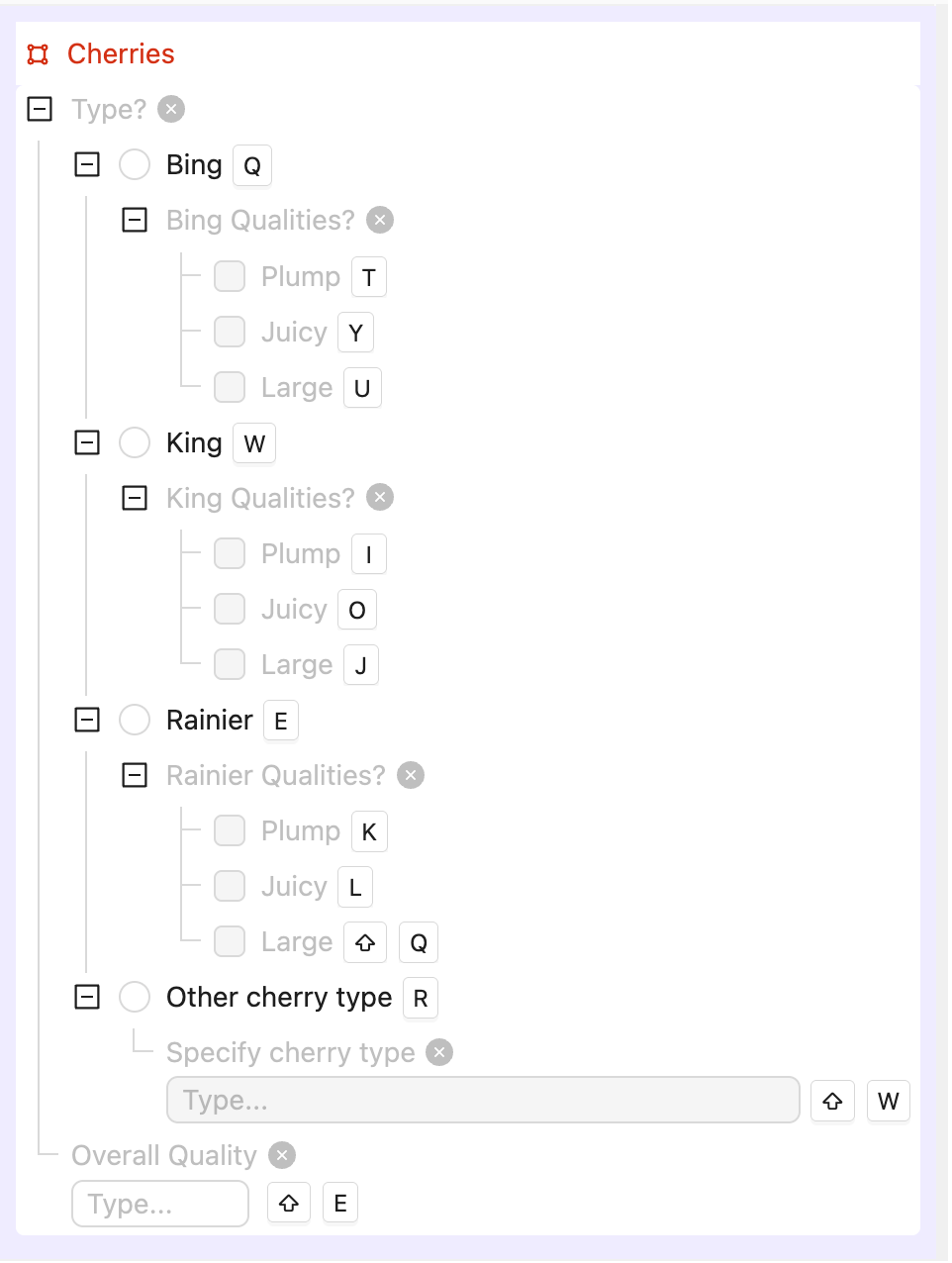 The same Ontology as text. The Basic examples use only the object. The Advanced examples also use the attributes and options:
- Single image labeling
- Image Group labeling
- Image Sequence labeling
- Video labeling
- Single image labeling
- Image Group labeling
- Image Sequence labeling
- Video labeling
- Radio button options
- Checklist options
- Text input
- Number input
The same Ontology as text. The Basic examples use only the object. The Advanced examples also use the attributes and options:Bounding Box Ontology
Cherries (bounding box object)
├── Type? (radio button)
│ ├── Bing
│ │ └── Bing Qualities? (checklist): Plump, Juicy, Large
│ ├── King
│ │ └── King Qualities? (checklist): Plump, Juicy, Large
│ ├── Rainier
│ │ └── Rainier Qualities? (checklist): Plump, Juicy, Large
│ └── Other cherry type
│ └── Specify cherry type (text)
└── Overall Quality (number)
from encord import EncordUserClient, Project
from encord.objects import Object, ObjectInstance
from encord.objects.coordinates import BoundingBoxCoordinates
# User input
SSH_PATH = "/Users/chris-encord/ssh-private-key.txt" # Replace with the file path to your SSH private key
PROJECT_ID = "00000000-0000-0000-0000-000000000000" # Replace with the unique ID for the Project
BUNDLE_SIZE = 100 # Optional: number of operations per bundle (keep it under 1000)
# Data unit titles in your Project.
IMAGE_TITLE = "cherries-001.jpg"
IMG_GROUP_TITLE = "cherries-ig"
IMG_SEQUENCE_TITLE = "cherries-is"
VIDEO_TITLE = "cherries-vid-001.mp4"
# Authorize connection to Encord
user_client: EncordUserClient = EncordUserClient.create_with_ssh_private_key(
ssh_private_key_path=SSH_PATH,
# For US platform users use "https://api.us.encord.com"
domain="https://api.encord.com",
)
project: Project = user_client.get_project(PROJECT_ID)
# Find bounding box object "Cherries" in the ontology.
ontology_structure = project.ontology_structure
box_ontology_object: Object = ontology_structure.get_child_by_title(title="Cherries", type_=Object)
# Initialise label rows
label_rows = {}
all_titles = [IMAGE_TITLE, IMG_GROUP_TITLE, IMG_SEQUENCE_TITLE, VIDEO_TITLE]
with project.create_bundle(bundle_size=BUNDLE_SIZE) as bundle:
for title in all_titles:
rows = project.list_label_rows_v2(data_title_eq=title)
assert isinstance(rows, list), f"Expected list for '{title}', got {type(rows)}"
if not rows:
print(f"Skipping: No label row found for {title}")
continue
lr = rows[0]
lr.initialise_labels(bundle=bundle)
assert lr.ontology_structure is not None, f"Ontology not initialized for '{title}'"
label_rows[title] = lr
# Coordinates for the bounding box
box = BoundingBoxCoordinates(height=0.35, width=0.35, top_left_x=0.1, top_left_y=0.1)
# Create instances and attach to frames
label_rows_to_save = []
# 1. One image > annotate frame 0
image_lr = label_rows.get(IMAGE_TITLE)
if image_lr is not None:
inst: ObjectInstance = box_ontology_object.create_instance()
inst.set_for_frames(coordinates=box, frames=0)
image_lr.add_object_instance(inst)
label_rows_to_save.append(image_lr)
# 2. One image group > annotate frame 0
img_group_lr = label_rows.get(IMG_GROUP_TITLE)
if img_group_lr is not None:
inst: ObjectInstance = box_ontology_object.create_instance()
inst.set_for_frames(coordinates=box, frames=0)
img_group_lr.add_object_instance(inst)
label_rows_to_save.append(img_group_lr)
# 3. One image sequence > annotate frame 0
img_sequence_lr = label_rows.get(IMG_SEQUENCE_TITLE)
if img_sequence_lr is not None:
inst: ObjectInstance = box_ontology_object.create_instance()
inst.set_for_frames(coordinates=box, frames=0)
img_sequence_lr.add_object_instance(inst)
label_rows_to_save.append(img_sequence_lr)
# 4. One video > reuse SAME instance across 3 consecutive frames (frames 100, 101, 102)
video_lr = label_rows.get(VIDEO_TITLE)
if video_lr is not None:
inst: ObjectInstance = box_ontology_object.create_instance()
consecutive_frames = [100, 101, 102]
for f in consecutive_frames:
inst.set_for_frames(coordinates=box, frames=f)
video_lr.add_object_instance(inst)
label_rows_to_save.append(video_lr)
# Save the label rows
with project.create_bundle(bundle_size=BUNDLE_SIZE) as bundle:
for lr in label_rows_to_save:
lr.save(bundle=bundle)
print(f"Saved label row for {lr.data_title}")
print("Done: created one bounding box on image, image group, image sequence, and 3 video frames.")
# Import dependencies
from encord import EncordUserClient, Project
from encord.objects import (
ChecklistAttribute,
FlatOption,
NestableOption,
Object,
ObjectInstance,
RadioAttribute,
TextAttribute,
)
from encord.objects.attributes import NumericAttribute
from encord.objects.coordinates import BoundingBoxCoordinates
# User input
SSH_PATH = "/Users/chris-encord/ssh-private-key.txt" # Replace with the file path to your SSH private key
PROJECT_ID = "00000000-0000-0000-0000-000000000000" # Replace with the unique ID for the Project
BUNDLE_SIZE = 100 # Optional: number of operations per bundle (keep it under 1000)
# Create user client using access key
user_client: EncordUserClient = EncordUserClient.create_with_ssh_private_key(
ssh_private_key_path=SSH_PATH,
# For US platform users use "https://api.us.encord.com"
domain="https://api.encord.com",
)
# Get project for which labels are to be added
project: Project = user_client.get_project(PROJECT_ID)
# Get the Project's Ontology
ontology_structure = project.ontology_structure
# Find the bounding box object in the Ontology. get_child_by_title raises an OntologyError if there is no match
box_ontology_object: Object = ontology_structure.get_child_by_title(title="Cherries", type_=Object)
# Find the "Type?" radio attribute and the "Overall Quality" number attribute of the "Cherries" object.
# The radio options, and the attributes nested under them, are looked up by title when the labels are added.
cherry_type_radio_attribute = box_ontology_object.get_child_by_title(title="Type?", type_=RadioAttribute)
cherry_quality_number_attribute = box_ontology_object.get_child_by_title(title="Overall Quality", type_=NumericAttribute)
# Keys in the sample data that hold the checklist answers for each cherry type
quality_option_keys = {
"Bing": "bing_quality_options",
"King": "king_quality_options",
"Rainier": "rainier_quality_options",
}
# Dictionary of labels per data unit and per frame with cherry type specified, including quality options
video_frame_labels = {
"cherries-001.jpg": {
0: {
"label_ref": "cherry_001",
"coordinates": BoundingBoxCoordinates(height=0.4, width=0.4, top_left_x=0.0, top_left_y=0.0),
"cherry_type": "Bing",
"bing_quality_options": "Plump, Juicy",
"cherry_quality": 4
}
},
"cherries-010.jpg": {
0: [
{
"label_ref": "cherry_002",
"coordinates": BoundingBoxCoordinates(height=0.4, width=0.4, top_left_x=0.0, top_left_y=0.0),
"cherry_type": "King",
"king_quality_options": "Plump, Juicy, Large",
"cherry_quality": 9
},
{
"label_ref": "cherry_003",
"coordinates": BoundingBoxCoordinates(height=0.2, width=0.1, top_left_x=0.5, top_left_y=0.0),
"cherry_type": "Rainier",
"rainier_quality_options": "Plump",
"cherry_quality": 5
},
{
"label_ref": "cherry_004",
"coordinates": BoundingBoxCoordinates(height=0.2, width=0.1, top_left_x=0.7, top_left_y=0.0),
"cherry_type": "Other cherry type",
"Specify cherry type": "Morello",
"cherry_quality": 3
},
],
},
"cherries-ig": {
0: {
"label_ref": "cherry_005",
"coordinates": BoundingBoxCoordinates(height=0.4, width=0.4, top_left_x=0.0, top_left_y=0.0),
"cherry_type": "Bing",
"bing_quality_options": "Plump, Juicy",
"cherry_quality": 7
},
2: [
{
"label_ref": "cherry_006",
"coordinates": BoundingBoxCoordinates(height=0.1, width=0.2, top_left_x=0.5, top_left_y=0.0),
"cherry_type": "King",
"king_quality_options": "Large",
"cherry_quality": 6
},
{
"label_ref": "cherry_007",
"coordinates": BoundingBoxCoordinates(height=0.1, width=0.2, top_left_x=0.0, top_left_y=0.5),
"cherry_type": "Rainier",
"rainier_quality_options": "Plump",
"cherry_quality": 6
},
{
"label_ref": "cherry_008",
"coordinates": BoundingBoxCoordinates(height=0.2, width=0.1, top_left_x=0.8, top_left_y=0.0),
"cherry_type": "Other cherry type",
"Specify cherry type": "Queen Anne",
"cherry_quality": 3
},
],
},
"cherries-is": {
0: {
"label_ref": "cherry_009",
"coordinates": BoundingBoxCoordinates(height=0.4, width=0.4, top_left_x=0.0, top_left_y=0.0),
"cherry_type": "Bing",
"bing_quality_options": "Plump",
"cherry_quality": 4
},
3: [
{
"label_ref": "cherry_010",
"coordinates": BoundingBoxCoordinates(height=0.4, width=0.4, top_left_x=0.5, top_left_y=0.0),
"cherry_type": "King",
"king_quality_options": "Plump, Juicy, Large",
"cherry_quality": 8
},
{
"label_ref": "cherry_011",
"coordinates": BoundingBoxCoordinates(height=0.3, width=0.3, top_left_x=0.0, top_left_y=0.5),
"cherry_type": "Rainier",
"rainier_quality_options": "Plump",
},
{
"label_ref": "cherry_012",
"coordinates": BoundingBoxCoordinates(height=0.2, width=0.1, top_left_x=0.9, top_left_y=0.0),
"cherry_type": "Other cherry type",
"Specify cherry type": "Lambert",
"cherry_quality": 4
},
],
},
"cherries-vid-001.mp4": {
103: [
{
"label_ref": "cherry_013",
"coordinates": BoundingBoxCoordinates(height=0.5, width=0.5, top_left_x=0.0, top_left_y=0.0),
"cherry_type": "Rainier",
"rainier_quality_options": "Plump",
"cherry_quality": 5
},
{
"label_ref": "cherry_014",
"coordinates": BoundingBoxCoordinates(height=0.2, width=0.2, top_left_x=0.6, top_left_y=0.0),
"cherry_type": "Bing",
"bing_quality_options": "Plump, Juicy, Large",
"cherry_quality": 9
},
{
"label_ref": "cherry_015",
"coordinates": BoundingBoxCoordinates(height=0.2, width=0.1, top_left_x=0.8, top_left_y=0.6),
"cherry_type": "Other cherry type",
"Specify cherry type": "Sweetheart",
"cherry_quality": 7
},
],
104: [
{
"label_ref": "cherry_016",
"coordinates": BoundingBoxCoordinates(height=0.5, width=0.5, top_left_x=0.0, top_left_y=0.0),
"cherry_type": "Rainier",
"rainier_quality_options": "Plump",
"cherry_quality": 7
},
{
"label_ref": "cherry_014",
"coordinates": BoundingBoxCoordinates(height=0.2, width=0.2, top_left_x=0.6, top_left_y=0.0),
"cherry_type": "Bing",
"bing_quality_options": "Plump, Juicy, Large",
"cherry_quality": 9
},
{
"label_ref": "cherry_017",
"coordinates": BoundingBoxCoordinates(height=0.2, width=0.1, top_left_x=0.8, top_left_y=0.6),
"cherry_type": "Other cherry type",
"Specify cherry type": "Sweetheart",
"cherry_quality": 2
},
],
105: [
{
"label_ref": "cherry_016",
"coordinates": BoundingBoxCoordinates(height=0.5, width=0.5, top_left_x=0.0, top_left_y=0.0),
"cherry_type": "Rainier",
"rainier_quality_options": "Plump",
"cherry_quality": 7
},
{
"label_ref": "cherry_014",
"coordinates": BoundingBoxCoordinates(height=0.2, width=0.2, top_left_x=0.6, top_left_y=0.0),
"cherry_type": "Bing",
"bing_quality_options": "Plump, Juicy, Large",
"cherry_quality": 9
},
{
"label_ref": "cherry_017",
"coordinates": BoundingBoxCoordinates(height=0.2, width=0.1, top_left_x=0.8, top_left_y=0.6),
"cherry_type": "Other cherry type",
"Specify cherry type": "Sweetheart",
"cherry_quality": 3
},
],
},
}
# Cache initialized label rows
label_row_map = {}
# Step 1: Initialize all label rows using a bundle
with project.create_bundle(bundle_size=BUNDLE_SIZE) as bundle:
for data_unit in video_frame_labels.keys():
label_rows = project.list_label_rows_v2(data_title_eq=data_unit)
assert isinstance(label_rows, list), f"Expected list of label rows for '{data_unit}', got {type(label_rows)}"
if not label_rows:
print(f"Skipping: No label row found for {data_unit}")
continue
label_row = label_rows[0]
label_row.initialise_labels(bundle=bundle)
assert label_row.ontology_structure is not None, f"Ontology not initialized for label row: {data_unit}"
label_row_map[data_unit] = label_row # Cache initialized label row for later use
# Step 2: Process all frames/annotations and prepare label rows to save
label_rows_to_save = []
for data_unit, frame_coordinates in video_frame_labels.items():
label_row = label_row_map.get(data_unit)
if not label_row:
print(f"Skipping: No initialized label row found for {data_unit}")
continue
object_instances_by_label_ref = {}
# Loop through the frames for the current data unit
for frame_number, items in frame_coordinates.items():
assert isinstance(frame_number, int), f"Frame number must be int, got {type(frame_number)}"
if not isinstance(items, list):
items = [items]
for item in items:
label_ref = item["label_ref"]
coord = item["coordinates"]
cherry_type = item["cherry_type"]
cherry_quality = item["cherry_quality"]
assert cherry_type in {
"Bing",
"King",
"Rainier",
"Other cherry type",
}, f"Unexpected cherry type '{cherry_type}' in data unit '{data_unit}'"
# Check if label_ref already exists for reusability
if label_ref not in object_instances_by_label_ref:
box_object_instance: ObjectInstance = box_ontology_object.create_instance()
assert box_object_instance is not None, "Failed to create ObjectInstance"
object_instances_by_label_ref[label_ref] = box_object_instance
# Set cherry quality attribute
box_object_instance.set_answer(attribute=cherry_quality_number_attribute, answer=cherry_quality)
# Set the cherry type: look up the radio option whose title matches the type in the sample data
cherry_type_option = cherry_type_radio_attribute.get_child_by_title(
title=cherry_type, type_=NestableOption
)
box_object_instance.set_answer(attribute=cherry_type_radio_attribute, answer=cherry_type_option)
if cherry_type == "Other cherry type":
# Set the text attribute nested under the "Other cherry type" option
text_attribute = cherry_type_option.get_child_by_title(
title="Specify cherry type", type_=TextAttribute
)
box_object_instance.set_answer(attribute=text_attribute, answer=item.get("Specify cherry type", ""))
else:
# Set the checklist attribute nested under the selected option, for example "Bing Qualities?"
checklist_attribute = cherry_type_option.get_child_by_title(
title=f"{cherry_type} Qualities?", type_=ChecklistAttribute
)
quality_titles = item.get(quality_option_keys[cherry_type], "").split(", ")
checklist_answers = [
checklist_attribute.get_child_by_title(title=quality, type_=FlatOption)
for quality in quality_titles
if quality
]
if checklist_answers:
box_object_instance.set_answer(
attribute=checklist_attribute, answer=checklist_answers, overwrite=True
)
else:
# Reuse existing instance across frames
box_object_instance = object_instances_by_label_ref[label_ref]
# Assign the object to the frame and track it
box_object_instance.set_for_frames(coordinates=coord, frames=frame_number)
# Add object instances to label_row **only if they have frames assigned**
for box_object_instance in object_instances_by_label_ref.values():
assert isinstance(box_object_instance, ObjectInstance), "Expected ObjectInstance type"
if box_object_instance.get_annotation_frames(): # Ensures it has at least one frame
label_row.add_object_instance(box_object_instance)
label_rows_to_save.append(label_row)
# Step 3: Save all label rows using a bundle
with project.create_bundle(bundle_size=BUNDLE_SIZE) as bundle:
for label_row in label_rows_to_save:
assert label_row is not None, "Trying to save a None label row"
label_row.save(bundle=bundle)
print(f"Saved label row for {label_row.data_title}")
print("Labels with cherry type radio buttons, checklist attributes, text labels, and number attributes added for all data units.")
Rotatable Bounding Box
Rotatable Bounding Box
BasicThis example includes the following: The same Ontology as text. The Basic examples use only the object. The Advanced examples also use the attributes and options:
- Single image labeling
- Image Group labeling
- Image Sequence labeling
- Video labeling
- Single image labeling
- Image Group labeling
- Image Sequence labeling
- Video labeling
- Radio button options
- Checklist options
- Text input
- Number input
RotatableBoundingBoxCoordinates, top_left_x, top_left_y, width, and height describe the box before it is rotated, and theta is the rotation angle in degrees. The box is rotated around its center.Rotatable Bounding Box OntologyThe same Ontology as text. The Basic examples use only the object. The Advanced examples also use the attributes and options:Rotatable Bounding Box Ontology
Persimmons (rotatable bounding box object)
├── Type? (radio button)
│ ├── Hachiya
│ │ └── Hachiya Qualities? (checklist): Plump, Juicy, Large
│ ├── Fuyu
│ │ └── Fuyu Qualities? (checklist): Plump, Juicy, Large
│ ├── Rojo Brilliante
│ │ └── Rojo Brilliante Qualities? (checklist): Plump, Juicy, Large
│ └── Other persimmon type
│ └── Specify persimmon type (text)
└── Overall Quality (number)
from encord import EncordUserClient, Project
from encord.objects import Object, ObjectInstance
from encord.objects.coordinates import RotatableBoundingBoxCoordinates
# User input
SSH_PATH = "/Users/chris-encord/ssh-private-key.txt" # Replace with the file path to your SSH private key
PROJECT_ID = "00000000-0000-0000-0000-000000000000" # Replace with the unique ID for the Project
BUNDLE_SIZE = 100 # Optional: number of operations per bundle (keep it under 1000)
# Data unit titles in your project
IMAGE_TITLE = "persimmons-001.jpg"
IMG_GROUP_TITLE = "persimmons-ig"
IMG_SEQUENCE_TITLE = "persimmons-is"
VIDEO_TITLE = "persimmons-vid-001.mp4"
# Authorize connection to Encord
user_client: EncordUserClient = EncordUserClient.create_with_ssh_private_key(
ssh_private_key_path=SSH_PATH,
# For US platform users use "https://api.us.encord.com"
domain="https://api.encord.com",
)
project: Project = user_client.get_project(PROJECT_ID)
# Find rotatable bbox object "Persimmons" in the ontology
ontology_structure = project.ontology_structure
rbbox_ontology_object: Object = ontology_structure.get_child_by_title(title="Persimmons", type_=Object)
# Initialise label rows
label_rows = {}
all_titles = [IMAGE_TITLE, IMG_GROUP_TITLE, IMG_SEQUENCE_TITLE, VIDEO_TITLE]
with project.create_bundle(bundle_size=BUNDLE_SIZE) as bundle:
for title in all_titles:
rows = project.list_label_rows_v2(data_title_eq=title)
assert isinstance(rows, list), f"Expected list for '{title}', got {type(rows)}"
if not rows:
print(f"Skipping: No label row found for {title}")
continue
lr = rows[0]
lr.initialise_labels(bundle=bundle)
assert lr.ontology_structure is not None, f"Ontology not initialized for '{title}'"
label_rows[title] = lr
# Coordinates for the rotatable bounding box
rbbox = RotatableBoundingBoxCoordinates(height=0.35, width=0.35, top_left_x=0.1, top_left_y=0.1, theta=25)
# Create instances and attach to frames
label_rows_to_save = []
# 1. One image > annotate frame 0
image_lr = label_rows.get(IMAGE_TITLE)
if image_lr is not None:
inst: ObjectInstance = rbbox_ontology_object.create_instance()
inst.set_for_frames(coordinates=rbbox, frames=0)
image_lr.add_object_instance(inst)
label_rows_to_save.append(image_lr)
# 2. One image group > annotate frame 0
img_group_lr = label_rows.get(IMG_GROUP_TITLE)
if img_group_lr is not None:
inst: ObjectInstance = rbbox_ontology_object.create_instance()
inst.set_for_frames(coordinates=rbbox, frames=0)
img_group_lr.add_object_instance(inst)
label_rows_to_save.append(img_group_lr)
# 3. One image sequence > annotate frame 0
img_sequence_lr = label_rows.get(IMG_SEQUENCE_TITLE)
if img_sequence_lr is not None:
inst: ObjectInstance = rbbox_ontology_object.create_instance()
inst.set_for_frames(coordinates=rbbox, frames=0)
img_sequence_lr.add_object_instance(inst)
label_rows_to_save.append(img_sequence_lr)
# 4 One video > reuse SAME instance across 3 consecutive frames (frames 100, 101, 102)
video_lr = label_rows.get(VIDEO_TITLE)
if video_lr is not None:
inst: ObjectInstance = rbbox_ontology_object.create_instance()
consecutive_frames = [100, 101, 102]
for f in consecutive_frames:
inst.set_for_frames(coordinates=rbbox, frames=f)
video_lr.add_object_instance(inst)
label_rows_to_save.append(video_lr)
# Save label rows
with project.create_bundle(bundle_size=BUNDLE_SIZE) as bundle:
for lr in label_rows_to_save:
lr.save(bundle=bundle)
print(f"Saved label row for {lr.data_title}")
print("Done: created one rotatable bounding box on image, image group, image sequence, and 3 video frames.")
# Import dependencies
from encord import EncordUserClient, Project
from encord.objects import (
ChecklistAttribute,
FlatOption,
NestableOption,
Object,
ObjectInstance,
RadioAttribute,
TextAttribute,
)
from encord.objects.coordinates import RotatableBoundingBoxCoordinates
from encord.objects.attributes import NumericAttribute
# User input
SSH_PATH = "/Users/chris-encord/ssh-private-key.txt" # Replace with the file path to your SSH private key
PROJECT_ID = "00000000-0000-0000-0000-000000000000" # Replace with the unique ID for the Project
BUNDLE_SIZE = 100 # Optional: number of operations per bundle (keep it under 1000)
# Create user client using access key
user_client: EncordUserClient = EncordUserClient.create_with_ssh_private_key(
ssh_private_key_path=SSH_PATH,
# For US platform users use "https://api.us.encord.com"
domain="https://api.encord.com",
)
# Get project for which labels are to be added
project: Project = user_client.get_project(PROJECT_ID)
assert project is not None, "Project not found — check PROJECT_ID"
# Get the Project's Ontology
ontology_structure = project.ontology_structure
# Find the rotatable bounding box object in the Ontology. get_child_by_title raises an OntologyError if there is no match
rbbox_ontology_object: Object = ontology_structure.get_child_by_title(title="Persimmons", type_=Object)
# Find the "Type?" radio attribute and the "Overall Quality" number attribute of the "Persimmons" object.
# The radio options, and the attributes nested under them, are looked up by title when the labels are added.
persimmon_type_radio_attribute = rbbox_ontology_object.get_child_by_title(title="Type?", type_=RadioAttribute)
quality_number_attribute = rbbox_ontology_object.get_child_by_title(title="Overall Quality", type_=NumericAttribute)
# Keys in the sample data that hold the checklist answers for each persimmon type
quality_option_keys = {
"Hachiya": "hachiya_quality_options",
"Fuyu": "fuyu_quality_options",
"Rojo Brilliante": "rjb_quality_options",
}
# Dictionary of labels per data unit and per frame with persimmon type specified, including quality options
video_frame_labels = {
"persimmons-001.jpg": {
0: {
"label_ref": "persimmon_001",
"coordinates": RotatableBoundingBoxCoordinates(
height=0.4, width=0.4, top_left_x=0.05, top_left_y=0.55, theta=23
),
"persimmon_type": "Rojo Brilliante",
"rjb_quality_options": "Plump, Juicy",
"quality_number": 6
},
},
"persimmons-010.jpg": {
0: [
{
"label_ref": "persimmon_002",
"coordinates": RotatableBoundingBoxCoordinates(
height=0.4, width=0.4, top_left_x=0.05, top_left_y=0.55, theta=23
),
"persimmon_type": "Fuyu",
"fuyu_quality_options": "Plump, Juicy, Large",
"quality_number": 9
},
{
"label_ref": "persimmon_003",
"coordinates": RotatableBoundingBoxCoordinates(
height=0.2, width=0.1, top_left_x=0.2, top_left_y=0.2, theta=25
),
"persimmon_type": "Rojo Brilliante",
"rjb_quality_options": "Plump",
"quality_number": 5
},
{
"label_ref": "persimmon_004",
"coordinates": RotatableBoundingBoxCoordinates(
height=0.2, width=0.1, top_left_x=0.3, top_left_y=0.3, theta=27
),
"persimmon_type": "Other persimmon type",
"Specify persimmon type": "Triumph",
"quality_number": 4
},
],
},
"persimmons-ig": {
0: {
"label_ref": "persimmon_005",
"coordinates": RotatableBoundingBoxCoordinates(
height=0.4, width=0.4, top_left_x=0.05, top_left_y=0.55, theta=23
),
"persimmon_type": "Hachiya",
"hachiya_quality_options": "Plump, Juicy",
"quality_number": 7
},
2: [
{
"label_ref": "persimmon_006",
"coordinates": RotatableBoundingBoxCoordinates(
height=0.1, width=0.2, top_left_x=0.2, top_left_y=0.2, theta=23
),
"persimmon_type": "Fuyu",
"fuyu_quality_options": "Large",
"quality_number": 8
},
{
"label_ref": "persimmon_007",
"coordinates": RotatableBoundingBoxCoordinates(
height=0.1, width=0.2, top_left_x=0.4, top_left_y=0.2, theta=127
),
"persimmon_type": "Rojo Brilliante",
"rjb_quality_options": "Plump",
"quality_number": 6
},
{
"label_ref": "persimmon_008",
"coordinates": RotatableBoundingBoxCoordinates(
height=0.2, width=0.1, top_left_x=0.6, top_left_y=0.3, theta=137
),
"persimmon_type": "Other persimmon type",
"Specify persimmon type": "Hiro",
"quality_number": 6
},
],
},
"persimmons-is": {
0: {
"label_ref": "persimmon_009",
"coordinates": RotatableBoundingBoxCoordinates(
height=0.4, width=0.4, top_left_x=0.05, top_left_y=0.55, theta=23
),
"persimmon_type": "Hachiya",
"hachiya_quality_options": "Plump",
"quality_number": 7
},
3: [
{
"label_ref": "persimmon_010",
"coordinates": RotatableBoundingBoxCoordinates(
height=0.4, width=0.4, top_left_x=0.05, top_left_y=0.05, theta=23
),
"persimmon_type": "Fuyu",
"fuyu_quality_options": "Plump, Juicy, Large",
"quality_number": 9
},
{
"label_ref": "persimmon_011",
"coordinates": RotatableBoundingBoxCoordinates(
height=0.3, width=0.3, top_left_x=0.5, top_left_y=0.05, theta=23
),
"persimmon_type": "Rojo Brilliante",
"rjb_quality_options": "Plump, Juicy",
"quality_number": 9
},
{
"label_ref": "persimmon_012",
"coordinates": RotatableBoundingBoxCoordinates(
height=0.2, width=0.1, top_left_x=0.7, top_left_y=0.05, theta=23
),
"persimmon_type": "Other persimmon type",
"Specify persimmon type": "Maru",
"quality_number": 8
},
],
},
"persimmons-vid-001.mp4": {
103: [
{
"label_ref": "persimmon_013",
"coordinates": RotatableBoundingBoxCoordinates(
height=0.5, width=0.5, top_left_x=0.05, top_left_y=0.55, theta=23
),
"persimmon_type": "Rojo Brilliante",
"rjb_quality_options": "Plump",
"quality_number": 7
},
{
"label_ref": "persimmon_014",
"coordinates": RotatableBoundingBoxCoordinates(
height=0.2, width=0.2, top_left_x=0.3, top_left_y=0.2, theta=23
),
"persimmon_type": "Hachiya",
"hachiya_quality_options": "Plump, Juicy, Large",
"quality_number": 9
},
{
"label_ref": "persimmon_015",
"coordinates": RotatableBoundingBoxCoordinates(
height=0.2, width=0.1, top_left_x=0.6, top_left_y=0.2, theta=23
),
"persimmon_type": "Other persimmon type",
"Specify persimmon type": "Triumph",
"quality_number": 2
},
],
104: [
{
"label_ref": "persimmon_016",
"coordinates": RotatableBoundingBoxCoordinates(
height=0.5, width=0.5, top_left_x=0.05, top_left_y=0.55, theta=23
),
"persimmon_type": "Rojo Brilliante",
"rjb_quality_options": "Plump",
"quality_number": 5
},
{
"label_ref": "persimmon_014",
"coordinates": RotatableBoundingBoxCoordinates(
height=0.2, width=0.2, top_left_x=0.3, top_left_y=0.2, theta=23
),
"persimmon_type": "Hachiya",
"hachiya_quality_options": "Plump, Juicy, Large",
"quality_number": 9
},
{
"label_ref": "persimmon_017",
"coordinates": RotatableBoundingBoxCoordinates(
height=0.2, width=0.1, top_left_x=0.6, top_left_y=0.2, theta=23
),
"persimmon_type": "Other persimmon type",
"Specify persimmon type": "Hiro",
"quality_number": 4
},
],
105: [
{
"label_ref": "persimmon_016",
"coordinates": RotatableBoundingBoxCoordinates(
height=0.5, width=0.5, top_left_x=0.05, top_left_y=0.55, theta=23
),
"persimmon_type": "Rojo Brilliante",
"rjb_quality_options": "Plump",
"quality_number": 7
},
{
"label_ref": "persimmon_014",
"coordinates": RotatableBoundingBoxCoordinates(
height=0.2, width=0.2, top_left_x=0.3, top_left_y=0.2, theta=23
),
"persimmon_type": "Hachiya",
"hachiya_quality_options": "Plump, Juicy, Large",
"quality_number": 8
},
{
"label_ref": "persimmon_017",
"coordinates": RotatableBoundingBoxCoordinates(
height=0.2, width=0.1, top_left_x=0.6, top_left_y=0.2, theta=23
),
"persimmon_type": "Other persimmon type",
"Specify persimmon type": "Maru",
"quality_number": 5
},
],
},
}
# Cache label rows after initialization
label_row_map = {}
# Step 1: Initialize all label rows with a bundle
with project.create_bundle(bundle_size=BUNDLE_SIZE) as bundle:
for data_unit in video_frame_labels.keys():
label_rows = project.list_label_rows_v2(data_title_eq=data_unit)
assert isinstance(label_rows, list), f"Expected list of label rows for '{data_unit}', got {type(label_rows)}"
assert label_rows, f"No label row found for {data_unit}"
label_row = label_rows[0]
assert label_row is not None, f"Label row is None for {data_unit}"
label_row.initialise_labels(bundle=bundle)
assert label_row.ontology_structure is not None, f"Ontology not initialized for label row: {data_unit}"
label_row_map[data_unit] = label_row # Cache it for processing later
# Step 2: Process labels and collect label rows to save
label_rows_to_save = []
for data_unit, frame_coordinates in video_frame_labels.items():
label_row = label_row_map.get(data_unit)
assert label_row is not None, f"Missing initialized label row for {data_unit}"
object_instances_by_label_ref = {}
for frame_number, items in frame_coordinates.items():
assert isinstance(frame_number, int), f"Frame number must be int, got {type(frame_number)}"
if not isinstance(items, list):
items = [items]
for item in items:
label_ref = item["label_ref"]
coord = item["coordinates"]
persimmon_type = item["persimmon_type"]
quality_number = item["quality_number"]
assert persimmon_type in {
"Hachiya",
"Fuyu",
"Rojo Brilliante",
"Other persimmon type",
}, f"Unexpected persimmon type '{persimmon_type}' in {data_unit}"
if label_ref not in object_instances_by_label_ref:
rbbox_object_instance: ObjectInstance = rbbox_ontology_object.create_instance()
assert rbbox_object_instance is not None, f"Failed to create ObjectInstance for {label_ref}"
# Set quality number attribute
rbbox_object_instance.set_answer(attribute=quality_number_attribute, answer=quality_number)
# Set the persimmon type: look up the radio option whose title matches the type in the sample data
persimmon_type_option = persimmon_type_radio_attribute.get_child_by_title(
title=persimmon_type, type_=NestableOption
)
rbbox_object_instance.set_answer(attribute=persimmon_type_radio_attribute, answer=persimmon_type_option)
if persimmon_type == "Other persimmon type":
# Set the text attribute nested under the "Other persimmon type" option
text_attribute = persimmon_type_option.get_child_by_title(
title="Specify persimmon type", type_=TextAttribute
)
rbbox_object_instance.set_answer(attribute=text_attribute, answer=item.get("Specify persimmon type", ""))
else:
# Set the checklist attribute nested under the selected option, for example "Hachiya Qualities?"
checklist_attribute = persimmon_type_option.get_child_by_title(
title=f"{persimmon_type} Qualities?", type_=ChecklistAttribute
)
quality_titles = item.get(quality_option_keys[persimmon_type], "").split(", ")
checklist_answers = [
checklist_attribute.get_child_by_title(title=quality, type_=FlatOption)
for quality in quality_titles
if quality
]
if checklist_answers:
rbbox_object_instance.set_answer(
attribute=checklist_attribute, answer=checklist_answers, overwrite=True
)
object_instances_by_label_ref[label_ref] = rbbox_object_instance
else:
rbbox_object_instance = object_instances_by_label_ref[label_ref]
# Assign coordinates for this frame
rbbox_object_instance.set_for_frames(coordinates=coord, frames=frame_number)
# Add object instances to label_row **only if they have frames assigned**
for rbbox_object_instance in object_instances_by_label_ref.values():
assert isinstance(rbbox_object_instance, ObjectInstance), "Expected ObjectInstance type"
if rbbox_object_instance.get_annotation_frames():
label_row.add_object_instance(rbbox_object_instance)
# Collect for saving in the next bundle
label_rows_to_save.append(label_row)
# Step 3: Save all label rows with a bundle
with project.create_bundle(bundle_size=BUNDLE_SIZE) as bundle:
for label_row in label_rows_to_save:
assert label_row is not None, "Trying to save a None label row"
label_row.save(bundle=bundle)
print(f"Saved label row for {label_row.data_title}")
print("Labels with persimmon type radio buttons, checklist attributes, number attributes, and text labels added for all data units.")
Polygons (Advanced)
Polygons (Advanced)
Polygons can have simple and complex shapes, including being enclosed in one another, and encompassing separate regions. In each case the polygon’s coordinates are arranged in a different way.BasicThis example includes the following:Simple PolygonImport a simple polygon using the recommended method. DonutImport a complex polygon with a hole in it.
 Multiple PolygonsImport a complex polygon that is in multiple parts.
 Donut with Object InsideImports a complex polygon that has a hole in it with another polygon inside.
 Polygons OntologyThis ontology applies for all polygon shapes (simple, donut, multiple polygons, donut with object inside).
 The same Ontology as text. The Basic examples use only the object. The Advanced examples also use the attributes and options:
- Single image labeling
- Image Group labeling
- Image Sequence labeling
- Video labeling
- Single image labeling
- Image Group labeling
- Image Sequence labeling
- Video labeling
- Radio button options
- Checklist options
- Text input
- Number input
PolygonCoordinates(polygons=[[[PointCoordinate(x1, y1), PointCoordinate(x2, y2),...]]])
PolygonCoordinates(polygons=
[
[
[PointCoordinate(x1, y1), PointCoordinate(x2, y2),...], # Outer ring
[PointCoordinate(x1, y1), PointCoordinate(x2, y2),...], # Inner ring
]
])
PolygonCoordinates(polygons=
[
[
[PointCoordinate(x1, y1), PointCoordinate(x2, y2),...], # Polygon 1
],
[
[PointCoordinate(x1, y1), PointCoordinate(x2, y2),...], # Polygon 2
],
[
[PointCoordinate(x1, y1), PointCoordinate(x2, y2),...], # Polygon 3
],
])
PolygonCoordinates(polygons=
[
[
[PointCoordinate(x1, y1), PointCoordinate(x2, y2),...], # Outer ring
[PointCoordinate(x1, y1), PointCoordinate(x2, y2),...], # Inner ring
],
[
[PointCoordinate(x1, y1), PointCoordinate(x2, y2),...], # Polygon inside
],
])
Polygons Ontology
Blueberries (polygon object)
├── Type? (radio button)
│ ├── Bluegold
│ │ └── Bluegold Qualities? (checklist): Plump, Juicy, Large
│ ├── Duke
│ │ └── Duke Qualities? (checklist): Plump, Juicy, Large
│ ├── Blueray
│ │ └── Blueray Qualities? (checklist): Plump, Juicy, Large
│ └── Other blueberry type
│ └── Specify blueberry type (text)
└── Overall Quality (number)
from encord import EncordUserClient, Project
from encord.objects import Object, ObjectInstance
from encord.objects.coordinates import PointCoordinate, PolygonCoordinates
# User input
SSH_PATH = "/Users/chris-encord/ssh-private-key.txt" # Replace with the file path to your SSH private key
PROJECT_ID = "00000000-0000-0000-0000-000000000000" # Replace with the unique ID for the Project
BUNDLE_SIZE = 100 # Optional: number of operations per bundle (keep it under 1000)
# Data unit titles in your Project
IMAGE_TITLE = "blueberries-001.jpg"
IMG_GROUP_TITLE = "blueberries-ig"
IMG_SEQUENCE_TITLE = "blueberries-is"
VIDEO_TITLE = "blueberries-vid-001.mp4"
# Authorize connection to Encord
user_client: EncordUserClient = EncordUserClient.create_with_ssh_private_key(
ssh_private_key_path=SSH_PATH,
# For US platform users use "https://api.us.encord.com"
domain="https://api.encord.com",
)
project: Project = user_client.get_project(PROJECT_ID)
# Find the polygon object "Blueberries" in the ontology
ontology_structure = project.ontology_structure
polygon_ontology_object: Object = ontology_structure.get_child_by_title(title="Blueberries", type_=Object)
# Initialise label rows
label_rows = {}
all_titles = [IMAGE_TITLE, IMG_GROUP_TITLE, IMG_SEQUENCE_TITLE, VIDEO_TITLE]
with project.create_bundle(bundle_size=BUNDLE_SIZE) as bundle:
for title in all_titles:
rows = project.list_label_rows_v2(data_title_eq=title)
assert isinstance(rows, list), f"Expected list for '{title}', got {type(rows)}"
if not rows:
print(f"Skipping: No label row found for {title}")
continue
lr = rows[0]
lr.initialise_labels(bundle=bundle)
assert lr.ontology_structure is not None, f"Ontology not initialized for '{title}'"
label_rows[title] = lr
# Coordinates: A simple 5-point polygon (single ring)
poly = PolygonCoordinates(
polygons=[
[
[
PointCoordinate(0.10, 0.10),
PointCoordinate(0.20, 0.15),
PointCoordinate(0.25, 0.25),
PointCoordinate(0.15, 0.30),
PointCoordinate(0.08, 0.22),
]
]
]
)
# Create instances and attach to frames
label_rows_to_save = []
# 1. One image > annotate frame 0
image_lr = label_rows.get(IMAGE_TITLE)
if image_lr is not None:
inst: ObjectInstance = polygon_ontology_object.create_instance()
inst.set_for_frames(coordinates=poly, frames=0)
image_lr.add_object_instance(inst)
label_rows_to_save.append(image_lr)
# 2. One image group > annotate frame 0
img_group_lr = label_rows.get(IMG_GROUP_TITLE)
if img_group_lr is not None:
inst: ObjectInstance = polygon_ontology_object.create_instance()
inst.set_for_frames(coordinates=poly, frames=0)
img_group_lr.add_object_instance(inst)
label_rows_to_save.append(img_group_lr)
# 3. One image sequence > annotate frame 0
img_sequence_lr = label_rows.get(IMG_SEQUENCE_TITLE)
if img_sequence_lr is not None:
inst: ObjectInstance = polygon_ontology_object.create_instance()
inst.set_for_frames(coordinates=poly, frames=0)
img_sequence_lr.add_object_instance(inst)
label_rows_to_save.append(img_sequence_lr)
# 4. One video > reuse SAME instance across 3 consecutive frames (frames 100, 101, 102)
video_lr = label_rows.get(VIDEO_TITLE)
if video_lr is not None:
inst: ObjectInstance = polygon_ontology_object.create_instance()
consecutive_frames = [100, 101, 102]
for f in consecutive_frames:
inst.set_for_frames(coordinates=poly, frames=f)
video_lr.add_object_instance(inst)
label_rows_to_save.append(video_lr)
# Save label rows
with project.create_bundle(bundle_size=BUNDLE_SIZE) as bundle:
for lr in label_rows_to_save:
lr.save(bundle=bundle)
print(f"Saved label row for {lr.data_title}")
print("Done: created one polygon on image, image group, image sequence, and 3 video frames.")
# Import dependencies
from encord import EncordUserClient, Project
from encord.objects import (
ChecklistAttribute,
FlatOption,
NestableOption,
Object,
ObjectInstance,
RadioAttribute,
TextAttribute,
)
from encord.objects.coordinates import PointCoordinate, PolygonCoordinates
from encord.objects.attributes import NumericAttribute
# User input
SSH_PATH = "/Users/chris-encord/ssh-private-key.txt" # Replace with the file path to your SSH private key
PROJECT_ID = "00000000-0000-0000-0000-000000000000" # Replace with the unique ID for the Project
BUNDLE_SIZE = 100 # Optional: number of operations per bundle (keep it under 1000)
# Create user client using access key
user_client: EncordUserClient = EncordUserClient.create_with_ssh_private_key(
ssh_private_key_path=SSH_PATH,
# For US platform users use "https://api.us.encord.com"
domain="https://api.encord.com",
)
# Get project for which labels are to be added
project: Project = user_client.get_project(PROJECT_ID)
assert project is not None, "Project not found — check PROJECT_ID"
# Get the Project's Ontology
ontology_structure = project.ontology_structure
# Find the polygon object in the Ontology. get_child_by_title raises an OntologyError if there is no match
polygon_ontology_object: Object = ontology_structure.get_child_by_title(title="Blueberries", type_=Object)
# Find the "Type?" radio attribute and the "Overall Quality" number attribute of the "Blueberries" object.
# The radio options, and the attributes nested under them, are looked up by title when the labels are added.
blueberry_type_radio_attribute = polygon_ontology_object.get_child_by_title(title="Type?", type_=RadioAttribute)
blueberry_quality_number_attribute = polygon_ontology_object.get_child_by_title(title="Overall Quality", type_=NumericAttribute)
# Keys in the sample data that hold the checklist answers for each blueberry type
quality_option_keys = {
"Bluegold": "bluegold_quality_options",
"Duke": "duke_quality_options",
"Blueray": "blueray_quality_options",
}
# Dictionary of labels per data unit and per frame with blueberry type specified, including quality options
video_frame_labels = {
"blueberries-001.jpg": {
0: {
"label_ref": "blueberry_001",
"coordinates": PolygonCoordinates(
polygons=[
[
[
PointCoordinate(0.01, 0.02),
PointCoordinate(0.03, 0.03),
PointCoordinate(0.05, 0.02),
PointCoordinate(0.04, 0.01),
PointCoordinate(0.02, 0.01),
]
]
]
),
"blueberry_type": "Bluegold",
"bluegold_quality_options": "Plump, Juicy",
"blueberry_quality": 8
}
},
"blueberries-010.jpg": {
0: [
{
"label_ref": "blueberry_002",
"coordinates": PolygonCoordinates(
polygons=[
[
[
PointCoordinate(0.01, 0.02),
PointCoordinate(0.03, 0.03),
PointCoordinate(0.05, 0.02),
PointCoordinate(0.04, 0.01),
PointCoordinate(0.02, 0.01),
]
]
]
),
"blueberry_type": "Duke",
"duke_quality_options": "Plump, Juicy, Large",
"blueberry_quality": 9
},
{
"label_ref": "blueberry_003",
"coordinates": PolygonCoordinates(
polygons=[
[
[
PointCoordinate(0.04, 0.05),
PointCoordinate(0.06, 0.06),
PointCoordinate(0.08, 0.05),
PointCoordinate(0.07, 0.04),
PointCoordinate(0.05, 0.04),
]
]
]
),
"blueberry_type": "Blueray",
"blueray_quality_options": "Plump",
"blueberry_quality": 5
},
{
"label_ref": "blueberry_004",
"coordinates": PolygonCoordinates(
polygons=[
[
[
PointCoordinate(0.07, 0.02),
PointCoordinate(0.09, 0.03),
PointCoordinate(0.11, 0.02),
PointCoordinate(0.10, 0.01),
PointCoordinate(0.08, 0.01),
]
]
]
),
"blueberry_type": "Other blueberry type",
"Specify blueberry type": "Highbush",
"blueberry_quality": 3
},
],
},
"blueberries-ig": {
0: {
"label_ref": "blueberry_005",
"coordinates": PolygonCoordinates(
polygons=[
[
[
PointCoordinate(0.01, 0.02),
PointCoordinate(0.03, 0.03),
PointCoordinate(0.05, 0.02),
PointCoordinate(0.04, 0.01),
PointCoordinate(0.02, 0.01),
]
]
]
),
"blueberry_type": "Bluegold",
"bluegold_quality_options": "Plump, Juicy",
"blueberry_quality": 8
},
2: [
{
"label_ref": "blueberry_006",
"coordinates": PolygonCoordinates(
polygons=[
[
[
PointCoordinate(0.01, 0.02),
PointCoordinate(0.03, 0.03),
PointCoordinate(0.05, 0.02),
PointCoordinate(0.04, 0.01),
PointCoordinate(0.02, 0.01),
]
]
]
),
"blueberry_type": "Duke",
"duke_quality_options": "Large",
"blueberry_quality": 4
},
{
"label_ref": "blueberry_007",
"coordinates": PolygonCoordinates(
polygons=[
[
[
PointCoordinate(0.04, 0.05),
PointCoordinate(0.06, 0.06),
PointCoordinate(0.08, 0.05),
PointCoordinate(0.07, 0.04),
PointCoordinate(0.05, 0.04),
]
]
]
),
"blueberry_type": "Blueray",
"blueray_quality_options": "Plump",
"blueberry_quality": 5
},
{
"label_ref": "blueberry_008",
"coordinates": PolygonCoordinates(
polygons=[
[
[
PointCoordinate(0.07, 0.02),
PointCoordinate(0.09, 0.03),
PointCoordinate(0.11, 0.02),
PointCoordinate(0.10, 0.01),
PointCoordinate(0.08, 0.01),
]
]
]
),
"blueberry_type": "Other blueberry type",
"Specify blueberry type": "Lowbush",
"blueberry_quality": 2
},
],
},
"blueberries-is": {
0: {
"label_ref": "blueberry_009",
"coordinates": PolygonCoordinates(
polygons=[
[
[
PointCoordinate(0.01, 0.02),
PointCoordinate(0.03, 0.03),
PointCoordinate(0.05, 0.02),
PointCoordinate(0.04, 0.01),
PointCoordinate(0.02, 0.01),
]
]
]
),
"blueberry_type": "Bluegold",
"bluegold_quality_options": "Plump",
"blueberry_quality": 6
},
3: [
{
"label_ref": "blueberry_010",
"coordinates": PolygonCoordinates(
polygons=[
[
[
PointCoordinate(0.01, 0.02),
PointCoordinate(0.03, 0.03),
PointCoordinate(0.05, 0.02),
PointCoordinate(0.04, 0.01),
PointCoordinate(0.02, 0.01),
]
]
]
),
"blueberry_type": "Duke",
"duke_quality_options": "Plump, Juicy, Large",
"blueberry_quality": 9
},
{
"label_ref": "blueberry_011",
"coordinates": PolygonCoordinates(
polygons=[
[
[
PointCoordinate(0.04, 0.05),
PointCoordinate(0.06, 0.06),
PointCoordinate(0.08, 0.05),
PointCoordinate(0.07, 0.04),
PointCoordinate(0.05, 0.04),
]
]
]
),
"blueberry_type": "Blueray",
"blueray_quality_options": "Plump",
"blueberry_quality": 6
},
{
"label_ref": "blueberry_012",
"coordinates": PolygonCoordinates(
polygons=[
[
[
PointCoordinate(0.07, 0.02),
PointCoordinate(0.09, 0.03),
PointCoordinate(0.11, 0.02),
PointCoordinate(0.10, 0.01),
PointCoordinate(0.08, 0.01),
]
]
]
),
"blueberry_type": "Other blueberry type",
"Specify blueberry type": "Highbush",
"blueberry_quality": 7
},
],
},
"blueberries-vid-001.mp4": {
103: [
{
"label_ref": "blueberry_013",
"coordinates": PolygonCoordinates(
polygons=[
[
[
PointCoordinate(0.01, 0.02),
PointCoordinate(0.03, 0.03),
PointCoordinate(0.05, 0.02),
PointCoordinate(0.04, 0.01),
PointCoordinate(0.02, 0.01),
]
]
]
),
"blueberry_type": "Blueray",
"blueray_quality_options": "Plump",
"blueberry_quality": 5
},
{
"label_ref": "blueberry_014",
"coordinates": PolygonCoordinates(
polygons=[
[
[
PointCoordinate(0.04, 0.05),
PointCoordinate(0.06, 0.06),
PointCoordinate(0.08, 0.05),
PointCoordinate(0.07, 0.04),
PointCoordinate(0.05, 0.04),
]
]
]
),
"blueberry_type": "Bluegold",
"bluegold_quality_options": "Plump, Juicy, Large",
"blueberry_quality": 9
},
{
"label_ref": "blueberry_015",
"coordinates": PolygonCoordinates(
polygons=[
[
[
PointCoordinate(0.07, 0.02),
PointCoordinate(0.09, 0.03),
PointCoordinate(0.11, 0.02),
PointCoordinate(0.10, 0.01),
PointCoordinate(0.08, 0.01),
]
]
]
),
"blueberry_type": "Other blueberry type",
"Specify blueberry type": "Lowbush",
"blueberry_quality": 8
},
],
104: [
{
"label_ref": "blueberry_016",
"coordinates": PolygonCoordinates(
polygons=[
[
[
PointCoordinate(0.01, 0.02),
PointCoordinate(0.03, 0.03),
PointCoordinate(0.05, 0.02),
PointCoordinate(0.04, 0.01),
PointCoordinate(0.02, 0.01),
]
]
]
),
"blueberry_type": "Blueray",
"blueray_quality_options": "Plump",
"blueberry_quality": 5
},
{
"label_ref": "blueberry_014",
"coordinates": PolygonCoordinates(
polygons=[
[
[
PointCoordinate(0.041, 0.052),
PointCoordinate(0.061, 0.062),
PointCoordinate(0.081, 0.052),
PointCoordinate(0.071, 0.042),
PointCoordinate(0.051, 0.042),
]
]
]
),
"blueberry_type": "Bluegold",
"bluegold_quality_options": "Plump, Juicy, Large",
"blueberry_quality": 9
},
{
"label_ref": "blueberry_017",
"coordinates": PolygonCoordinates(
polygons=[
[
[
PointCoordinate(0.07, 0.02),
PointCoordinate(0.09, 0.03),
PointCoordinate(0.11, 0.02),
PointCoordinate(0.10, 0.01),
PointCoordinate(0.08, 0.01),
]
]
]
),
"blueberry_type": "Other blueberry type",
"Specify blueberry type": "Highbush",
"blueberry_quality": 7
},
],
105: [
{
"label_ref": "blueberry_016",
"coordinates": PolygonCoordinates(
polygons=[
[
[
PointCoordinate(0.011, 0.022),
PointCoordinate(0.031, 0.032),
PointCoordinate(0.051, 0.022),
PointCoordinate(0.041, 0.012),
PointCoordinate(0.021, 0.012),
]
]
]
),
"blueberry_type": "Blueray",
"blueray_quality_options": "Plump",
"blueberry_quality": 5
},
{
"label_ref": "blueberry_014",
"coordinates": PolygonCoordinates(
polygons=[
[
[
PointCoordinate(0.043, 0.055),
PointCoordinate(0.063, 0.065),
PointCoordinate(0.083, 0.055),
PointCoordinate(0.073, 0.045),
PointCoordinate(0.053, 0.045),
]
]
]
),
"blueberry_type": "Bluegold",
"bluegold_quality_options": "Plump, Juicy, Large",
"blueberry_quality": 9
},
{
"label_ref": "blueberry_017",
"coordinates": PolygonCoordinates(
polygons=[
[
[
PointCoordinate(0.071, 0.022),
PointCoordinate(0.091, 0.032),
PointCoordinate(0.111, 0.022),
PointCoordinate(0.101, 0.012),
PointCoordinate(0.081, 0.012),
]
]
]
),
"blueberry_type": "Other blueberry type",
"Specify blueberry type": "Highbush",
"blueberry_quality": 3
},
],
},
}
# Loop through each data unit (image, video, etc.)
for data_unit, frame_coordinates in video_frame_labels.items():
object_instances_by_label_ref = {}
# Get the label row for the current data unit
label_rows = project.list_label_rows_v2(data_title_eq=data_unit)
assert isinstance(label_rows, list), f"Expected list of label rows for '{data_unit}', got {type(label_rows)}"
assert label_rows, f"No label rows found for data unit: {data_unit}"
label_row = label_rows[0]
assert label_row is not None, f"Label row is None for {data_unit}"
# Initialize label row using bundle
with project.create_bundle(bundle_size=BUNDLE_SIZE) as bundle:
label_row.initialise_labels()
assert label_row.ontology_structure is not None, f"Ontology not initialized for label row: {data_unit}"
for frame_number, items in frame_coordinates.items():
assert isinstance(frame_number, int), f"Frame number must be int, got {type(frame_number)}"
if not isinstance(items, list): # Single or multiple objects in the frame
items = [items]
for item in items:
label_ref = item["label_ref"]
coord = item["coordinates"]
blueberry_type = item["blueberry_type"]
blueberry_quality = item["blueberry_quality"]
assert blueberry_type in {
"Bluegold",
"Duke",
"Blueray",
"Other blueberry type",
}, f"Unexpected blueberry type '{blueberry_type}' in data unit '{data_unit}'"
if label_ref not in object_instances_by_label_ref:
polygon_object_instance: ObjectInstance = polygon_ontology_object.create_instance()
assert polygon_object_instance is not None, f"Failed to create ObjectInstance for {label_ref}"
object_instances_by_label_ref[label_ref] = polygon_object_instance
# Set blueberry quality attribute
polygon_object_instance.set_answer(attribute=blueberry_quality_number_attribute, answer=blueberry_quality)
# Set the blueberry type: look up the radio option whose title matches the type in the sample data
blueberry_type_option = blueberry_type_radio_attribute.get_child_by_title(
title=blueberry_type, type_=NestableOption
)
polygon_object_instance.set_answer(attribute=blueberry_type_radio_attribute, answer=blueberry_type_option)
if blueberry_type == "Other blueberry type":
# Set the text attribute nested under the "Other blueberry type" option
text_attribute = blueberry_type_option.get_child_by_title(
title="Specify blueberry type", type_=TextAttribute
)
polygon_object_instance.set_answer(attribute=text_attribute, answer=item.get("Specify blueberry type", ""))
else:
# Set the checklist attribute nested under the selected option, for example "Bluegold Qualities?"
checklist_attribute = blueberry_type_option.get_child_by_title(
title=f"{blueberry_type} Qualities?", type_=ChecklistAttribute
)
quality_titles = item.get(quality_option_keys[blueberry_type], "").split(", ")
checklist_answers = [
checklist_attribute.get_child_by_title(title=quality, type_=FlatOption)
for quality in quality_titles
if quality
]
if checklist_answers:
polygon_object_instance.set_answer(
attribute=checklist_attribute, answer=checklist_answers, overwrite=True
)
else:
polygon_object_instance = object_instances_by_label_ref[label_ref]
# Assign the object to the frame and track it
polygon_object_instance.set_for_frames(coordinates=coord, frames=frame_number)
# Add object instances to label_row **only if they have frames assigned**
for polygon_object_instance in object_instances_by_label_ref.values():
assert isinstance(polygon_object_instance, ObjectInstance), "Expected ObjectInstance type"
if polygon_object_instance.get_annotation_frames():
label_row.add_object_instance(polygon_object_instance)
# Save label row using the bundle
assert label_row is not None, "Trying to save a None label row"
label_row.save(bundle=bundle)
print("Labels with blueberry type radio buttons, checklist attributes, number classifications, and text labels added for all data units.")
from encord import EncordUserClient, Project
from encord.objects import Object, ObjectInstance
from encord.objects.coordinates import PointCoordinate, PolygonCoordinates
# User input
SSH_PATH = "/Users/chris-encord/ssh-private-key.txt" # Replace with the file path to your SSH private key
PROJECT_ID = "00000000-0000-0000-0000-000000000000" # Replace with the unique ID for the Project
BUNDLE_SIZE = 100 # Optional: number of operations per bundle (keep it under 1000)
# Data unit titles in your Project
IMAGE_TITLE = "blueberries-001.jpg"
IMG_GROUP_TITLE = "blueberries-ig"
IMG_SEQUENCE_TITLE = "blueberries-is"
VIDEO_TITLE = "blueberries-vid-001.mp4"
# Authorize connection to Encord
user_client: EncordUserClient = EncordUserClient.create_with_ssh_private_key(
ssh_private_key_path=SSH_PATH,
# For US platform users use "https://api.us.encord.com"
domain="https://api.encord.com",
)
project: Project = user_client.get_project(PROJECT_ID)
# Find the polygon object "Blueberries" in the ontology
ontology_structure = project.ontology_structure
polygon_ontology_object: Object = ontology_structure.get_child_by_title(title="Blueberries", type_=Object)
# Initialise label rows
label_rows = {}
all_titles = [IMAGE_TITLE, IMG_GROUP_TITLE, IMG_SEQUENCE_TITLE, VIDEO_TITLE]
with project.create_bundle(bundle_size=BUNDLE_SIZE) as bundle:
for title in all_titles:
rows = project.list_label_rows_v2(data_title_eq=title)
assert isinstance(rows, list), f"Expected list for '{title}', got {type(rows)}"
if not rows:
print(f"Skipping: No label row found for {title}")
continue
lr = rows[0]
lr.initialise_labels(bundle=bundle)
assert lr.ontology_structure is not None, f"Ontology not initialized for '{title}'"
label_rows[title] = lr
# Donut polygon coordinates
outer_ring = [
PointCoordinate(0.30, 0.30),
PointCoordinate(0.40, 0.28),
PointCoordinate(0.50, 0.35),
PointCoordinate(0.52, 0.48),
PointCoordinate(0.46, 0.60),
PointCoordinate(0.36, 0.62),
PointCoordinate(0.26, 0.55),
PointCoordinate(0.24, 0.42),
]
inner_ring = [ # hole
PointCoordinate(0.36, 0.42),
PointCoordinate(0.42, 0.41),
PointCoordinate(0.45, 0.48),
PointCoordinate(0.41, 0.53),
PointCoordinate(0.34, 0.50),
]
poly_donut = PolygonCoordinates(polygons=[[outer_ring, inner_ring]])
# Create instances and attach to frames
label_rows_to_save = []
# 1. One image > annotate frame 0
image_lr = label_rows.get(IMAGE_TITLE)
if image_lr is not None:
inst: ObjectInstance = polygon_ontology_object.create_instance()
inst.set_for_frames(coordinates=poly_donut, frames=0)
image_lr.add_object_instance(inst)
label_rows_to_save.append(image_lr)
# 2. One image group > annotate frame 0
img_group_lr = label_rows.get(IMG_GROUP_TITLE)
if img_group_lr is not None:
inst: ObjectInstance = polygon_ontology_object.create_instance()
inst.set_for_frames(coordinates=poly_donut, frames=0)
img_group_lr.add_object_instance(inst)
label_rows_to_save.append(img_group_lr)
# 3. One image sequence > annotate frame 0
img_sequence_lr = label_rows.get(IMG_SEQUENCE_TITLE)
if img_sequence_lr is not None:
inst: ObjectInstance = polygon_ontology_object.create_instance()
inst.set_for_frames(coordinates=poly_donut, frames=0)
img_sequence_lr.add_object_instance(inst)
label_rows_to_save.append(img_sequence_lr)
# 4. One video > reuse SAME instance across 3 consecutive frames (frames 100, 101, 102)
video_lr = label_rows.get(VIDEO_TITLE)
if video_lr is not None:
inst: ObjectInstance = polygon_ontology_object.create_instance()
consecutive_frames = [100, 101, 102]
for f in consecutive_frames:
inst.set_for_frames(coordinates=poly_donut, frames=f)
video_lr.add_object_instance(inst)
label_rows_to_save.append(video_lr)
# Save label rows
with project.create_bundle(bundle_size=BUNDLE_SIZE) as bundle:
for lr in label_rows_to_save:
lr.save(bundle=bundle)
print(f"Saved label row for {lr.data_title}")
print("Done: created one donut polygon on image, image group, image sequence, and 3 video frames.")
# Import dependencies
from encord import EncordUserClient, Project
from encord.objects import (
ChecklistAttribute,
FlatOption,
NestableOption,
Object,
ObjectInstance,
RadioAttribute,
TextAttribute,
)
from encord.objects.coordinates import PointCoordinate, PolygonCoordinates
from encord.objects.attributes import NumericAttribute
# User input
SSH_PATH = "/Users/chris-encord/ssh-private-key.txt" # Replace with the file path to your SSH private key
PROJECT_ID = "00000000-0000-0000-0000-000000000000" # Replace with the unique ID for the Project
BUNDLE_SIZE = 100 # Optional: number of operations per bundle (keep it under 1000)
# Create user client using access key
user_client: EncordUserClient = EncordUserClient.create_with_ssh_private_key(
ssh_private_key_path=SSH_PATH,
# For US platform users use "https://api.us.encord.com"
domain="https://api.encord.com",
)
# Get project for which labels are to be added
project: Project = user_client.get_project(PROJECT_ID)
assert project is not None, "Project not found — check PROJECT_ID"
# Get the Project's Ontology
ontology_structure = project.ontology_structure
# Find the polygon object in the Ontology. get_child_by_title raises an OntologyError if there is no match
polygon_ontology_object: Object = ontology_structure.get_child_by_title(title="Blueberries", type_=Object)
# Find the "Type?" radio attribute and the "Overall Quality" number attribute of the "Blueberries" object.
# The radio options, and the attributes nested under them, are looked up by title when the labels are added.
blueberry_type_radio_attribute = polygon_ontology_object.get_child_by_title(title="Type?", type_=RadioAttribute)
blueberry_quality_number_attribute = polygon_ontology_object.get_child_by_title(title="Overall Quality", type_=NumericAttribute)
# Keys in the sample data that hold the checklist answers for each blueberry type
quality_option_keys = {
"Bluegold": "bluegold_quality_options",
"Duke": "duke_quality_options",
"Blueray": "blueray_quality_options",
}
# Dictionary of labels per data unit and per frame with blueberry type specified, including quality options
video_frame_labels = {
"blueberries-001.jpg": {
0: {
"label_ref": "blueberry_001",
"coordinates": PolygonCoordinates(
polygons=[
[
# Outer ring (example: square)
[
PointCoordinate(0.1, 0.1),
PointCoordinate(0.9, 0.1),
PointCoordinate(0.9, 0.9),
PointCoordinate(0.1, 0.9),
PointCoordinate(0.1, 0.1), # Closing the ring
],
# Inner ring (example: smaller square hole)
[
PointCoordinate(0.4, 0.4),
PointCoordinate(0.6, 0.4),
PointCoordinate(0.6, 0.6),
PointCoordinate(0.4, 0.6),
PointCoordinate(0.4, 0.4), # Closing the ring
],
]
]
),
"blueberry_type": "Bluegold",
"bluegold_quality_options": "Plump, Juicy",
"blueberry_quality": 7
}
},
"blueberries-010.jpg": {
0: [
{
"label_ref": "blueberry_002",
"coordinates": PolygonCoordinates(
polygons=[
# First donut polygon
[
# Outer ring (larger square)
[
PointCoordinate(0.1, 0.1),
PointCoordinate(0.4, 0.1),
PointCoordinate(0.4, 0.4),
PointCoordinate(0.1, 0.4),
PointCoordinate(0.1, 0.1),
# Close the ring
],
# Inner ring (smaller square hole)
[
PointCoordinate(0.2, 0.2),
PointCoordinate(0.3, 0.2),
PointCoordinate(0.3, 0.3),
PointCoordinate(0.2, 0.3),
PointCoordinate(0.2, 0.2),
# Close the ring
],
]
]
),
"blueberry_type": "Duke",
"duke_quality_options": "Plump, Juicy, Large",
"blueberry_quality": 7
},
{
"label_ref": "blueberry_003",
"coordinates": PolygonCoordinates(
polygons=[
# Second donut polygon
[
# Outer ring (another larger square, elsewhere)
[
PointCoordinate(0.6, 0.6),
PointCoordinate(0.9, 0.6),
PointCoordinate(0.9, 0.9),
PointCoordinate(0.6, 0.9),
PointCoordinate(0.6, 0.6),
# Close the ring
],
# Inner ring (hole in the middle)
[
PointCoordinate(0.7, 0.7),
PointCoordinate(0.8, 0.7),
PointCoordinate(0.8, 0.8),
PointCoordinate(0.7, 0.8),
PointCoordinate(0.7, 0.7), # Close the ring
],
]
]
),
"blueberry_type": "Blueray",
"blueray_quality_options": "Plump",
"blueberry_quality": 4
},
{
"label_ref": "blueberry_004",
"coordinates": PolygonCoordinates(
polygons=[
# Third donut polygon
[
# Outer ring
[
PointCoordinate(0.3, 0.6),
PointCoordinate(0.7, 0.6),
PointCoordinate(0.7, 0.9),
PointCoordinate(0.3, 0.9),
PointCoordinate(0.3, 0.6),
# Close the ring
],
# Inner ring (hole)
[
PointCoordinate(0.4, 0.7),
PointCoordinate(0.6, 0.7),
PointCoordinate(0.6, 0.8),
PointCoordinate(0.4, 0.8),
PointCoordinate(0.4, 0.7),
# Close the ring
],
]
]
),
"blueberry_type": "Other blueberry type",
"Specify blueberry type": "Highbush",
"blueberry_quality": 6
},
],
},
"blueberries-ig": {
0: {
"label_ref": "blueberry_005",
"coordinates": PolygonCoordinates(
polygons=[
[
# Outer ring (example: square)
[
PointCoordinate(0.1, 0.1),
PointCoordinate(0.9, 0.1),
PointCoordinate(0.9, 0.9),
PointCoordinate(0.1, 0.9),
PointCoordinate(0.1, 0.1), # Closing the ring
],
# Inner ring (example: smaller square hole)
[
PointCoordinate(0.4, 0.4),
PointCoordinate(0.6, 0.4),
PointCoordinate(0.6, 0.6),
PointCoordinate(0.4, 0.6),
PointCoordinate(0.4, 0.4), # Closing the ring
],
]
]
),
"blueberry_type": "Bluegold",
"bluegold_quality_options": "Plump, Juicy",
"blueberry_quality": 7
},
2: [
{
"label_ref": "blueberry_006",
"coordinates": PolygonCoordinates(
polygons=[
# First donut polygon
[
# Outer ring (larger square)
[
PointCoordinate(0.1, 0.1),
PointCoordinate(0.4, 0.1),
PointCoordinate(0.4, 0.4),
PointCoordinate(0.1, 0.4),
PointCoordinate(0.1, 0.1),
# Close the ring
],
# Inner ring (smaller square hole)
[
PointCoordinate(0.2, 0.2),
PointCoordinate(0.3, 0.2),
PointCoordinate(0.3, 0.3),
PointCoordinate(0.2, 0.3),
PointCoordinate(0.2, 0.2),
# Close the ring
],
]
]
),
"blueberry_type": "Duke",
"duke_quality_options": "Large",
"blueberry_quality": 5
},
{
"label_ref": "blueberry_007",
"coordinates": PolygonCoordinates(
polygons=[
# Second donut polygon
[
# Outer ring (another larger square, elsewhere)
[
PointCoordinate(0.6, 0.6),
PointCoordinate(0.9, 0.6),
PointCoordinate(0.9, 0.9),
PointCoordinate(0.6, 0.9),
PointCoordinate(0.6, 0.6),
# Close the ring
],
# Inner ring (hole in the middle)
[
PointCoordinate(0.7, 0.7),
PointCoordinate(0.8, 0.7),
PointCoordinate(0.8, 0.8),
PointCoordinate(0.7, 0.8),
PointCoordinate(0.7, 0.7), # Close the ring
],
]
]
),
"blueberry_type": "Blueray",
"blueray_quality_options": "Plump",
"blueberry_quality": 6
},
{
"label_ref": "blueberry_008",
"coordinates": PolygonCoordinates(
polygons=[
# Third donut polygon
[
# Outer ring
[
PointCoordinate(0.3, 0.6),
PointCoordinate(0.7, 0.6),
PointCoordinate(0.7, 0.9),
PointCoordinate(0.3, 0.9),
PointCoordinate(0.3, 0.6),
# Close the ring
],
# Inner ring (hole)
[
PointCoordinate(0.4, 0.7),
PointCoordinate(0.6, 0.7),
PointCoordinate(0.6, 0.8),
PointCoordinate(0.4, 0.8),
PointCoordinate(0.4, 0.7),
# Close the ring
],
]
]
),
"blueberry_type": "Other blueberry type",
"Specify blueberry type": "Lowbush",
"blueberry_quality": 8
},
],
},
"blueberries-is": {
0: {
"label_ref": "blueberry_009",
"coordinates": PolygonCoordinates(
polygons=[
[
# Outer ring (example: square)
[
PointCoordinate(0.1, 0.1),
PointCoordinate(0.9, 0.1),
PointCoordinate(0.9, 0.9),
PointCoordinate(0.1, 0.9),
PointCoordinate(0.1, 0.1), # Closing the ring
],
# Inner ring (example: smaller square hole)
[
PointCoordinate(0.4, 0.4),
PointCoordinate(0.6, 0.4),
PointCoordinate(0.6, 0.6),
PointCoordinate(0.4, 0.6),
PointCoordinate(0.4, 0.4), # Closing the ring
],
]
]
),
"blueberry_type": "Bluegold",
"bluegold_quality_options": "Plump",
"blueberry_quality": 8
},
3: [
{
"label_ref": "blueberry_010",
"coordinates": PolygonCoordinates(
polygons=[
# First donut polygon
[
# Outer ring (larger square)
[
PointCoordinate(0.1, 0.1),
PointCoordinate(0.4, 0.1),
PointCoordinate(0.4, 0.4),
PointCoordinate(0.1, 0.4),
PointCoordinate(0.1, 0.1),
# Close the ring
],
# Inner ring (smaller square hole)
[
PointCoordinate(0.2, 0.2),
PointCoordinate(0.3, 0.2),
PointCoordinate(0.3, 0.3),
PointCoordinate(0.2, 0.3),
PointCoordinate(0.2, 0.2),
# Close the ring
],
]
]
),
"blueberry_type": "Duke",
"duke_quality_options": "Plump, Juicy, Large",
"blueberry_quality": 9
},
{
"label_ref": "blueberry_011",
"coordinates": PolygonCoordinates(
polygons=[
# Second donut polygon
[
# Outer ring (another larger square, elsewhere)
[
PointCoordinate(0.6, 0.6),
PointCoordinate(0.9, 0.6),
PointCoordinate(0.9, 0.9),
PointCoordinate(0.6, 0.9),
PointCoordinate(0.6, 0.6),
# Close the ring
],
# Inner ring (hole in the middle)
[
PointCoordinate(0.7, 0.7),
PointCoordinate(0.8, 0.7),
PointCoordinate(0.8, 0.8),
PointCoordinate(0.7, 0.8),
PointCoordinate(0.7, 0.7), # Close the ring
],
]
]
),
"blueberry_type": "Blueray",
"blueray_quality_options": "Plump",
"blueberry_quality": 5
},
{
"label_ref": "blueberry_012",
"coordinates": PolygonCoordinates(
polygons=[
# Third donut polygon
[
# Outer ring
[
PointCoordinate(0.3, 0.6),
PointCoordinate(0.7, 0.6),
PointCoordinate(0.7, 0.9),
PointCoordinate(0.3, 0.9),
PointCoordinate(0.3, 0.6),
# Close the ring
],
# Inner ring (hole)
[
PointCoordinate(0.4, 0.7),
PointCoordinate(0.6, 0.7),
PointCoordinate(0.6, 0.8),
PointCoordinate(0.4, 0.8),
PointCoordinate(0.4, 0.7),
# Close the ring
],
]
]
),
"blueberry_type": "Other blueberry type",
"Specify blueberry type": "Highbush",
"blueberry_quality": 8
},
],
},
"blueberries-vid-001.mp4": {
103: [
{
"label_ref": "blueberry_013",
"coordinates": PolygonCoordinates(
polygons=[
# First donut polygon
[
# Outer ring
[
PointCoordinate(0.05, 0.55),
PointCoordinate(0.25, 0.55),
PointCoordinate(0.25, 0.75),
PointCoordinate(0.05, 0.75),
PointCoordinate(0.05, 0.55),
# Close the ring
],
# Inner ring (hole)
[
PointCoordinate(0.10, 0.60),
PointCoordinate(0.20, 0.60),
PointCoordinate(0.20, 0.70),
PointCoordinate(0.10, 0.70),
PointCoordinate(0.10, 0.60),
# Close the ring
],
],
]
),
"blueberry_type": "Blueray",
"blueray_quality_options": "Plump",
"blueberry_quality": 6
},
{
"label_ref": "blueberry_014",
"coordinates": PolygonCoordinates(
polygons=[
# Second donut polygon
[
# Outer ring (larger square)
[
PointCoordinate(0.1, 0.1),
PointCoordinate(0.4, 0.1),
PointCoordinate(0.4, 0.4),
PointCoordinate(0.1, 0.4),
PointCoordinate(0.1, 0.1),
# Close the ring
],
# Inner ring (smaller square hole)
[
PointCoordinate(0.2, 0.2),
PointCoordinate(0.3, 0.2),
PointCoordinate(0.3, 0.3),
PointCoordinate(0.2, 0.3),
PointCoordinate(0.2, 0.2),
# Close the ring
],
]
]
),
"blueberry_type": "Bluegold",
"bluegold_quality_options": "Plump, Juicy, Large",
},
{
"label_ref": "blueberry_015",
"coordinates": PolygonCoordinates(
polygons=[
# Third donut polygon
[
# Outer ring
[
PointCoordinate(0.75, 0.75),
PointCoordinate(0.95, 0.75),
PointCoordinate(0.95, 0.95),
PointCoordinate(0.75, 0.95),
PointCoordinate(0.75, 0.75), # Close the ring
],
# Inner ring (hole)
[
PointCoordinate(0.80, 0.80),
PointCoordinate(0.90, 0.80),
PointCoordinate(0.90, 0.90),
PointCoordinate(0.80, 0.90),
PointCoordinate(0.80, 0.80),
# Close the ring
],
]
]
),
"blueberry_type": "Other blueberry type",
"Specify blueberry type": "Lowbush",
"blueberry_quality": 4
},
],
104: [
{
"label_ref": "blueberry_016",
"coordinates": PolygonCoordinates(
polygons=[
# Fourth donut polygon
[
# Outer ring
[
PointCoordinate(0.6, 0.1),
PointCoordinate(0.9, 0.1),
PointCoordinate(0.9, 0.4),
PointCoordinate(0.6, 0.4),
PointCoordinate(0.6, 0.1),
# Close the ring
],
# Inner ring (hole)
[
PointCoordinate(0.7, 0.2),
PointCoordinate(0.8, 0.2),
PointCoordinate(0.8, 0.3),
PointCoordinate(0.7, 0.3),
PointCoordinate(0.7, 0.2),
# Close the ring
],
]
]
),
"blueberry_type": "Blueray",
"blueray_quality_options": "Plump",
"blueberry_quality": 5
},
{
"label_ref": "blueberry_014",
"coordinates": PolygonCoordinates(
polygons=[
# Second donut polygon
[
# Outer ring (larger square)
[
PointCoordinate(0.13, 0.13),
PointCoordinate(0.43, 0.13),
PointCoordinate(0.43, 0.43),
PointCoordinate(0.13, 0.43),
PointCoordinate(0.13, 0.13),
# Close the ring
],
# Inner ring (smaller square hole)
[
PointCoordinate(0.18, 0.18),
PointCoordinate(0.28, 0.18),
PointCoordinate(0.28, 0.28),
PointCoordinate(0.17, 0.27),
PointCoordinate(0.18, 0.18),
# Close the ring
],
]
]
),
"blueberry_type": "Bluegold",
"bluegold_quality_options": "Plump, Juicy, Large",
"blueberry_quality": 9
},
{
"label_ref": "blueberry_017",
"coordinates": PolygonCoordinates(
polygons=[
# Fifth donut polygon
[
# Outer ring (larger square)
[
PointCoordinate(0.32, 0.62),
PointCoordinate(0.72, 0.61),
PointCoordinate(0.71, 0.92),
PointCoordinate(0.31, 0.91),
PointCoordinate(0.32, 0.62),
# Close the ring
],
# Inner ring (smaller square hole)
[
PointCoordinate(0.42, 0.72),
PointCoordinate(0.61, 0.71),
PointCoordinate(0.59, 0.82),
PointCoordinate(0.41, 0.81),
PointCoordinate(0.42, 0.72),
# Close the ring
],
]
]
),
"blueberry_type": "Other blueberry type",
"Specify blueberry type": "Highbush",
"blueberry_quality": 7
},
],
105: [
{
"label_ref": "blueberry_016",
"coordinates": PolygonCoordinates(
polygons=[
# Fourth donut polygon
[
# Outer ring
[
PointCoordinate(0.62, 0.12),
PointCoordinate(0.91, 0.13),
PointCoordinate(0.89, 0.42),
PointCoordinate(0.61, 0.40),
PointCoordinate(0.62, 0.12),
# Close the ring
],
# Inner ring (hole)
[
PointCoordinate(0.72, 0.22),
PointCoordinate(0.82, 0.23),
PointCoordinate(0.81, 0.33),
PointCoordinate(0.71, 0.32),
PointCoordinate(0.72, 0.22),
# Close the ring
],
]
]
),
"blueberry_type": "Blueray",
"blueray_quality_options": "Plump",
"blueberry_quality": 6
},
{
"label_ref": "blueberry_014",
"coordinates": PolygonCoordinates(
polygons=[
# Second donut polygon
[
# Outer ring (larger square)
[
PointCoordinate(0.11, 0.14),
PointCoordinate(0.41, 0.13),
PointCoordinate(0.40, 0.44),
PointCoordinate(0.10, 0.42),
PointCoordinate(0.11, 0.14),
# Close the ring
],
# Inner ring (smaller square hole)
[
PointCoordinate(0.21, 0.24),
PointCoordinate(0.30, 0.23),
PointCoordinate(0.28, 0.34),
PointCoordinate(0.19, 0.32),
PointCoordinate(0.21, 0.24),
# Close the ring
],
]
]
),
"blueberry_type": "Bluegold",
"bluegold_quality_options": "Plump, Juicy, Large",
"blueberry_quality": 9
},
{
"label_ref": "blueberry_017",
"coordinates": PolygonCoordinates(
polygons=[
# Fifth donut polygon
[
# Outer ring (larger square)
[
PointCoordinate(0.33, 0.60),
PointCoordinate(0.73, 0.59),
PointCoordinate(0.72, 0.88),
PointCoordinate(0.32, 0.89),
PointCoordinate(0.33, 0.60),
# Close the ring
],
# Inner ring (smaller square hole)
[
PointCoordinate(0.43, 0.70),
PointCoordinate(0.62, 0.69),
PointCoordinate(0.60, 0.80),
PointCoordinate(0.42, 0.79),
PointCoordinate(0.43, 0.70),
# Close the ring
],
]
]
),
"blueberry_type": "Other blueberry type",
"Specify blueberry type": "Highbush",
"blueberry_quality": 3
},
],
},
}
# Loop through each data unit (image, video, etc.)
for data_unit, frame_coordinates in video_frame_labels.items():
object_instances_by_label_ref = {}
# Get the label row for the current data unit
label_rows = project.list_label_rows_v2(data_title_eq=data_unit)
assert isinstance(label_rows, list), f"Expected list of label rows for '{data_unit}', got {type(label_rows)}"
assert label_rows, f"No label rows found for data unit: {data_unit}"
label_row = label_rows[0]
assert label_row is not None, f"Label row is None for {data_unit}"
# Initialize label row using bundle
with project.create_bundle(bundle_size=BUNDLE_SIZE) as bundle:
label_row.initialise_labels()
assert label_row.ontology_structure is not None, f"Ontology not initialized for label row: {data_unit}"
for frame_number, items in frame_coordinates.items():
assert isinstance(frame_number, int), f"Frame number must be int, got {type(frame_number)}"
if not isinstance(items, list): # Single or multiple objects in the frame
items = [items]
for item in items:
label_ref = item["label_ref"]
coord = item["coordinates"]
blueberry_type = item["blueberry_type"]
blueberry_quality = item["blueberry_quality"]
assert blueberry_type in {
"Bluegold",
"Duke",
"Blueray",
"Other blueberry type",
}, f"Unexpected blueberry type '{blueberry_type}' in data unit '{data_unit}'"
if label_ref not in object_instances_by_label_ref:
polygon_object_instance: ObjectInstance = polygon_ontology_object.create_instance()
assert polygon_object_instance is not None, f"Failed to create ObjectInstance for {label_ref}"
object_instances_by_label_ref[label_ref] = polygon_object_instance
# Set blueberry quality attribute
polygon_object_instance.set_answer(attribute=blueberry_quality_number_attribute, answer=blueberry_quality)
# Set the blueberry type: look up the radio option whose title matches the type in the sample data
blueberry_type_option = blueberry_type_radio_attribute.get_child_by_title(
title=blueberry_type, type_=NestableOption
)
polygon_object_instance.set_answer(attribute=blueberry_type_radio_attribute, answer=blueberry_type_option)
if blueberry_type == "Other blueberry type":
# Set the text attribute nested under the "Other blueberry type" option
text_attribute = blueberry_type_option.get_child_by_title(
title="Specify blueberry type", type_=TextAttribute
)
polygon_object_instance.set_answer(attribute=text_attribute, answer=item.get("Specify blueberry type", ""))
else:
# Set the checklist attribute nested under the selected option, for example "Bluegold Qualities?"
checklist_attribute = blueberry_type_option.get_child_by_title(
title=f"{blueberry_type} Qualities?", type_=ChecklistAttribute
)
quality_titles = item.get(quality_option_keys[blueberry_type], "").split(", ")
checklist_answers = [
checklist_attribute.get_child_by_title(title=quality, type_=FlatOption)
for quality in quality_titles
if quality
]
if checklist_answers:
polygon_object_instance.set_answer(
attribute=checklist_attribute, answer=checklist_answers, overwrite=True
)
else:
polygon_object_instance = object_instances_by_label_ref[label_ref]
# Assign the object to the frame and track it
polygon_object_instance.set_for_frames(coordinates=coord, frames=frame_number)
# Add object instances to label_row **only if they have frames assigned**
for polygon_object_instance in object_instances_by_label_ref.values():
assert isinstance(polygon_object_instance, ObjectInstance), "Expected ObjectInstance type"
if polygon_object_instance.get_annotation_frames():
label_row.add_object_instance(polygon_object_instance)
# Save label row using the bundle
assert label_row is not None, "Trying to save a None label row"
label_row.save(bundle=bundle)
print("Labels with blueberry type radio buttons, checklist attributes, number attributes, and text labels added for all data units.")
from encord import EncordUserClient, Project
from encord.objects import Object, ObjectInstance
from encord.objects.coordinates import PointCoordinate, PolygonCoordinates
# User input
SSH_PATH = "/Users/chris-encord/ssh-private-key.txt" # Replace with the file path to your SSH private key
PROJECT_ID = "00000000-0000-0000-0000-000000000000" # Replace with the unique ID for the Project
BUNDLE_SIZE = 100 # Optional: number of operations per bundle (keep it under 1000)
# Data unit titles in your Project
IMAGE_TITLE = "blueberries-001.jpg"
IMG_GROUP_TITLE = "blueberries-ig"
IMG_SEQUENCE_TITLE = "blueberries-is"
VIDEO_TITLE = "blueberries-vid-001.mp4"
# Authorize connection to Encord
user_client: EncordUserClient = EncordUserClient.create_with_ssh_private_key(
ssh_private_key_path=SSH_PATH,
# For US platform users use "https://api.us.encord.com"
domain="https://api.encord.com",
)
project: Project = user_client.get_project(PROJECT_ID)
# Find the polygon object "Blueberries" in the ontology
ontology_structure = project.ontology_structure
polygon_ontology_object: Object = ontology_structure.get_child_by_title(title="Blueberries", type_=Object)
# Initialise label rows
label_rows = {}
all_titles = [IMAGE_TITLE, IMG_GROUP_TITLE, IMG_SEQUENCE_TITLE, VIDEO_TITLE]
with project.create_bundle(bundle_size=BUNDLE_SIZE) as bundle:
for title in all_titles:
rows = project.list_label_rows_v2(data_title_eq=title)
assert isinstance(rows, list), f"Expected list for '{title}', got {type(rows)}"
if not rows:
print(f"Skipping: No label row found for {title}")
continue
lr = rows[0]
lr.initialise_labels(bundle=bundle)
assert lr.ontology_structure is not None, f"Ontology not initialized for '{title}'"
label_rows[title] = lr
# Multi-polygon coordinates: Two separate simple polygons
ring_a = [
PointCoordinate(0.15, 0.15),
PointCoordinate(0.22, 0.18),
PointCoordinate(0.24, 0.25),
PointCoordinate(0.18, 0.28),
PointCoordinate(0.12, 0.22),
]
ring_b = [
PointCoordinate(0.55, 0.35),
PointCoordinate(0.62, 0.38),
PointCoordinate(0.66, 0.45),
PointCoordinate(0.60, 0.50),
PointCoordinate(0.53, 0.43),
]
poly_multi = PolygonCoordinates(polygons=[[ring_a], [ring_b]])
# Create instances and attach to frames
label_rows_to_save = []
# 1. One image > annotate frame 0
image_lr = label_rows.get(IMAGE_TITLE)
if image_lr is not None:
inst: ObjectInstance = polygon_ontology_object.create_instance()
inst.set_for_frames(coordinates=poly_multi, frames=0)
image_lr.add_object_instance(inst)
label_rows_to_save.append(image_lr)
# 2. One image group > annotate frame 0
img_group_lr = label_rows.get(IMG_GROUP_TITLE)
if img_group_lr is not None:
inst: ObjectInstance = polygon_ontology_object.create_instance()
inst.set_for_frames(coordinates=poly_multi, frames=0)
img_group_lr.add_object_instance(inst)
label_rows_to_save.append(img_group_lr)
# 3. One image sequence > annotate frame 0
img_sequence_lr = label_rows.get(IMG_SEQUENCE_TITLE)
if img_sequence_lr is not None:
inst: ObjectInstance = polygon_ontology_object.create_instance()
inst.set_for_frames(coordinates=poly_multi, frames=0)
img_sequence_lr.add_object_instance(inst)
label_rows_to_save.append(img_sequence_lr)
# 4. One video > reuse SAME instance across 3 consecutive frames (frames 100, 101, 102)
video_lr = label_rows.get(VIDEO_TITLE)
if video_lr is not None:
inst: ObjectInstance = polygon_ontology_object.create_instance()
consecutive_frames = [100, 101, 102]
for f in consecutive_frames:
inst.set_for_frames(coordinates=poly_multi, frames=f)
video_lr.add_object_instance(inst)
label_rows_to_save.append(video_lr)
# Save label rows
with project.create_bundle(bundle_size=BUNDLE_SIZE) as bundle:
for lr in label_rows_to_save:
lr.save(bundle=bundle)
print(f"Saved label row for {lr.data_title}")
print("Done: created one multi-polygon (two separate rings) on image, image group, image sequence, and 3 video frames.")
# Import dependencies
from encord import EncordUserClient, Project
from encord.objects import (
ChecklistAttribute,
FlatOption,
NestableOption,
Object,
ObjectInstance,
RadioAttribute,
TextAttribute,
)
from encord.objects.coordinates import PointCoordinate, PolygonCoordinates
from encord.objects.attributes import NumericAttribute
# User input
SSH_PATH = "/Users/chris-encord/ssh-private-key.txt" # Replace with the file path to your SSH private key
PROJECT_ID = "00000000-0000-0000-0000-000000000000" # Replace with the unique ID for the Project
BUNDLE_SIZE = 100 # Optional: number of operations per bundle (keep it under 1000)
# Create user client using access key
user_client: EncordUserClient = EncordUserClient.create_with_ssh_private_key(
ssh_private_key_path=SSH_PATH,
# For US platform users use "https://api.us.encord.com"
domain="https://api.encord.com",
)
# Get project for which labels are to be added
project: Project = user_client.get_project(PROJECT_ID)
assert project is not None, "Project not found — check PROJECT_ID"
# Get the Project's Ontology
ontology_structure = project.ontology_structure
# Find the polygon object in the Ontology. get_child_by_title raises an OntologyError if there is no match
polygon_ontology_object: Object = ontology_structure.get_child_by_title(title="Blueberries", type_=Object)
# Find the "Type?" radio attribute and the "Overall Quality" number attribute of the "Blueberries" object.
# The radio options, and the attributes nested under them, are looked up by title when the labels are added.
blueberry_type_radio_attribute = polygon_ontology_object.get_child_by_title(title="Type?", type_=RadioAttribute)
blueberry_quality_number_attribute = polygon_ontology_object.get_child_by_title(title="Overall Quality", type_=NumericAttribute)
# Keys in the sample data that hold the checklist answers for each blueberry type
quality_option_keys = {
"Bluegold": "bluegold_quality_options",
"Duke": "duke_quality_options",
"Blueray": "blueray_quality_options",
}
# Dictionary of labels per data unit and per frame with blueberry type specified, including quality options
video_frame_labels = {
"blueberries-001.jpg": {
0: {
"label_ref": "blueberry_001",
"coordinates": PolygonCoordinates(
polygons=[
[
# Polygon
# First part (triangle)
[
PointCoordinate(0.1, 0.1),
PointCoordinate(0.3, 0.1),
PointCoordinate(0.2, 0.3),
PointCoordinate(0.1, 0.1),
# Close the polygon
]
],
[
# Second part (pentagon)
[
PointCoordinate(0.6, 0.2),
PointCoordinate(0.7, 0.25),
PointCoordinate(0.75, 0.35),
PointCoordinate(0.65, 0.45),
PointCoordinate(0.55, 0.35),
PointCoordinate(0.6, 0.2),
# Close the polygon
]
],
]
),
"blueberry_type": "Bluegold",
"bluegold_quality_options": "Plump, Juicy",
"blueberry_quality": 8
}
},
"blueberries-010.jpg": {
0: [
{
"label_ref": "blueberry_002",
"coordinates": PolygonCoordinates(
polygons=[
# Polygon 1
[
# First part
[
PointCoordinate(0.1, 0.1),
PointCoordinate(0.3, 0.1),
PointCoordinate(0.2, 0.3),
PointCoordinate(0.1, 0.1),
# Close the polygon
]
],
# Second part
[
[
PointCoordinate(0.5, 0.5),
PointCoordinate(0.7, 0.5),
PointCoordinate(0.6, 0.7),
PointCoordinate(0.5, 0.5),
# Close the polygon
]
],
]
),
"blueberry_type": "Duke",
"duke_quality_options": "Plump, Juicy, Large",
"blueberry_quality": 9
},
{
"label_ref": "blueberry_003",
"coordinates": PolygonCoordinates(
polygons=[
# Polygon 2
[
# First part
[
PointCoordinate(0.15, 0.6),
PointCoordinate(0.35, 0.6),
PointCoordinate(0.35, 0.8),
PointCoordinate(0.15, 0.8),
PointCoordinate(0.15, 0.6),
# Close the polygon
]
],
# Second part
[
[
PointCoordinate(0.55, 0.15),
PointCoordinate(0.75, 0.15),
PointCoordinate(0.75, 0.35),
PointCoordinate(0.55, 0.35),
PointCoordinate(0.55, 0.15),
# Close the polygon
]
],
]
),
"blueberry_type": "Blueray",
"blueray_quality_options": "Plump",
"blueberry_quality": 6
},
{
"label_ref": "blueberry_004",
"coordinates": PolygonCoordinates(
polygons=[
# Third polygon
[
# First part
[
PointCoordinate(0.25, 0.25),
PointCoordinate(0.4, 0.3),
PointCoordinate(0.35, 0.45),
PointCoordinate(0.2, 0.4),
PointCoordinate(0.25, 0.25),
# Close the polygon
]
],
# Second part
[
[
PointCoordinate(0.65, 0.6),
PointCoordinate(0.8, 0.65),
PointCoordinate(0.75, 0.8),
PointCoordinate(0.6, 0.75),
PointCoordinate(0.65, 0.6),
# Close the polygon
]
],
]
),
"blueberry_type": "Other blueberry type",
"Specify blueberry type": "Highbush",
"blueberry_quality": 4
},
],
},
"blueberries-ig": {
0: {
"label_ref": "blueberry_005",
"coordinates": PolygonCoordinates(
polygons=[
[
# Polygon
# First part (triangle)
[
PointCoordinate(0.1, 0.1),
PointCoordinate(0.3, 0.1),
PointCoordinate(0.2, 0.3),
PointCoordinate(0.1, 0.1),
# Close the ring
]
],
[
# Second part (pentagon)
[
PointCoordinate(0.6, 0.2),
PointCoordinate(0.7, 0.25),
PointCoordinate(0.75, 0.35),
PointCoordinate(0.65, 0.45),
PointCoordinate(0.55, 0.35),
PointCoordinate(0.6, 0.2),
# Close the ring
]
],
]
),
"blueberry_type": "Bluegold",
"bluegold_quality_options": "Plump, Juicy",
"blueberry_quality": 7
},
2: [
{
"label_ref": "blueberry_006",
"coordinates": PolygonCoordinates(
polygons=[
# First polygon
[
# First part
[
PointCoordinate(0.05, 0.15),
PointCoordinate(0.20, 0.10),
PointCoordinate(0.25, 0.25),
PointCoordinate(0.10, 0.30),
PointCoordinate(0.05, 0.15),
# Close the polygon
]
],
# Second part
[
[
PointCoordinate(0.50, 0.20),
PointCoordinate(0.65, 0.25),
PointCoordinate(0.60, 0.40),
PointCoordinate(0.45, 0.35),
PointCoordinate(0.50, 0.20),
# Close the polygon
]
],
]
),
"blueberry_type": "Duke",
"duke_quality_options": "Large",
"blueberry_quality": 5
},
{
"label_ref": "blueberry_007",
"coordinates": PolygonCoordinates(
polygons=[
# Second polygon
[
# First part
[
PointCoordinate(0.30, 0.60),
PointCoordinate(0.50, 0.60),
PointCoordinate(0.50, 0.75),
PointCoordinate(0.30, 0.75),
PointCoordinate(0.30, 0.60),
# Close the polygon
]
],
# Second part
[
[
PointCoordinate(0.65, 0.55),
PointCoordinate(0.85, 0.55),
PointCoordinate(0.85, 0.70),
PointCoordinate(0.65, 0.70),
PointCoordinate(0.65, 0.55),
# Close the polygon
]
],
]
),
"blueberry_type": "Blueray",
"blueray_quality_options": "Plump",
"blueberry_quality": 5
},
{
"label_ref": "blueberry_008",
"coordinates": PolygonCoordinates(
polygons=[
# Third polygon
[
# First part
[
PointCoordinate(0.10, 0.80),
PointCoordinate(0.25, 0.85),
PointCoordinate(0.20, 0.95),
PointCoordinate(0.05, 0.90),
PointCoordinate(0.10, 0.80),
# Close the polygon
]
],
# Second part
[
[
PointCoordinate(0.55, 0.75),
PointCoordinate(0.70, 0.80),
PointCoordinate(0.65, 0.95),
PointCoordinate(0.50, 0.90),
PointCoordinate(0.55, 0.75),
# Close the polygon
]
],
]
),
"blueberry_type": "Other blueberry type",
"Specify blueberry type": "Lowbush",
"blueberry_quality": 7
},
],
},
"blueberries-is": {
0: {
"label_ref": "blueberry_009",
"coordinates": PolygonCoordinates(
polygons=[
[
# Polygon
# First part (triangle)
[
PointCoordinate(0.1, 0.1),
PointCoordinate(0.3, 0.1),
PointCoordinate(0.2, 0.3),
PointCoordinate(0.1, 0.1),
# Close the ring
]
],
[
# Second part (pentagon)
[
PointCoordinate(0.6, 0.2),
PointCoordinate(0.7, 0.25),
PointCoordinate(0.75, 0.35),
PointCoordinate(0.65, 0.45),
PointCoordinate(0.55, 0.35),
PointCoordinate(0.6, 0.2),
# Close the ring
]
],
]
),
"blueberry_type": "Bluegold",
"bluegold_quality_options": "Plump",
"blueberry_quality": 5
},
3: [
{
"label_ref": "blueberry_010",
"coordinates": PolygonCoordinates(
polygons=[
# First polygon
[
# First part
[
PointCoordinate(0.05, 0.15),
PointCoordinate(0.20, 0.10),
PointCoordinate(0.25, 0.25),
PointCoordinate(0.10, 0.30),
PointCoordinate(0.05, 0.15),
# Close the polygon
]
],
# Second part
[
[
PointCoordinate(0.50, 0.20),
PointCoordinate(0.65, 0.25),
PointCoordinate(0.60, 0.40),
PointCoordinate(0.45, 0.35),
PointCoordinate(0.50, 0.20),
# Close the polygon
]
],
]
),
"blueberry_type": "Duke",
"duke_quality_options": "Plump, Juicy, Large",
"blueberry_quality": 9
},
{
"label_ref": "blueberry_011",
"coordinates": PolygonCoordinates(
polygons=[
# Second polygon
[
# First part
[
PointCoordinate(0.30, 0.60),
PointCoordinate(0.50, 0.60),
PointCoordinate(0.50, 0.75),
PointCoordinate(0.30, 0.75),
PointCoordinate(0.30, 0.60),
# Close the polygon
]
],
# Second part
[
[
PointCoordinate(0.65, 0.55),
PointCoordinate(0.85, 0.55),
PointCoordinate(0.85, 0.70),
PointCoordinate(0.65, 0.70),
PointCoordinate(0.65, 0.55),
# Close the polygon
]
],
]
),
"blueberry_type": "Blueray",
"blueray_quality_options": "Plump",
"blueberry_quality": 4
},
{
"label_ref": "blueberry_012",
"coordinates": PolygonCoordinates(
polygons=[
# Third polygon
[
# First part
[
PointCoordinate(0.10, 0.80),
PointCoordinate(0.25, 0.85),
PointCoordinate(0.20, 0.95),
PointCoordinate(0.05, 0.90),
PointCoordinate(0.10, 0.80),
# Close the polygon
]
],
# Second part
[
[
PointCoordinate(0.55, 0.75),
PointCoordinate(0.70, 0.80),
PointCoordinate(0.65, 0.95),
PointCoordinate(0.50, 0.90),
PointCoordinate(0.55, 0.75),
# Close the polygon
]
],
]
),
"blueberry_type": "Other blueberry type",
"Specify blueberry type": "Highbush",
"blueberry_quality": 1
},
],
},
"blueberries-vid-001.mp4": {
103: [
{
"label_ref": "blueberry_013",
"coordinates": PolygonCoordinates(
polygons=[
# First polygon
[
# First part
[
PointCoordinate(0.05, 0.35),
PointCoordinate(0.15, 0.33),
PointCoordinate(0.17, 0.43),
PointCoordinate(0.07, 0.45),
PointCoordinate(0.05, 0.35),
# Close the polygon
]
],
# Second part
[
[
PointCoordinate(0.80, 0.40),
PointCoordinate(0.90, 0.42),
PointCoordinate(0.88, 0.52),
PointCoordinate(0.78, 0.50),
PointCoordinate(0.80, 0.40),
# Close the polygon
]
],
]
),
"blueberry_type": "Blueray",
"blueray_quality_options": "Plump",
"blueberry_quality": 6
},
{
"label_ref": "blueberry_014",
"coordinates": PolygonCoordinates(
polygons=[
# Second polygon
[
# First part
[
PointCoordinate(0.05, 0.05),
PointCoordinate(0.15, 0.05),
PointCoordinate(0.15, 0.10),
PointCoordinate(0.05, 0.10),
PointCoordinate(0.05, 0.05),
# Close the polygon
]
],
# Second part
[
[
PointCoordinate(0.80, 0.05),
PointCoordinate(0.95, 0.05),
PointCoordinate(0.95, 0.10),
PointCoordinate(0.80, 0.10),
PointCoordinate(0.80, 0.05),
# Close the polygon
]
],
]
),
"blueberry_type": "Bluegold",
"bluegold_quality_options": "Plump, Juicy, Large",
"blueberry_quality": 9
},
{
"label_ref": "blueberry_015",
"coordinates": PolygonCoordinates(
polygons=[
# Third polygon
[
# First part
[
PointCoordinate(0.15, 0.40),
PointCoordinate(0.25, 0.38),
PointCoordinate(0.27, 0.48),
PointCoordinate(0.17, 0.50),
PointCoordinate(0.15, 0.40),
# Close the polygon
]
],
# Second part
[
[
PointCoordinate(0.65, 0.65),
PointCoordinate(0.75, 0.63),
PointCoordinate(0.77, 0.73),
PointCoordinate(0.67, 0.75),
PointCoordinate(0.65, 0.65),
# Close the polygon
]
],
]
),
"blueberry_type": "Other blueberry type",
"Specify blueberry type": "Lowbush",
"blueberry_quality": 7
},
],
104: [
{
"label_ref": "blueberry_016",
"coordinates": PolygonCoordinates(
polygons=[
# Fourth polygon
[
# First part
[
PointCoordinate(0.20, 0.20),
PointCoordinate(0.30, 0.18),
PointCoordinate(0.32, 0.28),
PointCoordinate(0.22, 0.30),
PointCoordinate(0.20, 0.20),
# Close the polygon
]
],
# Second part
[
[
PointCoordinate(0.65, 0.20),
PointCoordinate(0.75, 0.22),
PointCoordinate(0.73, 0.32),
PointCoordinate(0.63, 0.30),
PointCoordinate(0.65, 0.20),
# Close the polygon
]
],
]
),
"blueberry_type": "Blueray",
"blueray_quality_options": "Plump",
"blueberry_quality": 6
},
{
"label_ref": "blueberry_014",
"coordinates": PolygonCoordinates(
polygons=[
# Second polygon
[
# First part
[
PointCoordinate(0.30, 0.60),
PointCoordinate(0.50, 0.60),
PointCoordinate(0.50, 0.75),
PointCoordinate(0.30, 0.75),
PointCoordinate(0.30, 0.60),
# Close the polygon
]
],
# Second part
[
[
PointCoordinate(0.65, 0.55),
PointCoordinate(0.85, 0.55),
PointCoordinate(0.85, 0.70),
PointCoordinate(0.65, 0.70),
PointCoordinate(0.65, 0.55),
# Close the polygon
]
],
]
),
"blueberry_type": "Bluegold",
"bluegold_quality_options": "Plump, Juicy, Large",
"blueberry_quality": 9
},
{
"label_ref": "blueberry_017",
"coordinates": PolygonCoordinates(
polygons=[
# Fifth polygon
[
# First part
[
PointCoordinate(0.05, 0.05),
PointCoordinate(0.15, 0.05),
PointCoordinate(0.15, 0.10),
PointCoordinate(0.05, 0.10),
PointCoordinate(0.05, 0.05),
# Close the polygon
]
],
[
# Second part
[
PointCoordinate(0.80, 0.05),
PointCoordinate(0.95, 0.05),
PointCoordinate(0.95, 0.10),
PointCoordinate(0.80, 0.10),
PointCoordinate(0.80, 0.05),
# Close the polygon
]
],
]
),
"blueberry_type": "Other blueberry type",
"Specify blueberry type": "Highbush",
"blueberry_quality": 8
},
],
105: [
{
"label_ref": "blueberry_016",
"coordinates": PolygonCoordinates(
polygons=[
# Fourth polygon
[
# First part
[
PointCoordinate(0.40, 0.40),
PointCoordinate(0.50, 0.40),
PointCoordinate(0.50, 0.50),
PointCoordinate(0.40, 0.50),
PointCoordinate(0.40, 0.40),
# Close the polygon
]
],
# Second part
[
[
PointCoordinate(0.55, 0.55),
PointCoordinate(0.65, 0.55),
PointCoordinate(0.65, 0.65),
PointCoordinate(0.55, 0.65),
PointCoordinate(0.55, 0.55),
# Close the polygon
]
],
]
),
"blueberry_type": "Blueray",
"blueray_quality_options": "Plump",
"blueberry_quality": 6
},
{
"label_ref": "blueberry_014",
"coordinates": PolygonCoordinates(
polygons=[
# Second polygon
[
# First part
[
PointCoordinate(0.10, 0.80),
PointCoordinate(0.25, 0.85),
PointCoordinate(0.20, 0.95),
PointCoordinate(0.05, 0.90),
PointCoordinate(0.10, 0.80),
# Close the polygon
]
],
# Second part
[
[
PointCoordinate(0.55, 0.75),
PointCoordinate(0.70, 0.80),
PointCoordinate(0.65, 0.95),
PointCoordinate(0.50, 0.90),
PointCoordinate(0.55, 0.75),
# Close the polygon
]
],
]
),
"blueberry_type": "Bluegold",
"bluegold_quality_options": "Plump, Juicy, Large",
"blueberry_quality": 8
},
{
"label_ref": "blueberry_017",
"coordinates": PolygonCoordinates(
polygons=[
# Fifth polygon
[
# First part
[
PointCoordinate(0.35, 0.05),
PointCoordinate(0.45, 0.05),
PointCoordinate(0.45, 0.15),
PointCoordinate(0.35, 0.15),
PointCoordinate(0.35, 0.05),
# Close the polygon
]
],
[
# Second part
[
PointCoordinate(0.55, 0.05),
PointCoordinate(0.65, 0.05),
PointCoordinate(0.65, 0.15),
PointCoordinate(0.55, 0.15),
PointCoordinate(0.55, 0.05),
# Close the polygon
]
],
]
),
"blueberry_type": "Other blueberry type",
"Specify blueberry type": "Highbush",
"blueberry_quality": 9
},
],
},
}
# Loop through each data unit (image, video, etc.)
for data_unit, frame_coordinates in video_frame_labels.items():
object_instances_by_label_ref = {}
# Get the label row for the current data unit
label_rows = project.list_label_rows_v2(data_title_eq=data_unit)
assert isinstance(label_rows, list), f"Expected list of label rows for '{data_unit}', got {type(label_rows)}"
assert label_rows, f"No label rows found for data unit: {data_unit}"
label_row = label_rows[0]
assert label_row is not None, f"Label row is None for {data_unit}"
# Initialize label row using bundle
with project.create_bundle(bundle_size=BUNDLE_SIZE) as bundle:
label_row.initialise_labels()
assert label_row.ontology_structure is not None, f"Ontology not initialized for label row: {data_unit}"
for frame_number, items in frame_coordinates.items():
assert isinstance(frame_number, int), f"Frame number must be int, got {type(frame_number)}"
if not isinstance(items, list): # Single or multiple objects in the frame
items = [items]
for item in items:
label_ref = item["label_ref"]
coord = item["coordinates"]
blueberry_type = item["blueberry_type"]
blueberry_quality = item["blueberry_quality"]
assert blueberry_type in {
"Bluegold",
"Duke",
"Blueray",
"Other blueberry type",
}, f"Unexpected blueberry type '{blueberry_type}' in data unit '{data_unit}'"
if label_ref not in object_instances_by_label_ref:
polygon_object_instance: ObjectInstance = polygon_ontology_object.create_instance()
assert polygon_object_instance is not None, f"Failed to create ObjectInstance for {label_ref}"
object_instances_by_label_ref[label_ref] = polygon_object_instance
# Set blueberry quality attribute
polygon_object_instance.set_answer(attribute=blueberry_quality_number_attribute, answer=blueberry_quality)
# Set the blueberry type: look up the radio option whose title matches the type in the sample data
blueberry_type_option = blueberry_type_radio_attribute.get_child_by_title(
title=blueberry_type, type_=NestableOption
)
polygon_object_instance.set_answer(attribute=blueberry_type_radio_attribute, answer=blueberry_type_option)
if blueberry_type == "Other blueberry type":
# Set the text attribute nested under the "Other blueberry type" option
text_attribute = blueberry_type_option.get_child_by_title(
title="Specify blueberry type", type_=TextAttribute
)
polygon_object_instance.set_answer(attribute=text_attribute, answer=item.get("Specify blueberry type", ""))
else:
# Set the checklist attribute nested under the selected option, for example "Bluegold Qualities?"
checklist_attribute = blueberry_type_option.get_child_by_title(
title=f"{blueberry_type} Qualities?", type_=ChecklistAttribute
)
quality_titles = item.get(quality_option_keys[blueberry_type], "").split(", ")
checklist_answers = [
checklist_attribute.get_child_by_title(title=quality, type_=FlatOption)
for quality in quality_titles
if quality
]
if checklist_answers:
polygon_object_instance.set_answer(
attribute=checklist_attribute, answer=checklist_answers, overwrite=True
)
else:
polygon_object_instance = object_instances_by_label_ref[label_ref]
# Assign the object to the frame and track it
polygon_object_instance.set_for_frames(coordinates=coord, frames=frame_number)
# Add object instances to label_row **only if they have frames assigned**
for polygon_object_instance in object_instances_by_label_ref.values():
assert isinstance(polygon_object_instance, ObjectInstance), "Expected ObjectInstance type"
if polygon_object_instance.get_annotation_frames():
label_row.add_object_instance(polygon_object_instance)
# Save label row using the bundle
assert label_row is not None, "Trying to save a None label row"
label_row.save(bundle=bundle)
print("Labels with blueberry type radio buttons, checklist attributes, number classifications and text labels added for all data units.")
from encord import EncordUserClient, Project
from encord.objects import Object, ObjectInstance
from encord.objects.coordinates import PointCoordinate, PolygonCoordinates
# User input
SSH_PATH = "/Users/chris-encord/ssh-private-key.txt" # Replace with the file path to your SSH private key
PROJECT_ID = "00000000-0000-0000-0000-000000000000" # Replace with the unique ID for the Project
BUNDLE_SIZE = 100 # Optional: number of operations per bundle (keep it under 1000)
# Data unit titles in your Project
IMAGE_TITLE = "blueberries-001.jpg"
IMG_GROUP_TITLE = "blueberries-ig"
IMG_SEQUENCE_TITLE = "blueberries-is"
VIDEO_TITLE = "blueberries-vid-001.mp4"
# Authorize connection to Encord
user_client: EncordUserClient = EncordUserClient.create_with_ssh_private_key(
ssh_private_key_path=SSH_PATH,
# For US platform users use "https://api.us.encord.com"
domain="https://api.encord.com",
)
project: Project = user_client.get_project(PROJECT_ID)
# Find the polygon object "Blueberries" in the ontology
ontology_structure = project.ontology_structure
polygon_ontology_object: Object = ontology_structure.get_child_by_title(title="Blueberries", type_=Object)
# Initialise label rows
label_rows = {}
all_titles = [IMAGE_TITLE, IMG_GROUP_TITLE, IMG_SEQUENCE_TITLE, VIDEO_TITLE]
with project.create_bundle(bundle_size=BUNDLE_SIZE) as bundle:
for title in all_titles:
rows = project.list_label_rows_v2(data_title_eq=title)
assert isinstance(rows, list), f"Expected list for '{title}', got {type(rows)}"
if not rows:
print(f"Skipping: No label row found for {title}")
continue
lr = rows[0]
lr.initialise_labels(bundle=bundle)
assert lr.ontology_structure is not None, f"Ontology not initialized for '{title}'"
label_rows[title] = lr
# Donut: one outer ring and one inner ring (hole)
outer_ring = [
PointCoordinate(0.30, 0.30),
PointCoordinate(0.40, 0.28),
PointCoordinate(0.50, 0.35),
PointCoordinate(0.52, 0.48),
PointCoordinate(0.46, 0.60),
PointCoordinate(0.36, 0.62),
PointCoordinate(0.26, 0.55),
PointCoordinate(0.24, 0.42),
]
inner_hole = [
PointCoordinate(0.36, 0.42),
PointCoordinate(0.43, 0.41),
PointCoordinate(0.46, 0.48),
PointCoordinate(0.41, 0.54),
PointCoordinate(0.34, 0.51),
]
# Object: a ring fully inside the hole
inner_object = [
PointCoordinate(0.39, 0.46),
PointCoordinate(0.41, 0.46),
PointCoordinate(0.42, 0.48),
PointCoordinate(0.40, 0.50),
PointCoordinate(0.38, 0.48),
]
# ONE geometry for ONE annotation: MultiPolygon = [ donut (outer + hole), object ]
poly_donut_plus_object = PolygonCoordinates(polygons=[[outer_ring, inner_hole], [inner_object]])
# Create ONE instance and attach to frames
label_rows_to_save = []
# 1. One image > frame 0
image_lr = label_rows.get(IMAGE_TITLE)
if image_lr is not None:
inst: ObjectInstance = polygon_ontology_object.create_instance()
inst.set_for_frames(coordinates=poly_donut_plus_object, frames=0)
image_lr.add_object_instance(inst)
label_rows_to_save.append(image_lr)
# 2. One image group > frame 0
img_group_lr = label_rows.get(IMG_GROUP_TITLE)
if img_group_lr is not None:
inst: ObjectInstance = polygon_ontology_object.create_instance()
inst.set_for_frames(coordinates=poly_donut_plus_object, frames=0)
img_group_lr.add_object_instance(inst)
label_rows_to_save.append(img_group_lr)
# 3. One image sequence > frame 0
img_sequence_lr = label_rows.get(IMG_SEQUENCE_TITLE)
if img_sequence_lr is not None:
inst: ObjectInstance = polygon_ontology_object.create_instance()
inst.set_for_frames(coordinates=poly_donut_plus_object, frames=0)
img_sequence_lr.add_object_instance(inst)
label_rows_to_save.append(img_sequence_lr)
# 4. One video > reuse SAME instance across 3 consecutive frames
video_lr = label_rows.get(VIDEO_TITLE)
if video_lr is not None:
inst: ObjectInstance = polygon_ontology_object.create_instance()
for f in [100, 101, 102]:
inst.set_for_frames(coordinates=poly_donut_plus_object, frames=f)
video_lr.add_object_instance(inst)
label_rows_to_save.append(video_lr)
# Save label rows
with project.create_bundle(bundle_size=BUNDLE_SIZE) as bundle:
for lr in label_rows_to_save:
lr.save(bundle=bundle)
print(f"Saved label row for {lr.data_title}")
print("Done: created ONE annotation (single ObjectInstance) that is a donut-with-object geometry on image, image group, image sequence, and 3 video frames.")
# Import dependencies
from encord import EncordUserClient, Project
from encord.objects import (
ChecklistAttribute,
FlatOption,
NestableOption,
Object,
ObjectInstance,
RadioAttribute,
TextAttribute,
)
from encord.objects.coordinates import PointCoordinate, PolygonCoordinates
from encord.objects.attributes import NumericAttribute
# User input
SSH_PATH = "/Users/chris-encord/ssh-private-key.txt" # Replace with the file path to your SSH private key
PROJECT_ID = "00000000-0000-0000-0000-000000000000" # Replace with the unique ID for the Project
BUNDLE_SIZE = 100 # Optional: number of operations per bundle (keep it under 1000)
# Create user client using access key
user_client: EncordUserClient = EncordUserClient.create_with_ssh_private_key(
ssh_private_key_path=SSH_PATH,
# For US platform users use "https://api.us.encord.com"
domain="https://api.encord.com",
)
# Get project for which labels are to be added
project: Project = user_client.get_project(PROJECT_ID)
assert project is not None, "Project not found — check PROJECT_ID"
# Get the Project's Ontology
ontology_structure = project.ontology_structure
# Find the polygon object in the Ontology. get_child_by_title raises an OntologyError if there is no match
polygon_ontology_object: Object = ontology_structure.get_child_by_title(title="Blueberries", type_=Object)
# Find the "Type?" radio attribute and the "Overall Quality" number attribute of the "Blueberries" object.
# The radio options, and the attributes nested under them, are looked up by title when the labels are added.
blueberry_type_radio_attribute = polygon_ontology_object.get_child_by_title(title="Type?", type_=RadioAttribute)
blueberry_quality_number_attribute = polygon_ontology_object.get_child_by_title(title="Overall Quality", type_=NumericAttribute)
# Keys in the sample data that hold the checklist answers for each blueberry type
quality_option_keys = {
"Bluegold": "bluegold_quality_options",
"Duke": "duke_quality_options",
"Blueray": "blueray_quality_options",
}
# Dictionary of labels per data unit and per frame with blueberry type specified, including quality options
video_frame_labels = {
"blueberries-001.jpg": {
0: {
"label_ref": "blueberry_001",
"coordinates": PolygonCoordinates(
polygons=[
# Donut + inner polygon
[
# Outer ring
[
PointCoordinate(0.10, 0.10),
PointCoordinate(0.22, 0.09),
PointCoordinate(0.21, 0.22),
PointCoordinate(0.09, 0.21),
PointCoordinate(0.10, 0.10),
],
# Inner ring
[
PointCoordinate(0.13, 0.13),
PointCoordinate(0.13, 0.18),
PointCoordinate(0.18, 0.18),
PointCoordinate(0.18, 0.13),
PointCoordinate(0.13, 0.13),
],
],
# Shape inside the hole
[
[
PointCoordinate(0.145, 0.145),
PointCoordinate(0.165, 0.150),
PointCoordinate(0.160, 0.165),
PointCoordinate(0.145, 0.145),
]
],
]
),
"blueberry_type": "Bluegold",
"bluegold_quality_options": "Plump, Juicy",
"blueberry_quality": 7
}
},
"blueberries-010.jpg": {
0: [
{
"label_ref": "blueberry_002",
"coordinates": PolygonCoordinates(
polygons=[
# First donut + inner polygon
[
# Outer ring
[
PointCoordinate(0.10, 0.10),
PointCoordinate(0.22, 0.09),
PointCoordinate(0.21, 0.22),
PointCoordinate(0.09, 0.21),
PointCoordinate(0.10, 0.10),
],
# Inner ring
[
PointCoordinate(0.13, 0.13),
PointCoordinate(0.13, 0.18),
PointCoordinate(0.18, 0.18),
PointCoordinate(0.18, 0.13),
PointCoordinate(0.13, 0.13),
],
],
# Shape inside the hole
[
[
PointCoordinate(0.145, 0.145),
PointCoordinate(0.165, 0.150),
PointCoordinate(0.160, 0.165),
PointCoordinate(0.145, 0.145),
]
],
]
),
"blueberry_type": "Duke",
"duke_quality_options": "Plump, Juicy, Large",
"blueberry_quality": 9
},
{
"label_ref": "blueberry_003",
"coordinates": PolygonCoordinates(
polygons=[
# Second donut + inner polygon
[
# Outer ring
[
PointCoordinate(0.30, 0.10),
PointCoordinate(0.42, 0.11),
PointCoordinate(0.41, 0.22),
PointCoordinate(0.29, 0.21),
PointCoordinate(0.30, 0.10),
],
# Inner ring
[
PointCoordinate(0.33, 0.13),
PointCoordinate(0.33, 0.18),
PointCoordinate(0.38, 0.18),
PointCoordinate(0.38, 0.13),
PointCoordinate(0.33, 0.13),
],
],
# Shape inside the hole
[
[
PointCoordinate(0.345, 0.145),
PointCoordinate(0.355, 0.155),
PointCoordinate(0.350, 0.165),
PointCoordinate(0.340, 0.160),
PointCoordinate(0.345, 0.145),
]
],
]
),
"blueberry_type": "Blueray",
"blueray_quality_options": "Plump",
"blueberry_quality": 6
},
{
"label_ref": "blueberry_004",
"coordinates": PolygonCoordinates(
polygons=[
# Third donut + inner polygon
[
# Outer ring
[
PointCoordinate(0.10, 0.30),
PointCoordinate(0.22, 0.29),
PointCoordinate(0.21, 0.42),
PointCoordinate(0.09, 0.41),
PointCoordinate(0.10, 0.30),
],
# Inner ring
[
PointCoordinate(0.13, 0.33),
PointCoordinate(0.13, 0.38),
PointCoordinate(0.18, 0.38),
PointCoordinate(0.18, 0.33),
PointCoordinate(0.13, 0.33),
],
],
# Shape inside the hole
[
[
PointCoordinate(0.145, 0.345),
PointCoordinate(0.155, 0.355),
PointCoordinate(0.150, 0.370),
PointCoordinate(0.140, 0.360),
PointCoordinate(0.145, 0.345),
]
],
]
),
"blueberry_type": "Other blueberry type",
"Specify blueberry type": "Highbush",
"blueberry_quality": 3
},
],
},
"blueberries-ig": {
0: {
"label_ref": "blueberry_005",
"coordinates": PolygonCoordinates(
polygons=[
# Donut + inner polygon
[
# Outer ring
[
PointCoordinate(0.10, 0.10),
PointCoordinate(0.22, 0.09),
PointCoordinate(0.21, 0.22),
PointCoordinate(0.09, 0.21),
PointCoordinate(0.10, 0.10),
],
# Inner ring
[
PointCoordinate(0.13, 0.13),
PointCoordinate(0.13, 0.18),
PointCoordinate(0.18, 0.18),
PointCoordinate(0.18, 0.13),
PointCoordinate(0.13, 0.13),
],
],
# Shape inside the hole
[
[
PointCoordinate(0.145, 0.145),
PointCoordinate(0.165, 0.150),
PointCoordinate(0.160, 0.165),
PointCoordinate(0.145, 0.145),
]
],
]
),
"blueberry_type": "Bluegold",
"bluegold_quality_options": "Plump, Juicy",
"blueberry_quality": 7
},
2: [
{
"label_ref": "blueberry_006",
"coordinates": PolygonCoordinates(
polygons=[
# First donut + inner polygon
[
# Outer ring
[
PointCoordinate(0.10, 0.10),
PointCoordinate(0.22, 0.09),
PointCoordinate(0.21, 0.22),
PointCoordinate(0.09, 0.21),
PointCoordinate(0.10, 0.10),
],
# Inner ring
[
PointCoordinate(0.13, 0.13),
PointCoordinate(0.13, 0.18),
PointCoordinate(0.18, 0.18),
PointCoordinate(0.18, 0.13),
PointCoordinate(0.13, 0.13),
],
],
# Shape inside the hole
[
[
PointCoordinate(0.145, 0.145),
PointCoordinate(0.165, 0.150),
PointCoordinate(0.160, 0.165),
PointCoordinate(0.145, 0.145),
]
],
]
),
"blueberry_type": "Duke",
"duke_quality_options": "Large",
"blueberry_quality": 5
},
{
"label_ref": "blueberry_007",
"coordinates": PolygonCoordinates(
polygons=[
# Second donut + inner polygon
[
# Outer ring
[
PointCoordinate(0.30, 0.10),
PointCoordinate(0.42, 0.11),
PointCoordinate(0.41, 0.22),
PointCoordinate(0.29, 0.21),
PointCoordinate(0.30, 0.10),
],
# Inner ring
[
PointCoordinate(0.33, 0.13),
PointCoordinate(0.33, 0.18),
PointCoordinate(0.38, 0.18),
PointCoordinate(0.38, 0.13),
PointCoordinate(0.33, 0.13),
],
],
# Shape inside the hole
[
[
PointCoordinate(0.345, 0.145),
PointCoordinate(0.355, 0.155),
PointCoordinate(0.350, 0.165),
PointCoordinate(0.340, 0.160),
PointCoordinate(0.345, 0.145),
]
],
]
),
"blueberry_type": "Blueray",
"blueray_quality_options": "Plump",
"blueberry_quality": 5
},
{
"label_ref": "blueberry_008",
"coordinates": PolygonCoordinates(
polygons=[
# Third donut + inner polygon
[
# Outer ring
[
PointCoordinate(0.10, 0.30),
PointCoordinate(0.22, 0.29),
PointCoordinate(0.21, 0.42),
PointCoordinate(0.09, 0.41),
PointCoordinate(0.10, 0.30),
],
# Inner ring
[
PointCoordinate(0.13, 0.33),
PointCoordinate(0.13, 0.38),
PointCoordinate(0.18, 0.38),
PointCoordinate(0.18, 0.33),
PointCoordinate(0.13, 0.33),
],
],
# Shape inside the hole
[
[
PointCoordinate(0.145, 0.345),
PointCoordinate(0.155, 0.355),
PointCoordinate(0.150, 0.370),
PointCoordinate(0.140, 0.360),
PointCoordinate(0.145, 0.345),
]
],
]
),
"blueberry_type": "Other blueberry type",
"Specify blueberry type": "Lowbush",
"blueberry_quality": 3
},
],
},
"blueberries-is": {
0: {
"label_ref": "blueberry_009",
"coordinates": PolygonCoordinates(
polygons=[
# Donut + inner polygon
[
# Outer ring
[
PointCoordinate(0.10, 0.10),
PointCoordinate(0.22, 0.09),
PointCoordinate(0.21, 0.22),
PointCoordinate(0.09, 0.21),
PointCoordinate(0.10, 0.10),
],
# Inner ring
[
PointCoordinate(0.13, 0.13),
PointCoordinate(0.13, 0.18),
PointCoordinate(0.18, 0.18),
PointCoordinate(0.18, 0.13),
PointCoordinate(0.13, 0.13),
],
],
# Shape inside the hole
[
[
PointCoordinate(0.145, 0.145),
PointCoordinate(0.165, 0.150),
PointCoordinate(0.160, 0.165),
PointCoordinate(0.145, 0.145),
]
],
]
),
"blueberry_type": "Bluegold",
"bluegold_quality_options": "Plump",
"blueberry_quality": 4
},
3: [
{
"label_ref": "blueberry_010",
"coordinates": PolygonCoordinates(
polygons=[
# First donut + inner polygon
[
# Outer ring
[
PointCoordinate(0.10, 0.10),
PointCoordinate(0.22, 0.09),
PointCoordinate(0.21, 0.22),
PointCoordinate(0.09, 0.21),
PointCoordinate(0.10, 0.10),
],
# Inner ring
[
PointCoordinate(0.13, 0.13),
PointCoordinate(0.13, 0.18),
PointCoordinate(0.18, 0.18),
PointCoordinate(0.18, 0.13),
PointCoordinate(0.13, 0.13),
],
],
# Shape inside the hole
[
[
PointCoordinate(0.145, 0.145),
PointCoordinate(0.165, 0.150),
PointCoordinate(0.160, 0.165),
PointCoordinate(0.145, 0.145),
]
],
]
),
"blueberry_type": "Duke",
"duke_quality_options": "Plump, Juicy, Large",
"blueberry_quality": 9
},
{
"label_ref": "blueberry_011",
"coordinates": PolygonCoordinates(
polygons=[
# Second donut + inner polygon
[
# Outer ring
[
PointCoordinate(0.30, 0.10),
PointCoordinate(0.42, 0.11),
PointCoordinate(0.41, 0.22),
PointCoordinate(0.29, 0.21),
PointCoordinate(0.30, 0.10),
],
# Inner ring
[
PointCoordinate(0.33, 0.13),
PointCoordinate(0.33, 0.18),
PointCoordinate(0.38, 0.18),
PointCoordinate(0.38, 0.13),
PointCoordinate(0.33, 0.13),
],
],
# Shape inside the hole
[
[
PointCoordinate(0.345, 0.145),
PointCoordinate(0.355, 0.155),
PointCoordinate(0.350, 0.165),
PointCoordinate(0.340, 0.160),
PointCoordinate(0.345, 0.145),
]
],
]
),
"blueberry_type": "Blueray",
"blueray_quality_options": "Plump",
"blueberry_quality": 6
},
{
"label_ref": "blueberry_012",
"coordinates": PolygonCoordinates(
polygons=[
# Third donut + inner polygon
[
# Outer ring
[
PointCoordinate(0.10, 0.30),
PointCoordinate(0.22, 0.29),
PointCoordinate(0.21, 0.42),
PointCoordinate(0.09, 0.41),
PointCoordinate(0.10, 0.30),
],
# Inner ring
[
PointCoordinate(0.13, 0.33),
PointCoordinate(0.13, 0.38),
PointCoordinate(0.18, 0.38),
PointCoordinate(0.18, 0.33),
PointCoordinate(0.13, 0.33),
],
],
# Shape inside the hole
[
[
PointCoordinate(0.145, 0.345),
PointCoordinate(0.155, 0.355),
PointCoordinate(0.150, 0.370),
PointCoordinate(0.140, 0.360),
PointCoordinate(0.145, 0.345),
]
],
]
),
"blueberry_type": "Other blueberry type",
"Specify blueberry type": "Highbush",
"blueberry_quality": 5
},
],
},
"blueberries-vid-001.mp4": {
103: [
{
"label_ref": "blueberry_013",
"coordinates": PolygonCoordinates(
polygons=[
# First donut + inner polygon
[
# Outer ring
[
PointCoordinate(0.10, 0.10),
PointCoordinate(0.22, 0.09),
PointCoordinate(0.21, 0.22),
PointCoordinate(0.09, 0.21),
PointCoordinate(0.10, 0.10),
],
# Inner ring
[
PointCoordinate(0.13, 0.13),
PointCoordinate(0.13, 0.18),
PointCoordinate(0.18, 0.18),
PointCoordinate(0.18, 0.13),
PointCoordinate(0.13, 0.13),
],
],
# Shape inside the hole
[
[
PointCoordinate(0.145, 0.145),
PointCoordinate(0.165, 0.150),
PointCoordinate(0.160, 0.165),
PointCoordinate(0.145, 0.145),
]
],
]
),
"blueberry_type": "Blueray",
"blueray_quality_options": "Plump",
"blueberry_quality": 4
},
{
"label_ref": "blueberry_014",
"coordinates": PolygonCoordinates(
polygons=[
# Second donut + inner polygon
[
# Outer ring
[
PointCoordinate(0.30, 0.10),
PointCoordinate(0.42, 0.11),
PointCoordinate(0.41, 0.22),
PointCoordinate(0.29, 0.21),
PointCoordinate(0.30, 0.10),
],
# Inner ring
[
PointCoordinate(0.33, 0.13),
PointCoordinate(0.33, 0.18),
PointCoordinate(0.38, 0.18),
PointCoordinate(0.38, 0.13),
PointCoordinate(0.33, 0.13),
],
],
# Shape inside the hole
[
[
PointCoordinate(0.345, 0.145),
PointCoordinate(0.355, 0.155),
PointCoordinate(0.350, 0.165),
PointCoordinate(0.340, 0.160),
PointCoordinate(0.345, 0.145),
]
],
]
),
"blueberry_type": "Bluegold",
"bluegold_quality_options": "Plump, Juicy, Large",
"blueberry_quality": 9
},
{
"label_ref": "blueberry_015",
"coordinates": PolygonCoordinates(
polygons=[
# Third donut + inner polygon
[
# Outer ring
[
PointCoordinate(0.10, 0.30),
PointCoordinate(0.22, 0.29),
PointCoordinate(0.21, 0.42),
PointCoordinate(0.09, 0.41),
PointCoordinate(0.10, 0.30),
],
# Inner ring
[
PointCoordinate(0.13, 0.33),
PointCoordinate(0.13, 0.38),
PointCoordinate(0.18, 0.38),
PointCoordinate(0.18, 0.33),
PointCoordinate(0.13, 0.33),
],
],
# Shape inside the hole
[
[
PointCoordinate(0.145, 0.345),
PointCoordinate(0.155, 0.355),
PointCoordinate(0.150, 0.370),
PointCoordinate(0.140, 0.360),
PointCoordinate(0.145, 0.345),
]
],
]
),
"blueberry_type": "Other blueberry type",
"Specify blueberry type": "Lowbush",
"blueberry_quality": 8
},
],
104: [
{
"label_ref": "blueberry_016",
"coordinates": PolygonCoordinates(
polygons=[
# Fourth donut + inner polygon
[
# Outer ring
[
PointCoordinate(0.30, 0.30),
PointCoordinate(0.42, 0.31),
PointCoordinate(0.41, 0.42),
PointCoordinate(0.29, 0.41),
PointCoordinate(0.30, 0.30),
],
# Inner ring
[
PointCoordinate(0.33, 0.33),
PointCoordinate(0.33, 0.38),
PointCoordinate(0.38, 0.38),
PointCoordinate(0.38, 0.33),
PointCoordinate(0.33, 0.33),
],
],
# Shape inside the hole
[
[
PointCoordinate(0.345, 0.345),
PointCoordinate(0.360, 0.350),
PointCoordinate(0.355, 0.365),
PointCoordinate(0.345, 0.345),
]
],
]
),
"blueberry_type": "Blueray",
"blueray_quality_options": "Plump",
"blueberry_quality": 7
},
{
"label_ref": "blueberry_014",
"coordinates": PolygonCoordinates(
polygons=[
# Second donut + inner polygon
[
# Outer ring
[
PointCoordinate(0.31, 0.10),
PointCoordinate(0.45, 0.12),
PointCoordinate(0.43, 0.25),
PointCoordinate(0.30, 0.22),
PointCoordinate(0.31, 0.10),
],
# Inner ring
[
PointCoordinate(0.34, 0.14),
PointCoordinate(0.34, 0.19),
PointCoordinate(0.39, 0.20),
PointCoordinate(0.40, 0.15),
PointCoordinate(0.34, 0.14),
],
],
# Shape inside the hole
[
[
PointCoordinate(0.355, 0.155),
PointCoordinate(0.370, 0.160),
PointCoordinate(0.365, 0.175),
PointCoordinate(0.350, 0.170),
PointCoordinate(0.355, 0.155),
]
],
]
),
"blueberry_type": "Bluegold",
"bluegold_quality_options": "Plump, Juicy, Large",
"blueberry_quality": 9
},
{
"label_ref": "blueberry_017",
"coordinates": PolygonCoordinates(
polygons=[
# Fifth donut + inner polygon
[
# Outer ring
[
PointCoordinate(0.50, 0.10),
PointCoordinate(0.62, 0.12),
PointCoordinate(0.61, 0.22),
PointCoordinate(0.49, 0.21),
PointCoordinate(0.50, 0.10),
],
# Inner ring
[
PointCoordinate(0.53, 0.13),
PointCoordinate(0.53, 0.18),
PointCoordinate(0.58, 0.18),
PointCoordinate(0.58, 0.13),
PointCoordinate(0.53, 0.13),
],
],
# Shape inside the hole
[
[
PointCoordinate(0.545, 0.145),
PointCoordinate(0.560, 0.150),
PointCoordinate(0.555, 0.165),
PointCoordinate(0.540, 0.160),
PointCoordinate(0.545, 0.145),
]
],
]
),
"blueberry_type": "Other blueberry type",
"Specify blueberry type": "Highbush",
"blueberry_quality": 2
},
],
105: [
{
"label_ref": "blueberry_016",
"coordinates": PolygonCoordinates(
polygons=[
# Fourth donut + inner polygon
[
# Outer ring
[
PointCoordinate(0.33, 0.33),
PointCoordinate(0.47, 0.34),
PointCoordinate(0.45, 0.46),
PointCoordinate(0.31, 0.45),
PointCoordinate(0.33, 0.33),
],
# Inner ring
[
PointCoordinate(0.36, 0.36),
PointCoordinate(0.37, 0.41),
PointCoordinate(0.42, 0.42),
PointCoordinate(0.43, 0.37),
PointCoordinate(0.36, 0.36),
],
],
# Shape inside the hole
[
[
PointCoordinate(0.375, 0.375),
PointCoordinate(0.395, 0.380),
PointCoordinate(0.390, 0.395),
PointCoordinate(0.370, 0.390),
PointCoordinate(0.375, 0.375),
]
],
]
),
"blueberry_type": "Blueray",
"blueray_quality_options": "Plump",
"blueberry_quality": 5
},
{
"label_ref": "blueberry_014",
"coordinates": PolygonCoordinates(
polygons=[
# Second donut + inner polygon
[
# Outer ring
[
PointCoordinate(0.33, 0.12),
PointCoordinate(0.46, 0.13),
PointCoordinate(0.44, 0.26),
PointCoordinate(0.31, 0.25),
PointCoordinate(0.33, 0.12),
],
# Inner ring
[
PointCoordinate(0.36, 0.16),
PointCoordinate(0.37, 0.21),
PointCoordinate(0.41, 0.22),
PointCoordinate(0.42, 0.17),
PointCoordinate(0.36, 0.16),
],
],
# Shape inside the hole
[
[
PointCoordinate(0.375, 0.175),
PointCoordinate(0.390, 0.180),
PointCoordinate(0.385, 0.195),
PointCoordinate(0.370, 0.190),
PointCoordinate(0.375, 0.175),
]
],
]
),
"blueberry_type": "Bluegold",
"bluegold_quality_options": "Plump, Juicy, Large",
"blueberry_quality": 8
},
{
"label_ref": "blueberry_017",
"coordinates": PolygonCoordinates(
polygons=[
# Fifth donut + inner polygon
[
# Outer ring
[
PointCoordinate(0.53, 0.13),
PointCoordinate(0.67, 0.14),
PointCoordinate(0.66, 0.26),
PointCoordinate(0.52, 0.25),
PointCoordinate(0.53, 0.13),
],
# Inner ring
[
PointCoordinate(0.56, 0.16),
PointCoordinate(0.57, 0.21),
PointCoordinate(0.62, 0.22),
PointCoordinate(0.63, 0.17),
PointCoordinate(0.56, 0.16),
],
],
# Shape inside the hole
[
[
PointCoordinate(0.575, 0.175),
PointCoordinate(0.595, 0.180),
PointCoordinate(0.590, 0.195),
PointCoordinate(0.570, 0.190),
PointCoordinate(0.575, 0.175),
]
],
]
),
"blueberry_type": "Other blueberry type",
"Specify blueberry type": "Highbush",
"blueberry_quality": 6
},
],
},
}
# Loop through each data unit (image, video, etc.)
for data_unit, frame_coordinates in video_frame_labels.items():
object_instances_by_label_ref = {}
# Get the label row for the current data unit
label_rows = project.list_label_rows_v2(data_title_eq=data_unit)
assert isinstance(label_rows, list), f"Expected list of label rows for '{data_unit}', got {type(label_rows)}"
assert label_rows, f"No label rows found for data unit: {data_unit}"
label_row = label_rows[0]
assert label_row is not None, f"Label row is None for {data_unit}"
# Initialize label row using bundle
with project.create_bundle(bundle_size=BUNDLE_SIZE) as bundle:
label_row.initialise_labels()
assert label_row.ontology_structure is not None, f"Ontology not initialized for label row: {data_unit}"
for frame_number, items in frame_coordinates.items():
assert isinstance(frame_number, int), f"Frame number must be int, got {type(frame_number)}"
if not isinstance(items, list): # Single or multiple objects in the frame
items = [items]
for item in items:
label_ref = item["label_ref"]
coord = item["coordinates"]
blueberry_type = item["blueberry_type"]
blueberry_quality = item["blueberry_quality"]
assert blueberry_type in {
"Bluegold",
"Duke",
"Blueray",
"Other blueberry type",
}, f"Unexpected blueberry type '{blueberry_type}' in data unit '{data_unit}'"
if label_ref not in object_instances_by_label_ref:
polygon_object_instance: ObjectInstance = polygon_ontology_object.create_instance()
assert polygon_object_instance is not None, f"Failed to create ObjectInstance for {label_ref}"
object_instances_by_label_ref[label_ref] = polygon_object_instance
# Set blueberry quality attribute
polygon_object_instance.set_answer(attribute=blueberry_quality_number_attribute, answer=blueberry_quality)
# Set the blueberry type: look up the radio option whose title matches the type in the sample data
blueberry_type_option = blueberry_type_radio_attribute.get_child_by_title(
title=blueberry_type, type_=NestableOption
)
polygon_object_instance.set_answer(attribute=blueberry_type_radio_attribute, answer=blueberry_type_option)
if blueberry_type == "Other blueberry type":
# Set the text attribute nested under the "Other blueberry type" option
text_attribute = blueberry_type_option.get_child_by_title(
title="Specify blueberry type", type_=TextAttribute
)
polygon_object_instance.set_answer(attribute=text_attribute, answer=item.get("Specify blueberry type", ""))
else:
# Set the checklist attribute nested under the selected option, for example "Bluegold Qualities?"
checklist_attribute = blueberry_type_option.get_child_by_title(
title=f"{blueberry_type} Qualities?", type_=ChecklistAttribute
)
quality_titles = item.get(quality_option_keys[blueberry_type], "").split(", ")
checklist_answers = [
checklist_attribute.get_child_by_title(title=quality, type_=FlatOption)
for quality in quality_titles
if quality
]
if checklist_answers:
polygon_object_instance.set_answer(
attribute=checklist_attribute, answer=checklist_answers, overwrite=True
)
else:
polygon_object_instance = object_instances_by_label_ref[label_ref]
# Assign the object to the frame and track it
polygon_object_instance.set_for_frames(coordinates=coord, frames=frame_number)
# Add object instances to label_row **only if they have frames assigned**
for polygon_object_instance in object_instances_by_label_ref.values():
assert isinstance(polygon_object_instance, ObjectInstance), "Expected ObjectInstance type"
if polygon_object_instance.get_annotation_frames():
label_row.add_object_instance(polygon_object_instance)
# Save label row using the bundle
assert label_row is not None, "Trying to save a None label row"
label_row.save(bundle=bundle)
print("Labels with blueberry type radio buttons, checklist attributes, number attributes, and text labels added for all data units.")
DEPRECATED - Polygons
DEPRECATED - Polygons
This example passes a single list of points to
PolygonCoordinates (the older values format), which only supports simple polygons. For new code, use PolygonCoordinates(polygons=...) as shown in the Polygons (Advanced) section.- Single image labeling
- Image Group labeling
- Image Sequence labeling
- Video labeling
- Radio button options
- Checklist options
- Text input
- Number input
# Import dependencies
from encord import EncordUserClient, Project
from encord.objects import (
ChecklistAttribute,
FlatOption,
NestableOption,
Object,
ObjectInstance,
RadioAttribute,
TextAttribute,
)
from encord.objects.attributes import NumericAttribute
from encord.objects.coordinates import PointCoordinate, PolygonCoordinates
# User input
SSH_PATH = "/Users/chris-encord/ssh-private-key.txt" # Replace with the file path to your SSH private key
PROJECT_ID = "00000000-0000-0000-0000-000000000000" # Replace with the unique ID for the Project
BUNDLE_SIZE = 100 # Optional: number of operations per bundle (keep it under 1000)
# Create user client using access key
user_client: EncordUserClient = EncordUserClient.create_with_ssh_private_key(
ssh_private_key_path=SSH_PATH,
# For US platform users use "https://api.us.encord.com"
domain="https://api.encord.com",
)
# Get project for which labels are to be added
project: Project = user_client.get_project(PROJECT_ID)
assert project is not None, "Project not found — check PROJECT_ID"
# Get the Project's Ontology
ontology_structure = project.ontology_structure
# Find the polygon object in the Ontology. get_child_by_title raises an OntologyError if there is no match
polygon_ontology_object: Object = ontology_structure.get_child_by_title(title="Blueberries", type_=Object)
# Find the "Type?" radio attribute and the "Overall Quality" number attribute of the "Blueberries" object.
# The radio options, and the attributes nested under them, are looked up by title when the labels are added.
blueberry_type_radio_attribute = polygon_ontology_object.get_child_by_title(title="Type?", type_=RadioAttribute)
blueberry_quality_number_attribute = polygon_ontology_object.get_child_by_title(title="Overall Quality", type_=NumericAttribute)
# Keys in the sample data that hold the checklist answers for each blueberry type
quality_option_keys = {
"Bluegold": "bluegold_quality_options",
"Duke": "duke_quality_options",
"Blueray": "blueray_quality_options",
}
# Dictionary of labels per data unit and per frame with blueberry type specified, including quality options
video_frame_labels = {
"blueberries-001.jpg": {
0: {
"label_ref": "blueberry_001",
"coordinates": PolygonCoordinates(
[
PointCoordinate(0.01, 0.02),
PointCoordinate(0.03, 0.03),
PointCoordinate(0.05, 0.02),
PointCoordinate(0.04, 0.01),
PointCoordinate(0.02, 0.01),
]
),
"blueberry_type": "Bluegold",
"bluegold_quality_options": "Plump, Juicy",
"blueberry_quality": 7
}
},
"blueberries-010.jpg": {
0: [
{
"label_ref": "blueberry_002",
"coordinates": PolygonCoordinates(
[
PointCoordinate(0.01, 0.02),
PointCoordinate(0.03, 0.03),
PointCoordinate(0.05, 0.02),
PointCoordinate(0.04, 0.01),
PointCoordinate(0.02, 0.01),
]
),
"blueberry_type": "Duke",
"duke_quality_options": "Plump, Juicy, Large",
"blueberry_quality": 9
},
{
"label_ref": "blueberry_003",
"coordinates": PolygonCoordinates(
[
PointCoordinate(0.04, 0.05),
PointCoordinate(0.06, 0.06),
PointCoordinate(0.08, 0.05),
PointCoordinate(0.07, 0.04),
PointCoordinate(0.05, 0.04),
]
),
"blueberry_type": "Blueray",
"blueray_quality_options": "Plump",
},
{
"label_ref": "blueberry_004",
"coordinates": PolygonCoordinates(
[
PointCoordinate(0.07, 0.02),
PointCoordinate(0.09, 0.03),
PointCoordinate(0.11, 0.02),
PointCoordinate(0.10, 0.01),
PointCoordinate(0.08, 0.01),
]
),
"blueberry_type": "Other blueberry type",
"Specify blueberry type": "Highbush",
},
],
},
"blueberries-ig": {
0: {
"label_ref": "blueberry_005",
"coordinates": PolygonCoordinates(
[
PointCoordinate(0.01, 0.02),
PointCoordinate(0.03, 0.03),
PointCoordinate(0.05, 0.02),
PointCoordinate(0.04, 0.01),
PointCoordinate(0.02, 0.01),
]
),
"blueberry_type": "Bluegold",
"bluegold_quality_options": "Plump, Juicy",
"blueberry_quality": 8
},
2: [
{
"label_ref": "blueberry_006",
"coordinates": PolygonCoordinates(
[
PointCoordinate(0.01, 0.02),
PointCoordinate(0.03, 0.03),
PointCoordinate(0.05, 0.02),
PointCoordinate(0.04, 0.01),
PointCoordinate(0.02, 0.01),
]
),
"blueberry_type": "Duke",
"duke_quality_options": "Large",
"blueberry_quality": 7
},
{
"label_ref": "blueberry_007",
"coordinates": PolygonCoordinates(
[
PointCoordinate(0.04, 0.05),
PointCoordinate(0.06, 0.06),
PointCoordinate(0.08, 0.05),
PointCoordinate(0.07, 0.04),
PointCoordinate(0.05, 0.04),
]
),
"blueberry_type": "Blueray",
"blueray_quality_options": "Plump",
"blueberry_quality": 4
},
{
"label_ref": "blueberry_008",
"coordinates": PolygonCoordinates(
[
PointCoordinate(0.07, 0.02),
PointCoordinate(0.09, 0.03),
PointCoordinate(0.11, 0.02),
PointCoordinate(0.10, 0.01),
PointCoordinate(0.08, 0.01),
]
),
"blueberry_type": "Other blueberry type",
"Specify blueberry type": "Lowbush",
"blueberry_quality": 3
},
],
},
"blueberries-is": {
0: {
"label_ref": "blueberry_009",
"coordinates": PolygonCoordinates(
[
PointCoordinate(0.01, 0.02),
PointCoordinate(0.03, 0.03),
PointCoordinate(0.05, 0.02),
PointCoordinate(0.04, 0.01),
PointCoordinate(0.02, 0.01),
]
),
"blueberry_type": "Bluegold",
"bluegold_quality_options": "Plump",
"blueberry_quality": 5
},
3: [
{
"label_ref": "blueberry_010",
"coordinates": PolygonCoordinates(
[
PointCoordinate(0.01, 0.02),
PointCoordinate(0.03, 0.03),
PointCoordinate(0.05, 0.02),
PointCoordinate(0.04, 0.01),
PointCoordinate(0.02, 0.01),
]
),
"blueberry_type": "Duke",
"duke_quality_options": "Plump, Juicy, Large",
"blueberry_quality": 9
},
{
"label_ref": "blueberry_011",
"coordinates": PolygonCoordinates(
[
PointCoordinate(0.04, 0.05),
PointCoordinate(0.06, 0.06),
PointCoordinate(0.08, 0.05),
PointCoordinate(0.07, 0.04),
PointCoordinate(0.05, 0.04),
]
),
"blueberry_type": "Blueray",
"blueray_quality_options": "Plump",
"blueberry_quality": 5
},
{
"label_ref": "blueberry_012",
"coordinates": PolygonCoordinates(
[
PointCoordinate(0.07, 0.02),
PointCoordinate(0.09, 0.03),
PointCoordinate(0.11, 0.02),
PointCoordinate(0.10, 0.01),
PointCoordinate(0.08, 0.01),
]
),
"blueberry_type": "Other blueberry type",
"Specify blueberry type": "Powder Blue",
"blueberry_quality": 4
},
],
},
"blueberries-vid-001.mp4": {
103: [
{
"label_ref": "blueberry_013",
"coordinates": PolygonCoordinates(
[
PointCoordinate(0.01, 0.02),
PointCoordinate(0.03, 0.03),
PointCoordinate(0.05, 0.02),
PointCoordinate(0.04, 0.01),
PointCoordinate(0.02, 0.01),
]
),
"blueberry_type": "Blueray",
"blueray_quality_options": "Plump",
"blueberry_quality": 4
},
{
"label_ref": "blueberry_014",
"coordinates": PolygonCoordinates(
[
PointCoordinate(0.04, 0.05),
PointCoordinate(0.06, 0.06),
PointCoordinate(0.08, 0.05),
PointCoordinate(0.07, 0.04),
PointCoordinate(0.05, 0.04),
]
),
"blueberry_type": "Bluegold",
"bluegold_quality_options": "Plump, Juicy, Large",
"blueberry_quality": 9
},
{
"label_ref": "blueberry_015",
"coordinates": PolygonCoordinates(
[
PointCoordinate(0.07, 0.02),
PointCoordinate(0.09, 0.03),
PointCoordinate(0.11, 0.02),
PointCoordinate(0.10, 0.01),
PointCoordinate(0.08, 0.01),
]
),
"blueberry_type": "Other blueberry type",
"Specify blueberry type": "Lowbush",
"blueberry_quality": 6
},
],
104: [
{
"label_ref": "blueberry_016",
"coordinates": PolygonCoordinates(
[
PointCoordinate(0.01, 0.02),
PointCoordinate(0.03, 0.03),
PointCoordinate(0.05, 0.02),
PointCoordinate(0.04, 0.01),
PointCoordinate(0.02, 0.01),
]
),
"blueberry_type": "Blueray",
"blueray_quality_options": "Plump",
},
{
"label_ref": "blueberry_014",
"coordinates": PolygonCoordinates(
[
PointCoordinate(0.041, 0.052),
PointCoordinate(0.061, 0.062),
PointCoordinate(0.081, 0.052),
PointCoordinate(0.071, 0.042),
PointCoordinate(0.051, 0.042),
]
),
"blueberry_type": "Bluegold",
"bluegold_quality_options": "Plump, Juicy, Large",
"blueberry_quality": 9
},
{
"label_ref": "blueberry_017",
"coordinates": PolygonCoordinates(
[
PointCoordinate(0.07, 0.02),
PointCoordinate(0.09, 0.03),
PointCoordinate(0.11, 0.02),
PointCoordinate(0.10, 0.01),
PointCoordinate(0.08, 0.01),
]
),
"blueberry_type": "Other blueberry type",
"Specify blueberry type": "Highbush",
"blueberry_quality": 6
},
],
105: [
{
"label_ref": "blueberry_016",
"coordinates": PolygonCoordinates(
[
PointCoordinate(0.011, 0.022),
PointCoordinate(0.031, 0.032),
PointCoordinate(0.051, 0.022),
PointCoordinate(0.041, 0.012),
PointCoordinate(0.021, 0.012),
]
),
"blueberry_type": "Blueray",
"blueray_quality_options": "Plump",
"blueberry_quality": 6
},
{
"label_ref": "blueberry_014",
"coordinates": PolygonCoordinates(
[
PointCoordinate(0.043, 0.055),
PointCoordinate(0.063, 0.065),
PointCoordinate(0.083, 0.055),
PointCoordinate(0.073, 0.045),
PointCoordinate(0.053, 0.045),
]
),
"blueberry_type": "Bluegold",
"bluegold_quality_options": "Plump, Juicy, Large",
"blueberry_quality": 7
},
{
"label_ref": "blueberry_017",
"coordinates": PolygonCoordinates(
[
PointCoordinate(0.071, 0.022),
PointCoordinate(0.091, 0.032),
PointCoordinate(0.111, 0.022),
PointCoordinate(0.101, 0.012),
PointCoordinate(0.081, 0.012),
]
),
"blueberry_type": "Other blueberry type",
"Specify blueberry type": "Powder Blue",
"blueberry_quality": 1
},
],
},
}
# Loop through each data unit (image, video, etc.)
for data_unit, frame_coordinates in video_frame_labels.items():
object_instances_by_label_ref = {}
# Get the label row for the current data unit
label_rows = project.list_label_rows_v2(data_title_eq=data_unit)
assert isinstance(label_rows, list), f"Expected list of label rows for '{data_unit}', got {type(label_rows)}"
assert label_rows, f"No label rows found for data unit: {data_unit}"
label_row = label_rows[0]
assert label_row is not None, f"Label row is None for {data_unit}"
# Initialize label row using bundle
with project.create_bundle(bundle_size=BUNDLE_SIZE) as bundle:
label_row.initialise_labels()
assert label_row.ontology_structure is not None, f"Ontology not initialized for label row: {data_unit}"
for frame_number, items in frame_coordinates.items():
assert isinstance(frame_number, int), f"Frame number must be int, got {type(frame_number)}"
if not isinstance(items, list): # Single or multiple objects in the frame
items = [items]
for item in items:
label_ref = item["label_ref"]
coord = item["coordinates"]
blueberry_type = item["blueberry_type"]
blueberry_quality = item["blueberry_quality"]
assert blueberry_type in {
"Bluegold",
"Duke",
"Blueray",
"Other blueberry type",
}, f"Unexpected blueberry type '{blueberry_type}' in data unit '{data_unit}'"
if label_ref not in object_instances_by_label_ref:
polygon_object_instance: ObjectInstance = polygon_ontology_object.create_instance()
assert polygon_object_instance is not None, f"Failed to create ObjectInstance for {label_ref}"
object_instances_by_label_ref[label_ref] = polygon_object_instance
# Set blueberry quality attribute
polygon_object_instance.set_answer(attribute=blueberry_quality_number_attribute, answer=blueberry_quality)
# Set the blueberry type: look up the radio option whose title matches the type in the sample data
blueberry_type_option = blueberry_type_radio_attribute.get_child_by_title(
title=blueberry_type, type_=NestableOption
)
polygon_object_instance.set_answer(attribute=blueberry_type_radio_attribute, answer=blueberry_type_option)
if blueberry_type == "Other blueberry type":
# Set the text attribute nested under the "Other blueberry type" option
text_attribute = blueberry_type_option.get_child_by_title(
title="Specify blueberry type", type_=TextAttribute
)
polygon_object_instance.set_answer(attribute=text_attribute, answer=item.get("Specify blueberry type", ""))
else:
# Set the checklist attribute nested under the selected option, for example "Bluegold Qualities?"
checklist_attribute = blueberry_type_option.get_child_by_title(
title=f"{blueberry_type} Qualities?", type_=ChecklistAttribute
)
quality_titles = item.get(quality_option_keys[blueberry_type], "").split(", ")
checklist_answers = [
checklist_attribute.get_child_by_title(title=quality, type_=FlatOption)
for quality in quality_titles
if quality
]
if checklist_answers:
polygon_object_instance.set_answer(
attribute=checklist_attribute, answer=checklist_answers, overwrite=True
)
else:
polygon_object_instance = object_instances_by_label_ref[label_ref]
# Assign the object to the frame and track it
polygon_object_instance.set_for_frames(coordinates=coord, frames=frame_number)
# Add object instances to label_row **only if they have frames assigned**
for polygon_object_instance in object_instances_by_label_ref.values():
assert isinstance(polygon_object_instance, ObjectInstance), "Expected ObjectInstance type"
if polygon_object_instance.get_annotation_frames():
label_row.add_object_instance(polygon_object_instance)
# Save label row using the bundle
assert label_row is not None, "Trying to save a None label row"
label_row.save(bundle=bundle)
print("Labels with blueberry type radio buttons, checklist attributes, number attributes, and text labels added for all data units.")
Polyline
Polyline
BasicThis example includes the following: The same Ontology as text. The Basic examples use only the object. The Advanced examples also use the attributes and options:
- Single image labeling
- Image Group labeling
- Image Sequence labeling
- Video labeling
- Single image labeling
- Image Group labeling
- Image Sequence labeling
- Video labeling
- Radio button options
- Checklist options
- Text input
- Number input
The same Ontology as text. The Basic examples use only the object. The Advanced examples also use the attributes and options:Polyline Ontology
Branches (polyline object)
├── Type? (radio button)
│ ├── Fruiting spur
│ │ └── Fruiting spur Qualities? (checklist): Short length, High bud density, Healthy
│ ├── Sucker
│ │ └── Sucker Qualities? (checklist): Short length, High bud density, Healthy
│ ├── Side shoot
│ │ └── Side shoot Qualities? (checklist): Short length, High bud density, Healthy
│ └── Other branch type
│ └── Specify branch type (text)
└── Overall Quality (number)
from encord import EncordUserClient, Project
from encord.objects import Object, ObjectInstance
from encord.objects.coordinates import PolylineCoordinates, PointCoordinate
# User input
SSH_PATH = "/Users/chris-encord/ssh-private-key.txt" # Replace with the file path to your SSH private key
PROJECT_ID = "00000000-0000-0000-0000-000000000000" # Replace with the unique ID for the Project
BUNDLE_SIZE = 100 # Optional: number of operations per bundle (keep it under 1000)
# Data unit titles in your Project
IMAGE_TITLE = "cherries-001.jpg"
IMG_GROUP_TITLE = "cherries-ig"
IMG_SEQUENCE_TITLE = "cherries-is"
VIDEO_TITLE = "cherries-vid-001.mp4"
# Ontology object title for your POLYLINE object
POLYLINE_OBJECT_TITLE = "Branches"
# Authorize connection to Encord
user_client: EncordUserClient = EncordUserClient.create_with_ssh_private_key(
ssh_private_key_path=SSH_PATH,
# For US platform users use "https://api.us.encord.com"
domain="https://api.encord.com",
)
project: Project = user_client.get_project(PROJECT_ID)
# Find a POLYLINE object in the ontology by title
ontology_structure = project.ontology_structure
polyline_object: Object = ontology_structure.get_child_by_title(title=POLYLINE_OBJECT_TITLE, type_=Object)
# Initialise label rows
label_rows = {}
all_titles = [IMAGE_TITLE, IMG_GROUP_TITLE, IMG_SEQUENCE_TITLE, VIDEO_TITLE]
with project.create_bundle(bundle_size=BUNDLE_SIZE) as bundle:
for title in all_titles:
rows = project.list_label_rows_v2(data_title_eq=title)
assert isinstance(rows, list), f"Expected list for '{title}', got {type(rows)}"
if not rows:
print(f"Skipping: No label row found for {title}")
continue
lr = rows[0]
lr.initialise_labels(bundle=bundle)
assert lr.ontology_structure is not None, f"Ontology not initialized for '{title}'"
label_rows[title] = lr
# Polyline coordinates: A simple bent line with 5 vertices
pline = PolylineCoordinates([
PointCoordinate(0.10, 0.80),
PointCoordinate(0.20, 0.60),
PointCoordinate(0.40, 0.55),
PointCoordinate(0.65, 0.40),
PointCoordinate(0.85, 0.35),
])
# Create instances and attach to frames
label_rows_to_save = []
# 1. One image > frame 0
image_lr = label_rows.get(IMAGE_TITLE)
if image_lr is not None:
inst: ObjectInstance = polyline_object.create_instance()
inst.set_for_frames(coordinates=pline, frames=0)
image_lr.add_object_instance(inst)
label_rows_to_save.append(image_lr)
# 2. One image group > frame 0
img_group_lr = label_rows.get(IMG_GROUP_TITLE)
if img_group_lr is not None:
inst: ObjectInstance = polyline_object.create_instance()
inst.set_for_frames(coordinates=pline, frames=0)
img_group_lr.add_object_instance(inst)
label_rows_to_save.append(img_group_lr)
# 3. One image sequence > frame 0
img_sequence_lr = label_rows.get(IMG_SEQUENCE_TITLE)
if img_sequence_lr is not None:
inst: ObjectInstance = polyline_object.create_instance()
inst.set_for_frames(coordinates=pline, frames=0)
img_sequence_lr.add_object_instance(inst)
label_rows_to_save.append(img_sequence_lr)
# 4. One video > reuse SAME instance across 3 consecutive frames (frames 100, 101, 102)
video_lr = label_rows.get(VIDEO_TITLE)
if video_lr is not None:
inst: ObjectInstance = polyline_object.create_instance()
for f in [100, 101, 102]:
inst.set_for_frames(coordinates=pline, frames=f)
video_lr.add_object_instance(inst)
label_rows_to_save.append(video_lr)
# Save label rows
with project.create_bundle(bundle_size=BUNDLE_SIZE) as bundle:
for lr in label_rows_to_save:
lr.save(bundle=bundle)
print(f"Saved label row for {lr.data_title}")
print("Done: created one polyline on image, image group, image sequence, and 3 video frames.")
# Import dependencies
from encord import EncordUserClient, Project
from encord.objects import (
ChecklistAttribute,
FlatOption,
NestableOption,
Object,
ObjectInstance,
RadioAttribute,
TextAttribute,
)
from encord.objects.coordinates import PointCoordinate, PolylineCoordinates
from encord.objects.attributes import NumericAttribute
# User input
SSH_PATH = "/Users/chris-encord/ssh-private-key.txt" # Replace with the file path to your SSH private key
PROJECT_ID = "00000000-0000-0000-0000-000000000000" # Replace with the unique ID for the Project
BUNDLE_SIZE = 100 # Optional: number of operations per bundle (keep it under 1000)
# Create user client using access key
user_client: EncordUserClient = EncordUserClient.create_with_ssh_private_key(
ssh_private_key_path=SSH_PATH,
# For US platform users use "https://api.us.encord.com"
domain="https://api.encord.com",
)
# Get project for which labels are to be added
project: Project = user_client.get_project(PROJECT_ID)
assert project is not None, "Project not found — check PROJECT_ID"
# Get the Project's Ontology
ontology_structure = project.ontology_structure
# Find the polyline object in the Ontology. get_child_by_title raises an OntologyError if there is no match
polyline_ontology_object: Object = ontology_structure.get_child_by_title(title="Branches", type_=Object)
# Find the "Type?" radio attribute and the "Overall Quality" number attribute of the "Branches" object.
# The radio options, and the attributes nested under them, are looked up by title when the labels are added.
branch_type_radio_attribute = polyline_ontology_object.get_child_by_title(title="Type?", type_=RadioAttribute)
quality_number_attribute = polyline_ontology_object.get_child_by_title(title="Overall Quality", type_=NumericAttribute)
# Keys in the sample data that hold the checklist answers for each branch type
quality_option_keys = {
"Fruiting spur": "fruiting_spur_quality_options",
"Sucker": "sucker_quality_options",
"Side shoot": "side_shoot_quality_options",
}
# Dictionary of labels per data unit and per frame with branch type specified, including quality options
video_image_frame_labels = {
"cherries-001.jpg": {
0: {
"label_ref": "branch_001",
"coordinates": PolylineCoordinates(
[
PointCoordinate(0.013, 0.023),
PointCoordinate(0.033, 0.033),
PointCoordinate(0.053, 0.023),
PointCoordinate(0.043, 0.013),
]
),
"branch_type": "Fruiting spur",
"fruiting_spur_quality_options": "Short length, High bud density",
"quality_number": 8
}
},
"cherries-010.jpg": {
0: [
{
"label_ref": "branch_002",
"coordinates": PolylineCoordinates(
[
PointCoordinate(0.03, 0.023),
PointCoordinate(0.033, 0.033),
PointCoordinate(0.053, 0.033),
PointCoordinate(0.043, 0.013),
]
),
"branch_type": "Sucker",
"sucker_quality_options": "Short length, High bud density, Healthy",
"quality_number": 7
},
{
"label_ref": "branch_003",
"coordinates": PolylineCoordinates(
[
PointCoordinate(0.043, 0.053),
PointCoordinate(0.063, 0.063),
PointCoordinate(0.083, 0.053),
PointCoordinate(0.073, 0.043),
]
),
"branch_type": "Side shoot",
"side_shoot_quality_options": "Short length",
"quality_number": 8
},
{
"label_ref": "branch_004",
"coordinates": PolylineCoordinates(
[
PointCoordinate(0.073, 0.023),
PointCoordinate(0.093, 0.033),
PointCoordinate(0.113, 0.023),
PointCoordinate(0.103, 0.013),
]
),
"branch_type": "Other branch type",
"Specify branch type": "Cane",
"quality_number": 5
},
],
},
"cherries-ig": {
0: {
"label_ref": "branch_005",
"coordinates": PolylineCoordinates(
[
PointCoordinate(0.013, 0.023),
PointCoordinate(0.033, 0.033),
PointCoordinate(0.053, 0.023),
PointCoordinate(0.043, 0.013),
]
),
"branch_type": "Fruiting spur",
"fruiting_spur_quality_options": "Short length, High bud density",
"quality_number": 9
},
2: [
{
"label_ref": "branch_006",
"coordinates": PolylineCoordinates(
[
PointCoordinate(0.013, 0.023),
PointCoordinate(0.033, 0.033),
PointCoordinate(0.053, 0.023),
PointCoordinate(0.043, 0.013),
]
),
"branch_type": "Sucker",
"sucker_quality_options": "Healthy",
"quality_number": 6
},
{
"label_ref": "branch_007",
"coordinates": PolylineCoordinates(
[
PointCoordinate(0.043, 0.053),
PointCoordinate(0.063, 0.063),
PointCoordinate(0.083, 0.053),
PointCoordinate(0.073, 0.043),
]
),
"branch_type": "Side shoot",
"side_shoot_quality_options": "Short length",
"quality_number": 5
},
{
"label_ref": "branch_008",
"coordinates": PolylineCoordinates(
[
PointCoordinate(0.073, 0.023),
PointCoordinate(0.093, 0.033),
PointCoordinate(0.113, 0.023),
PointCoordinate(0.103, 0.013),
]
),
"branch_type": "Other branch type",
"Specify branch type": "Cane",
"quality_number": 4
},
],
},
"cherries-is": {
0: {
"label_ref": "branch_009",
"coordinates": PolylineCoordinates(
[
PointCoordinate(0.013, 0.023),
PointCoordinate(0.033, 0.033),
PointCoordinate(0.053, 0.023),
PointCoordinate(0.043, 0.013),
]
),
"branch_type": "Fruiting spur",
"fruiting_spur_quality_options": "Short length",
"quality_number": 7
},
3: [
{
"label_ref": "branch_010",
"coordinates": PolylineCoordinates(
[
PointCoordinate(0.013, 0.023),
PointCoordinate(0.033, 0.033),
PointCoordinate(0.053, 0.023),
PointCoordinate(0.043, 0.013),
]
),
"branch_type": "Sucker",
"sucker_quality_options": "Short length, High bud density, Healthy",
"quality_number": 9
},
{
"label_ref": "branch_011",
"coordinates": PolylineCoordinates(
[
PointCoordinate(0.043, 0.053),
PointCoordinate(0.063, 0.063),
PointCoordinate(0.083, 0.053),
PointCoordinate(0.073, 0.043),
]
),
"branch_type": "Side shoot",
"side_shoot_quality_options": "Short length",
"quality_number": 6
},
{
"label_ref": "branch_012",
"coordinates": PolylineCoordinates(
[
PointCoordinate(0.073, 0.023),
PointCoordinate(0.093, 0.033),
PointCoordinate(0.113, 0.023),
PointCoordinate(0.103, 0.013),
]
),
"branch_type": "Other branch type",
"Specify branch type": "Cane",
"quality_number": 7
},
],
},
"cherries-vid-001.mp4": {
103: [
{
"label_ref": "branch_013",
"coordinates": PolylineCoordinates(
[
PointCoordinate(0.013, 0.023),
PointCoordinate(0.033, 0.033),
PointCoordinate(0.053, 0.023),
PointCoordinate(0.043, 0.013),
]
),
"branch_type": "Side shoot",
"side_shoot_quality_options": "Short length",
"quality_number": 8
},
{
"label_ref": "branch_014",
"coordinates": PolylineCoordinates(
[
PointCoordinate(0.043, 0.053),
PointCoordinate(0.063, 0.063),
PointCoordinate(0.083, 0.053),
PointCoordinate(0.073, 0.043),
]
),
"branch_type": "Fruiting spur",
"fruiting_spur_quality_options": "Short length, High bud density, Healthy",
"quality_number": 9
},
{
"label_ref": "branch_015",
"coordinates": PolylineCoordinates(
[
PointCoordinate(0.073, 0.023),
PointCoordinate(0.093, 0.033),
PointCoordinate(0.113, 0.023),
PointCoordinate(0.103, 0.013),
]
),
"branch_type": "Other branch type",
"Specify branch type": "Cane",
"quality_number": 5
},
],
104: [
{
"label_ref": "branch_016",
"coordinates": PolylineCoordinates(
[
PointCoordinate(0.013, 0.023),
PointCoordinate(0.033, 0.033),
PointCoordinate(0.053, 0.023),
PointCoordinate(0.043, 0.013),
]
),
"branch_type": "Side shoot",
"side_shoot_quality_options": "Short length",
"quality_number": 8
},
{
"label_ref": "branch_014",
"coordinates": PolylineCoordinates(
[
PointCoordinate(0.0413, 0.0523),
PointCoordinate(0.0613, 0.0623),
PointCoordinate(0.0813, 0.0523),
PointCoordinate(0.0713, 0.0423),
]
),
"branch_type": "Fruiting spur",
"fruiting_spur_quality_options": "Short length, High bud density, Healthy",
"quality_number": 7
},
{
"label_ref": "branch_017",
"coordinates": PolylineCoordinates(
[
PointCoordinate(0.073, 0.023),
PointCoordinate(0.093, 0.033),
PointCoordinate(0.113, 0.023),
PointCoordinate(0.103, 0.013),
]
),
"branch_type": "Other branch type",
"Specify branch type": "Cane",
"quality_number": 4
},
],
105: [
{
"label_ref": "branch_016",
"coordinates": PolylineCoordinates(
[
PointCoordinate(0.0113, 0.0223),
PointCoordinate(0.0313, 0.0323),
PointCoordinate(0.0513, 0.0223),
PointCoordinate(0.0413, 0.0123),
]
),
"branch_type": "Side shoot",
"side_shoot_quality_options": "Short length",
"quality_number": 3
},
{
"label_ref": "branch_014",
"coordinates": PolylineCoordinates(
[
PointCoordinate(0.0433, 0.0553),
PointCoordinate(0.0633, 0.0653),
PointCoordinate(0.0833, 0.0553),
PointCoordinate(0.0733, 0.0453),
]
),
"branch_type": "Fruiting spur",
"fruiting_spur_quality_options": "Short length, High bud density, Healthy",
"quality_number": 9
},
{
"label_ref": "branch_017",
"coordinates": PolylineCoordinates(
[
PointCoordinate(0.0713, 0.0223),
PointCoordinate(0.0913, 0.0323),
PointCoordinate(0.1113, 0.0223),
PointCoordinate(0.1013, 0.0123),
]
),
"branch_type": "Other branch type",
"Specify branch type": "Cane",
"quality_number": 2
},
],
},
}
# Cache label rows after initialization
label_row_map = {}
# Step 1: Initialize all label rows using a bundle
with project.create_bundle(bundle_size=BUNDLE_SIZE) as bundle:
for data_unit in video_image_frame_labels.keys():
label_rows = project.list_label_rows_v2(data_title_eq=data_unit)
assert isinstance(label_rows, list), f"Expected list of label rows for '{data_unit}', got {type(label_rows)}"
if not label_rows:
print(f"Skipping: No label row found for {data_unit}")
continue
label_row = label_rows[0]
label_row.initialise_labels(bundle=bundle)
assert label_row.ontology_structure is not None, f"Ontology not initialized for label row: {data_unit}"
label_row_map[data_unit] = label_row # Cache the initialized label row
# Step 2: Process all frame coordinates and prepare label rows for saving
label_rows_to_save = []
for data_unit, frame_coordinates in video_image_frame_labels.items():
label_row = label_row_map.get(data_unit)
assert label_row is not None, f"Label row not initialized for {data_unit}"
object_instances_by_label_ref = {}
for frame_number, items in frame_coordinates.items():
assert isinstance(frame_number, int), f"Frame number must be int, got {type(frame_number)}"
if not isinstance(items, list):
items = [items]
for item in items:
label_ref = item["label_ref"]
coord = item["coordinates"]
branch_type = item["branch_type"]
quality_number = item["quality_number"]
assert branch_type in {
"Fruiting spur",
"Sucker",
"Side shoot",
"Other branch type",
}, f"Unexpected branch type '{branch_type}' in {data_unit}"
if label_ref not in object_instances_by_label_ref:
polyline_object_instance: ObjectInstance = polyline_ontology_object.create_instance()
assert polyline_object_instance is not None, "Failed to create ObjectInstance"
# Set quality number attribute
polyline_object_instance.set_answer(attribute=quality_number_attribute, answer=quality_number)
# Set the branch type: look up the radio option whose title matches the type in the sample data
branch_type_option = branch_type_radio_attribute.get_child_by_title(
title=branch_type, type_=NestableOption
)
polyline_object_instance.set_answer(attribute=branch_type_radio_attribute, answer=branch_type_option)
if branch_type == "Other branch type":
# Set the text attribute nested under the "Other branch type" option
text_attribute = branch_type_option.get_child_by_title(
title="Specify branch type", type_=TextAttribute
)
polyline_object_instance.set_answer(attribute=text_attribute, answer=item.get("Specify branch type", ""))
else:
# Set the checklist attribute nested under the selected option, for example "Fruiting spur Qualities?"
checklist_attribute = branch_type_option.get_child_by_title(
title=f"{branch_type} Qualities?", type_=ChecklistAttribute
)
quality_titles = item.get(quality_option_keys[branch_type], "").split(", ")
checklist_answers = [
checklist_attribute.get_child_by_title(title=quality, type_=FlatOption)
for quality in quality_titles
if quality
]
if checklist_answers:
polyline_object_instance.set_answer(
attribute=checklist_attribute, answer=checklist_answers, overwrite=True
)
object_instances_by_label_ref[label_ref] = polyline_object_instance
else:
polyline_object_instance = object_instances_by_label_ref[label_ref]
# Assign coordinates for this frame
polyline_object_instance.set_for_frames(coordinates=coord, frames=frame_number)
# Add object instances to the label row if they have frames assigned
for polyline_object_instance in object_instances_by_label_ref.values():
assert isinstance(polyline_object_instance, ObjectInstance), "Expected ObjectInstance type"
if polyline_object_instance.get_annotation_frames():
label_row.add_object_instance(polyline_object_instance)
label_rows_to_save.append(label_row)
# Step 3: Save all label rows using a bundle
with project.create_bundle(bundle_size=BUNDLE_SIZE) as bundle:
for label_row in label_rows_to_save:
assert label_row is not None, "Trying to save a None label row"
label_row.save(bundle=bundle)
print(f"Saved label row for {label_row.data_title}")
print("Labels with branch type radio buttons, checklist attributes, number attributes, and text labels added for all data units.")
Keypoint
Keypoint
BasicThis example includes the following: The same Ontology as text. The Basic examples use only the object. The Advanced examples also use the attributes and options:
- Single image labeling
- Image Group labeling
- Image Sequence labeling
- Video labeling
- Single image labeling
- Image Group labeling
- Image Sequence labeling
- Video labeling
- Radio button options
- Checklist options
- Text input
- Number input
The same Ontology as text. The Basic examples use only the object. The Advanced examples also use the attributes and options:Keypoint Ontology
Floral axis (keypoint object)
├── Type? (radio button)
│ ├── Pedicel
│ │ └── Pedicel Qualities? (checklist): Robust, Healthy, Good Growth and Alignment
│ ├── Peduncle
│ │ └── Peduncle Qualities? (checklist): Robust, Healthy, Good Growth and Alignment
│ └── Other floral axis type
│ └── Specify floral axis type (text)
└── Overall Quality (number)
from encord import EncordUserClient, Project
from encord.objects import Object, ObjectInstance
from encord.objects.coordinates import PointCoordinate
# User input
SSH_PATH = "/Users/chris-encord/ssh-private-key.txt" # Replace with the file path to your SSH private key
PROJECT_ID = "00000000-0000-0000-0000-000000000000" # Replace with the unique ID for the Project
BUNDLE_SIZE = 100 # Optional: number of operations per bundle (keep it under 1000)
# Data unit titles in your Project
IMAGE_TITLE = "blueberries-001.jpg"
IMG_GROUP_TITLE = "blueberries-ig"
IMG_SEQUENCE_TITLE = "blueberries-is"
VIDEO_TITLE = "blueberries-vid-001.mp4"
# Ontology object title for your KEYPOINT object
KEYPOINT_OBJECT_TITLE = "Floral axis"
# Authorize connection to Encord
user_client: EncordUserClient = EncordUserClient.create_with_ssh_private_key(
ssh_private_key_path=SSH_PATH,
# For US platform users use "https://api.us.encord.com"
domain="https://api.encord.com",
)
project: Project = user_client.get_project(PROJECT_ID)
# Find a KEYPOINT object in the ontology by title
ontology_structure = project.ontology_structure
keypoint_object: Object = ontology_structure.get_child_by_title(title=KEYPOINT_OBJECT_TITLE, type_=Object)
# Initialise label rows
label_rows = {}
all_titles = [IMAGE_TITLE, IMG_GROUP_TITLE, IMG_SEQUENCE_TITLE, VIDEO_TITLE]
with project.create_bundle(bundle_size=BUNDLE_SIZE) as bundle:
for title in all_titles:
rows = project.list_label_rows_v2(data_title_eq=title)
assert isinstance(rows, list), f"Expected list for '{title}', got {type(rows)}"
if not rows:
print(f"Skipping: No label row found for {title}")
continue
lr = rows[0]
lr.initialise_labels(bundle=bundle)
assert lr.ontology_structure is not None, f"Ontology not initialized for '{title}'"
label_rows[title] = lr
# Keypoint coordinates: A single point roughly near the center
kp = PointCoordinate(0.5, 0.5)
# Create instances and attach to frames
label_rows_to_save = []
# 1. One image > frame 0
image_lr = label_rows.get(IMAGE_TITLE)
if image_lr is not None:
inst: ObjectInstance = keypoint_object.create_instance()
inst.set_for_frames(coordinates=kp, frames=0)
image_lr.add_object_instance(inst)
label_rows_to_save.append(image_lr)
# 2. One image group > frame 0
img_group_lr = label_rows.get(IMG_GROUP_TITLE)
if img_group_lr is not None:
inst: ObjectInstance = keypoint_object.create_instance()
inst.set_for_frames(coordinates=kp, frames=0)
img_group_lr.add_object_instance(inst)
label_rows_to_save.append(img_group_lr)
# 3. One image sequence > frame 0
img_sequence_lr = label_rows.get(IMG_SEQUENCE_TITLE)
if img_sequence_lr is not None:
inst: ObjectInstance = keypoint_object.create_instance()
inst.set_for_frames(coordinates=kp, frames=0)
img_sequence_lr.add_object_instance(inst)
label_rows_to_save.append(img_sequence_lr)
# 4. One video > reuse SAME instance across 3 consecutive frames (frames 100, 101, 102)
video_lr = label_rows.get(VIDEO_TITLE)
if video_lr is not None:
inst: ObjectInstance = keypoint_object.create_instance()
for f in [100, 101, 102]:
inst.set_for_frames(coordinates=kp, frames=f)
video_lr.add_object_instance(inst)
label_rows_to_save.append(video_lr)
# Save label rows
with project.create_bundle(bundle_size=BUNDLE_SIZE) as bundle:
for lr in label_rows_to_save:
lr.save(bundle=bundle)
print(f"Saved label row for {lr.data_title}")
print("Done: created one keypoint on image, image group, image sequence, and 3 video frames.")
# Import dependencies
from encord import EncordUserClient, Project
from encord.objects import (
ChecklistAttribute,
FlatOption,
NestableOption,
Object,
ObjectInstance,
RadioAttribute,
TextAttribute,
)
from encord.objects.coordinates import PointCoordinate
from encord.objects.attributes import NumericAttribute
# User input
SSH_PATH = "/Users/chris-encord/ssh-private-key.txt" # Replace with the file path to your SSH private key
PROJECT_ID = "00000000-0000-0000-0000-000000000000" # Replace with the unique ID for the Project
BUNDLE_SIZE = 100 # Optional: number of operations per bundle (keep it under 1000)
# Create user client using access key
user_client: EncordUserClient = EncordUserClient.create_with_ssh_private_key(
ssh_private_key_path=SSH_PATH,
# For US platform users use "https://api.us.encord.com"
domain="https://api.encord.com",
)
# Get project for which labels are to be added
project: Project = user_client.get_project(PROJECT_ID)
assert project is not None, "Project not found — check PROJECT_ID"
# Get the Project's Ontology
ontology_structure = project.ontology_structure
# Find the keypoint object in the Ontology. get_child_by_title raises an OntologyError if there is no match
keypoint_ontology_object: Object = ontology_structure.get_child_by_title(title="Floral axis", type_=Object)
# Find the "Type?" radio attribute and the "Overall Quality" number attribute of the "Floral axis" object.
# The radio options, and the attributes nested under them, are looked up by title when the labels are added.
floral_axis_type_radio_attribute = keypoint_ontology_object.get_child_by_title(title="Type?", type_=RadioAttribute)
quality_number_attribute = keypoint_ontology_object.get_child_by_title(title="Overall Quality", type_=NumericAttribute)
# Keys in the sample data that hold the checklist answers for each floral axis type
quality_option_keys = {
"Pedicel": "pedicel_quality_options",
"Peduncle": "peduncle_quality_options",
}
# Dictionary of labels per data unit and per frame with floral axis type specified, including quality options
video_image_frame_labels = {
"blueberries-001.jpg": {
0: {
"label_ref": "floral_axis_001",
"coordinates": PointCoordinate(x=0.01, y=0.02),
"floral_axis_type": "Pedicel",
"pedicel_quality_options": "Robust, Healthy",
"quality_number": 8
}
},
"blueberries-010.jpg": {
0: [
{
"label_ref": "floral_axis_002",
"coordinates": PointCoordinate(x=0.03, y=0.03),
"floral_axis_type": "Peduncle",
"peduncle_quality_options": "Robust, Healthy, Good Growth and Alignment",
"quality_number": 9
},
{
"label_ref": "floral_axis_003",
"coordinates": PointCoordinate(x=0.05, y=0.04),
"floral_axis_type": "Peduncle",
"peduncle_quality_options": "Robust",
"quality_number": 5
},
{
"label_ref": "floral_axis_004",
"coordinates": PointCoordinate(x=0.09, y=0.03),
"floral_axis_type": "Other floral axis type",
"Specify floral axis type": "Calyx",
"quality_number": 4
},
],
},
"blueberries-ig": {
0: {
"label_ref": "floral_axis_005",
"coordinates": PointCoordinate(x=0.05, y=0.02),
"floral_axis_type": "Pedicel",
"pedicel_quality_options": "Robust, Healthy",
"quality_number": 7
},
2: [
{
"label_ref": "floral_axis_006",
"coordinates": PointCoordinate(x=0.03, y=0.03),
"floral_axis_type": "Pedicel",
"pedicel_quality_options": "Good Growth and Alignment",
"quality_number": 4
},
{
"label_ref": "floral_axis_007",
"coordinates": PointCoordinate(x=0.04, y=0.05),
"floral_axis_type": "Pedicel",
"pedicel_quality_options": "Robust",
"quality_number": 3
},
{
"label_ref": "floral_axis_008",
"coordinates": PointCoordinate(x=0.11, y=0.02),
"floral_axis_type": "Other floral axis type",
"Specify floral axis type": "Calyx",
"quality_number": 3
},
],
},
"blueberries-is": {
0: {
"label_ref": "floral_axis_009",
"coordinates": PointCoordinate(x=0.01, y=0.02),
"floral_axis_type": "Peduncle",
"peduncle_quality_options": "Robust",
"quality_number": 5
},
3: [
{
"label_ref": "floral_axis_010",
"coordinates": PointCoordinate(x=0.03, y=0.03),
"floral_axis_type": "Peduncle",
"peduncle_quality_options": "Robust, Healthy, Good Growth and Alignment",
"quality_number": 9
},
{
"label_ref": "floral_axis_011",
"coordinates": PointCoordinate(x=0.08, y=0.05),
"floral_axis_type": "Peduncle",
"peduncle_quality_options": "Robust",
"quality_number": 2
},
{
"label_ref": "floral_axis_012",
"coordinates": PointCoordinate(x=0.11, y=0.02),
"floral_axis_type": "Other floral axis type",
"Specify floral axis type": "Calyx",
"quality_number": 1
},
],
},
"blueberries-vid-001.mp4": {
103: [
{
"label_ref": "floral_axis_013",
"coordinates": PointCoordinate(x=0.02, y=0.01),
"floral_axis_type": "Pedicel",
"pedicel_quality_options": "Robust",
"quality_number": 5
},
{
"label_ref": "floral_axis_014",
"coordinates": PointCoordinate(x=0.06, y=0.06),
"floral_axis_type": "Pedicel",
"pedicel_quality_options": "Robust, Healthy, Good Growth and Alignment",
"quality_number": 8
},
{
"label_ref": "floral_axis_015",
"coordinates": PointCoordinate(x=0.10, y=0.01),
"floral_axis_type": "Other floral axis type",
"Specify floral axis type": "Calyx",
"quality_number": 7
},
],
104: [
{
"label_ref": "floral_axis_016",
"coordinates": PointCoordinate(x=0.04, y=0.01),
"floral_axis_type": "Pedicel",
"pedicel_quality_options": "Robust",
"quality_number": 6
},
{
"label_ref": "floral_axis_014",
"coordinates": PointCoordinate(x=0.08, y=0.05),
"floral_axis_type": "Pedicel",
"pedicel_quality_options": "Robust, Healthy, Good Growth and Alignment",
"quality_number": 9
},
{
"label_ref": "floral_axis_017",
"coordinates": PointCoordinate(x=0.11, y=0.02),
"floral_axis_type": "Other floral axis type",
"Specify floral axis type": "Calyx",
"quality_number": 6
},
],
105: [
{
"label_ref": "floral_axis_016",
"coordinates": PointCoordinate(x=0.05, y=0.02),
"floral_axis_type": "Pedicel",
"pedicel_quality_options": "Robust",
"quality_number": 5
},
{
"label_ref": "floral_axis_014",
"coordinates": PointCoordinate(x=0.07, y=0.04),
"floral_axis_type": "Pedicel",
"pedicel_quality_options": "Robust, Healthy, Good Growth and Alignment",
"quality_number": 5
},
{
"label_ref": "floral_axis_017",
"coordinates": PointCoordinate(x=0.09, y=0.03),
"floral_axis_type": "Other floral axis type",
"Specify floral axis type": "Calyx",
"quality_number": 3
},
],
},
}
# Cache initialized label rows
label_row_map = {}
# Step 1: Initialize all label rows using a bundle
with project.create_bundle(bundle_size=BUNDLE_SIZE) as bundle:
for data_unit in video_image_frame_labels.keys():
label_rows = project.list_label_rows_v2(data_title_eq=data_unit)
assert isinstance(label_rows, list), f"Expected list of label rows for '{data_unit}', got {type(label_rows)}"
if not label_rows:
print(f"Skipping: No label row found for {data_unit}")
continue
label_row = label_rows[0]
label_row.initialise_labels(bundle=bundle)
assert label_row.ontology_structure is not None, f"Ontology not initialized for label row: {data_unit}"
label_row_map[data_unit] = label_row # Cache initialized label row for later use
# Step 2: Process all frames/annotations and prepare label rows to save
label_rows_to_save = []
for data_unit, frame_coordinates in video_image_frame_labels.items():
label_row = label_row_map.get(data_unit)
if not label_row:
print(f"Skipping: No initialized label row found for {data_unit}")
continue
object_instances_by_label_ref = {}
# Loop through the frames for the current data unit
for frame_number, items in frame_coordinates.items():
assert isinstance(frame_number, int), f"Frame number must be int, got {type(frame_number)}"
if not isinstance(items, list):
items = [items]
for item in items:
label_ref = item["label_ref"]
coord = item["coordinates"]
floral_axis_type = item["floral_axis_type"]
quality_number = item["quality_number"]
assert floral_axis_type in {
"Pedicel",
"Peduncle",
"Other floral axis type",
}, f"Unexpected floral axis type '{floral_axis_type}' in data unit '{data_unit}'"
# Check if label_ref already exists for reusability
if label_ref not in object_instances_by_label_ref:
keypoint_object_instance: ObjectInstance = keypoint_ontology_object.create_instance()
assert keypoint_object_instance is not None, "Failed to create ObjectInstance"
object_instances_by_label_ref[label_ref] = keypoint_object_instance
# Set quality attribute
keypoint_object_instance.set_answer(attribute=quality_number_attribute, answer=quality_number)
# Set the floral axis type: look up the radio option whose title matches the type in the sample data
floral_axis_type_option = floral_axis_type_radio_attribute.get_child_by_title(
title=floral_axis_type, type_=NestableOption
)
keypoint_object_instance.set_answer(attribute=floral_axis_type_radio_attribute, answer=floral_axis_type_option)
if floral_axis_type == "Other floral axis type":
# Set the text attribute nested under the "Other floral axis type" option
text_attribute = floral_axis_type_option.get_child_by_title(
title="Specify floral axis type", type_=TextAttribute
)
keypoint_object_instance.set_answer(attribute=text_attribute, answer=item.get("Specify floral axis type", ""))
else:
# Set the checklist attribute nested under the selected option, for example "Pedicel Qualities?"
checklist_attribute = floral_axis_type_option.get_child_by_title(
title=f"{floral_axis_type} Qualities?", type_=ChecklistAttribute
)
quality_titles = item.get(quality_option_keys[floral_axis_type], "").split(", ")
checklist_answers = [
checklist_attribute.get_child_by_title(title=quality, type_=FlatOption)
for quality in quality_titles
if quality
]
if checklist_answers:
keypoint_object_instance.set_answer(
attribute=checklist_attribute, answer=checklist_answers, overwrite=True
)
else:
# Reuse existing instance across frames
keypoint_object_instance = object_instances_by_label_ref[label_ref]
# Assign the object to the frame and track it
keypoint_object_instance.set_for_frames(coordinates=coord, frames=frame_number)
# Add object instances to label_row **only if they have frames assigned**
for keypoint_object_instance in object_instances_by_label_ref.values():
assert isinstance(keypoint_object_instance, ObjectInstance), "Expected ObjectInstance type"
if keypoint_object_instance.get_annotation_frames():
label_row.add_object_instance(keypoint_object_instance)
label_rows_to_save.append(label_row)
# Step 3: Save all label rows using a bundle
with project.create_bundle(bundle_size=BUNDLE_SIZE) as bundle:
for label_row in label_rows_to_save:
assert label_row is not None, "Trying to save a None label row"
label_row.save(bundle=bundle)
print(f"Saved label row for {label_row.data_title}")
print("Labels with floral axis type radio buttons, checklist attributes, number attributes, and text labels added for all data units.")
Circle
Circle
Use
CircleCoordinates(center_x=0.XX, center_y=0.YY, radius=0.XX) to specify the location and size of the Circle object label you want to import.# Import dependencies
from encord import EncordUserClient
from encord.objects import Object, OntologyStructure
from encord.objects.coordinates import CircleCoordinates
# User input
SSH_PATH = "/Users/chris-encord/ssh-private-key.txt" # Replace with the file path to your SSH private key
PROJECT_ID = "00000000-0000-0000-0000-000000000000" # Replace with the unique ID for the Project
DATA_TITLE = "image_001.jpg" # Replace with the name of the image
ONTOLOGY_OBJECT_TITLE = "Defect" # Replace with the name of the Circle object label
user_client = EncordUserClient.create_with_ssh_private_key(
ssh_private_key_path=SSH_PATH,
# For US platform users use "https://api.us.encord.com"
domain="https://api.encord.com",
)
project = user_client.get_project(PROJECT_ID)
(label_row,) = project.list_label_rows_v2(data_title_eq=DATA_TITLE)
label_row.initialise_labels()
ontology_structure: OntologyStructure = label_row.ontology_structure
circle_ontology_object: Object = ontology_structure.get_child_by_title(
title=ONTOLOGY_OBJECT_TITLE, type_=Object
)
circle_object_instance = circle_ontology_object.create_instance()
circle_object_instance.set_for_frames(
coordinates=CircleCoordinates(center_x=0.5, center_y=0.5, radius=0.1),
frames=0,
)
label_row.add_object_instance(circle_object_instance)
label_row.save()
# Import dependencies
from encord import EncordUserClient
from encord.objects import Object, OntologyStructure
from encord.objects.coordinates import CircleCoordinates
# User input
SSH_PATH = "/Users/chris-encord/ssh-private-key.txt" # Replace with the file path to your SSH private key
PROJECT_ID = "00000000-0000-0000-0000-000000000000" # Replace with the unique ID for the Project
DATA_TITLE = "image_group_001" # Replace with the name of the image group
ONTOLOGY_OBJECT_TITLE = "Defect" # Replace with the name of the Circle object label
IMAGE_INDEX = 2 # Frame number of the image inside the image group (0 = first image)
user_client = EncordUserClient.create_with_ssh_private_key(
ssh_private_key_path=SSH_PATH,
# For US platform users use "https://api.us.encord.com"
domain="https://api.encord.com",
)
project = user_client.get_project(PROJECT_ID)
(label_row,) = project.list_label_rows_v2(data_title_eq=DATA_TITLE)
label_row.initialise_labels()
ontology_structure: OntologyStructure = label_row.ontology_structure
circle_ontology_object: Object = ontology_structure.get_child_by_title(
title=ONTOLOGY_OBJECT_TITLE, type_=Object
)
circle_object_instance = circle_ontology_object.create_instance()
circle_object_instance.set_for_frames(
coordinates=CircleCoordinates(center_x=0.5, center_y=0.5, radius=0.1),
frames=IMAGE_INDEX,
)
label_row.add_object_instance(circle_object_instance)
label_row.save()
# Import dependencies
from encord import EncordUserClient
from encord.objects import Object, OntologyStructure
from encord.objects.coordinates import CircleCoordinates
# User input
SSH_PATH = "/Users/chris-encord/ssh-private-key.txt" # Replace with the file path to your SSH private key
PROJECT_ID = "00000000-0000-0000-0000-000000000000" # Replace with the unique ID for the Project
DATA_TITLE = "image_sequence_001" # Replace with the name of the Image Sequence
ONTOLOGY_OBJECT_TITLE = "Defect" # Replace with the name of the Circle object label
FRAME_INDEX = 5 # Frame number of the image inside the image sequence (0 = first image)
user_client = EncordUserClient.create_with_ssh_private_key(
ssh_private_key_path=SSH_PATH,
# For US platform users use "https://api.us.encord.com"
domain="https://api.encord.com",
)
project = user_client.get_project(PROJECT_ID)
(label_row,) = project.list_label_rows_v2(data_title_eq=DATA_TITLE)
label_row.initialise_labels()
ontology_structure: OntologyStructure = label_row.ontology_structure
circle_ontology_object: Object = ontology_structure.get_child_by_title(
title=ONTOLOGY_OBJECT_TITLE, type_=Object
)
circle_object_instance = circle_ontology_object.create_instance()
circle_object_instance.set_for_frames(
coordinates=CircleCoordinates(center_x=0.5, center_y=0.5, radius=0.1),
frames=FRAME_INDEX,
)
label_row.add_object_instance(circle_object_instance)
label_row.save()
# Import dependencies
from encord import EncordUserClient
from encord.objects import Object, OntologyStructure
from encord.objects.coordinates import CircleCoordinates
from encord.objects.frames import Range
# User input
SSH_PATH = "/Users/chris-encord/ssh-private-key.txt" # Replace with the file path to your SSH private key
PROJECT_ID = "00000000-0000-0000-0000-000000000000" # Replace with the unique ID for the Project
DATA_TITLE = "video_001.mp4" # Replace with the name of the video
ONTOLOGY_OBJECT_TITLE = "Defect" # Replace with the name of the Circle object label
FRAME_RANGE = Range(start=10, end=12) # A range of three video frames: 10, 11, 12 to import the label.
user_client = EncordUserClient.create_with_ssh_private_key(
ssh_private_key_path=SSH_PATH,
# For US platform users use "https://api.us.encord.com"
domain="https://api.encord.com",
)
project = user_client.get_project(PROJECT_ID)
(label_row,) = project.list_label_rows_v2(data_title_eq=DATA_TITLE)
label_row.initialise_labels()
ontology_structure: OntologyStructure = label_row.ontology_structure
circle_ontology_object: Object = ontology_structure.get_child_by_title(
title=ONTOLOGY_OBJECT_TITLE, type_=Object
)
circle_object_instance = circle_ontology_object.create_instance()
circle_object_instance.set_for_frames(
coordinates=CircleCoordinates(center_x=0.5, center_y=0.5, radius=0.1),
frames=FRAME_RANGE,
)
label_row.add_object_instance(circle_object_instance)
label_row.save()
Bitmask
Bitmask
BasicThis example includes the following: The same Ontology as text. The Basic examples use only the object. The Advanced examples also use the attributes and options:
- Single image labeling
- Image Group labeling
- Image Sequence labeling
- Video labeling
- Single image labeling
- Image Group labeling
- Image Sequence labeling
- Video labeling
- Radio button options
- Checklist options
- Text input
- Number input
The same Ontology as text. The Basic examples use only the object. The Advanced examples also use the attributes and options:Bitmask Ontology
Apples (bitmask object)
├── Type? (radio button)
│ ├── Sugar Bee
│ │ └── Sugar Bee Qualities? (checklist): Plump, Juicy, Large
│ ├── Granny Smith
│ │ └── Granny Smith Qualities? (checklist): Plump, Juicy, Large
│ ├── Honey Crisp
│ │ └── Honey Crisp Qualities? (checklist): Plump, Juicy, Large
│ └── Other apple type
│ └── Specify apple type (text)
└── Overall Quality (number)
from encord import EncordUserClient, Project
from encord.objects import Object, ObjectInstance
from encord.objects.coordinates import BitmaskCoordinates
import numpy as np
# User input
SSH_PATH = "/Users/chris-encord/ssh-private-key.txt" # Replace with the file path to your SSH private key
PROJECT_ID = "00000000-0000-0000-0000-000000000000" # Replace with the unique ID for the Project
BUNDLE_SIZE = 100 # Optional: number of operations per bundle (keep it under 1000)
# Data unit titles in your Project
IMAGE_TITLE = "apples-001.jpg"
IMG_GROUP_TITLE = "apples-ig"
IMG_SEQUENCE_TITLE = "apples-is"
VIDEO_TITLE = "apples-vid-001.mp4"
# Authorize connection to Encord
user_client: EncordUserClient = EncordUserClient.create_with_ssh_private_key(
ssh_private_key_path=SSH_PATH,
# For US platform users use "https://api.us.encord.com"
domain="https://api.encord.com",
)
project: Project = user_client.get_project(PROJECT_ID)
# Find the bitmask object "Apples" in the ontology
ontology_structure = project.ontology_structure
bitmask_ontology_object: Object = ontology_structure.get_child_by_title(title="Apples", type_=Object)
# Initialise label rows
label_rows = {}
all_titles = [IMAGE_TITLE, IMG_GROUP_TITLE, IMG_SEQUENCE_TITLE, VIDEO_TITLE]
with project.create_bundle(bundle_size=BUNDLE_SIZE) as bundle:
for title in all_titles:
rows = project.list_label_rows_v2(data_title_eq=title)
assert isinstance(rows, list), f"Expected list for '{title}', got {type(rows)}"
if not rows:
print(f"Skipping: No label row found for {title}")
continue
lr = rows[0]
lr.initialise_labels(bundle=bundle)
assert lr.ontology_structure is not None, f"Ontology not initialized for '{title}'"
label_rows[title] = lr
# Bitmasks must have the same height and width as the image or frame they label,
# so build the masks from the frame's own size (images in a group can differ in size)
def make_masks(label_row, frame):
frame_view = label_row.get_frame_view(frame)
h, w = frame_view.height, frame_view.width
mask_a_arr = np.ones((h, w), dtype=bool) # Whole frame
mask_b_arr = np.zeros((h, w), dtype=bool)
mask_b_arr[0 : h // 3, 0 : w // 3] = True # Top-left third
mask_c_arr = np.zeros((h, w), dtype=bool)
mask_c_arr[h // 4 : h // 2, w // 4 : w // 2] = True # Block between the top-left and the center
return BitmaskCoordinates(mask_a_arr), BitmaskCoordinates(mask_b_arr), BitmaskCoordinates(mask_c_arr)
# Create instances and attach to frames
label_rows_to_save = []
# 1. One image > annotate frame 0
image_lr = label_rows.get(IMAGE_TITLE)
if image_lr is not None:
mask_a, _, _ = make_masks(image_lr, 0)
inst: ObjectInstance = bitmask_ontology_object.create_instance()
inst.set_for_frames(coordinates=mask_a, frames=0, manual_annotation=True)
image_lr.add_object_instance(inst)
label_rows_to_save.append(image_lr)
# 2. One image group > annotate frame 0
img_group_lr = label_rows.get(IMG_GROUP_TITLE)
if img_group_lr is not None:
_, mask_b, _ = make_masks(img_group_lr, 0)
inst: ObjectInstance = bitmask_ontology_object.create_instance()
inst.set_for_frames(coordinates=mask_b, frames=0, manual_annotation=True)
img_group_lr.add_object_instance(inst)
label_rows_to_save.append(img_group_lr)
# 3. One image sequence > annotate frame 0
img_sequence_lr = label_rows.get(IMG_SEQUENCE_TITLE)
if img_sequence_lr is not None:
_, _, mask_c = make_masks(img_sequence_lr, 0)
inst: ObjectInstance = bitmask_ontology_object.create_instance()
inst.set_for_frames(coordinates=mask_c, frames=0, manual_annotation=True)
img_sequence_lr.add_object_instance(inst)
label_rows_to_save.append(img_sequence_lr)
# 4. One video > reuse SAME instance across 3 consecutive frames (100, 101, 102)
video_lr = label_rows.get(VIDEO_TITLE)
if video_lr is not None:
inst: ObjectInstance = bitmask_ontology_object.create_instance()
for f, bm in zip([100, 101, 102], make_masks(video_lr, 100)):
inst.set_for_frames(coordinates=bm, frames=f, manual_annotation=True)
video_lr.add_object_instance(inst)
label_rows_to_save.append(video_lr)
# Save label rows
with project.create_bundle(bundle_size=BUNDLE_SIZE) as bundle:
for lr in label_rows_to_save:
lr.save(bundle=bundle)
print(f"Saved label row for {lr.data_title}")
print("Done: created bitmasks on image, image group, image sequence, and 3 video frames for 'Apples'.")
# Import dependencies
import numpy as np
from encord import EncordUserClient, Project
from encord.objects import (
Object,
ObjectInstance,
RadioAttribute,
ChecklistAttribute,
TextAttribute,
FlatOption,
NestableOption,
)
from encord.objects.coordinates import BitmaskCoordinates
from encord.objects.attributes import NumericAttribute
# User input
SSH_PATH = "/Users/chris-encord/ssh-private-key.txt" # Replace with the file path to your SSH private key
PROJECT_ID = "00000000-0000-0000-0000-000000000000" # Replace with the unique ID for the Project
# Create user client using ssh key
user_client: EncordUserClient = EncordUserClient.create_with_ssh_private_key(
ssh_private_key_path=SSH_PATH,
# For US platform users use "https://api.us.encord.com"
domain="https://api.encord.com",
)
# Get project for which labels are to be added
project: Project = user_client.get_project(PROJECT_ID)
# Get the Project's Ontology
ontology_structure = project.ontology_structure
# Find the bitmask object in the Ontology. get_child_by_title raises an OntologyError if there is no match
bitmask_ontology_object: Object = ontology_structure.get_child_by_title(title="Apples", type_=Object)
# Find the "Type?" radio attribute and the "Overall Quality" number attribute of the "Apples" object.
# The radio options, and the attributes nested under them, are looked up by title when the labels are added.
apple_type_radio_attribute = bitmask_ontology_object.get_child_by_title(title="Type?", type_=RadioAttribute)
apple_quality_number_attribute = bitmask_ontology_object.get_child_by_title(title="Overall Quality", type_=NumericAttribute)
# Keys in the sample data that hold the checklist answers for each apple type
quality_option_keys = {
"Sugar Bee": "sugar_bee_quality_options",
"Granny Smith": "granny_smith_quality_options",
"Honey Crisp": "honey_crisp_quality_options",
}
# Dictionary of labels per data unit and per frame with apple type specified, including quality options
video_frame_labels = {
"apples-001.jpg": {
0: {
"label_ref": "apple_001",
"apple_type": "Sugar Bee",
"sugar_bee_quality_options": "Plump, Juicy",
"apple_quality": 7
}
},
"apples-010.jpg": {
0: [
{
"label_ref": "apple_002",
"apple_type": "Granny Smith",
"granny_smith_quality_options": "Plump, Juicy, Large",
"apple_quality": 9
},
{
"label_ref": "apple_003",
"apple_type": "Honey Crisp",
"honey_crisp_quality_options": "Plump",
"apple_quality": 8
},
{
"label_ref": "apple_004",
"apple_type": "Other apple type", "Specify apple type": "Fuji",
"apple_quality": 4
},
],
},
"apples-ig": {
0: {
"label_ref": "apple_005",
"apple_type": "Sugar Bee",
"sugar_bee_quality_options": "Plump, Juicy",
"apple_quality": 7
},
2: [
{
"label_ref": "apple_006",
"apple_type": "Granny Smith",
"granny_smith_quality_options": "Large",
"apple_quality": 6
},
{
"label_ref": "apple_007",
"apple_type": "Honey Crisp",
"honey_crisp_quality_options": "Plump",
"apple_quality": 3
},
{
"label_ref": "apple_008",
"apple_type": "Other apple type",
"Specify apple type": "Jazz",
"apple_quality": 6
},
]
},
"apples-is": {
0: {
"label_ref": "apple_009",
"apple_type": "Sugar Bee",
"sugar_bee_quality_options": "Plump",
"apple_quality": 5
},
3: [
{
"label_ref": "apple_010",
"apple_type": "Granny Smith",
"granny_smith_quality_options": "Plump, Juicy, Large",
"apple_quality": 9
},
{
"label_ref": "apple_011",
"apple_type": "Honey Crisp",
"honey_crisp_quality_options": "Plump",
"apple_quality": 8
},
{
"label_ref": "apple_012",
"apple_type": "Other apple type",
"Specify apple type": "Red Delicious",
"apple_quality": 8
},
]
},
"apples-vid-001.mp4": {
103: [
{
"label_ref": "apple_013",
"apple_type": "Honey Crisp",
"honey_crisp_quality_options": "Plump",
"apple_quality": 4
},
{
"label_ref": "apple_014",
"apple_type": "Sugar Bee",
"sugar_bee_quality_options": "Plump, Juicy, Large",
"apple_quality": 9
},
{
"label_ref": "apple_015",
"apple_type": "Other apple type",
"Specify apple type": "Jazz",
"apple_quality": 4
},
],
104: [
{
"label_ref": "apple_016",
"apple_type": "Honey Crisp",
"honey_crisp_quality_options": "Plump",
"apple_quality": 4
},
{
"label_ref": "apple_014",
"apple_type": "Sugar Bee",
"sugar_bee_quality_options": "Plump, Juicy, Large",
"apple_quality": 9
},
{
"label_ref": "apple_017",
"apple_type": "Other apple type",
"Specify apple type": "Fuji",
"apple_quality": 8
},
],
105: [
{
"label_ref": "apple_016",
"apple_type": "Honey Crisp",
"honey_crisp_quality_options": "Plump",
"apple_quality": 4
},
{
"label_ref": "apple_014",
"apple_type": "Sugar Bee",
"sugar_bee_quality_options": "Plump, Juicy, Large",
"apple_quality": 9
},
{
"label_ref": "apple_017",
"apple_type": "Other apple type",
"Specify apple type": "Red Delicious",
"apple_quality": 7
},
],
},
}
# Loop through each data unit (image, video, etc.)
for data_unit, frame_coordinates in video_frame_labels.items():
object_instances_by_label_ref = {}
# Get the label row for the current data unit
label_row = project.list_label_rows_v2(data_title_eq=data_unit)[0]
label_row.initialise_labels()
# Loop through the frames for the current data unit
for frame_number, items in frame_coordinates.items():
if not isinstance(items, list): # Multiple objects in the frame
items = [items]
for item in items:
label_ref = item["label_ref"]
# For simplicity, the bitmask covers the whole image or frame. A bitmask must have the same height and
# width as the image or frame it labels, so size it from the frame (images in a group can differ in size)
frame_view = label_row.get_frame_view(frame_number)
coord = BitmaskCoordinates(np.ones((frame_view.height, frame_view.width), dtype=bool))
apple_type = item["apple_type"]
apple_quality = item["apple_quality"]
# Check if label_ref already exists for reusability
if label_ref not in object_instances_by_label_ref:
bitmask_object_instance: ObjectInstance = bitmask_ontology_object.create_instance()
object_instances_by_label_ref[label_ref] = bitmask_object_instance # Store for reuse
# Set apple quality attribute
bitmask_object_instance.set_answer(attribute=apple_quality_number_attribute, answer=apple_quality)
# Set the apple type: look up the radio option whose title matches the type in the sample data
apple_type_option = apple_type_radio_attribute.get_child_by_title(
title=apple_type, type_=NestableOption
)
bitmask_object_instance.set_answer(attribute=apple_type_radio_attribute, answer=apple_type_option)
if apple_type == "Other apple type":
# Set the text attribute nested under the "Other apple type" option
text_attribute = apple_type_option.get_child_by_title(
title="Specify apple type", type_=TextAttribute
)
bitmask_object_instance.set_answer(attribute=text_attribute, answer=item.get("Specify apple type", ""))
else:
# Set the checklist attribute nested under the selected option, for example "Sugar Bee Qualities?"
checklist_attribute = apple_type_option.get_child_by_title(
title=f"{apple_type} Qualities?", type_=ChecklistAttribute
)
quality_titles = item.get(quality_option_keys[apple_type], "").split(", ")
checklist_answers = [
checklist_attribute.get_child_by_title(title=quality, type_=FlatOption)
for quality in quality_titles
if quality
]
if checklist_answers:
bitmask_object_instance.set_answer(
attribute=checklist_attribute, answer=checklist_answers, overwrite=True
)
else:
# Reuse existing instance across frames
bitmask_object_instance = object_instances_by_label_ref[label_ref]
# Assign the object to the frame and track it
bitmask_object_instance.set_for_frames(coordinates=coord, frames=frame_number)
# Add object instances to label_row **only if they have frames assigned**
for bitmask_object_instance in object_instances_by_label_ref.values():
if bitmask_object_instance.get_annotation_frames(): # Ensures it has at least one frame
label_row.add_object_instance(bitmask_object_instance)
# Upload all labels for this data unit (video/image) to the server
label_row.save()
print(" Labels with apple type radio buttons, checklist attributes, number attributes, and text labels added for all data units.")
Object Primitives
Object Primitives
Before you can import Object Primitive labels into Encord, the Object Primitive Template MUST exist in Encord. Use the UI to create the Object Primitive Template so you can visually inspect the Object Primitive.
- Single image labeling
- Image Group labeling
- Image Sequence labeling
- Video labeling
- Single image labeling
- Image Group labeling
- Image Sequence labeling
- Video labeling
- Radio button options
- Checklist options
- Text input
- Number input
point_0, point_1, and point_2. SkeletonTemplate.create_instance matches each coordinate to the template vertex with the same name, so replace the vertex names in the code with the names in your template. The same Ontology as text. The Basic examples use only the object. The Advanced examples also use the attributes and options:
Primitives Ontology
Strawberries (skeleton object)
├── Type? (radio button)
│ ├── Albion
│ │ └── Albion Qualities? (checklist): Plump, Juicy, Large
│ ├── Redcoat
│ │ └── Redcoat Qualities? (checklist): Plump, Juicy, Large
│ ├── Sweet Kiss
│ │ └── Sweet Kiss Qualities? (checklist): Plump, Juicy, Large
│ └── Other strawberry type
│ └── Specify strawberry type (text)
└── Overall Quality (number)
Skeleton template: Triangle (vertices: point_0, point_1, point_2)
from encord import EncordUserClient, Project
from encord.objects import Object, ObjectInstance
from encord.objects.coordinates import SkeletonCoordinate
from encord.objects.skeleton_template import SkeletonTemplate
# User input
SSH_PATH = "/Users/chris-encord/ssh-private-key.txt" # Replace with the file path to your SSH private key
PROJECT_ID = "00000000-0000-0000-0000-000000000000" # Replace with the unique ID for the Project
BUNDLE_SIZE = 100 # Optional: number of operations per bundle (keep it under 1000)
IMAGE_TITLE = "cherries-001.jpg"
IMG_GROUP_TITLE = "cherries-ig"
IMG_SEQUENCE_TITLE = "cherries-is"
VIDEO_TITLE = "cherries-vid-001.mp4"
# Authorize connection to Encord
user_client: EncordUserClient = EncordUserClient.create_with_ssh_private_key(
ssh_private_key_path=SSH_PATH,
# For US platform users use "https://api.us.encord.com"
domain="https://api.encord.com",
)
project: Project = user_client.get_project(PROJECT_ID)
# Ontology pieces
ontology = project.ontology_structure
skeleton_object: Object = ontology.get_child_by_title(title="Strawberries", type_=Object)
# The skeleton template your object uses
assert "Triangle" in ontology.skeleton_templates, "Skeleton template 'Triangle' not found in ontology."
template: SkeletonTemplate = ontology.skeleton_templates["Triangle"]
# Coordinate set. create_instance matches each point to the template vertex with the same name,
# and raises a ValueError if the names don't match the template.
# Replace "point_0", "point_1", and "point_2" with the vertex names in your skeleton template.
tri_coords = template.create_instance(
[
SkeletonCoordinate(x=0.30, y=0.30, name="point_0"),
SkeletonCoordinate(x=0.45, y=0.30, name="point_1"),
SkeletonCoordinate(x=0.35, y=0.45, name="point_2"),
]
)
# Initialize label rows
label_rows = {}
with project.create_bundle(bundle_size=BUNDLE_SIZE) as bundle:
for title in [IMAGE_TITLE, IMG_GROUP_TITLE, IMG_SEQUENCE_TITLE, VIDEO_TITLE]:
rows = project.list_label_rows_v2(data_title_eq=title)
assert isinstance(rows, list), f"Expected list for '{title}', got {type(rows)}"
if not rows:
print(f"Skipping: No label row found for {title}")
continue
lr = rows[0]
lr.initialise_labels(bundle=bundle)
assert lr.ontology_structure is not None, f"Ontology not initialized for '{title}'"
label_rows[title] = lr
# Create one skeleton instance per data unit and assign frames
to_save = []
# 1. One image > frame 0
lr = label_rows.get(IMAGE_TITLE)
if lr:
inst: ObjectInstance = skeleton_object.create_instance()
inst.set_for_frames(coordinates=tri_coords, frames=0)
lr.add_object_instance(inst)
to_save.append(lr)
# 2. One image group > frame 0
lr = label_rows.get(IMG_GROUP_TITLE)
if lr:
inst: ObjectInstance = skeleton_object.create_instance()
inst.set_for_frames(coordinates=tri_coords, frames=0)
lr.add_object_instance(inst)
to_save.append(lr)
# 3. One image sequence > frame 0
lr = label_rows.get(IMG_SEQUENCE_TITLE)
if lr:
inst: ObjectInstance = skeleton_object.create_instance()
inst.set_for_frames(coordinates=tri_coords, frames=0)
lr.add_object_instance(inst)
to_save.append(lr)
# 4. One video > reuse same instance across 3 consecutive frames
lr = label_rows.get(VIDEO_TITLE)
if lr:
inst: ObjectInstance = skeleton_object.create_instance()
for f in [100, 101, 102]:
inst.set_for_frames(coordinates=tri_coords, frames=f)
lr.add_object_instance(inst)
to_save.append(lr)
# Save label rows
with project.create_bundle(bundle_size=BUNDLE_SIZE) as bundle:
for lr in to_save:
lr.save(bundle=bundle)
print(f"Saved label row for {lr.data_title}")
print("Done: placed a minimal 'Strawberries' skeleton (Triangle) on image, image group, image sequence, and 3 video frames.")
# Import dependencies
from encord import EncordUserClient, Project
from encord.objects import (
ChecklistAttribute,
FlatOption,
NestableOption,
Object,
ObjectInstance,
RadioAttribute,
TextAttribute,
)
from encord.objects.coordinates import SkeletonCoordinate
from encord.objects.skeleton_template import SkeletonTemplate
from encord.objects.attributes import NumericAttribute
# User input
SSH_PATH = "/Users/chris-encord/ssh-private-key.txt" # Replace with the file path to your SSH private key
PROJECT_ID = "00000000-0000-0000-0000-000000000000" # Replace with the unique ID for the Project
BUNDLE_SIZE = 100 # Optional: number of operations per bundle (keep it under 1000)
# Create user client using access key
user_client: EncordUserClient = EncordUserClient.create_with_ssh_private_key(
ssh_private_key_path=SSH_PATH,
# For US platform users use "https://api.us.encord.com"
domain="https://api.encord.com",
)
# Get project for which labels are to be added
project: Project = user_client.get_project(PROJECT_ID)
assert project is not None, "Project not found — check PROJECT_ID"
# Get the Project's Ontology
ontology_structure = project.ontology_structure
# Find the skeleton object in the Ontology. get_child_by_title raises an OntologyError if there is no match
skeleton_ontology_object: Object = ontology_structure.get_child_by_title(title="Strawberries", type_=Object)
# Get the "Triangle" skeleton template used by the "Strawberries" object
skeleton_template: SkeletonTemplate = ontology_structure.skeleton_templates["Triangle"]
# Find the "Type?" radio attribute and the "Overall Quality" number attribute of the "Strawberries" object.
# The radio options, and the attributes nested under them, are looked up by title when the labels are added.
strawberry_type_radio_attribute = skeleton_ontology_object.get_child_by_title(title="Type?", type_=RadioAttribute)
quality_number_attribute = skeleton_ontology_object.get_child_by_title(title="Overall Quality", type_=NumericAttribute)
# Keys in the sample data that hold the checklist answers for each strawberry type
quality_option_keys = {
"Albion": "albion_quality_options",
"Redcoat": "redcoat_quality_options",
"Sweet Kiss": "sweet_kiss_quality_options",
}
# skeleton_template.create_instance matches each SkeletonCoordinate to the template vertex with the same name,
# and raises a ValueError if the names don't match the template. Replace "point_0", "point_1", and "point_2"
# with the vertex names in your skeleton template.
# Dictionary of labels per data unit and per frame with strawberry type specified, including quality options
video_frame_labels = {
"strawberries-001.jpg": {
0: {
"label_ref": "strawberry_001",
"coordinates": skeleton_template.create_instance(
[
SkeletonCoordinate(x=0.25, y=0.25, name="point_0"),
SkeletonCoordinate(x=0.35, y=0.25, name="point_1"),
SkeletonCoordinate(x=0.25, y=0.35, name="point_2"),
]
),
"strawberry_type": "Albion",
"albion_quality_options": "Plump, Juicy",
"quality_number": 8
}
},
"strawberries-010.jpg": {
0: [
{
"label_ref": "strawberry_002",
"coordinates": skeleton_template.create_instance(
[
SkeletonCoordinate(x=0.25, y=0.25, name="point_0"),
SkeletonCoordinate(x=0.35, y=0.25, name="point_1"),
SkeletonCoordinate(x=0.25, y=0.35, name="point_2"),
]
),
"strawberry_type": "Redcoat",
"redcoat_quality_options": "Plump, Juicy, Large",
"quality_number": 9
},
{
"label_ref": "strawberry_003",
"coordinates": skeleton_template.create_instance(
[
SkeletonCoordinate(x=0.45, y=0.45, name="point_0"),
SkeletonCoordinate(x=0.55, y=0.45, name="point_1"),
SkeletonCoordinate(x=0.45, y=0.55, name="point_2"),
]
),
"strawberry_type": "Sweet Kiss",
"sweet_kiss_quality_options": "Plump",
"quality_number": 7
},
{
"label_ref": "strawberry_004",
"coordinates": skeleton_template.create_instance(
[
SkeletonCoordinate(x=0.65, y=0.65, name="point_0"),
SkeletonCoordinate(x=0.75, y=0.65, name="point_1"),
SkeletonCoordinate(x=0.65, y=0.75, name="point_2"),
]
),
"strawberry_type": "Other strawberry type",
"Specify strawberry type": "Pineberry",
"quality_number": 4
},
],
},
"strawberries-ig": {
0: {
"label_ref": "strawberry_005",
"coordinates": skeleton_template.create_instance(
[
SkeletonCoordinate(x=0.25, y=0.25, name="point_0"),
SkeletonCoordinate(x=0.35, y=0.25, name="point_1"),
SkeletonCoordinate(x=0.25, y=0.35, name="point_2"),
]
),
"strawberry_type": "Albion",
"albion_quality_options": "Plump, Juicy",
"quality_number": 8
},
2: [
{
"label_ref": "strawberry_006",
"coordinates": skeleton_template.create_instance(
[
SkeletonCoordinate(x=0.25, y=0.25, name="point_0"),
SkeletonCoordinate(x=0.35, y=0.25, name="point_1"),
SkeletonCoordinate(x=0.25, y=0.35, name="point_2"),
]
),
"strawberry_type": "Redcoat",
"redcoat_quality_options": "Large",
"quality_number": 6
},
{
"label_ref": "strawberry_007",
"coordinates": skeleton_template.create_instance(
[
SkeletonCoordinate(x=0.45, y=0.45, name="point_0"),
SkeletonCoordinate(x=0.55, y=0.45, name="point_1"),
SkeletonCoordinate(x=0.45, y=0.55, name="point_2"),
]
),
"strawberry_type": "Sweet Kiss",
"sweet_kiss_quality_options": "Plump",
"quality_number": 5
},
{
"label_ref": "strawberry_008",
"coordinates": skeleton_template.create_instance(
[
SkeletonCoordinate(x=0.65, y=0.65, name="point_0"),
SkeletonCoordinate(x=0.75, y=0.65, name="point_1"),
SkeletonCoordinate(x=0.65, y=0.75, name="point_2"),
]
),
"strawberry_type": "Other strawberry type",
"Specify strawberry type": "Pineberry",
"quality_number": 7
},
],
},
"strawberries-is": {
0: {
"label_ref": "strawberry_009",
"coordinates": skeleton_template.create_instance(
[
SkeletonCoordinate(x=0.25, y=0.25, name="point_0"),
SkeletonCoordinate(x=0.35, y=0.25, name="point_1"),
SkeletonCoordinate(x=0.25, y=0.35, name="point_2"),
]
),
"strawberry_type": "Albion",
"albion_quality_options": "Plump",
"quality_number": 4
},
3: [
{
"label_ref": "strawberry_010",
"coordinates": skeleton_template.create_instance(
[
SkeletonCoordinate(x=0.25, y=0.25, name="point_0"),
SkeletonCoordinate(x=0.35, y=0.25, name="point_1"),
SkeletonCoordinate(x=0.25, y=0.35, name="point_2"),
]
),
"strawberry_type": "Redcoat",
"redcoat_quality_options": "Plump, Juicy, Large",
"quality_number": 9
},
{
"label_ref": "strawberry_011",
"coordinates": skeleton_template.create_instance(
[
SkeletonCoordinate(x=0.45, y=0.45, name="point_0"),
SkeletonCoordinate(x=0.55, y=0.45, name="point_1"),
SkeletonCoordinate(x=0.45, y=0.55, name="point_2"),
]
),
"strawberry_type": "Sweet Kiss",
"sweet_kiss_quality_options": "Plump",
"quality_number": 7
},
{
"label_ref": "strawberry_012",
"coordinates": skeleton_template.create_instance(
[
SkeletonCoordinate(x=0.65, y=0.65, name="point_0"),
SkeletonCoordinate(x=0.75, y=0.65, name="point_1"),
SkeletonCoordinate(x=0.65, y=0.75, name="point_2"),
]
),
"strawberry_type": "Other strawberry type",
"Specify strawberry type": "Pineberry",
"quality_number": 7
},
],
},
"strawberries-vid-001.mp4": {
103: [
{
"label_ref": "strawberry_013",
"coordinates": skeleton_template.create_instance(
[
SkeletonCoordinate(x=0.25, y=0.25, name="point_0"),
SkeletonCoordinate(x=0.35, y=0.25, name="point_1"),
SkeletonCoordinate(x=0.25, y=0.35, name="point_2"),
]
),
"strawberry_type": "Sweet Kiss",
"sweet_kiss_quality_options": "Plump",
"quality_number": 7
},
{
"label_ref": "strawberry_014",
"coordinates": skeleton_template.create_instance(
[
SkeletonCoordinate(x=0.45, y=0.45, name="point_0"),
SkeletonCoordinate(x=0.55, y=0.45, name="point_1"),
SkeletonCoordinate(x=0.45, y=0.55, name="point_2"),
]
),
"strawberry_type": "Albion",
"albion_quality_options": "Plump, Juicy, Large",
"quality_number": 9
},
{
"label_ref": "strawberry_015",
"coordinates": skeleton_template.create_instance(
[
SkeletonCoordinate(x=0.65, y=0.65, name="point_0"),
SkeletonCoordinate(x=0.75, y=0.65, name="point_1"),
SkeletonCoordinate(x=0.65, y=0.75, name="point_2"),
]
),
"strawberry_type": "Other strawberry type",
"Specify strawberry type": "Pineberry",
"quality_number": 6
},
],
104: [
{
"label_ref": "strawberry_016",
"coordinates": skeleton_template.create_instance(
[
SkeletonCoordinate(x=0.15, y=0.15, name="point_0"),
SkeletonCoordinate(x=0.25, y=0.25, name="point_1"),
SkeletonCoordinate(x=0.15, y=0.15, name="point_2"),
]
),
"strawberry_type": "Sweet Kiss",
"sweet_kiss_quality_options": "Plump",
"quality_number": 8
},
{
"label_ref": "strawberry_014",
"coordinates": skeleton_template.create_instance(
[
SkeletonCoordinate(x=0.35, y=0.35, name="point_0"),
SkeletonCoordinate(x=0.45, y=0.35, name="point_1"),
SkeletonCoordinate(x=0.35, y=0.45, name="point_2"),
]
),
"strawberry_type": "Albion",
"albion_quality_options": "Plump, Juicy, Large",
"quality_number": 8
},
{
"label_ref": "strawberry_017",
"coordinates": skeleton_template.create_instance(
[
SkeletonCoordinate(x=0.55, y=0.55, name="point_0"),
SkeletonCoordinate(x=0.65, y=0.55, name="point_1"),
SkeletonCoordinate(x=0.55, y=0.65, name="point_2"),
]
),
"strawberry_type": "Other strawberry type",
"Specify strawberry type": "Pineberry",
"quality_number": 7
},
],
105: [
{
"label_ref": "strawberry_016",
"coordinates": skeleton_template.create_instance(
[
SkeletonCoordinate(x=0.25, y=0.25, name="point_0"),
SkeletonCoordinate(x=0.35, y=0.25, name="point_1"),
SkeletonCoordinate(x=0.25, y=0.35, name="point_2"),
]
),
"strawberry_type": "Sweet Kiss",
"sweet_kiss_quality_options": "Plump",
"quality_number": 6
},
{
"label_ref": "strawberry_014",
"coordinates": skeleton_template.create_instance(
[
SkeletonCoordinate(x=0.45, y=0.45, name="point_0"),
SkeletonCoordinate(x=0.55, y=0.45, name="point_1"),
SkeletonCoordinate(x=0.45, y=0.55, name="point_2"),
]
),
"strawberry_type": "Albion",
"albion_quality_options": "Plump, Juicy, Large",
"quality_number": 9
},
{
"label_ref": "strawberry_017",
"coordinates": skeleton_template.create_instance(
[
SkeletonCoordinate(x=0.75, y=0.75, name="point_0"),
SkeletonCoordinate(x=0.65, y=0.75, name="point_1"),
SkeletonCoordinate(x=0.75, y=0.65, name="point_2"),
]
),
"strawberry_type": "Other strawberry type",
"Specify strawberry type": "Pineberry",
"quality_number": 5
},
],
},
}
# Loop through each data unit (image, video, etc.)
for data_unit, frame_coordinates in video_frame_labels.items():
object_instances_by_label_ref = {}
# Get the label row for the current data unit
label_rows = project.list_label_rows_v2(data_title_eq=data_unit)
assert isinstance(label_rows, list), f"Expected list of label rows for '{data_unit}', got {type(label_rows)}"
assert label_rows, f"No label row found for data unit: {data_unit}"
label_row = label_rows[0]
assert label_row is not None, f"Label row is None for {data_unit}"
# Initialize label row using bundle
with project.create_bundle(bundle_size=BUNDLE_SIZE) as bundle:
label_row.initialise_labels()
assert label_row.ontology_structure is not None, f"Ontology not initialized for label row: {data_unit}"
for frame_number, items in frame_coordinates.items():
assert isinstance(frame_number, int), f"Frame number must be int, got {type(frame_number)}"
if not isinstance(items, list):
items = [items]
for item in items:
label_ref = item["label_ref"]
coord = item["coordinates"]
strawberry_type = item["strawberry_type"]
quality_number = item["quality_number"]
assert strawberry_type in {
"Albion",
"Redcoat",
"Sweet Kiss",
"Other strawberry type",
}, f"Unexpected strawberry type '{strawberry_type}' in data unit '{data_unit}'"
if label_ref not in object_instances_by_label_ref:
skeleton_object_instance: ObjectInstance = skeleton_ontology_object.create_instance()
assert skeleton_object_instance is not None, f"Failed to create ObjectInstance for {label_ref}"
# Set quality number attribute
skeleton_object_instance.set_answer(attribute=quality_number_attribute, answer=quality_number)
object_instances_by_label_ref[label_ref] = skeleton_object_instance
# Set the strawberry type: look up the radio option whose title matches the type in the sample data
strawberry_type_option = strawberry_type_radio_attribute.get_child_by_title(
title=strawberry_type, type_=NestableOption
)
skeleton_object_instance.set_answer(attribute=strawberry_type_radio_attribute, answer=strawberry_type_option)
if strawberry_type == "Other strawberry type":
# Set the text attribute nested under the "Other strawberry type" option
text_attribute = strawberry_type_option.get_child_by_title(
title="Specify strawberry type", type_=TextAttribute
)
skeleton_object_instance.set_answer(attribute=text_attribute, answer=item.get("Specify strawberry type", ""))
else:
# Set the checklist attribute nested under the selected option, for example "Albion Qualities?"
checklist_attribute = strawberry_type_option.get_child_by_title(
title=f"{strawberry_type} Qualities?", type_=ChecklistAttribute
)
quality_titles = item.get(quality_option_keys[strawberry_type], "").split(", ")
checklist_answers = [
checklist_attribute.get_child_by_title(title=quality, type_=FlatOption)
for quality in quality_titles
if quality
]
if checklist_answers:
skeleton_object_instance.set_answer(
attribute=checklist_attribute, answer=checklist_answers, overwrite=True
)
else:
skeleton_object_instance = object_instances_by_label_ref[label_ref]
# Assign the object to the frame and track it
skeleton_object_instance.set_for_frames(coordinates=coord, frames=frame_number)
# Add object instances to label_row **only if they have frames assigned**
for skeleton_object_instance in object_instances_by_label_ref.values():
assert isinstance(skeleton_object_instance, ObjectInstance), "Expected ObjectInstance type"
if skeleton_object_instance.get_annotation_frames():
label_row.add_object_instance(skeleton_object_instance)
# Save label row using the bundle
assert label_row is not None, "Trying to save a None label row"
label_row.save(bundle=bundle)
print("Labels with strawberry type radio buttons, checklist attributes, number attributes, and text labels added for all data units.")
Classifications
Text Classification
Text Classification
The following example assumes the Ontology includes a text classification field named
Mood. In this example, the text classification for the data unit DATA_UNIT is set to Melancholy on the first frame.- Replace
SSH_PATHwith the file path to your SSH private key. - Replace
PROJECT_IDwith the unique ID of your Project. - Replace
DATA_UNITwith the name of the data unit (file) to label. - Replace the Classification names and answers to suit your needs.
Text Classification
# Import dependencies
from encord import EncordUserClient
from encord.objects import LabelRowV2, Classification, OntologyStructure
# User input
SSH_PATH = "/Users/chris-encord/ssh-private-key.txt" # Replace with the file path to your SSH private key
PROJECT_ID = "00000000-0000-0000-0000-000000000000" # Replace with the unique ID for the Project
DATA_UNIT = "image_001.jpg" # Replace with the name of the data unit (file) to label
# Create user client using SSH private key
user_client = EncordUserClient.create_with_ssh_private_key(
ssh_private_key_path=SSH_PATH,
# For US platform users use "https://api.us.encord.com"
domain="https://api.encord.com",
)
# Get the Project
project = user_client.get_project(PROJECT_ID)
# Get the label row for the data unit
label_row: LabelRowV2 = project.list_label_rows_v2(data_title_eq=DATA_UNIT)[0]
# Download the existing labels
label_row.initialise_labels()
# Get Ontology Structure
ontology_structure: OntologyStructure = label_row.ontology_structure
# Assume that the following text classification exists in the Ontology.
text_ontology_classification: Classification = (
ontology_structure.get_child_by_title(
title="Mood", type_=Classification
)
)
text_classification_instance = text_ontology_classification.create_instance()
# Set the value of the classification instance
text_classification_instance.set_answer(answer="Melancholy")
# Select the frames where the classification instance is present. Not required for global classifications
text_classification_instance.set_for_frames(frames=0)
# Add it to the label row
label_row.add_classification_instance(text_classification_instance)
# Save labels
label_row.save()
Text
Text
Example 1:Adds a Text classification to a specific data unit. Replace
DATA_UNIT with the name of the data unit you want to add the classification to.Example 2:Adds a Text attribute to an arbitrary bounding box on a specific data unit. Replace DATA_UNIT with the name of the data unit you want to add the label to, and PROJECT_ID with the unique ID of the Project.from encord import EncordUserClient
from encord.objects import OntologyStructure, Classification
# User input
SSH_PATH = "/Users/chris-encord/ssh-private-key.txt" # Replace with the file path to your SSH private key
PROJECT_ID = "00000000-0000-0000-0000-000000000000" # Replace with the unique ID for the Project
DATA_UNIT = "image_001.jpg" # Replace with the name of the data unit (file) to label
# Create user client using SSH private key
user_client = EncordUserClient.create_with_ssh_private_key(
ssh_private_key_path=SSH_PATH,
# For US platform users use "https://api.us.encord.com"
domain="https://api.encord.com",
)
project = user_client.get_project(PROJECT_ID)
label_row = project.list_label_rows_v2(data_title_eq=DATA_UNIT)[0]
label_row.initialise_labels()
# Get Ontology Structure
ontology_structure: OntologyStructure = label_row.ontology_structure
# Assume that the following text classification exists in the Ontology.
text_ontology_classification: Classification = (
ontology_structure.get_child_by_title(
title="Name", type_=Classification
)
)
text_classification_instance = text_ontology_classification.create_instance()
# Set the value of the classification instance
text_classification_instance.set_answer(answer="Dexter")
# Select the frames where the classification instance is present. Not required for global classifications
text_classification_instance.set_for_frames(frames=0)
# Add it to the label row
label_row.add_classification_instance(text_classification_instance)
# Save labels
label_row.save()
print('added classification instance')
from encord import EncordUserClient
from encord.objects import OntologyStructure, Object
from encord.objects.attributes import TextAttribute
from encord.objects.coordinates import BoundingBoxCoordinates
# User input
SSH_PATH = "/Users/chris-encord/ssh-private-key.txt" # Replace with the file path to your SSH private key
PROJECT_ID = "00000000-0000-0000-0000-000000000000" # Replace with the unique ID for the Project
DATA_UNIT = "image_001.jpg" # Replace with the name of the data unit (file) to label
# Create user client using SSH private key
user_client = EncordUserClient.create_with_ssh_private_key(
ssh_private_key_path=SSH_PATH,
# For US platform users use "https://api.us.encord.com"
domain="https://api.encord.com",
)
# Get Project
project = user_client.get_project(PROJECT_ID)
# Get label rows
label_row = project.list_label_rows_v2(data_title_eq=DATA_UNIT)[0]
#Initialise labels
label_row.initialise_labels()
# Get Ontology Structure
ontology_structure: OntologyStructure = label_row.ontology_structure
# Define the object
person_object: Object = ontology_structure.get_child_by_title(
title="Person", type_=Object
)
# Define the text attribute
name_attribute = person_object.get_child_by_title("Name", type_=TextAttribute)
# Create object instance
person_object_instance = person_object.create_instance()
# Add arbitrary bounding box
person_object_instance.set_for_frames(
coordinates=BoundingBoxCoordinates(0.5, 0.5, 0.5, 0.5),
frames=0,
manual_annotation=True
)
# Set attribute
person_object_instance.set_answer(
answer="Dexter",
attribute=name_attribute,
)
# Add object instance
label_row.add_object_instance(person_object_instance)
# Save labels
label_row.save()
print('added object instance')
Number
Number
Example 1:Adds a Number input to a specific data unit. Replace
DATA_UNIT with the name of the data unit you want to add the classification to.Example 2:Adds a Number attribute to an arbitrary bounding box on a specific data unit. Replace DATA_UNIT with the name of the data unit you want to add the label to, and PROJECT_ID with the unique ID of the Project.from encord import EncordUserClient
from encord.objects import OntologyStructure, Classification
# User input
SSH_PATH = "/Users/chris-encord/ssh-private-key.txt" # Replace with the file path to your SSH private key
PROJECT_ID = "00000000-0000-0000-0000-000000000000" # Replace with the unique ID for the Project
DATA_UNIT = "image_001.jpg" # Replace with the name of the data unit (file) to label
# Create user client using SSH private key
user_client = EncordUserClient.create_with_ssh_private_key(
ssh_private_key_path=SSH_PATH,
# For US platform users use "https://api.us.encord.com"
domain="https://api.encord.com",
)
project = user_client.get_project(PROJECT_ID)
label_row = project.list_label_rows_v2(data_title_eq=DATA_UNIT)[0]
label_row.initialise_labels()
# Get Ontology Structure
ontology_structure: OntologyStructure = label_row.ontology_structure
# Assume that the following Number input exists in the Ontology.
number_ontology_classification: Classification = (
ontology_structure.get_child_by_title(
title="Score", type_=Classification
)
)
number_classification_instance = number_ontology_classification.create_instance()
# Set the value of the classification instance
number_classification_instance.set_answer(answer=2)
# Select the frames where the classification instance is present. Not required for global classifications
number_classification_instance.set_for_frames(frames=0)
# Add it to the label row
label_row.add_classification_instance(number_classification_instance)
# Save labels
label_row.save()
print('added classification instance')
from encord import EncordUserClient
from encord.objects import OntologyStructure, Object
from encord.objects.attributes import NumericAttribute
from encord.objects.coordinates import BoundingBoxCoordinates
# User input
SSH_PATH = "/Users/chris-encord/ssh-private-key.txt" # Replace with the file path to your SSH private key
PROJECT_ID = "00000000-0000-0000-0000-000000000000" # Replace with the unique ID for the Project
DATA_UNIT = "image_001.jpg" # Replace with the name of the data unit (file) to label
# Create user client using SSH private key
user_client = EncordUserClient.create_with_ssh_private_key(
ssh_private_key_path=SSH_PATH,
# For US platform users use "https://api.us.encord.com"
domain="https://api.encord.com",
)
# Get Project
project = user_client.get_project(PROJECT_ID)
# Get label rows
label_row = project.list_label_rows_v2(data_title_eq=DATA_UNIT)[0]
#Initialise labels
label_row.initialise_labels()
# Get Ontology Structure
ontology_structure: OntologyStructure = label_row.ontology_structure
# Define the object
car_object: Object = ontology_structure.get_child_by_title(
title="Car", type_=Object
)
# Get the numerical attribute
race_position_attribute = car_object.get_child_by_title("Race Position", type_=NumericAttribute)
# Create object instance
car_object_instance = car_object.create_instance()
# Add arbitrary bounding box
car_object_instance.set_for_frames(
coordinates=BoundingBoxCoordinates(0.5, 0.5, 0.5, 0.5),
frames=0,
manual_annotation=True
)
# Set attribute answer
car_object_instance.set_answer(
answer=2,
attribute=race_position_attribute,
)
# Add object instance
label_row.add_object_instance(car_object_instance)
# Save labels
label_row.save()
print('added object instance')
Radio Button
Radio Button
Example 1:Imports a Radio button options (
Blueberry or Cherry?) to a single image (blueberry_003.jpg).Example 2:Imports a Radio button options (Blueberry or Cherry?) across a range of sequential frames (160 to 165) to a video (Blueberries_video.mp4).# Import dependencies
from encord import EncordUserClient, Project
from encord.objects import Classification, Option
# User input
SSH_PATH = "/Users/chris-encord/ssh-private-key.txt" # Replace with the file path to your SSH private key
PROJECT_ID = "00000000-0000-0000-0000-000000000000" # Replace with the unique ID for the Project
DATA_UNIT = "blueberry_003.jpg" # Replace with the name of the data unit (file) to label
CLASSIFICATION_TITLE = "Blueberry or Cherry?" # Replace with the title of the radio button classification
OPTION_TITLE = "Blueberry" # Replace with the title of the option to select
# Create user client using SSH private key
user_client: EncordUserClient = EncordUserClient.create_with_ssh_private_key(
ssh_private_key_path=SSH_PATH,
# For US platform users use "https://api.us.encord.com"
domain="https://api.encord.com",
)
# Get the Project to add the classifications to
project: Project = user_client.get_project(PROJECT_ID)
# Specify the data unit to apply classification
label_row = project.list_label_rows_v2(
data_title_eq=DATA_UNIT
)[0]
label_row.initialise_labels()
# Assume that the following radio classification exists in the ontology.
radio_ontology_classification: Classification = project.ontology_structure.get_child_by_title(
title=CLASSIFICATION_TITLE,
type_=Classification,
)
selected_option = radio_ontology_classification.get_child_by_title(
title=OPTION_TITLE, type_=Option
)
radio_classification_instance = (
radio_ontology_classification.create_instance()
)
radio_classification_instance.set_answer(
answer=selected_option
)
radio_classification_instance.set_for_frames(
# Add the classification to the image
frames=0,
# There are multiple additional fields that can be set optionally:
manual_annotation=True,
confidence=1.0,
)
label_row.add_classification_instance(radio_classification_instance)
label_row.save()
# Import dependencies
from encord import EncordUserClient, Project
from encord.objects import Classification, Option
# User input
SSH_PATH = "/Users/chris-encord/ssh-private-key.txt" # Replace with the file path to your SSH private key
PROJECT_ID = "00000000-0000-0000-0000-000000000000" # Replace with the unique ID for the Project
# Create user client using SSH private key
user_client: EncordUserClient = EncordUserClient.create_with_ssh_private_key(
ssh_private_key_path=SSH_PATH,
# For US platform users use "https://api.us.encord.com"
domain="https://api.encord.com",
)
# Get the Project to add the classifications to
project: Project = user_client.get_project(PROJECT_ID)
# Specify the data unit to apply classification
label_row = project.list_label_rows_v2(
data_title_eq="blueberry_003.jpg"
)[0]
label_row.initialise_labels()
# Assume that the following radio classification exists in the ontology.
radio_ontology_classification: Classification = project.ontology_structure.get_child_by_title(
title="Blueberry or Cherry?",
type_=Classification,
)
blueberry_option = radio_ontology_classification.get_child_by_title(
title="Blueberry", type_=Option
)
radio_classification_instance = (
radio_ontology_classification.create_instance()
)
radio_classification_instance.set_answer(
answer=blueberry_option
)
radio_classification_instance.set_for_frames(
# Add the classification to the image
frames=0,
# There are multiple additional fields that can be set optionally:
manual_annotation=True,
confidence=1.0,
)
label_row.add_classification_instance(radio_classification_instance)
label_row.save()
# Import dependencies
from encord import EncordUserClient, Project
from encord.objects import Classification, Option
from encord.objects.frames import Range
# User input
SSH_PATH = "/Users/chris-encord/ssh-private-key.txt" # Replace with the file path to your SSH private key
PROJECT_ID = "00000000-0000-0000-0000-000000000000" # Replace with the unique ID for the Project
# Create user client using SSH private key
user_client: EncordUserClient = EncordUserClient.create_with_ssh_private_key(
ssh_private_key_path=SSH_PATH,
# For US platform users use "https://api.us.encord.com"
domain="https://api.encord.com",
)
# Get the Project to add the classifications to
project: Project = user_client.get_project(PROJECT_ID)
# Specify the data unit to add classification
label_row = project.list_label_rows_v2(
data_title_eq="Blueberries_video.mp4"
)[0]
label_row.initialise_labels()
# Assume that the following radio classification exists in the ontology.
radio_ontology_classification: Classification = project.ontology_structure.get_child_by_title(
title="Blueberry or Cherry?",
type_=Classification,
)
blueberry_option = radio_ontology_classification.get_child_by_title(
title="Blueberry", type_=Option
)
radio_classification_instance = (
radio_ontology_classification.create_instance()
)
radio_classification_instance.set_answer(
answer=blueberry_option,
)
radio_classification_instance.set_for_frames(
frames=Range(start=160, end=165),
# There are multiple additional fields that can be set optionally:
manual_annotation=True,
confidence=1.0,
)
label_row.add_classification_instance(radio_classification_instance)
label_row.save()
Checklist
Checklist
Example 1:Imports a Checklist options (
Many types of fruit?) to a single image (apple_003.jpg). The selected items from the list are apple and kiwi.Example 2:Imports a Checklist options (Many types of fruit?) across a range of sequential frames: 193 to 197) to a video (Blueberries_video.mp4). The selected items from the list are apple and kiwi.# Import dependencies
from encord import EncordUserClient, Project
from encord.objects import Classification, Option
# User input
SSH_PATH = "/Users/chris-encord/ssh-private-key.txt" # Replace with the file path to your SSH private key
PROJECT_ID = "00000000-0000-0000-0000-000000000000" # Replace with the unique ID for the Project
DATA_UNIT = "Blueberries_video.mp4" # Replace with the name of the data unit (file) to label
CLASSIFICATION_TITLE = "Many types of fruit?" # Replace with the title of the checklist classification
OPTION_TITLES = ["Apple", "Kiwi"] # Replace with the titles of the options to select
FRAME = 177 # Replace with the frame to add the classification to
# Create user client using SSH private key
user_client: EncordUserClient = EncordUserClient.create_with_ssh_private_key(
ssh_private_key_path=SSH_PATH,
# For US platform users use "https://api.us.encord.com"
domain="https://api.encord.com",
)
# Get the Project to add the classifications to
project: Project = user_client.get_project(PROJECT_ID)
label_row = project.list_label_rows_v2(
data_title_eq=DATA_UNIT
)[0]
label_row.initialise_labels()
# Assume that the following checklist classification exists in the ontology.
checklist_ontology_classification: Classification = project.ontology_structure.get_child_by_title(
title=CLASSIFICATION_TITLE,
type_=Classification,
)
selected_options = [
checklist_ontology_classification.get_child_by_title(title=option_title, type_=Option)
for option_title in OPTION_TITLES
]
checklist_classification_instance = (
checklist_ontology_classification.create_instance()
)
checklist_classification_instance.set_answer(
selected_options
)
checklist_classification_instance.set_for_frames(
frames=FRAME,
# There are multiple additional fields that can be set optionally:
manual_annotation=True,
confidence=1.0,
)
label_row.add_classification_instance(checklist_classification_instance)
label_row.save()
# Import dependencies
from encord import EncordUserClient, Project
from encord.objects import Classification, Option
# User input
SSH_PATH = "/Users/chris-encord/ssh-private-key.txt" # Replace with the file path to your SSH private key
PROJECT_ID = "00000000-0000-0000-0000-000000000000" # Replace with the unique ID for the Project
# Create user client using SSH private key
user_client: EncordUserClient = EncordUserClient.create_with_ssh_private_key(
ssh_private_key_path=SSH_PATH,
# For US platform users use "https://api.us.encord.com"
domain="https://api.encord.com",
)
# Get the Project to add the classifications to
project: Project = user_client.get_project(PROJECT_ID)
# Specify the data unit to add classification
label_row = project.list_label_rows_v2(
data_title_eq="apple_003.jpg"
)[0]
label_row.initialise_labels()
# Assume that the following Checklist options exists in the ontology.
checklist_ontology_classification: Classification = project.ontology_structure.get_child_by_title(
title="Many types of fruit?",
type_=Classification,
)
apple_option = checklist_ontology_classification.get_child_by_title(
title="Apple", type_=Option
)
kiwi_option = checklist_ontology_classification.get_child_by_title(
title="Kiwi", type_=Option
)
checklist_classification_instance = (
checklist_ontology_classification.create_instance()
)
checklist_classification_instance.set_answer(
[apple_option, kiwi_option]
)
checklist_classification_instance.set_for_frames(
# Add the classification to the image
frames=0,
# There are multiple additional fields that can be set optionally:
manual_annotation=True,
)
label_row.add_classification_instance(checklist_classification_instance)
label_row.save()
# Import dependencies
from encord import EncordUserClient, Project
from encord.objects import Classification, Option
from encord.objects.frames import Range
# User input
SSH_PATH = "/Users/chris-encord/ssh-private-key.txt" # Replace with the file path to your SSH private key
PROJECT_ID = "00000000-0000-0000-0000-000000000000" # Replace with the unique ID for the Project
# Create user client using SSH private key
user_client: EncordUserClient = EncordUserClient.create_with_ssh_private_key(
ssh_private_key_path=SSH_PATH,
# For US platform users use "https://api.us.encord.com"
domain="https://api.encord.com",
)
# Get the Project to add the classifications to
project: Project = user_client.get_project(PROJECT_ID)
# Specify the data unit to add classification
label_row = project.list_label_rows_v2(
data_title_eq="Blueberries_video.mp4"
)[0]
label_row.initialise_labels()
# Assume that the following Checklist options exists in the ontology.
checklist_ontology_classification: Classification = project.ontology_structure.get_child_by_title(
title="Many types of fruit?",
type_=Classification,
)
apple_option = checklist_ontology_classification.get_child_by_title(
title="Apple", type_=Option
)
kiwi_option = checklist_ontology_classification.get_child_by_title(
title="Kiwi", type_=Option
)
checklist_classification_instance = (
checklist_ontology_classification.create_instance()
)
checklist_classification_instance.set_answer(
[apple_option, kiwi_option]
)
checklist_classification_instance.set_for_frames(
frames=Range(start=193, end=197),
# There are multiple additional fields that can be set optionally:
manual_annotation=True,
)
label_row.add_classification_instance(checklist_classification_instance)
label_row.save()
Attributes
The following scripts assume that an object label calledWhale has already been created. Each script retrieves the object instance and searches for the corresponding attribute within the Project’s Ontology. For radio buttons and checklists, the scripts also identify the relevant attribute options.
- Replace
SSH_PATHwith the file path to your SSH private key. - Replace
PROJECT_IDwith the unique ID of your Project. - Replace
DATA_UNITwith the name of the data unit (file) that has theWhaleobject labels. - Replace
Whalewith the name of your object. - Replace the attributes and attribute answers to suit your needs.
# Import dependencies
from encord import EncordUserClient
from encord.objects import LabelRowV2, Object, OntologyStructure
# User input
SSH_PATH = "/Users/chris-encord/ssh-private-key.txt" # Replace with the file path to your SSH private key
PROJECT_ID = "00000000-0000-0000-0000-000000000000" # Replace with the unique ID for the Project
DATA_UNIT = "image_001.jpg" # Replace with the name of the data unit (file) to label
# Create user client using SSH private key
user_client = EncordUserClient.create_with_ssh_private_key(
ssh_private_key_path=SSH_PATH,
# For US platform users use "https://api.us.encord.com"
domain="https://api.encord.com",
)
# Get the Project
project = user_client.get_project(PROJECT_ID)
# Get the label row for the data unit
label_row: LabelRowV2 = project.list_label_rows_v2(data_title_eq=DATA_UNIT)[0]
# Download the existing labels
label_row.initialise_labels()
# Get the Ontology structure
ontology_structure: OntologyStructure = label_row.ontology_structure
#Assume that the following Object exists in the Ontology.
object_label = ontology_structure.get_child_by_title(
title="Whale",
type_=Object
)
# Get the existing "Whale" object labels on the data unit. This example sets the attribute on the first one
whale_instances = label_row.get_object_instances(filter_ontology_object=object_label)
assert whale_instances, "No 'Whale' object labels found on this data unit"
object_instance = whale_instances[0]
# Find the attribute name
attribute = object_label.get_child_by_title("Description")
# Set the answer for the attribute
object_instance.set_answer(attribute=attribute, answer="This is a picture of a whale")
# Save labels
label_row.save()
# Import dependencies
from encord import EncordUserClient
from encord.objects import LabelRowV2, Option, Object, OntologyStructure
# User input
SSH_PATH = "/Users/chris-encord/ssh-private-key.txt" # Replace with the file path to your SSH private key
PROJECT_ID = "00000000-0000-0000-0000-000000000000" # Replace with the unique ID for the Project
DATA_UNIT = "image_001.jpg" # Replace with the name of the data unit (file) to label
# Create user client using SSH private key
user_client = EncordUserClient.create_with_ssh_private_key(
ssh_private_key_path=SSH_PATH,
# For US platform users use "https://api.us.encord.com"
domain="https://api.encord.com",
)
# Get the Project
project = user_client.get_project(PROJECT_ID)
# Get the label row for the data unit
label_row: LabelRowV2 = project.list_label_rows_v2(data_title_eq=DATA_UNIT)[0]
# Download the existing labels
label_row.initialise_labels()
# Get the ontology structure
ontology_structure: OntologyStructure = label_row.ontology_structure
# Find Object label
object_label = ontology_structure.get_child_by_title(
title="Whale",
type_=Object
)
# Get the existing "Whale" object labels on the data unit. This example sets the attribute on the first one
whale_instances = label_row.get_object_instances(filter_ontology_object=object_label)
assert whale_instances, "No 'Whale' object labels found on this data unit"
object_instance = whale_instances[0]
# Find the attribute
object_attribute = object_label.get_child_by_title("Colour")
# Find the attribute option you want to set
attribute_option = object_attribute.get_child_by_title(
title="Purple",
type_=Option
)
# Set the attribute option
object_instance.set_answer(attribute_option)
# Save labels
label_row.save()
# Import dependencies
from encord import EncordUserClient
from encord.objects import LabelRowV2, Option, Object, OntologyStructure
# User input
SSH_PATH = "/Users/chris-encord/ssh-private-key.txt" # Replace with the file path to your SSH private key
PROJECT_ID = "00000000-0000-0000-0000-000000000000" # Replace with the unique ID for the Project
DATA_UNIT = "image_001.jpg" # Replace with the name of the data unit (file) to label
# Create user client using SSH private key
user_client = EncordUserClient.create_with_ssh_private_key(
ssh_private_key_path=SSH_PATH,
# For US platform users use "https://api.us.encord.com"
domain="https://api.encord.com",
)
# Get the Project
project = user_client.get_project(PROJECT_ID)
# Get the label row for the data unit
label_row: LabelRowV2 = project.list_label_rows_v2(data_title_eq=DATA_UNIT)[0]
# Download the existing labels
label_row.initialise_labels()
# Get the Ontology structure
ontology_structure: OntologyStructure = label_row.ontology_structure
# Find Object label
object_label = ontology_structure.get_child_by_title(
title="Whale",
type_=Object
)
# Get the existing "Whale" object labels on the data unit. This example sets the attribute on the first one
whale_instances = label_row.get_object_instances(filter_ontology_object=object_label)
assert whale_instances, "No 'Whale' object labels found on this data unit"
object_instance = whale_instances[0]
# Find the attribute
object_attribute = object_label.get_child_by_title("Characteristics")
# Find the attribute option you want to set
mammal_option = object_attribute.get_child_by_title(
title="Mammal",
type_=Option
)
# Find the attribute option you want to set
big_option = object_attribute.get_child_by_title(
title="Big",
type_=Option
)
# Set the attribute options
object_instance.set_answer([mammal_option, big_option])
# Save labels
label_row.save()
Nested Attributes
Radio button attributes can be nested. The following script assumes that an object label calledWhale has already been created.
Nested Radio Attributes
# Import dependencies
from encord import EncordUserClient
from encord.objects import LabelRowV2, Option, Object, OntologyStructure, RadioAttribute
# User input
SSH_PATH = "/Users/chris-encord/ssh-private-key.txt" # Replace with the file path to your SSH private key
PROJECT_ID = "00000000-0000-0000-0000-000000000000" # Replace with the unique ID for the Project
DATA_UNIT = "image_001.jpg" # Replace with the name of the data unit (file) to label
# Create user client using SSH private key
user_client = EncordUserClient.create_with_ssh_private_key(
ssh_private_key_path=SSH_PATH,
# For US platform users use "https://api.us.encord.com"
domain="https://api.encord.com",
)
# Get the Project
project = user_client.get_project(PROJECT_ID)
# Get the label row for the data unit
label_row: LabelRowV2 = project.list_label_rows_v2(data_title_eq=DATA_UNIT)[0]
# Download the existing labels
label_row.initialise_labels()
# Get the ontology structure
ontology_structure: OntologyStructure = label_row.ontology_structure
# Find Object label
object_label = ontology_structure.get_child_by_title(
title="Whale",
type_=Object
)
# Get the existing "Whale" object labels on the data unit. This example sets the attribute on the first one
whale_instances = label_row.get_object_instances(filter_ontology_object=object_label)
assert whale_instances, "No 'Whale' object labels found on this data unit"
object_instance = whale_instances[0]
# Find the attribute
object_attribute = object_label.get_child_by_title("Colour")
# Find the attribute option you want to set
attribute_option = object_attribute.get_child_by_title(
title="Blue",
type_=Option
)
# Set the attribute option
object_instance.set_answer(attribute_option)
# Assume that the following Radio button options exists in the Ontology.
nested_radio_ontology_attribute: RadioAttribute = (
ontology_structure.get_child_by_title(
title="Any Other Colors?", type_=RadioAttribute
)
)
# Assume the following radio button nested attribute exists in the Ontology
nested_radio_attribute_option = nested_radio_ontology_attribute.get_child_by_title(
title="Pink",
type_=Option
)
# Set the nested attribute option
object_instance.set_answer(nested_radio_attribute_option, attribute=nested_radio_ontology_attribute)
# Save labels
label_row.save()
Relation Attributes
Relation attributes use text attributes as pointers to show a relationship between labels. When an attribute is marked as Relation the string#relation is appended to the attribute name.
You can specify relationships between any object labels in a data unit, if a Relation attribute is added to one object label type with Relation.
Learn more about relation attributes in Encord here.
Relation Attributes
from typing import List
from encord import EncordUserClient
from encord.objects import LabelRowV2, Object, OntologyStructure, ObjectInstance, TextAttribute
from encord.objects.coordinates import BoundingBoxCoordinates, PolygonCoordinates, PointCoordinate
# User input
SSH_PATH = "/Users/chris-encord/ssh-private-key.txt" # Replace with the file path to your SSH private key
PROJECT_ID = "00000000-0000-0000-0000-000000000000" # Replace with the unique ID for the Project
# Ontology titles. Replace with your ontology titles
BB_OBJECT_TITLE = "Bounding Box"
PG_OBJECT_TITLE = "Polygon"
REL_ATTR_TITLE = "Relationship #relation"
SPECIFY_ATTR_TITLE = "Specify relationship"
# --- Connect to Encord ---
user_client: EncordUserClient = EncordUserClient.create_with_ssh_private_key(
ssh_private_key_path=SSH_PATH,
# For US platform users use "https://api.us.encord.com"
domain="https://api.encord.com",
)
project = user_client.get_project(PROJECT_ID)
# Import labels to data units
data_unit_specs = {
# -------- Image --------
"cherries-015.jpg": {
0: {
"bb": BoundingBoxCoordinates(height=0.30, width=0.30, top_left_x=0.05, top_left_y=0.05),
"pg": PolygonCoordinates(
polygons=[
[
[
PointCoordinate(x=0.40, y=0.40),
PointCoordinate(x=0.60, y=0.40),
PointCoordinate(x=0.50, y=0.60),
]
]
]
),
"bb_specify_text": "BB references the Polygon",
"pg_specify_text": "Polygon is referenced by the BB",
}
},
# -------- Video 1 --------
"cherries-vid-002.mp4": {
12: {
"bb": BoundingBoxCoordinates(height=0.25, width=0.25, top_left_x=0.10, top_left_y=0.10),
"pg": PolygonCoordinates(
polygons=[
[
[
PointCoordinate(x=0.55, y=0.55),
PointCoordinate(x=0.75, y=0.55),
PointCoordinate(x=0.65, y=0.75),
]
]
]
),
"bb_specify_text": "BB references PG (video-001)",
"pg_specify_text": "PG references BB (video-001)",
},
15: {
"bb": BoundingBoxCoordinates(height=0.27, width=0.27, top_left_x=0.12, top_left_y=0.12),
"pg": PolygonCoordinates(
polygons=[
[
[
PointCoordinate(x=0.57, y=0.57),
PointCoordinate(x=0.77, y=0.57),
PointCoordinate(x=0.67, y=0.77),
]
]
]
),
},
},
# -------- Video 2 --------
"blueberry-02.mp4": {
101: {
"bb": BoundingBoxCoordinates(height=0.20, width=0.20, top_left_x=0.00, top_left_y=0.00),
"pg": PolygonCoordinates(
polygons=[
[
[
PointCoordinate(x=0.30, y=0.30),
PointCoordinate(x=0.50, y=0.30),
PointCoordinate(x=0.40, y=0.50),
]
]
]
),
"bb_specify_text": "BB references PG (video-002)",
"pg_specify_text": "PG references BB (video-002)",
}
},
}
# Process each data unit
for data_title, frame_map in data_unit_specs.items():
print(f"\nProcessing {data_title}")
# Get label row for this data unit
label_rows: List[LabelRowV2] = project.list_label_rows_v2(data_title_eq=data_title)
if not label_rows:
print(f"Skipping {data_title}: no label row found")
continue
label_row: LabelRowV2 = label_rows[0]
# Initialise labels
label_row.initialise_labels()
# Get ontology FROM label row
ontology_structure: OntologyStructure = label_row.ontology_structure
assert ontology_structure is not None, "Ontology not available after initialise_labels()"
# Find ontology objects
bb_object_label: Object = ontology_structure.get_child_by_title(title=BB_OBJECT_TITLE, type_=Object)
pg_object_label: Object = ontology_structure.get_child_by_title(title=PG_OBJECT_TITLE, type_=Object)
# Find attributes ON EACH object
bb_relation_attr: TextAttribute = bb_object_label.get_child_by_title(type_=TextAttribute, title=REL_ATTR_TITLE)
bb_specify_attr: TextAttribute = bb_object_label.get_child_by_title(type_=TextAttribute, title=SPECIFY_ATTR_TITLE)
pg_relation_attr: TextAttribute = pg_object_label.get_child_by_title(type_=TextAttribute, title=REL_ATTR_TITLE)
pg_specify_attr: TextAttribute = pg_object_label.get_child_by_title(type_=TextAttribute, title=SPECIFY_ATTR_TITLE)
# Create labels
bb_instance: ObjectInstance = bb_object_label.create_instance()
pg_instance: ObjectInstance = pg_object_label.create_instance()
bb_specify_text_to_set = None
pg_specify_text_to_set = None
# Assign coordinates per frame
for frame_number, coords in frame_map.items():
bb_instance.set_for_frames(coordinates=coords["bb"], frames=frame_number)
pg_instance.set_for_frames(coordinates=coords["pg"], frames=frame_number)
# set specify text once
if bb_specify_text_to_set is None:
bb_specify_text_to_set = coords.get("bb_specify_text")
if pg_specify_text_to_set is None:
pg_specify_text_to_set = coords.get("pg_specify_text")
# Add instances to the label row
label_row.add_object_instance(pg_instance)
label_row.add_object_instance(bb_instance)
# Relations
bb_instance.set_answer(attribute=bb_relation_attr, answer=pg_instance.object_hash)
pg_instance.set_answer(attribute=pg_relation_attr, answer=bb_instance.object_hash)
# Human-readable relationship text
if isinstance(bb_specify_text_to_set, str) and bb_specify_text_to_set:
bb_instance.set_answer(attribute=bb_specify_attr, answer=bb_specify_text_to_set)
if isinstance(pg_specify_text_to_set, str) and pg_specify_text_to_set:
pg_instance.set_answer(attribute=pg_specify_attr, answer=pg_specify_text_to_set)
# Save labels
label_row.save()
print(f"Saved labels for {data_title}")
print("\nDone: Bounding Box ↔ Polygon relations added for image + video data units.")
Dynamic Attributes
Dynamic attributes are attributes for object instances where the answer can change in each frame. You can read more about them here. The following example adds bounding boxes for the labelPerson to three frames. It then sets the dynamic attribute Position to Walking and Standing. Wherever you can set frames, you can either set a single integer, a Range, or a list of Ranges.
Dynamic Attributes
# Import dependencies
from encord import EncordUserClient
from encord.objects import LabelRowV2, Object, ObjectInstance, OntologyStructure, Option, RadioAttribute
from encord.objects.coordinates import BoundingBoxCoordinates
from encord.objects.frames import Range
# User input
SSH_PATH = "/Users/chris-encord/ssh-private-key.txt" # Replace with the file path to your SSH private key
PROJECT_ID = "00000000-0000-0000-0000-000000000000" # Replace with the unique ID for the Project
DATA_UNIT = "video_001.mp4" # Replace with the name of the data unit (file) to label
# Create user client using SSH private key
user_client = EncordUserClient.create_with_ssh_private_key(
ssh_private_key_path=SSH_PATH,
# For US platform users use "https://api.us.encord.com"
domain="https://api.encord.com",
)
# Get the Project
project = user_client.get_project(PROJECT_ID)
# Get the label row for the data unit
label_row: LabelRowV2 = project.list_label_rows_v2(data_title_eq=DATA_UNIT)[0]
# Download the existing labels
label_row.initialise_labels()
# Get the Ontology structure
ontology_structure: OntologyStructure = label_row.ontology_structure
# Find the object in the Ontology
person_ontology_object: Object = ontology_structure.get_child_by_title(
"Person", type_=Object
)
# Create an instance of the Person object
person_object_instance: ObjectInstance = person_ontology_object.create_instance()
# Find the dynamic attribute in the Ontology
position_attribute = person_ontology_object.get_child_by_title(
title="Position", # The options here are "Standing" or "Walking"
type_=RadioAttribute,
)
# Coordinates for bounding boxes on frames 3, 4, and 5
coordinates_per_frame = {
3: BoundingBoxCoordinates(
height=0.5,
width=0.5,
top_left_x=0.2,
top_left_y=0.2,
),
4: BoundingBoxCoordinates(
height=0.5,
width=0.5,
top_left_x=0.3,
top_left_y=0.3,
),
5: BoundingBoxCoordinates(
height=0.5,
width=0.5,
top_left_x=0.4,
top_left_y=0.4,
),
}
# Add the bounding box labels to the object instance for each frame
for frame_number, coordinates in coordinates_per_frame.items():
person_object_instance.set_for_frames(
coordinates=coordinates, frames=frame_number
)
# Link the object instance to the label row
label_row.add_object_instance(person_object_instance)
# Assume the person is standing in frame 3
person_object_instance.set_answer(
answer=position_attribute.get_child_by_title("Standing", type_=Option),
attribute=position_attribute,
frames=3,
)
# Assume the person is walking in frames 4 and 5
person_object_instance.set_answer(
answer=position_attribute.get_child_by_title("Walking", type_=Option),
attribute=position_attribute,
frames=Range(start=4, end=5),
)
# Save labels
label_row.save()
Import Labels in Bulk
When importing a large number of labels, here are some tips to improve your label import performance:-
A data unit is one image, one image group, one image sequence, one video, or one DICOM series. One data unit is equivalent to one label row. You only need to call the initialise_labels function and save the label row ONCE per data unit. It does not matter how many labels are added to the data unit between the
initialise_labelsfunction and saving the label row. -
Use the bundle function to significantly improve the import performance when you do any of the following:
- Import labels on a large number of individual images (NOT image groups, image sequences, videos, or DICOM sets).
- Import labels on a large number of data units at once.
In the following code, ensure you replace:
SSH_PATHwith the full path to your private key.PROJECT_IDwith the unique ID of your Project.pass # Replace with your label row operationswith the label row operations you want to perform.- Optionally, change the value of
BUNDLE_SIZEto suit your needs. We strongly recommend NOT bundling more than 1000 operations at once, because bundling more than 1000 operations can reduce performance instead of improving performance.
# Import dependencies
from encord import EncordUserClient, Project
# User input
SSH_PATH = "/Users/chris-encord/ssh-private-key.txt" # Replace with the file path to your SSH private key
PROJECT_ID = "00000000-0000-0000-0000-000000000000" # Replace with the unique ID for the Project
BUNDLE_SIZE = 100 # Optional: number of operations per bundle (keep it under 1000)
# Authenticate
user_client: EncordUserClient = EncordUserClient.create_with_ssh_private_key(
ssh_private_key_path=SSH_PATH,
# For US platform users use "https://api.us.encord.com"
domain="https://api.encord.com",
)
# Get the Project to import labels to
project: Project = user_client.get_project(PROJECT_ID)
label_rows = project.list_label_rows_v2()
# Initialize label rows using bundles
with project.create_bundle(bundle_size=BUNDLE_SIZE) as bundle:
for label_row in label_rows:
label_row.initialise_labels(bundle=bundle)
for label_row in label_rows:
# Write any label row operation here. For example import, or export label rows.
pass # Replace with your label row operations
# Saving changes to label rows using bundles
with project.create_bundle(bundle_size=BUNDLE_SIZE) as bundle:
for label_row in label_rows:
label_row.save(bundle=bundle)