

Filter Presets
Filter presets are saved groups of filter criteria that you can reuse across Label Validation.Create Filter Preset
Create a Filter Preset based on raw JSON.
# Import dependencies
from encord import EncordUserClient

from encord.orm.filter_preset import ActiveFilterPresetDefinition, FilterDefinition
from encord.orm.filter_preset import FilterPreset as OrmFilterPreset

SSH_PATH = "<file-path-to-ssh-key>"
PROJECT_ID = "<project-unique-id>"

# Initialize the user client
user_client = EncordUserClient.create_with_ssh_private_key(
    ssh_private_key_path=SSH_PATH,
    # For US platform users use "https://api.us.encord.com"
    domain="https://api.encord.com",
)

# Get project
project = user_client.get_project(PROJECT_ID)


# Define the filter preset structure

# Create a preset with the defined filter preset
preset = project.create_filter_preset(
    name="<name-for-your-preset>",
    filter_preset= ActiveFilterPresetDefinition(global_filters=FilterDefinition(
        filters= [{'key':'<key-name>',
        'include':True or False,
        'values' : [<filter-values>],
        'type': '<client-metadata-type'}]
    )
 ))

# Output the result
print(f"Preset created with UUID: {preset.uuid}")
print("Preset contents: ", preset.get_filter_preset_json())
# Import dependencies
from encord import EncordUserClient

from encord.orm.filter_preset import ActiveFilterPresetDefinition, FilterDefinition
from encord.orm.filter_preset import FilterPreset as OrmFilterPreset

SSH_PATH = "/Users/chris-encord/sdk-ssh-private-key.txt"
PROJECT_ID = "2dd135b6-0ab2-49b1-9b38-b5c685107790"

# Initialize the user client
user_client = EncordUserClient.create_with_ssh_private_key(
    ssh_private_key_path=SSH_PATH,
    # For US platform users use "https://api.us.encord.com"
    domain="https://api.encord.com",
)

# Get project
project = user_client.get_project(PROJECT_ID)


# Define the filter preset structure

# Create a preset with the defined filter preset
preset = project.create_filter_preset(
    name="Cherries and Apples",
    filter_preset= ActiveFilterPresetDefinition(global_filters=FilterDefinition(
        filters= [{'key':'Fruit',
        'include':True,
        'values' : ['Cherries', 'Apples'],
        'type': 'client_meta_enum'}]
    )
  )
 )

# Output the result
print(f"Preset created with UUID: {preset.uuid}")
print("Preset contents: ", preset.get_filter_preset_json())
Update Filter Presets
All arguments are optional when updating a filter preset.
# Import dependencies
from encord import EncordUserClient

from encord.orm.filter_preset import ActiveFilterPresetDefinition, FilterDefinition
from encord.orm.filter_preset import FilterPreset as OrmFilterPreset

SSH_PATH = "<file-path-to-ssh-key>"
PROJECT_ID = "<project-unique-id>"
PRESET_ID = "<preset-unique-id>"

# Initialize the user client
user_client = EncordUserClient.create_with_ssh_private_key(
    ssh_private_key_path=SSH_PATH,
    # For US platform users use "https://api.us.encord.com"
    domain="https://api.encord.com",
)

# Get project
project = user_client.get_project(PROJECT_ID)

# Create a preset with the defined filter preset
preset = project.get_filter_preset(filter_preset_uuid=PRESET_ID)
preset.update_preset(
    name="<updated-preset-name>",
    filter_preset= ActiveFilterPresetDefinition(global_filters=FilterDefinition(
        filters= [{'key':'<key-name>',
        'include':True or False,
        'values' : [<filter-values>],
        'type': '<client-metadata-type>'}]
    )
  )
 )

# Output the result
print(f"Updated Preset with UUID: {preset.uuid}")
# Import dependencies
from encord import EncordUserClient

from encord.orm.filter_preset import ActiveFilterPresetDefinition, FilterDefinition
from encord.orm.filter_preset import FilterPreset as OrmFilterPreset

SSH_PATH = "/Users/chris-encord/sdk-ssh-private-key.txt"
PROJECT_ID = "2dd135b6-0ab2-49b1-9b38-b5c685107790"
PRESET_ID = "b19d1b00-25e4-467c-acf0-c930e0b74ee1"

# Initialize the user client
user_client = EncordUserClient.create_with_ssh_private_key(
    ssh_private_key_path=SSH_PATH,
    # For US platform users use "https://api.us.encord.com"
    domain="https://api.encord.com",
)

# Get project
project = user_client.get_project(PROJECT_ID)

# Define the filter preset structure (with only global_filters, no local_filters)

# Create a preset with the defined filter preset
preset = project.get_filter_preset(filter_preset_uuid=PRESET_ID)
preset.update_preset(
    name="Cherries, Apples, Blueberries",
    filter_preset= ActiveFilterPresetDefinition(global_filters=FilterDefinition(
        filters= [{'key':'Fruit',
        'include':True,
        'values' : ['Cherries', 'Blueberries', 'Apples'],
        'type': 'client_meta_enum'}]
    )
  )
)

# Output the result
print(f"Updated Preset with UUID: {preset.uuid}")
List Filter Presets
List all Filter Presets in Project Explorer by name with their unique identifier.
# Import dependencies
from encord import EncordUserClient

SSH_PATH = "file-path-to-ssh-private-key"
PROJECT_ID = "<project_hash>"

user_client: EncordUserClient = EncordUserClient.create_with_ssh_private_key(
    ssh_private_key_path=SSH_PATH,
    # For US platform users use "https://api.us.encord.com"
    domain="https://api.encord.com",
)

# Get project
project = user_client.get_project(PROJECT_ID)

# Get Preset Filters for the project
presets = project.list_filter_presets()

# List Preset Filters by name and UUID
for preset in presets:
    print(preset.name, preset.uuid)
# Import dependencies
from encord import EncordUserClient

SSH_PATH = "/Users/chris-encord/sdk-ssh-private-key.txt"
PROJECT_ID = "5fdb3d88-b88c-4a00-8aa9-e7e836024cdd"


user_client: EncordUserClient = EncordUserClient.create_with_ssh_private_key(
    ssh_private_key_path=SSH_PATH,
    # For US platform users use "https://api.us.encord.com"
    domain="https://api.encord.com",
)

# Get project
project = user_client.get_project(PROJECT_ID)

# Get Preset Filters for the project
presets = project.list_filter_presets()

# List Preset Filters by name and UUID
for preset in presets:
    print(preset.name, preset.uuid)
Delete Presets
Use the following code template to delete a preset filter in Project Explorer.Template
# Import dependencies
from encord import EncordUserClient

SSH_PATH = "file-path-to-ssh-private-key"
PROJECT_ID = "<project-unique-id>"

# Preset ID to delete
PRESET_ID = "unique-preset-filter-id"

user_client: EncordUserClient = EncordUserClient.create_with_ssh_private_key(
    ssh_private_key_path=SSH_PATH,
    # For US platform users use "https://api.us.encord.com"
    domain="https://api.encord.com",
)

# Get project
project = user_client.get_project(PROJECT_ID)

# Delete Preset Filter
project.delete_filter_preset(PRESET_ID)
View Preset JSON
This code outputs the filters that make up the Project Explorer filter preset in a JSON file format.# Import dependencies
from encord import EncordUserClient
from encord.orm.filter_preset import FilterPreset as OrmFilterPreset
SSH_PATH = "<file-path-to-ssh-private-key>"
PROJECT_ID = "<project-unique-id>"
PRESET_ID = "<uuid-of-the-preset-filter>"
user_client: EncordUserClient = EncordUserClient.create_with_ssh_private_key(
ssh_private_key_path=SSH_PATH,
# For US platform users use "https://api.us.encord.com"
domain="https://api.encord.com",
)
# Get project
project = user_client.get_project(PROJECT_ID)
# Get filter preset and return the JSON representation
filter_preset_json = project.get_filter_preset(filter_preset_uuid=PRESET_ID).get_filter_preset_json()
# Output the result
print("\nFormatted Output:\n")
print(filter_preset_json)
# Import dependencies
from encord import EncordUserClient

from encord.orm.filter_preset import FilterPreset as OrmFilterPreset

SSH_PATH = "/Users/chris-encord/ssh-private-key.txt"
PROJECT_ID = "<project-unique-id>"
PRESET_ID = "fc8c2d43-d7d5-4f40-a3e4-1bebb7b71d2f"

user_client: EncordUserClient = EncordUserClient.create_with_ssh_private_key(
    ssh_private_key_path=SSH_PATH,
    # For US platform users use "https://api.us.encord.com"
    domain="https://api.encord.com",
)

# Get project
project = user_client.get_project(PROJECT_ID)

# Get filter preset and return the JSON representation
filter_preset_json = project.get_filter_preset(filter_preset_uuid=PRESET_ID).get_filter_preset_json()

# Output the result
print("\nFormatted Output:\n")
print(filter_preset_json)
Collections
Project Explorer supports two types of Collections: Frame Collections and Label Collections. Frame Collections are groups of frames (images and video frames) you selected by filtering, sorting, inspecting, and analyzing the data units in Project Explorer. Label Collections are groups of labels, on your frames (images and video frames), that you selected by filtering, sorting, inspecting, and analyzing the labels on your data units in Project Explorer.List Collections
List all Collections in a Project by name with their unique identifier.
from encord import EncordUserClient
from encord.objects.coordinates import BoundingBoxCoordinates
from encord.orm.collection import ProjectCollectionType, ProjectDataCollectionItemRequest, ProjectLabelCollectionItemRequest, ProjectCollectionBulkItemResponse

SSH_PATH = "<file-path-to-ssh-private-key>"

PROJECT_ID = "<unique-annotate-project-id>"

user_client = EncordUserClient.create_with_ssh_private_key(
    ssh_private_key_path=SSH_PATH,
    # For US platform users use "https://api.us.encord.com"
    domain="https://api.encord.com",
)

project = user_client.get_project(PROJECT_ID)

print(project.title)

collections = project.list_collections()
for collection in collections:
    print(collection.name, collection.collection_type, collection.uuid)
from encord import EncordUserClient
from encord.objects.coordinates import BoundingBoxCoordinates
from encord.orm.collection import ProjectCollectionType, ProjectDataCollectionItemRequest, ProjectLabelCollectionItemRequest, ProjectCollectionBulkItemResponse

SSH_PATH = "/Users/chris-encord/sdk-ssh-private-key.txt"

PROJECT_ID = "5fdb3d88-b88c-4a00-8aa9-e7e836024cdd"

user_client = EncordUserClient.create_with_ssh_private_key(
    ssh_private_key_path=SSH_PATH,
    # For US platform users use "https://api.us.encord.com"
    domain="https://api.encord.com",
)

project = user_client.get_project(PROJECT_ID)

print(project.title)

collections = project.list_collections()
for collection in collections:
    print(collection.name, collection.collection_type, collection.uuid)
List FRAME Collections
List all FRAME Collections in a Project by name with their unique identifier.
from encord import EncordUserClient
from encord.objects.coordinates import BoundingBoxCoordinates
from encord.orm.collection import ProjectCollectionType, ProjectDataCollectionItemRequest, ProjectLabelCollectionItemRequest, ProjectCollectionBulkItemResponse

SSH_PATH = "<file-path-to-ssh-private-key>"

PROJECT_ID = "<unique-annotate-project-id>"

user_client = EncordUserClient.create_with_ssh_private_key(
    ssh_private_key_path=SSH_PATH,
    # For US platform users use "https://api.us.encord.com"
    domain="https://api.encord.com",
)

project = user_client.get_project(PROJECT_ID)

print(project.title)

collections = project.list_collections()

for collection in collections:
    # Check if the collection type is 'FRAME'
    if collection.collection_type == ProjectCollectionType.FRAME:
        print(collection.name, collection.collection_type, collection.uuid)
from encord import EncordUserClient
from encord.objects.coordinates import BoundingBoxCoordinates
from encord.orm.collection import ProjectCollectionType, ProjectDataCollectionItemRequest, ProjectLabelCollectionItemRequest, ProjectCollectionBulkItemResponse

SSH_PATH = "/Users/chris-encord/sdk-ssh-private-key.txt"

PROJECT_ID = "5fdb3d88-b88c-4a00-8aa9-e7e836024cdd"

user_client = EncordUserClient.create_with_ssh_private_key(
    ssh_private_key_path=SSH_PATH,
    # For US platform users use "https://api.us.encord.com"
    domain="https://api.encord.com",
)

project = user_client.get_project(PROJECT_ID)

print(project.title)

collections = project.list_collections()

for collection in collections:
    # Check if the collection type is 'FRAME'
    if collection.collection_type == ProjectCollectionType.FRAME:
        print(collection.name, collection.collection_type, collection.uuid)
List LABEL Collections
List all LABEL Collections in a Project by name with their unique identifier.
from encord import EncordUserClient
from encord.objects.coordinates import BoundingBoxCoordinates
from encord.orm.collection import ProjectCollectionType, ProjectDataCollectionItemRequest, ProjectLabelCollectionItemRequest, ProjectCollectionBulkItemResponse

SSH_PATH = "<file-path-to-ssh-private-key>"

PROJECT_ID = "<unique-annotate-project-id>"

user_client = EncordUserClient.create_with_ssh_private_key(
    ssh_private_key_path=SSH_PATH,
    # For US platform users use "https://api.us.encord.com"
    domain="https://api.encord.com",
)

project = user_client.get_project(PROJECT_ID)

print(project.title)

collections = project.list_collections()

# Specify LABEL Collections
for collection in collections:
    if collection.collection_type == ProjectCollectionType.LABEL:
        print(collection.name, collection.collection_type, collection.uuid)
from encord import EncordUserClient
from encord.objects.coordinates import BoundingBoxCoordinates
from encord.orm.collection import ProjectCollectionType, ProjectDataCollectionItemRequest, ProjectLabelCollectionItemRequest, ProjectCollectionBulkItemResponse

SSH_PATH = "/Users/chris-encord/sdk-ssh-private-key.txt"

PROJECT_ID = "5fdb3d88-b88c-4a00-8aa9-e7e836024cdd"

user_client = EncordUserClient.create_with_ssh_private_key(
    ssh_private_key_path=SSH_PATH,
    # For US platform users use "https://api.us.encord.com"
    domain="https://api.encord.com",
)

project = user_client.get_project(PROJECT_ID)

print(project.title)

collections = project.list_collections()

# Specify LABEL Collections
for collection in collections:
    if collection.collection_type == ProjectCollectionType.LABEL:
        print(collection.name, collection.collection_type, collection.uuid)
Create Collection
Create a Collection with a meaningful name and description in a Folder.from encord import EncordUserClient
from encord.objects.coordinates import BoundingBoxCoordinates
from encord.orm.collection import ProjectCollectionType, ProjectDataCollectionItemRequest, ProjectLabelCollectionItemRequest
SSH_PATH = "<file-path-to-ssh-private-key>"
PROJECT_ID = "<unique-annotate-project-id>"
user_client = EncordUserClient.create_with_ssh_private_key(
ssh_private_key_path=SSH_PATH,
# For US platform users use "https://api.us.encord.com"
domain="https://api.encord.com",
)
project = user_client.get_project(PROJECT_ID)
collection = project.create_collection(name="Test Collection 1", description="A useful and meaningful description for the Collection.", collection_type=ProjectCollectionType.FRAME) # or ProjectCollectionType.LABEL
print(collection)
from encord import EncordUserClient
from encord.objects.coordinates import BoundingBoxCoordinates
from encord.orm.collection import ProjectCollectionType, ProjectDataCollectionItemRequest, ProjectLabelCollectionItemRequest

SSH_PATH = "/Users/chris-encord/sdk-ssh-private-key.txt"

PROJECT_ID = "5fdb3d88-b88c-4a00-8aa9-e7e836024cdd"

user_client = EncordUserClient.create_with_ssh_private_key(
    ssh_private_key_path=SSH_PATH,
    # For US platform users use "https://api.us.encord.com"
    domain="https://api.encord.com",
)

project = user_client.get_project(PROJECT_ID)

collection = project.create_collection(name="FRAME Collection 1", description="A useful and meaningful description for the Collection.", collection_type=ProjectCollectionType.FRAME)

print(collection)
from encord import EncordUserClient
from encord.objects.coordinates import BoundingBoxCoordinates
from encord.orm.collection import ProjectCollectionType, ProjectDataCollectionItemRequest, ProjectLabelCollectionItemRequest

SSH_PATH = "/Users/chris-encord/sdk-ssh-private-key.txt"

PROJECT_ID = "5fdb3d88-b88c-4a00-8aa9-e7e836024cdd"

user_client = EncordUserClient.create_with_ssh_private_key(
    ssh_private_key_path=SSH_PATH,
    # For US platform users use "https://api.us.encord.com"
    domain="https://api.encord.com",
)

project = user_client.get_project(PROJECT_ID)

collection = project.create_collection(name="LABEL Collection 1", description="A useful and meaningful description for the Collection.", collection_type=ProjectCollectionType.LABEL)

print(collection)
Update Collection
Update the name and/or description of a Project Collection. Both arguments are optional.from encord import EncordUserClient
SSH_PATH = "<file-path-to-ssh-private-key>"
PROJECT_ID = "<unique-annotate-project-id>"
COLLECTION_ID = "<unique-collection-id>"
user_client = EncordUserClient.create_with_ssh_private_key(
ssh_private_key_path=SSH_PATH,
# For US platform users use "https://api.us.encord.com"
domain="https://api.encord.com",
)
project = user_client.get_project(PROJECT_ID)
collection = project.get_collection(COLLECTION_ID)
collection.update_collection(name="Updated Collection name", description="An updated description for the Collection.")
Delete Collection
Delete a Project Collection using its unique identifier.from encord import EncordUserClient
SSH_PATH = "<file-path-to-ssh-private-key>"
PROJECT_ID = "<unique-annotate-project-id>"
COLLECTION_ID = "<unique-collection-id>"
user_client = EncordUserClient.create_with_ssh_private_key(
ssh_private_key_path=SSH_PATH,
# For US platform users use "https://api.us.encord.com"
domain="https://api.encord.com",
)
project = user_client.get_project(PROJECT_ID)
project.delete_collection(COLLECTION_ID)
Add Items to a Collection
You need the data hash of the data units in your Annotate Project to add the data units to a Project Collection.Get Data ID
Get Data ID
Get Data ID
Use the following code to get the Data ID (unique ID for data units from Dataset) from your Annotate Project:
# Import dependencies
from encord import EncordUserClient

SSH_PATH = "<file-path-to-ssh-private-key>"

PROJECT_ID = "<project-unique-id>"

user_client = EncordUserClient.create_with_ssh_private_key(
    ssh_private_key_path=SSH_PATH,
    # For US platform users use "https://api.us.encord.com"
    domain="https://api.encord.com",
)


# Specify Project. Replace <project_hash> with the hash of your Project.
project = user_client.get_project(PROJECT_ID)

# Get label rows for your Project
label_rows = project.list_label_rows_v2()

# Iterate through label rows and print data hashes and titles
for label_row in label_rows:
    print(f"Data hash: {label_row.data_hash}")
    print(f"Data title: {label_row.data_title}")
    print("---")  # Separator for readability
# Import dependencies
from encord import EncordUserClient

SSH_PATH = "/Users/chris-encord/sdk-ssh-private-key.txt"

PROJECT_ID = "2dd135b6-0ab2-49b1-9b38-b5c685107790"

user_client = EncordUserClient.create_with_ssh_private_key(
    ssh_private_key_path=SSH_PATH,
    # For US platform users use "https://api.us.encord.com"
    domain="https://api.encord.com",
)


# Specify Project. Replace <project_hash> with the hash of your Project.
project = user_client.get_project(PROJECT_ID)

# Get label rows for your Project
label_rows = project.list_label_rows_v2()

# Iterate through label rows and print data hashes and titles
for label_row in label_rows:
    print(f"Data hash: {label_row.data_hash}")
    print(f"Data title: {label_row.data_title}")
    print("---")  # Separator for readability
Get Annotation ID
Get Annotation ID
Get Annotation ID
You need the Data ID, frame number, AND the Annotation ID (Object Hash) for the label or classification you want to add to the LABEL Collection.The following code gets the Annotation ID for all the labels in an Annotate Project
# Import dependencies
from encord import EncordUserClient

SSH_PATH = "<file-path-to-ssh-private-key>"

PROJECT_ID = "<project-unique-id>"

user_client = EncordUserClient.create_with_ssh_private_key(
    ssh_private_key_path=SSH_PATH,
    # For US platform users use "https://api.us.encord.com"
    domain="https://api.encord.com",
)


# Specify Project. Replace <project_hash> with the hash of your Project.
project = user_client.get_project(PROJECT_ID)

# Get label rows for your Project
label_rows = project.list_label_rows_v2()

# Iterate through label rows and print data hashes, titles, and label hashes
for label_row in label_rows:
    print(f"Data hash: {label_row.data_hash}")
    print(f"Data title: {label_row.data_title}")
    print(f"Label hash: {label_row.data_hash}")
    print("---")  # Separator for readability
# Import dependencies
from encord import EncordUserClient

SSH_PATH = "/Users/chris-encord/sdk-ssh-private-key.txt"

PROJECT_ID = "2dd135b6-0ab2-49b1-9b38-b5c685107790"

user_client = EncordUserClient.create_with_ssh_private_key(
    ssh_private_key_path=SSH_PATH,
    # For US platform users use "https://api.us.encord.com"
    domain="https://api.encord.com",
)


# Specify Project. Replace <project_hash> with the hash of your Project.
project = user_client.get_project(PROJECT_ID)

# Get label rows for your Project
label_rows = project.list_label_rows_v2()

# Iterate through label rows and print data hashes, titles, and label hashes
for label_row in label_rows:
    print(f"Data hash: {label_row.data_hash}")
    print(f"Data title: {label_row.data_title}")
    print(f"Label hash: {label_row.data_hash}")
    print("---")  # Separator for readability
Add Items to FRAMES Collection
Add Items to FRAMES Collection
Add Items to FRAMES Collection
You need the Data ID and frame number of the frames you want to add to a Collection.
# Import dependencies
from encord import EncordUserClient
from encord.collection import ProjectCollection
from encord.orm.filter_preset import FilterPreset
from encord.objects.coordinates import BoundingBoxCoordinates
from encord.orm.collection import ProjectCollectionType, ProjectDataCollectionItemRequest, ProjectLabelCollectionItemRequest, ProjectCollectionBulkItemResponse


# Define constants
SSH_PATH = "<file-path-to-ssh-private-key>"

PROJECT_ID = "<project-unique-id>"

COLLECTION_ID = "<collection-unique-id>"

# Initialize the user client using the SSH private key
user_client = EncordUserClient.create_with_ssh_private_key(
    ssh_private_key_path=SSH_PATH,
    # For US platform users use "https://api.us.encord.com"
    domain="https://api.encord.com",
)

# Fetch the specific Project by ID
project = user_client.get_project(PROJECT_ID)


# Fetch the specific collection by hash
collection = project.get_collection(COLLECTION_ID)

# Add items to the collection and capture the response
response = collection.add_items([ProjectDataCollectionItemRequest(data_uuid="<data-unique-id>", frame=<frame-number>)])

# Print the success message
print(f"Added items to collection {COLLECTION_ID}.")

# Check if there were any failed items
if isinstance(response, ProjectCollectionBulkItemResponse):
    failed_items = response.failed_items
    if failed_items:
        print("The following items failed to be added to the collection:")
        for failed_item in failed_items:
            # Assuming failed_item is an instance of either ProjectDataCollectionItemRequest or ProjectLabelCollectionItemRequest
            print(f"Failed item: {failed_item}")
    else:
        print("All items were added successfully.")
else:
    print("Unexpected response format.")
# Import dependencies
from encord import EncordUserClient
from encord.collection import ProjectCollection
from encord.orm.filter_preset import FilterPreset
from encord.objects.coordinates import BoundingBoxCoordinates
from encord.orm.collection import ProjectCollectionType, ProjectDataCollectionItemRequest, ProjectLabelCollectionItemRequest, ProjectCollectionBulkItemResponse

# Define constants
SSH_PATH = "/Users/chris-encord/sdk-ssh-private-key.txt"
PROJECT_ID = "2dd135b6-0ab2-49b1-9b38-b5c685107790"
COLLECTION_ID = "76863c3b-533d-4e67-a09b-ccc81d933674"

# Initialize the user client using the SSH private key
user_client = EncordUserClient.create_with_ssh_private_key(
    ssh_private_key_path=SSH_PATH,
    # For US platform users use "https://api.us.encord.com"
    domain="https://api.encord.com",
)

# Fetch the project
project = user_client.get_project(PROJECT_ID)

# Fetch the specific collection by hash
collection = project.get_collection(COLLECTION_ID)

# Add items to the collection and capture the response
response = collection.add_items([ProjectDataCollectionItemRequest(data_uuid="08a38705-0497-4e28-9c0e-d10f1ad150fa", frame=0)])

# Print the success message
print(f"Added items to collection {COLLECTION_ID}.")

# Check if there were any failed items
if isinstance(response, ProjectCollectionBulkItemResponse):
    failed_items = response.failed_items
    if failed_items:
        print("The following items failed to be added to the collection:")
        for failed_item in failed_items:
            # Assuming failed_item is an instance of either ProjectDataCollectionItemRequest or ProjectLabelCollectionItemRequest
            print(f"Failed item: {failed_item}")
    else:
        print("All items were added successfully.")
else:
    print("Unexpected response format.")
Add items to LABEL Collection
Add items to LABEL Collection
Add Items to LABEL Collection
You need the Data ID, frame number, AND the Annotation ID to add items to a LABEL Collection.
# Import dependencies
from encord import EncordUserClient
from encord.collection import ProjectCollection
from encord.orm.filter_preset import FilterPreset
from encord.objects.coordinates import BoundingBoxCoordinates
from encord.orm.collection import ProjectCollectionType, ProjectDataCollectionItemRequest, ProjectLabelCollectionItemRequest, ProjectCollectionBulkItemResponse


# Define constants
SSH_PATH = "<file-path-to-ssh-private-key>"

PROJECT_ID = "<project-unique-id>"

COLLECTION_ID = "<collection-unique-id>"

# Initialize the user client using the SSH private key
user_client = EncordUserClient.create_with_ssh_private_key(
    ssh_private_key_path=SSH_PATH,
    # For US platform users use "https://api.us.encord.com"
    domain="https://api.encord.com",
)


# Fetch the specified Project by ID
project = user_client.get_project(PROJECT_ID)


# Fetch the specific Collection by ID
collection = project.get_collection(COLLECTION_ID)


# Add items to the collection and capture the response
response = collection.add_items([ProjectLabelCollectionItemRequest(data_uuid="<data-unique-id>", frame=<frame-number>, annotation_id="<annotation-unique-id>")])

# Print the success message
print(f"Added items to collection {COLLECTION_ID}.")

# Check if there were any failed items
if isinstance(response, ProjectCollectionBulkItemResponse):
    failed_items = response.failed_items
    if failed_items:
        print("The following items failed to be added to the collection:")
        for failed_item in failed_items:
            # Assuming failed_item is an instance of ProjectLabelCollectionItemRequest
            print(f"Failed item: {failed_item}")
    else:
        print("All items were added successfully.")
else:
    print("Unexpected response format.")
# Import dependencies
from encord import EncordUserClient
from encord.collection import ProjectCollection
from encord.orm.filter_preset import FilterPreset
from encord.objects.coordinates import BoundingBoxCoordinates
from encord.orm.collection import ProjectCollectionType, ProjectDataCollectionItemRequest, ProjectLabelCollectionItemRequest, ProjectCollectionBulkItemResponse


# Define constants
SSH_PATH = "/Users/chris-encord/sdk-ssh-private-key.txt"
PROJECT_ID = "2dd135b6-0ab2-49b1-9b38-b5c685107790"
COLLECTION_ID = "578b343b-ecb1-4948-b203-f1446fb9ceab"

# Initialize the user client using the SSH private key
user_client = EncordUserClient.create_with_ssh_private_key(
    ssh_private_key_path=SSH_PATH,
    # For US platform users use "https://api.us.encord.com"
    domain="https://api.encord.com",
)

# Fetch the specified Project by ID
project = user_client.get_project(PROJECT_ID)

# Fetch the specific Collection by ID
collection = project.get_collection(COLLECTION_ID)

# Add items to the collection and capture the response
response = collection.add_items([ProjectLabelCollectionItemRequest(data_uuid="7be6cfcf-e2d4-494f-98f5-91e5ef1c8d1b", frame=435, annotation_id="4kybTAWK")])

# Print the success message
print(f"Added items to collection {COLLECTION_ID}.")

# Check if there were any failed items
if isinstance(response, ProjectCollectionBulkItemResponse):
    failed_items = response.failed_items
    if failed_items:
        print("The following items failed to be added to the collection:")
        for failed_item in failed_items:
            # Assuming failed_item is an instance of ProjectLabelCollectionItemRequest
            print(f"Failed item: {failed_item}")
    else:
        print("All items were added successfully.")
else:
    print("Unexpected response format.")
Add Items to a Collection using Presets
The code to add items to a Frame Collection or a Label Collection is the same. You can find the Preset ID for your preset in the Project Explorer.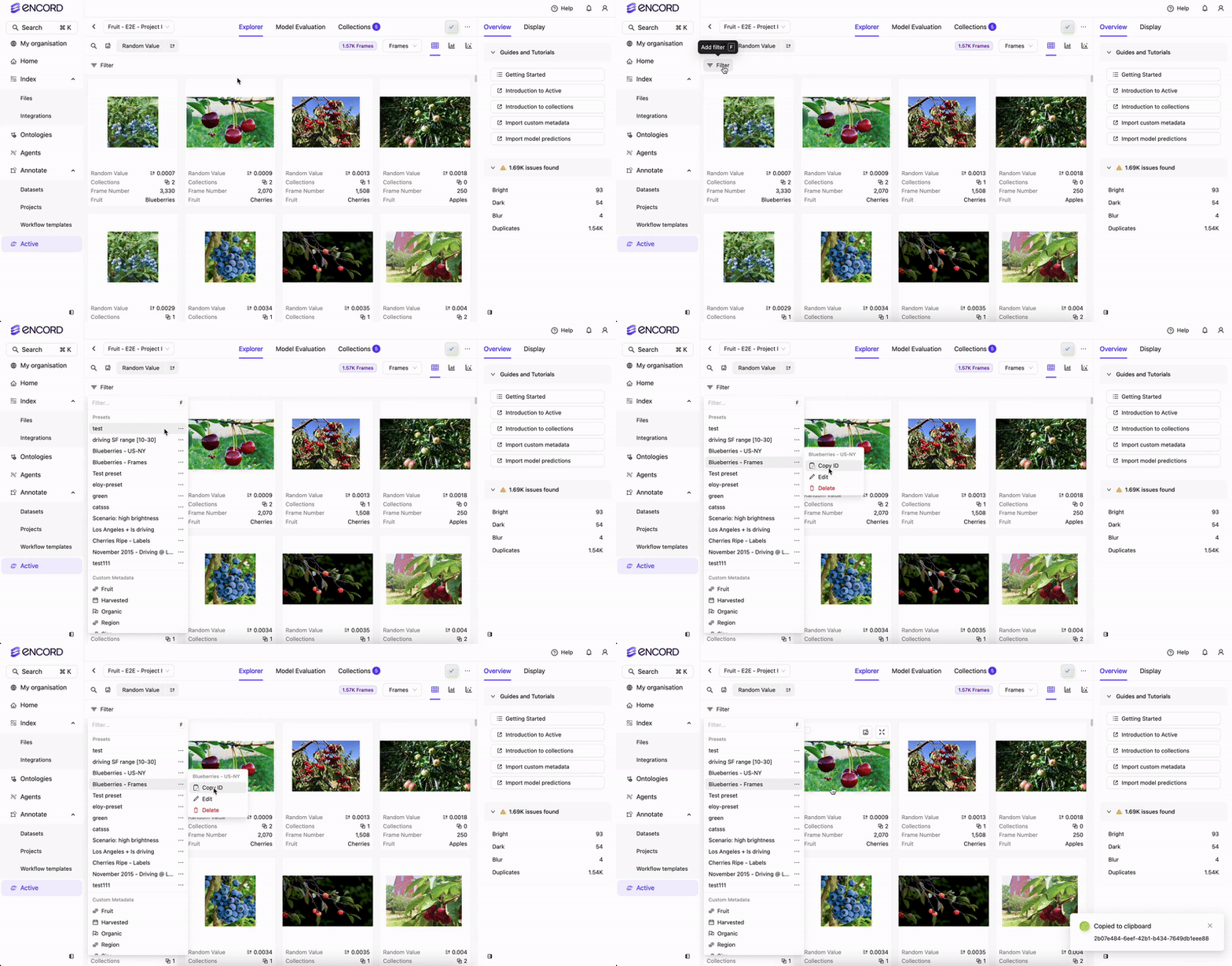
# Import dependencies
from encord import EncordUserClient
from encord.collection import ProjectCollection
from encord.orm.filter_preset import FilterPreset
from encord.objects.coordinates import BoundingBoxCoordinates
from encord.orm.collection import ProjectCollectionType, ProjectDataCollectionItemRequest, ProjectLabelCollectionItemRequest


# Define constants
SSH_PATH = "<file-path-to-ssh-private-key>"

PROJECT_ID = "<project-unique-id>"

COLLECTION_ID = "<collection-unique-id>"

PRESET_ID = "<preset-unique-id>"

# Initialize the user client using the SSH private key
user_client = EncordUserClient.create_with_ssh_private_key(
    ssh_private_key_path=SSH_PATH,
    # For US platform users use "https://api.us.encord.com"
    domain="https://api.encord.com",
)

# Fetch the specific Project by ID
project = user_client.get_project(PROJECT_ID)


# Fetch the specific Collection by ID
collection = project.get_collection(COLLECTION_ID)


collection.add_preset_items(PRESET_ID)

print(f"Added items to collection {COLLECTION_ID}.")
# Import dependencies
from encord import EncordUserClient
from encord.collection import ProjectCollection
from encord.orm.filter_preset import FilterPreset
from encord.objects.coordinates import BoundingBoxCoordinates
from encord.orm.collection import ProjectCollectionType, ProjectDataCollectionItemRequest, ProjectLabelCollectionItemRequest


# Define constants
SSH_PATH = "/Users/chris-encord/sdk-ssh-private-key.txt"

PROJECT_ID = "2dd135b6-0ab2-49b1-9b38-b5c685107790"

COLLECTION_ID = "fdc0775e-2694-4191-946e-c3364d00fdc3"

PRESET_ID = "65eb2e39-c7a4-4aae-bdc6-cce00efdfedf"

# Initialize the user client using the SSH private key
user_client = EncordUserClient.create_with_ssh_private_key(
    ssh_private_key_path=SSH_PATH,
    # For US platform users use "https://api.us.encord.com"
    domain="https://api.encord.com",
)

# Fetch the specific Project by ID
project = user_client.get_project(PROJECT_ID)


# Fetch the specific Collection by ID
collection = project.get_collection(COLLECTION_ID)


collection.add_preset_items(PRESET_ID)

print(f"Added items to collection {COLLECTION_ID}.")
Remove Items from a Collection
Remove items from a Frame or Label Collection.Get Data ID
Get Data ID
Get Data ID
Use the following code to get the Data ID (unique ID for data units from Dataset) from your Annotate Project:
# Import dependencies
from encord import EncordUserClient

SSH_PATH = "<file-path-to-ssh-private-key>"

PROJECT_ID = "<project-unique-id>"

user_client = EncordUserClient.create_with_ssh_private_key(
    ssh_private_key_path=SSH_PATH,
    # For US platform users use "https://api.us.encord.com"
    domain="https://api.encord.com",
)


# Specify Project. Replace <project_hash> with the hash of your Project.
project = user_client.get_project(PROJECT_ID)

# Get label rows for your Project
label_rows = project.list_label_rows_v2()

# Iterate through label rows and print data hashes and titles
for label_row in label_rows:
    print(f"Data hash: {label_row.data_hash}")
    print(f"Data title: {label_row.data_title}")
    print("---")  # Separator for readability
# Import dependencies
from encord import EncordUserClient

SSH_PATH = "/Users/chris-encord/sdk-ssh-private-key.txt"

PROJECT_ID = "2dd135b6-0ab2-49b1-9b38-b5c685107790"

user_client = EncordUserClient.create_with_ssh_private_key(
    ssh_private_key_path=SSH_PATH,
    # For US platform users use "https://api.us.encord.com"
    domain="https://api.encord.com",
)


# Specify Project. Replace <project_hash> with the hash of your Project.
project = user_client.get_project(PROJECT_ID)

# Get label rows for your Project
label_rows = project.list_label_rows_v2()

# Iterate through label rows and print data hashes and titles
for label_row in label_rows:
    print(f"Data hash: {label_row.data_hash}")
    print(f"Data title: {label_row.data_title}")
    print("---")  # Separator for readability
Get Annotation ID
Get Annotation ID
Get Annotation ID
You need the Data ID AND the Annotation ID (Object Hash) for the label or classification you want to remove from the LABEL Collection.The following code gets the Annotation ID for all the labels in an Annotate Project
# Import dependencies
from encord import EncordUserClient

SSH_PATH = "<file-path-to-ssh-private-key>"

PROJECT_ID = "<project-unique-id>"

user_client = EncordUserClient.create_with_ssh_private_key(
    ssh_private_key_path=SSH_PATH,
    # For US platform users use "https://api.us.encord.com"
    domain="https://api.encord.com",
)


# Specify Project. Replace <project_hash> with the hash of your Project.
project = user_client.get_project(PROJECT_ID)

# Get label rows for your Project
label_rows = project.list_label_rows_v2()

# Iterate through label rows and print data hashes and titles
for label_row in label_rows:
    print(f"Data hash: {label_row.data_hash}")
    print(f"Data title: {label_row.data_title}")
    print("---")  # Separator for readability
# Import dependencies
from encord import EncordUserClient

SSH_PATH = "/Users/chris-encord/sdk-ssh-private-key.txt"

PROJECT_ID = "2dd135b6-0ab2-49b1-9b38-b5c685107790"

user_client = EncordUserClient.create_with_ssh_private_key(
    ssh_private_key_path=SSH_PATH,
    # For US platform users use "https://api.us.encord.com"
    domain="https://api.encord.com",
)


# Specify Project. Replace <project_hash> with the hash of your Project.
project = user_client.get_project(PROJECT_ID)

# Get label rows for your Project
label_rows = project.list_label_rows_v2()

# Iterate through label rows and print data hashes and titles
for label_row in label_rows:
    print(f"Data hash: {label_row.data_hash}")
    print(f"Data title: {label_row.data_title}")
    print("---")  # Separator for readability
Remove Items from FRAME Collections
Remove Items from FRAME Collections
Remove Items from FRAME Collections
You need the Data ID of frames to remove items from a FRAME Collection.
# Import dependencies
from encord import EncordUserClient
from encord.collection import ProjectCollection
from encord.orm.filter_preset import FilterPreset
from encord.objects.coordinates import BoundingBoxCoordinates
from encord.orm.collection import ProjectCollectionType, ProjectDataCollectionItemRequest, ProjectLabelCollectionItemRequest


# Define constants
SSH_PATH = "<file-path-to-ssh-private-key>"

PROJECT_ID = "<project-unique-id>"

COLLECTION_ID = "<collection-unique-id>"

# Initialize the user client using the SSH private key
user_client = EncordUserClient.create_with_ssh_private_key(
    ssh_private_key_path=SSH_PATH,
    # For US platform users use "https://api.us.encord.com"
    domain="https://api.encord.com",
)

# Fetch the specific Project by ID
project = user_client.get_project(PROJECT_ID)


# Fetch the specific Collection by ID
collection = project.get_collection(COLLECTION_ID)


# Add images or video frames to a FRAMES Collection
collection.remove_items([ProjectDataCollectionItemRequest(data_uuid="<data-unique-id>", frame=0)])

print(f"Removed items to collection {COLLECTION_ID}.")
# Import dependencies
from encord import EncordUserClient
from encord.collection import ProjectCollection
from encord.orm.filter_preset import FilterPreset
from encord.objects.coordinates import BoundingBoxCoordinates
from encord.orm.collection import ProjectCollectionType, ProjectDataCollectionItemRequest, ProjectLabelCollectionItemRequest


# Define constants
SSH_PATH = "/Users/chris-encord/sdk-ssh-private-key.txt"

PROJECT_ID = "2dd135b6-0ab2-49b1-9b38-b5c685107790"

COLLECTION_ID = "fdc0775e-2694-4191-946e-c3364d00fdc3"

# Initialize the user client using the SSH private key
user_client = EncordUserClient.create_with_ssh_private_key(
    ssh_private_key_path=SSH_PATH,
    # For US platform users use "https://api.us.encord.com"
    domain="https://api.encord.com",
)

# Fetch the specific Project by ID
project = user_client.get_project(PROJECT_ID)


# Fetch the specific Collection by ID
collection = project.get_collection(COLLECTION_ID)


collection.remove_items([ProjectDataCollectionItemRequest(data_uuid="08a38705-0497-4e28-9c0e-d10f1ad150fa", frame=0)])

print(f"Removed items to collection {COLLECTION_ID}.")
Remove Items from LABEL Collections
Remove Items from LABEL Collections
Remove Items from LABEL Collections
You need the Data ID and Annotation ID to remove items from LABEL Collections.
# Import dependencies
from encord import EncordUserClient
from encord.collection import ProjectCollection
from encord.orm.filter_preset import FilterPreset
from encord.objects.coordinates import BoundingBoxCoordinates
from encord.orm.collection import ProjectCollectionType, ProjectDataCollectionItemRequest, ProjectLabelCollectionItemRequest


# Define constants
SSH_PATH = "<file-path-to-ssh-private-key>"

PROJECT_ID = "<project-unique-id>"

COLLECTION_ID = "<collection-unique-id>"

# Initialize the user client using the SSH private key
user_client = EncordUserClient.create_with_ssh_private_key(
    ssh_private_key_path=SSH_PATH,
    # For US platform users use "https://api.us.encord.com"
    domain="https://api.encord.com",
)


# Fetch the specified Project by ID
project = user_client.get_project(PROJECT_ID)


# Fetch the specific Collection by ID
collection = project.get_collection(COLLECTION_ID)


collection.remove_items([ProjectLabelCollectionItemRequest(data_uuid="data-unique-id", frame=<frame-number>, annotation_id="<annotation-unique-id>")])

print(f"Removed items to collection {COLLECTION_ID}.")
# Import dependencies
from encord import EncordUserClient
from encord.collection import ProjectCollection
from encord.orm.filter_preset import FilterPreset
from encord.objects.coordinates import BoundingBoxCoordinates
from encord.orm.collection import ProjectCollectionType, ProjectDataCollectionItemRequest, ProjectLabelCollectionItemRequest


# Define constants
SSH_PATH = "/Users/chris-encord/sdk-ssh-private-key.txt"

PROJECT_ID = "2dd135b6-0ab2-49b1-9b38-b5c685107790"

COLLECTION_ID = "578b343b-ecb1-4948-b203-f1446fb9ceab"

# Initialize the user client using the SSH private key
user_client = EncordUserClient.create_with_ssh_private_key(
    ssh_private_key_path=SSH_PATH,
    # For US platform users use "https://api.us.encord.com"
    domain="https://api.encord.com",
)


# Fetch the specified Project by ID
project = user_client.get_project(PROJECT_ID)


# Fetch the specific Collection by ID
collection = project.get_collection(COLLECTION_ID)


collection.remove_items([ProjectLabelCollectionItemRequest(data_uuid="7be6cfcf-e2d4-494f-98f5-91e5ef1c8d1b", frame=435, annotation_id="4kybTAWK")])

print(f"Removed items to collection {COLLECTION_ID}.")
Remove Items From a Collection using Presets
The code to remove items from a Frame Collection or a Label Collection is the same. You can find the Preset ID for your preset in the Project Explorer.
# Import dependencies
from encord import EncordUserClient
from encord.collection import ProjectCollection
from encord.orm.filter_preset import FilterPreset
from encord.objects.coordinates import BoundingBoxCoordinates
from encord.orm.collection import ProjectCollectionType, ProjectDataCollectionItemRequest, ProjectLabelCollectionItemRequest


# Define constants
SSH_PATH = "<file-path-to-ssh-private-key>"

PROJECT_ID = "<project-unique-id>"

COLLECTION_ID = "<collection-unique-id>"

PRESET_ID = "<preset-unique-id>"

# Initialize the user client using the SSH private key
user_client = EncordUserClient.create_with_ssh_private_key(
    ssh_private_key_path=SSH_PATH,
    # For US platform users use "https://api.us.encord.com"
    domain="https://api.encord.com",
)

# Fetch the specific Project by ID
project = user_client.get_project(PROJECT_ID)


# Fetch the specific Collection by ID
collection = project.get_collection(COLLECTION_ID)


collection.remove_preset_items(PRESET_ID)

print(f"Removed items from Collection {COLLECTION_ID}.")
# Import dependencies
from encord import EncordUserClient
from encord.collection import ProjectCollection
from encord.orm.filter_preset import FilterPreset
from encord.objects.coordinates import BoundingBoxCoordinates
from encord.orm.collection import ProjectCollectionType, ProjectDataCollectionItemRequest, ProjectLabelCollectionItemRequest


# Define constants
SSH_PATH = "/Users/chris-encord/sdk-ssh-private-key.txt"

PROJECT_ID = "2dd135b6-0ab2-49b1-9b38-b5c685107790"

COLLECTION_ID = "fdc0775e-2694-4191-946e-c3364d00fdc3"

PRESET_ID = "65eb2e39-c7a4-4aae-bdc6-cce00efdfedf"

# Initialize the user client using the SSH private key
user_client = EncordUserClient.create_with_ssh_private_key(
    ssh_private_key_path=SSH_PATH,
    # For US platform users use "https://api.us.encord.com"
    domain="https://api.encord.com",
)

# Fetch the specific Project by ID
project = user_client.get_project(PROJECT_ID)


# Fetch the specific Collection by ID
collection = project.get_collection(COLLECTION_ID)


collection.remove_preset_items(PRESET_ID)

print(f"Removed items from Collection {COLLECTION_ID}.")
List all Items in a Collection
List All Frames in a Collection
List All Frames in a Collection
List all Frames in a Collection
Lists all FRAMES in a Collection.
# Import dependencies
from encord import EncordUserClient
from encord.collection import ProjectCollection
from encord.orm.filter_preset import FilterPreset
from encord.objects.coordinates import BoundingBoxCoordinates
from encord.orm.collection import ProjectCollectionType, ProjectDataCollectionItemRequest, ProjectLabelCollectionItemRequest

# Define constants
SSH_PATH = "<file-path-to-private-ssh-key>"
PROJECT_ID = "<project-unique-id>"
COLLECTION_ID = "<collection-unique-id>"

# Initialize the user client using the SSH private key
user_client = EncordUserClient.create_with_ssh_private_key(
    ssh_private_key_path=SSH_PATH,
    # For US platform users use "https://api.us.encord.com"
    domain="https://api.encord.com",
)

# Fetch the specified Project by ID
project = user_client.get_project(PROJECT_ID)

# Fetch the specific Collection by ID
collection = project.get_collection(COLLECTION_ID)

frame_list = []

# Iterate over frames
for label_row, frames in collection.list_frames():
    frame_list.extend(frames)
    for frame in frames:
        print(f"UUID: {label_row.data_hash}, Frame number: {frame.frame}")
# Import dependencies
from encord import EncordUserClient
from encord.collection import ProjectCollection
from encord.orm.filter_preset import FilterPreset
from encord.objects.coordinates import BoundingBoxCoordinates
from encord.orm.collection import ProjectCollectionType, ProjectDataCollectionItemRequest, ProjectLabelCollectionItemRequest

# Define constants
SSH_PATH = "/Users/chris-encord/sdk-ssh-private-key.txt"
PROJECT_ID = "2dd135b6-0ab2-49b1-9b38-b5c685107790"
COLLECTION_ID = "fdc0775e-2694-4191-946e-c3364d00fdc3"

# Initialize the user client using the SSH private key
user_client = EncordUserClient.create_with_ssh_private_key(
    ssh_private_key_path=SSH_PATH,
    # For US platform users use "https://api.us.encord.com"
    domain="https://api.encord.com",
)

# Fetch the specified Project by ID
project = user_client.get_project(PROJECT_ID)

# Fetch the specific Collection by ID
collection = project.get_collection(COLLECTION_ID)

frame_list = []

# Iterate over frames
for label_row, frames in collection.list_frames():
    frame_list.extend(frames)
    for frame in frames:
        print(f"UUID: {label_row.data_hash}, Frame number: {frame.frame}")
List All Labels in a Collection
List All Labels in a Collection
List All Labels in a Collection
Lists all annotations (object labels and classifications) in a Label Collection with the frame ID and frame number.
# Import dependencies
from encord import EncordUserClient
from encord.collection import ProjectCollection
from encord.orm.filter_preset import FilterPreset
from encord.objects.coordinates import BoundingBoxCoordinates
from encord.orm.collection import ProjectCollectionType, ProjectDataCollectionItemRequest, ProjectLabelCollectionItemRequest

# Define constants
SSH_PATH = "<file-path-to-private-key>"
PROJECT_ID = "<project-unique-id>"
COLLECTION_ID = "<collection-unique-id>"

# Initialize the user client using the SSH private key
user_client = EncordUserClient.create_with_ssh_private_key(
    ssh_private_key_path=SSH_PATH,
    # For US platform users use "https://api.us.encord.com"
    domain="https://api.encord.com",
)

# Fetch the specified Project by ID
project = user_client.get_project(PROJECT_ID)

# Fetch the specific Collection by ID
collection = project.get_collection(COLLECTION_ID)

annotation_list = []

# Iterate over annotations
for label_row, annotations in collection.list_annotations():
    annotation_list.extend(annotations)
    for annotation in annotations:
        print(f"UUID: {label_row.data_hash}, Frame number: {annotation.frame}, Annotation: {annotation.annotation_id}")
# Import dependencies
from encord import EncordUserClient
from encord.collection import ProjectCollection
from encord.orm.filter_preset import FilterPreset
from encord.objects.coordinates import BoundingBoxCoordinates
from encord.orm.collection import ProjectCollectionType, ProjectDataCollectionItemRequest, ProjectLabelCollectionItemRequest

# Define constants
SSH_PATH = "/Users/chris-encord/sdk-ssh-private-key.txt"
PROJECT_ID = "2dd135b6-0ab2-49b1-9b38-b5c685107790"
COLLECTION_ID = "578b343b-ecb1-4948-b203-f1446fb9ceab"

# Initialize the user client using the SSH private key
user_client = EncordUserClient.create_with_ssh_private_key(
    ssh_private_key_path=SSH_PATH,
    # For US platform users use "https://api.us.encord.com"
    domain="https://api.encord.com",
)

# Fetch the specified Project by ID
project = user_client.get_project(PROJECT_ID)

# Fetch the specific Collection by ID
collection = project.get_collection(COLLECTION_ID)

annotation_list = []

# Iterate over annotations
for label_row, annotations in collection.list_annotations():
    annotation_list.extend(annotations)
    for annotation in annotations:
        print(f"UUID: {label_row.data_hash}, Frame number: {annotation.frame}, Annotation: {annotation.annotation_id}")