

Upload Local Data
You can upload up to 250 local files at a time.
Any files you upload to Encord must be stored in folders. Click here to learn how to create a folder to store your files.
- Navigate to Data > Files & Folders.
- Click the + Upload files button.
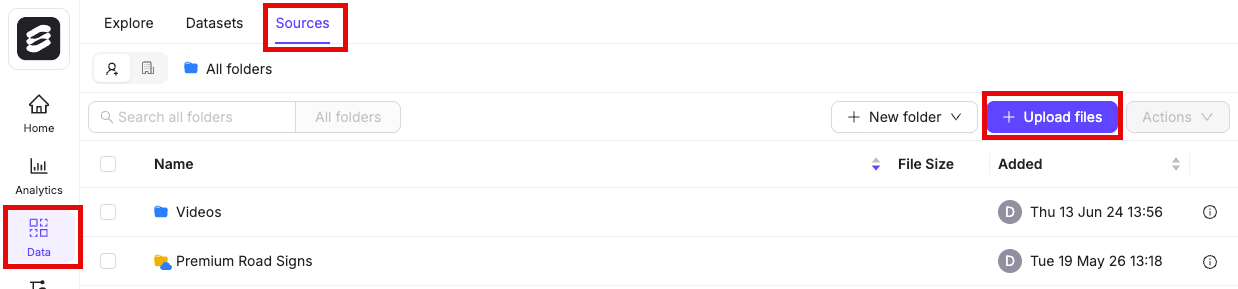
- Select a folder to upload your files to. You can click +New folder to create a new folder.
- Select the type of data you want to add.

- A - Upload : Drag and drop local text, PDF, video, or image files. Click Upload to finish.
- B - Batch images as : Create an image group or image sequence from local images. See our section on creating image groups and image sequences for more information. Click Upload and batch images to finish.
- C - DICOM / NIfTI : Create a DICOM series from local DICOM files, or upload NIfTI files. Click Upload to finish.
- D - Import from private cloud : Add any data stored in your cloud storage. At least one data integration is required to register cloud data. Learn how to upload private cloud data here.
To import DICOM files, Encord requires the files to have the following DICOM tags:Rows
Columns
StudyInstanceUID
SeriesInstanceUID
SOPInstanceUID
PatientID
The following DICOM tags are required to render DICOM images in 3D:ImagePositionPatient
ImageOrientationPatient
SliceThickness
PixelSpacing
Custom metadata
Custom metadata for files uploaded locally can only be added through the Encord SDK.
- Filtering and sorting in Data and Project Explorer.
- Creating custom Label Editor layouts based on metadata.
clientMetadata field (examples show how this is done) of your JSON file.
We enforce a 10MB limit on the custom metadata for each data item. Internally, we store custom metadata as a PostgreSQL
jsonb type. Read the relevant PostgreSQL documentation about the jsonb type and its behaviors. For example, jsonb type does not preserve key order or duplicate keys.Metadata schema
Metadata schemas, including custom embeddings, can only be imported through the Encord SDK.
- Scalars: Methods for filtering.
- Enums: Methods with options for filtering.
- Embeddings: Method for embedding plot visualization, similarity search, and natural language search.
Metadata schema table
Useadd_scalar to add a scalar key to your metadata schema.
Use
add_enum and add_enum_options to add an enum and enum options to your metadata schema.
Use
add_embedding to add an embedding to your metadata schema.
Use
add_geospatial to add a new geospatial type to the metadata schema.
- Geospatial custom metadata is supported only in Curate.
- Geospatial custom metadata can be applied to all data unit types and on individual frames in videos.